Oakmark Funds & Janus Transaction Download - Issues with Password [Edited]
Comments
-
This content has been removed.
-
Just a sidenote, it appears that Fidelity Investments has a problem linking to Janus in the External Link Accounts, points to maybe Janus having a problem. It used to work for me then stopped working around Dec 9 2025. It kept locking my Janus account when trying to link.
My two bits
0 -
This content has been removed.
-
I downgraded to the earlier Quicken version R64.30 on windows desktop a while back because that was the last version where the Oakmark/Janus password issue was not broken. None of the bug fixes in later versions apply to my situations, so I'm content at the moment, but I'd really prefer to be running the latest version with all bug fixes and security updates.
0 -
Thank you for your replies,
Unfortunately, not all issues can be corrected quickly. The ticket is still open and ongoing. I'm not seeing any new updates yet.
Thank you for sharing a work around for this issue!
Thank you!
Quicken Kristina
Make sure to sign up for the email digest to see a round up of your top posts.
0 -
Just confirming what @algee99 posted about downgrading to an earlier Quicken version: I just copied my data file to a PC running Quicken version 63.21 and Janus upgraded with no issues.
Obviously, this proves that this is a Quicken, not Janus (and probably not an Oakmark) problem. Quicken need to to fix this ASAP or at least, extend our subscriptions until a fix is pushed.
2 -
I'm going to have to downgrade my Quicken as well. Cannot believe Quicken would roll out an update without any testing to see if the new version actually works. I can't believe Quicken actually expects me to renew my subscription
0 -
Come on Quicken Support…..over three months to fix this issue.
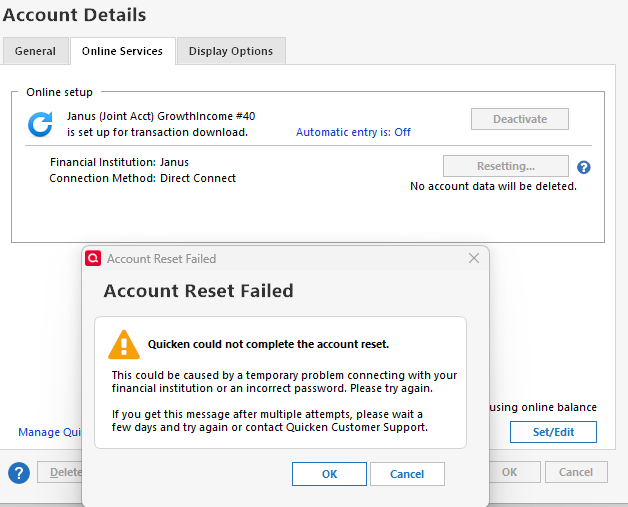
Now my work around isn't even working anymore. Quicken is given me this error code when I try to "Reset the Account" [Edited - Language]
 0
0 -
Thank you for the update,
I'm sorry to hear your work around stopped working. I've seen others say that rolling back to R63.21 is an effective work around. If you haven't already done so, please try using the article linked below to revert to that earlier version:
I hope this helps!
Quicken Kristina
Make sure to sign up for the email digest to see a round up of your top posts.
0 -
This content has been removed.
-
This content has been removed.
-
Thank you for your reply,
I sent you a DM to answer your question. To view it, please click the envelop icon near the upper right.

Thank you!
Quicken Kristina
Make sure to sign up for the email digest to see a round up of your top posts.
0 -
Please add me to this ticket. Resetting the janus connection every time I need a download is not productive. The way quicken forces subscription renewals and then it doesnt correct the issues is a bit over the top
1 -
This content has been removed.
-
After I ran one step update today on R64.30 (The last release where Oakmark login worked), I saw there is a new February release, so I upgraded Quicken to R66.18 HF2. Ran one step update on my Oakmark account again and it went through fine. I'll try again later today and tomorrow in the morning to see if the login problem is fixed.
If it fails tomorrow, I'll revert back to R64.30
Here's hoping it's fixed!
1 -
This content has been removed.
-
Same…no change at all!!
0 -
Ok, the new release didn't fix my Oakmark login issues. It's the same issue we've all been seeing. If it works once, like if you reset the account, then it works perfectly for the rest of the day, but something happens overnight and it is broken again. In my case, I had performed the One Step Update earlier that day using the older R64.30 release version of Quicken (which works fine for Oakmark, and probably Janus as well) and then updated Quicken versions. It continued to work for the rest of the day and now is borked again.
Downgrading to R64.30 until the next release, then I'll try again.
0 -
How do I downgrade to this older version?
0 -
I got the idea from a comment early on in this discussion, and @Quicken Kristina mentioned it on this page (4) of this discussion.
Here's the link:
0 -
This content has been removed.
-
This content has been removed.
-
This content has been removed.
-
Going on four months now. That's 1/3 of a year's subscription.
0 -
Add me to the list, please.
0 -
I asked for a refund due to this ongoing issue and was not given one. What I did receive was an extension of my membership for an additional 3 months. I told the Quicken rep that if this issue is not resolved by the mid of this year I would be leaving and looking else where: and of course asking for a refund.
0 -
Hello @Tom Young,
Thank you for letting us know you're also encountering this issue. I added you to the ticket.
Thank you!
Quicken Kristina
Make sure to sign up for the email digest to see a round up of your top posts.
0 -
Updated Quicken to the latest (R66.23), rebooted comp and tried OSU for Oakmark. Same problem with password that's been seen since November. I should never assume, but in this case, I assume all you Janus people will have the same problem with this release as with all the previous releases, that we've all been complaining about.
Reverting to 64.30 AGAIN.
Are all of us on this ticket going to get membership extensions? Do I have to spend some time on the phone with customer support in order to get it?
0 -
This content has been removed.
-
Janus still not working. Yes please on an extension.
0

