Incorrect Register Balances

rtatar0766
rtatar0766 Quicken Windows Subscription Member

I am using Quicken Classic for Windows, v R65.17. This is an annoying glitch that has been a bother for a long time (more than a year). I go to reconcile my bank account, proceeding from the prior reconciliation, and enter all transactions, matching the bank statement exactly. The resulting account balance is frequently incorrect. If I close the register and reopen it, the balance is correct. I haven't been able to figure out what causes this, perhaps entering from one month into the next? Found no consistency. Does anyone have this experience and if so, have you figured out what causes it and is there a fix? I have become frustrated enough with this silly problem to post it. Thanks

Comments

  • Quicken Alyssa
    Quicken Alyssa Quicken Windows Subscription Moderator mod

    Hello @rtatar0766,

    Thank you for sharing your experience and reporting the issues you are having.

    I have some follow-up questions for you to hopefully help us narrow down what could be causing this.

    • How are you opening Quicken when you use it?
      • Do you use the red application icon?
      • Or do you use an icon that looks like a sheet of paper with the corner folded down?
    • What troubleshooting steps have you tried already, if any?
    • Where is your data file located?
    • Is your file being synced/backed up by any third-party services like OneDrive, Dropbox, or Carbonite?

    Looking forward to your response!

    Quicken Alyssa

    Make sure to sign up for the email digest to see a round up of your top posts.

  • rtatar0766
    rtatar0766 Quicken Windows Subscription Member

    Thank you for responding so quickly.

    I start Quicken from the red application icon.

    I really haven't done any troubleshooting. Just have tried to find some consistency as to when it happens. It doesn't happen all the time. As I mentioned in my post yesterday, I thought it might have something with entering transactions for a date range that runs from one month into the next. I haven't seen a consistent reason.

    The file is located on my PC

    I periodically back up to a removable hard drive. The file also backs up to Quicken in the Cloud I believe.

    Is this a known problem or am I the only one bringing it up?

    Thanks

  • Jim_Harman
    Jim_Harman Quicken Windows Subscription SuperUser ✭✭✭✭✭

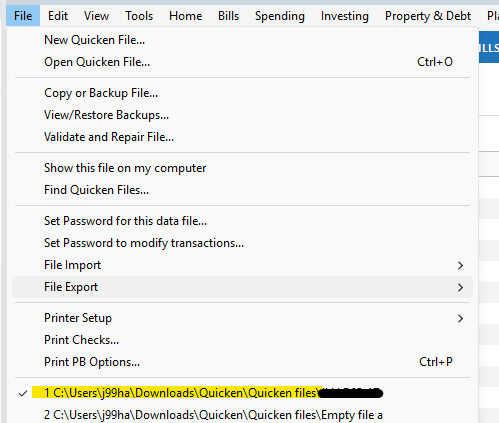
    To answer the "where is your file located" question, @Quicken Alyssa is looking for the highlighted path in your File menu:

    image.png

    Having OneDrive or another cloud storage system in that path may cause problems.

    QWin Premier subscription