Paychecks are entering automatically but are set as a reminder.

Randy W
Randy W Quicken Windows Subscription Member ✭✭✭

I have a problem that started within the past three months or so. It was confusing at first but finally have narrowed down to what is happening. My paycheck is set as a reminder. However, on the due date it enters as a split transaction while the reminder awaits attention as a paycheck. Even if I enter the reminder in advance when my company provides advance notice of payroll transaction. On the due date the split transaction enters again creating a duplicate and causing the confusion.

I noticed several other reports of this issue. Most were closed without providing the solution. One was closed after asking the user to turn in a ticket and provide a cleansed data file.

What is the solution?

Tagged:

Comments

  • Randy W
    Randy W Quicken Windows Subscription Member ✭✭✭

    I just realized one more thing that I missed… the split transaction is entering as a payment and not as a deposit.

  • Quicken Kristina
    Quicken Kristina Quicken Windows Subscription Moderator mod
    edited December 2025

    Hello @Randy W,

    Thank you for reaching out! The issue you describe sounds like the issue described in this earlier discussion:

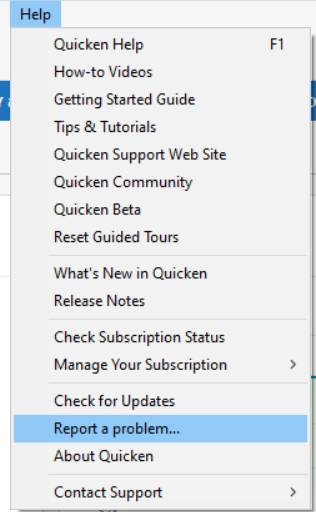
    Is this the same as the issue you are encountering? If so, then to help investigate the issue, please navigate to Help>Report a Problem and send a problem report with log files attached.

    Report a Problem QWin.png

    While you will not receive a response through this submission, these reports will help our teams in further investigating the issue. The more problem reports we receive, the better.

    If the issue you're seeing is different, then please provide more details exactly what is happening. A screenshot of the issue (with any personal information redacted) would also be helpful. If needed, please refer to this Community FAQ for instructions on how to attach a screenshot. Alternatively, you can also drag and drop screenshots to your response if you are not given the option to add attachments.

    I look forward to your response!

    (CTP-15666)

    Quicken Kristina

    Make sure to sign up for the email digest to see a round up of your top posts.

  • ljb1493
    ljb1493 Quicken Windows Subscription Member ✭✭

    Hey @Quicken Kristina , I already reported the issue in Sept using "Help → report…." and referenced my specific community post, which you shared above, containing detailed evidence of the problem and how to recreate it. It's no where to be found in the discussion - https://community.quicken.com/categories/alerts

    Help me understand. How long does it take for an issue like this to make it onto the "Known Product Issues" list?

    This projected balance issue is obviously not isolated.

  • Quicken Kristina
    Quicken Kristina Quicken Windows Subscription Moderator mod

    Hello @ljb1493,

    Thank you for joining the discussion and for letting us know you sent logs!

    Help me understand. How long does it take for an issue like this to make it onto the "Known Product Issues" list?

    Not every known issue has a corresponding Community Alert. It's not a matter of time. It's a matter of how widespread an issue is, based on how many users are reporting the problem.

    I hope this helps!

    Quicken Kristina

    Make sure to sign up for the email digest to see a round up of your top posts.

  • agraseck
    agraseck Quicken Windows Subscription Member ✭✭

    Hi, I am having this same issue starting today. The flurry of posts today shows that something very recently broke in this.

    I have followed all of the advice and can restore the detailed information in my paychecks by clicking "edit all instances.." and then "done". But it reverts back to $0 as soon as I do a One-Step Update.

    And yes, I've tried restoring from backup, etc. this is a quicken problem, not a user problem.

    If this has been a known problem since September, why is it not fixed?

  • Quicken Kristina
    Quicken Kristina Quicken Windows Subscription Moderator mod

    Hello @agraseck,

    Thank you for letting us know you're also impacted by this, and thank you for sending logs. Not all issues can be fixed quickly. The information submitted helps our teams investigate the issue.

    Thank you!

    Quicken Kristina

    Make sure to sign up for the email digest to see a round up of your top posts.

  • ljb1493
    ljb1493 Quicken Windows Subscription Member ✭✭

    @Quicken Kristina, Thank you for the additional information that not every issues makes it to the Community Alert. A few thoughts… Those properly reported issues that do not make it to the alerts fall into the Dev "Black Hole" (as another user also called it). This issue seems to be wide spread and growing in user scope. What metric is used to determine "widespread"?

  • Randy W
    Randy W Quicken Windows Subscription Member ✭✭✭

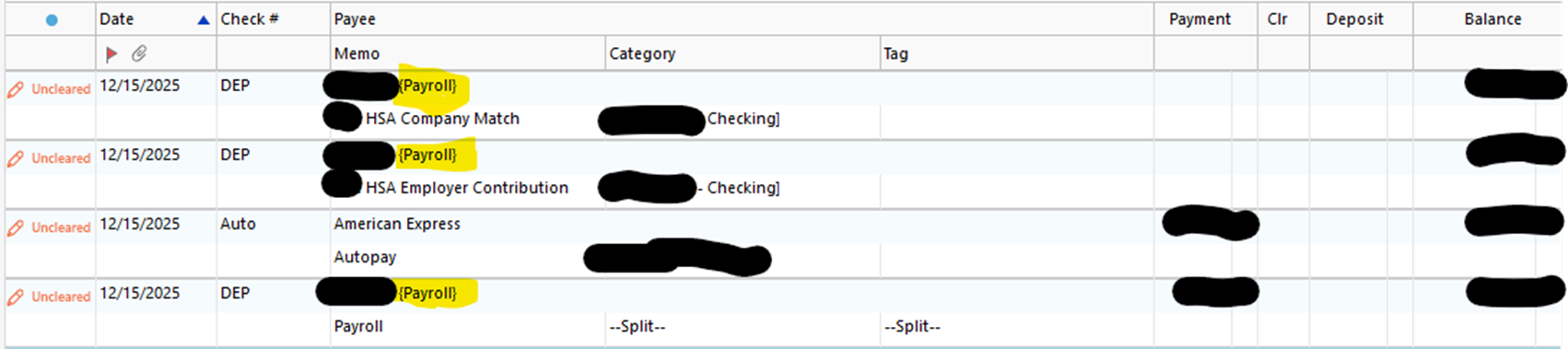
    Hello @Quicken Kristina … I cannot be certain it is the same issue without waiting for the next pay period. I do not believe that it has anything to do with running a One Step Update as described in the link. I believe the transactions are occurring as an Auto Entry, not related to any other activity. Here is the screen shot I took showing the entries that appeared by themselves highlighted in yellow.

    image.png

    I have since cleaned up my register by deleting these entries and processing my paycheck reminder. I can send in a report now or I can wait until it happens again in two weeks before I clean things up.

  • Gregorydb
    Gregorydb Member ✭✭
    edited December 2025

    I'm having the same issue. My paychecks are being entered automatically, but I have them set to remind me. The amounts are never right, and it does NOT seem to transfer to my 401k account, I have to manually correct about 1/2 the entries. I verified it is set to remind me, not auto enter, and I have deleted/recreated the paycheck entry, but still on the day of the check, every time, it enters the paycheck and I have to correct it. It's been going on for months.

    [Edited - Readability]

  • Quicken Kristina
    Quicken Kristina Quicken Windows Subscription Moderator mod

    Hello @Gregorydb,

    Thank you for letting us know you're also impacted by this issue.

    Thank you for your reply @Randy W,

    The issue looks and sounds similar to the known issue. Are you manually correcting the information when this problem happens? If so, do the manual corrections stick, or do they revert to the incorrect information again?

    Thank you!

    Quicken Kristina

    Make sure to sign up for the email digest to see a round up of your top posts.

  • Gregorydb
    Gregorydb Member ✭✭
    edited December 2025

    @Quicken Kristina

    When I manually go into the checking account, I can modify the entry, with the corrected information, it sticks and moves money into the corrected account. It should be noted that it adds things that aren't in the memorized paycheck, and a good amount of them are wrong.

    [Edited - Readability]

  • ljb1493
    ljb1493 Quicken Windows Subscription Member ✭✭

    @Quicken Kristina

    What is Quicken Development's opinion on this, seemingly growing, and other related Paycheck reminder and account register issues? Have they accepted it as an actual set of bugs? When is it scheduled to be worked on and fix released?

  • Quicken Kristina
    Quicken Kristina Quicken Windows Subscription Moderator mod

    Thank you for your replies,

    @Gregorydb,

    Thank you for the additional information. What other things are being added? Are these entire new transactions, additional split lines in the existing transaction, or something else? Please include a screenshot of what you are seeing (with any personal information redacted). If needed, please refer to this Community FAQ for instructions on how to attach a screenshot. Alternatively, you can also drag and drop screenshots to your response if you are not given the option to add attachments.

    @ljb1493,

    Unfortunately, our teams do not give ETAs. I have access to the tickets used to track issues, but those tickets do not provide detailed information. I can see that this issue has been reported and our teams are looking into it.

    Thank you!

    Quicken Kristina

    Make sure to sign up for the email digest to see a round up of your top posts.

  • Randy W
    Randy W Quicken Windows Subscription Member ✭✭✭

    Hello @Quicken Kristina. The corrections stick. However, unlike the link provided I do not believe it has anything to do with running a One Step update. I have ran many One Step Updates since reporting the issue and none have caused the entries to reappear. My view at the moment is that the entries are behaving like an automatic reminder. I will know for certain once my paycheck reminder comes due again.

  • ljb1493
    ljb1493 Quicken Windows Subscription Member ✭✭

    @Quicken Kristina ,

    I asked several questions, you answered only 1. These are what you did NOT answer -

    What is development's opinion on this, seemingly growing, and other related Paycheck reminder and account register issues? Have they accepted it as an actual set of bugs?

    Larry

  • Quicken Kristina
    Quicken Kristina Quicken Windows Subscription Moderator mod

    Thank you for your reply @Randy W,

    Please let me know what happens when the reminder comes due again. It's possible that it is matching to the paycheck, and that's what is causing it to enter the register automatically instead of reminding you.

    @ljb1493,

    The fact that there is a ticket, CTP-15666, which is open and ongoing, means that they have accepted the issue as a bug. I don't know development's opinion on the matter. That's not information I have access to.

    Thank you!

    Quicken Kristina

    Make sure to sign up for the email digest to see a round up of your top posts.

  • ljb1493
    ljb1493 Quicken Windows Subscription Member ✭✭
    edited December 2025

    @Quicken Kristina

    Thanks for providing the ticket number, which users do not have access to, nor can see. Nor has it been listed on the "Known issues" discussion. Again, more of the development "black hole".

    Also, I just observed, on paycheck wizard created reminders having split deposits in 2 accounts, the reminders turn into future/pending payments when entering another future reminder into that register. The amount of the payment is the secondary deposit from the paycheck.

    C'mon Quicken, get these nuisance paycheck transaction issues fixed….

  • VinSomething
    VinSomething Quicken Windows Subscription Member ✭✭✭

    I'm going to add myself as a data point.

    I have a bi-weekly paycheck set up to remind me 3 days in advance of my paycheck because my paycheck varies a few cents due to certain tax and withholding rounding issues. Quicken is now auto-entering this on my behalf. When it does it shows the Category/Tag fields as "Split" versus "Paycheck" when enter it myself.

    My corrective action is to delete the split transaction. I then find the paycheck on my bill/income reminders and "edit this instance and all future instances" and change the date from the next purported paycheck in two weeks back to the present date. I then enter accordingly.

    For what it's worth I have 5 pre-tax deductions (including two transfers), an Employer Match, 4 tax lines, 4 after-tax deductions (1 transfer), and 3 deposit accounts. I've made the problem report in the Quicken application.

  • Quicken Kristina
    Quicken Kristina Quicken Windows Subscription Moderator mod

    Hello @VinSomething,

    Thank you for letting us know you're also impacted by this and for sending logs. I added you to the ticket.

    Thank you!

    Quicken Kristina

    Make sure to sign up for the email digest to see a round up of your top posts.

  • Randy W
    Randy W Quicken Windows Subscription Member ✭✭✭
    edited December 2025

    Hello @Quicken Kristina,

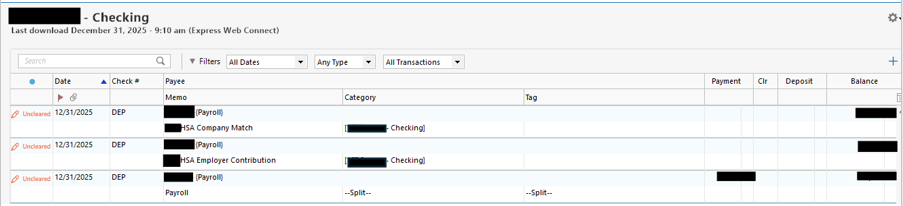
    Today was the reminder date of my Paycheck. When I first opened Quicken my register was correct and did not show any additional transactions. After running the One Step Update three additional transactions related to my paycheck appeared. Here are the three entries that appeared.xx

    image.png

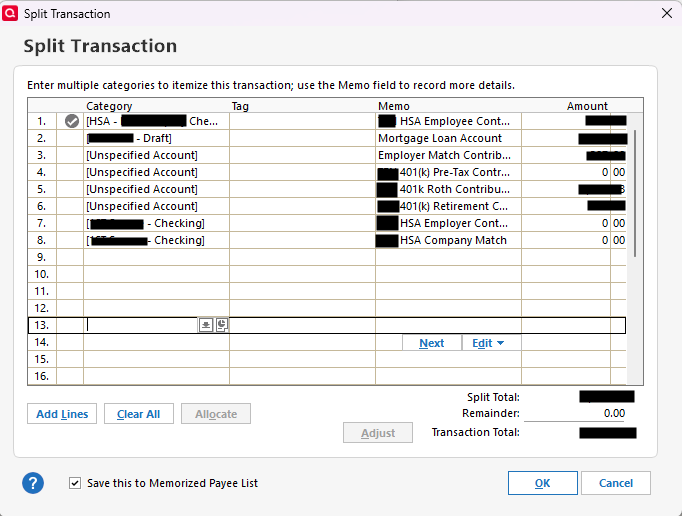
    In looking into the split detail of the one spend transaction. I see the following:

    image.png

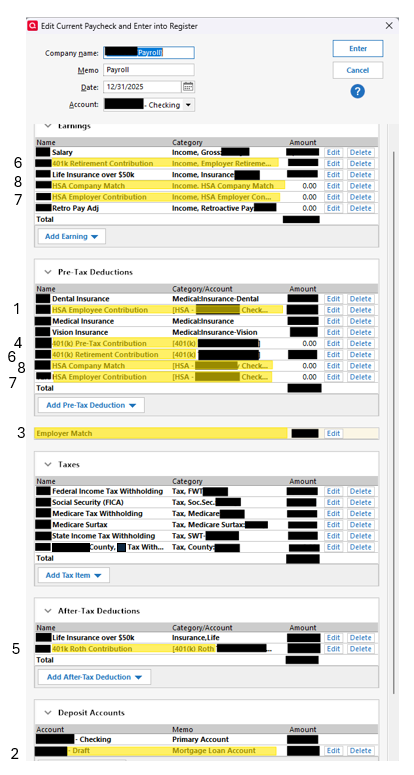
    In comparing these entries to my paycheck reminder, I do not see a pattern as to how the split transaction is created. It seems to be pulling from different areas of the paycheck reminder. In the image below I have related my paycheck reminder to the split transaction using the reference numbers of the split.

    image.png

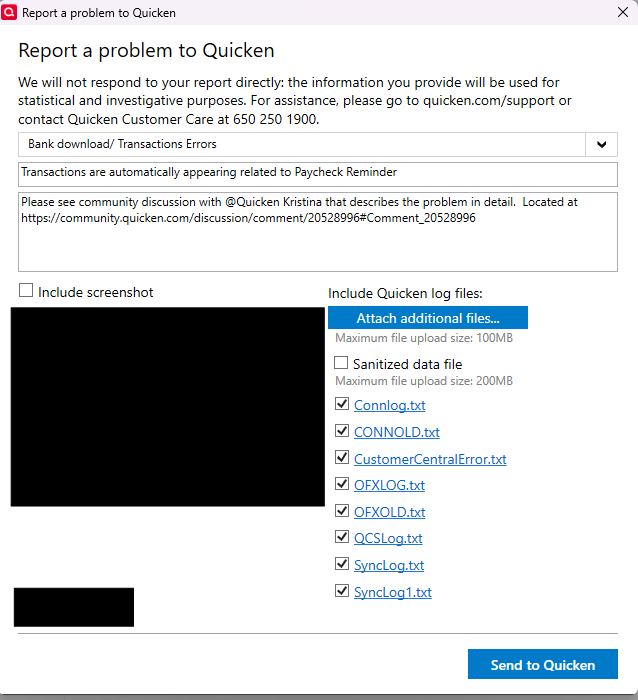
    I did use "Report a Problem" this time before fixing the issue. However, the message states that "the information provided will be used for statistical and investigative purposes." Please follow up on this and get a ticket assigned to this problem and post it in this thread.

    image.png

    After reporting the problem, I fixed it again by deleting the three transactions that had appeared in my checking account register. I then reran the One Step Update before entering the reminder to see if they would reappear again. They did not reappear. I entered my Paycheck Reminder and all is good.

    Please ensure a ticket gets assigned to this problem and post it here.

  • ljb1493
    ljb1493 Quicken Windows Subscription Member ✭✭

    @Randy W I have a similar issue with paycheck reminders in Quicken Premier Windows. After One Step Update (OSU) future paycheck reminders in my checking account register change to a "payment".

    To fix the information, I click the reminder icon, then "Edit this and all future reminders" (on the first reminder) or "Edit all instances of this reminder" (if not the first reminder), then simply click "done". That reverts the reminders back to the correct deposit amounts. I hope it works for you. It's easier than deleting and entering new reminders, which ultimately exhibit the same OSU issue.

  • Gregorydb
    Gregorydb Member ✭✭
    edited January 1

    @Quicken Kristina Good Morning, So Quicken today entered all the correct numbers for the numerous entries for my paycheck, however it still says Unspecified account for my 401k. I verified that in the future entries they are all correct, so something strange about that. I also noticed that my rent reminder disappeared. I have no idea where it went, so i had to enter it. It was there are the start of the One Step update, it went through and during the step that says "Updating your Data" is when my pay check was entered and my rent entry disappeared,

  • Randy W
    Randy W Quicken Windows Subscription Member ✭✭✭

    Hello @ljb1493, thank you for the suggestion. However, my paycheck is a reminder and remains so. It is not an auto entry transaction and does not change to one. The transactions that are appearing on their own are additional to my paycheck, but the source is clearly my paycheck reminder. After I delete the additional transactions and enter my paycheck reminder, Quicken is stable regardless of how many One Step Updates I run. I already frequently edit my payroll reminder as my paycheck changes. I will give the edit a go to see if something in the behavior changes. Thank you again for the suggestion.

  • Quicken Kristina
    Quicken Kristina Quicken Windows Subscription Moderator mod

    Thank you for your replies,

    @Randy W,

    Posting to the Quicken Community is not the same thing as reaching out to Quicken Support directly. It is primarily a user-to-user platform with a small number of moderators who can do some troubleshooting with you. Since the issue you're encountering is different from the known issue, I recommend that you contact Quicken Support directly for further assistance, as they have access to tools that we can't access on the Community and they're able to escalate the issue as needed. The Quicken Support phone number can be found through this link here. Phone support is available from 5:00 am PT to 5:00 pm PT, Monday through Friday.

    I apologize that I could not be of more assistance! 

    @Gregorydb,

    I'm glad to hear that the numbers for your paycheck were correct. I added the additional information you provided to the ticket.

    Thank you!

    Quicken Kristina

    Make sure to sign up for the email digest to see a round up of your top posts.