Capital Gains Estimator

MMinderbinder
MMinderbinder Quicken Windows Subscription Member ✭✭
edited December 2025 in Investing (Windows)

Trying to do my final year end tax planning and running the capital gains estimator doesn't seem to be bringing in current year capital gains results in order to use the "offset YTD gains" under the custom options. When I click the start search, I receive the message "You have no realized capital gains to offset but you have requested money from your holdings. Continue anyway?" Options are yes and no.

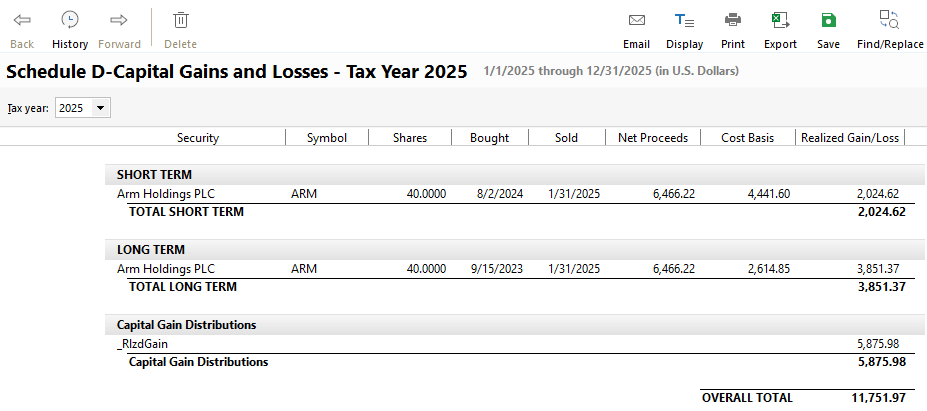
When I click Yes, it brings me back to the "What should I sell?" prompt where the start option is available, so it doesn't allow any functionality. I have existing current year capital gains that are in my Schedule D-Capital Gains and Losses Tax Reporting.

Anyone else having issue with the Capital Gains Estimator functionality not performing?

I am on R65.17 Build 27.1.65.17 Quicken Classic Premier

Thanks!

Quicken user since 1993

Comments

  • Quicken Anja
    Quicken Anja Moderator mod

    Hello @MMinderbinder,

    Thanks for the detailed description of what you’re experiencing.

    To help us narrow down what might be causing this behavior, could you please provide a bit more information?

    • Where is your Quicken data file stored? Is it on your local hard drive (C: drive), or is it stored in a cloud-synced or external location such as OneDrive, Dropbox, or a USB drive?
    • Have you tried any troubleshooting steps so far? If so, please let us know what you’ve already attempted and whether it made any difference.
    • When did this issue first start occurring?
    • Were there any recent changes to your system or Quicken setup prior to this starting (for example, a Quicken update, Windows update, or new software installation)?

    Additionally, if possible, please include screenshots of what you are seeing.

    If needed, you can refer to this Community FAQ for instructions on how to attach screenshots, or you may drag and drop them directly into your reply if the option is unavailable.

    Once we have this information, we’ll be in a better position to investigate further.

    Thank you!

    -Quicken Anja
    Make sure to sign up for the email digest to see a round up of your top posts.

  • markus1957
    markus1957 Quicken Windows Subscription SuperUser, Windows Beta Beta

    My gains are showing up in the Estimator but the automated "Offset YTD Gains" option provides a junk selection. I can manually select lots to accomplish the goal of tax loss harvesting to offset YTD gains.

  • MMinderbinder
    MMinderbinder Quicken Windows Subscription Member ✭✭
    edited December 2025

    Hello @Quicken Anja-

    I first noticed this lack of functionality when I posted on December 17 as I don't regularly use this feature. My data file is on my C: hard drive under the Quicken default directory. For troubleshooting, I tried different option selections within the tool, none of which were successful.

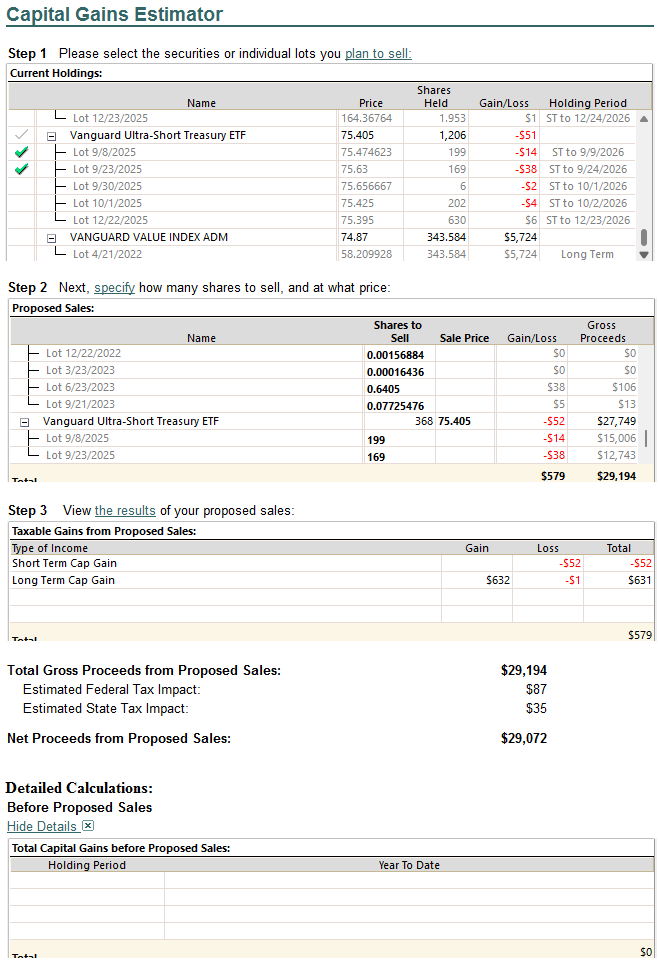
    When I use the estimator today, I now get past the Start and it goes through the search activity, however, when I select the Detailed Calculations in Step 3, there are no data lines in the Total Capital Gains before Proposed Sales. I also noticed that in the Step 1 section, it is not showing all of the investment lots that exist within my portfolio. For example, I have stock XXXX and it shows two lots but not the other 15 dividend reinvestment lots.

    This same issue continues in the current build 27.1.65.29.

    Thanks and happy holidays!

    Quicken user since 1993

  • MMinderbinder
    MMinderbinder Quicken Windows Subscription Member ✭✭

    This is a copy of a screen snip of the details after running the search in the Step 3 section.

    image.png

    And a copy of the Schedule D report for 2025 to show I have gains.

    image.png

    Thanks!

    Quicken user since 1993

  • Quicken Anja
    Quicken Anja Moderator mod

    @MMinderbinder Thank you for the detailed follow-up and for sharing the screenshots—those are very helpful.

    Given the behavior you’re seeing, this can sometimes be caused by internal data inconsistencies within the file.

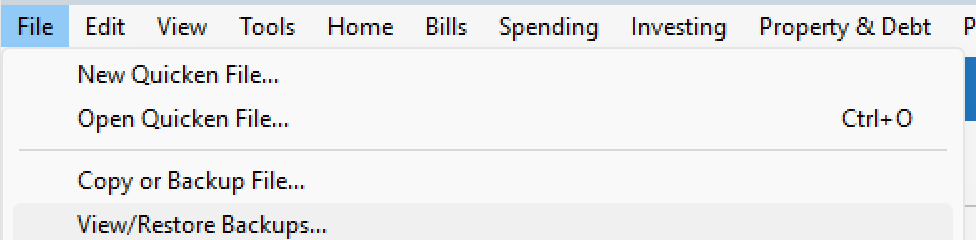
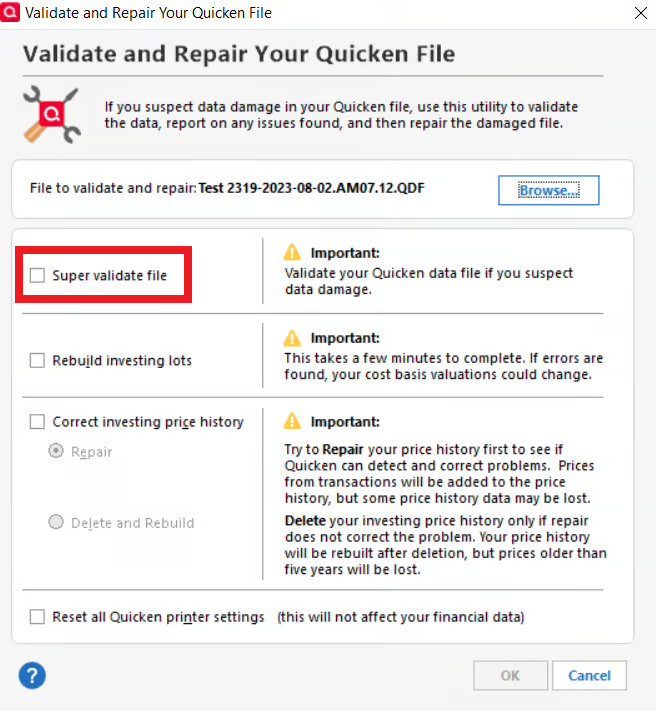
    To rule that out, I recommend validating—and if needed, super validating—your data file. Before starting, please make sure to save a backup as a precaution.

    • File > View/Restore Backups...
    image.png

    Validate File

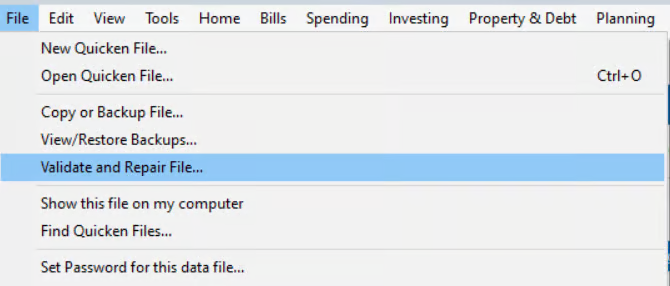
    1. Go to File
    2. Select Validate and Repair File… image.png
    3. Check Validate File
    4. Click OK
    5. Close the Data Log once it finishes
    6. Close Quicken completely (leave it closed for at least 30 seconds)
    7. Reopen Quicken and test the Capital Gains Estimator again

    If the issue persists, please proceed with Super Validate.

    Super Validate File

    1. Go to File
    2. Hold CTRL + Shift, then click Validate and Repair File…
    3. Select Super Validate File image.png
    4. Click OK
    5. Close the Data Log
    6. Close Quicken completely (leave it closed for at least 30 seconds)
    7. Reopen Quicken and test again

    Please let me know the results after completing these steps.

    Thank you!

    -Quicken Anja
    Make sure to sign up for the email digest to see a round up of your top posts.

  • MMinderbinder
    MMinderbinder Quicken Windows Subscription Member ✭✭

    Hello @Quicken Anja

    Thank you for the recommendation to run the validation and the Super Validation - I had not seen the super validation option before. I tend to try validating if I experience issues, but did try it again with the most recent release, hoping that maybe there would have been a change.

    I'll start by saying I ran through both processes and each time the Capital Gains estimator did not change the behavior identified above and does not recognize my year to date gains to evaluate a legitimate scenario. Very disappointing. I also found an Option of "Update YTD cap. gains" under the Options dropdown which I had not tried before, nor recall seeing. Either way, still no recognition of the "Detailed Calculations" showing a "Before Proposed Sales" with any information.

    I would also like to add to this string that during the validation process, I have discovered that Quicken has indiscriminately removed all of the split transactions I have been using for years. There were HUNDREDS of records that were disconnected and instead used the first category on all of my transactions that were previously split. You cannot begin to understand how DISAPPOINTED I am. Gone are all of the detailed tracking I have done for YEARS to get an accurate budget and understanding of where my family spends money. If I recorded a credit card transaction to the grocery store and had three splits $40 groceries, $25 medical, and $35 gifts, I no longer have the DETAIL of that and rather show a $100 spend to groceries.

    This is terrible!

    It took me HOURS to go through and deal with the unlinked transactions that went to asset/liability accounts, however, all category items seem to have been lost forever.

    I cannot believe that it is limited to me being affected.

    This should have been a MASSIVE communication campaign to inform your users that such a basic element of your software has been compromised at the instant your company because aware of this situation.

    So frustrated!

    Quicken user since 1993

  • Jim_Harman
    Jim_Harman Quicken Windows Subscription SuperUser ✭✭✭✭✭

    @MMinderbinder did you follow the advice of @Quicken Anja and save a backup before validating? If so you should be able to restore the backup without any loss of data.

    QWin Premier subscription
  • markus1957
    markus1957 Quicken Windows Subscription SuperUser, Windows Beta Beta

    Seconding the recommendation to restore from the backup but cautioning that the validation or super-validation results indicate a corrupted datafile. Restoring will get you back to a corrupted datafile that will probably blow up at some point in the future.

    Once restored you should try to get a validate, super-validate that does not corrupt your splits. You should also review the splits to make sure they reference valid categories. If you still have trouble with them, try a file copy with the template option to get your datafile into an uncorrupted state. I also have years of transactions, many with splits and neither of the validate features corrupts the splits. You indicated you have validated before without this issue, that is interesting.

    With respect to your original issue of not getting YTD capital gains to report to the CG Estimator, I'll say again that my YTD gains do report accurately to the estimator. Given the references to tax planner data in the CG Estimator, I wondered if YTD gains were derived from the tax planner rather than an internal data query, so I tested it with user entered values of zero for ST & LT gains in tax planner and found the CG Estimator now showed no YTD gains information. I reverted the tax planner to show my actual gains and they reappeared in the CG Estimator. I suspect that your original issue was the result of not having the tax planner set up to show your YTD gains.

    As I also mentioned, the CG estimator's choices for the Offset YTD Gains function are junk, but you can use it to make your own selections manually.

  • MMinderbinder
    MMinderbinder Quicken Windows Subscription Member ✭✭

    Hello @Jim_Harman and @markus1957

    Yes - I have the backup but the datafile already had all the splits removed and links to asset/liability accounts broken. I am not saying this instance of my action to validate the file caused the issue. I believe that the file was corrupted through a datafile update from Quicken when a new build was released or a potential change in how they tag a split transaction. I don't know how it was done or even when, but I did not go through the transactions and delete them, so it had to have been during a processing of the datafile by Quicken. All my splits were matched to valid categories.

    My new results for super-validation:

    "[Tue Dec 30 15:27:53 2025]

    File: "C:\Users\#####\Documents\Quicken\Quickendatafile"

    QDF:
    Validating your data.

    QEL:
    No read errors.

    QEL:Removed 1 qel records for transfers not in register

    [Tue Dec 30 15:31:11 2025]
    Maximum security reference: 283, number of securities: 283.
    All security references are within the normal range.

    Super validation has completed."

    The tax planner is giving mixed results. I selected a different scenario and I did see a higher value of capital gains, but still does not tie to the actual values. The estimator still produces odd results using offset capital gains and does not create output to offset capital gains with loss sales, but rather recommends selling shares which increase the capital gain amounts.

    Still frustrated - but thanks for chiming in.

    Quicken user since 1993

  • MMinderbinder
    MMinderbinder Quicken Windows Subscription Member ✭✭

    Hello @Jim_Harman and @markus1957

    Fix Validate/Repair Messing Up Tax Planner — Quicken

    This looks to be a connected issue so there are others. And the sleuthing done to identify the breaking of splits with OSU indicate an issue that is permeating other areas of Quicken.

    Quicken user since 1993

  • Jim_Harman
    Jim_Harman Quicken Windows Subscription SuperUser ✭✭✭✭✭
    edited December 2025

    The broken splits are sometimes caused by the Sync option being enabled. If you don't use Quicken on the Web or the mobile apps to view your data, you should turn that off at Edit > Preferences > Mobile and Web.

    QWin Premier subscription