Portfolio Shows Incorrect # Of Shares (blank) w/ Option to 'Show Closed Lots' disabled.

Quicken Classic Premier
Windows 11 Home 25H2 - ARM64
Windows 10 (whatever the latest version is) x86 architecture
Quicken Version R65.29 Build 27.1.65.29
This problem has been going on for years. I always download the latest version.
When I look at my stock portfolio (Investments→Portfolio) the SHARES column for some securities is (more often than not) blank. After I toggle the sort order (of any column) the correct number of shares will eventually appear. But they are just as likely to disappear as I toggle the column headers.
As you can imagine, this is quite maddening when I am deciding which security I should sell.
I have reported this to Quicken many times and an agent was able to remote into my machine and see the problem. My file is 241,376 KB and growing. I am a long time user of Quicken (DOS ?). I have investment transactions going back to circa 1975. But don't jump to the conclusion that my file is corrupted or too big.
A few days ago, I discovered, if I select the OPTION → Show Closed Lots, all of the SHARES are displayed correctly. I am wondering if anybody else has encountered this problem? When I enable that option I see securities which I no longer need to track on a daily basis which is distracting.
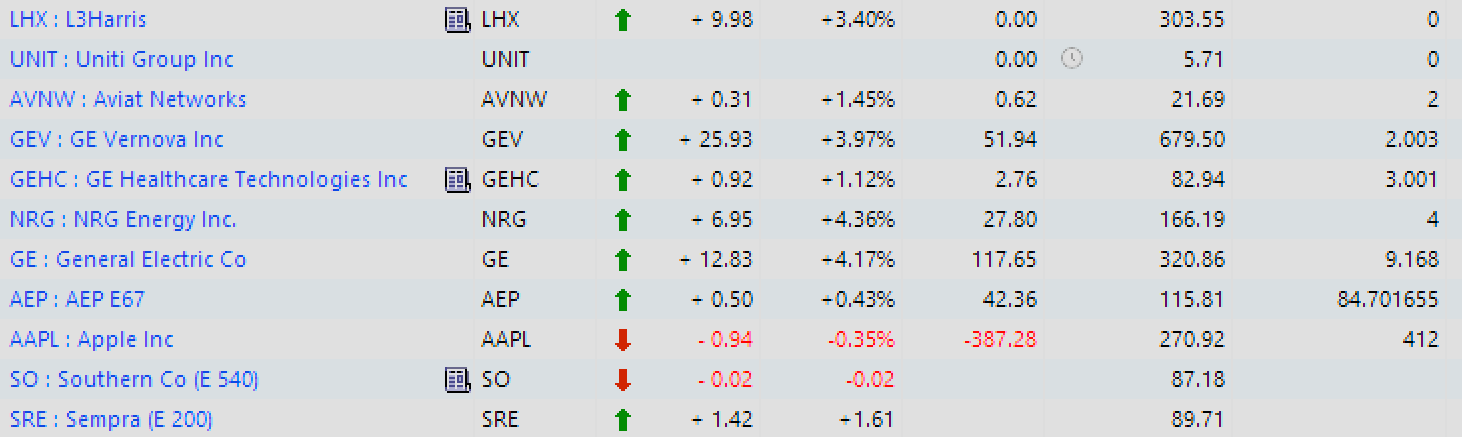
In the following screenshot, Show Closed Lots is disabled. The rightmost column is SHARES
LHX is correct. That security is on the Watch List.
I closed my position in UNIT in April 2024.
However, I have a position in the last two stocks; SO and SRE. The SHARES are blank.
The other positions are correct.
In the following screenshot I have enabled Show Closed Lots. All the SHARES are correct and I can change the sort order of any column.
I no longer hold a position in the stocks showing 0 shares and LHX is on the Watch List.
Note that SO and SRE now show the correct position.
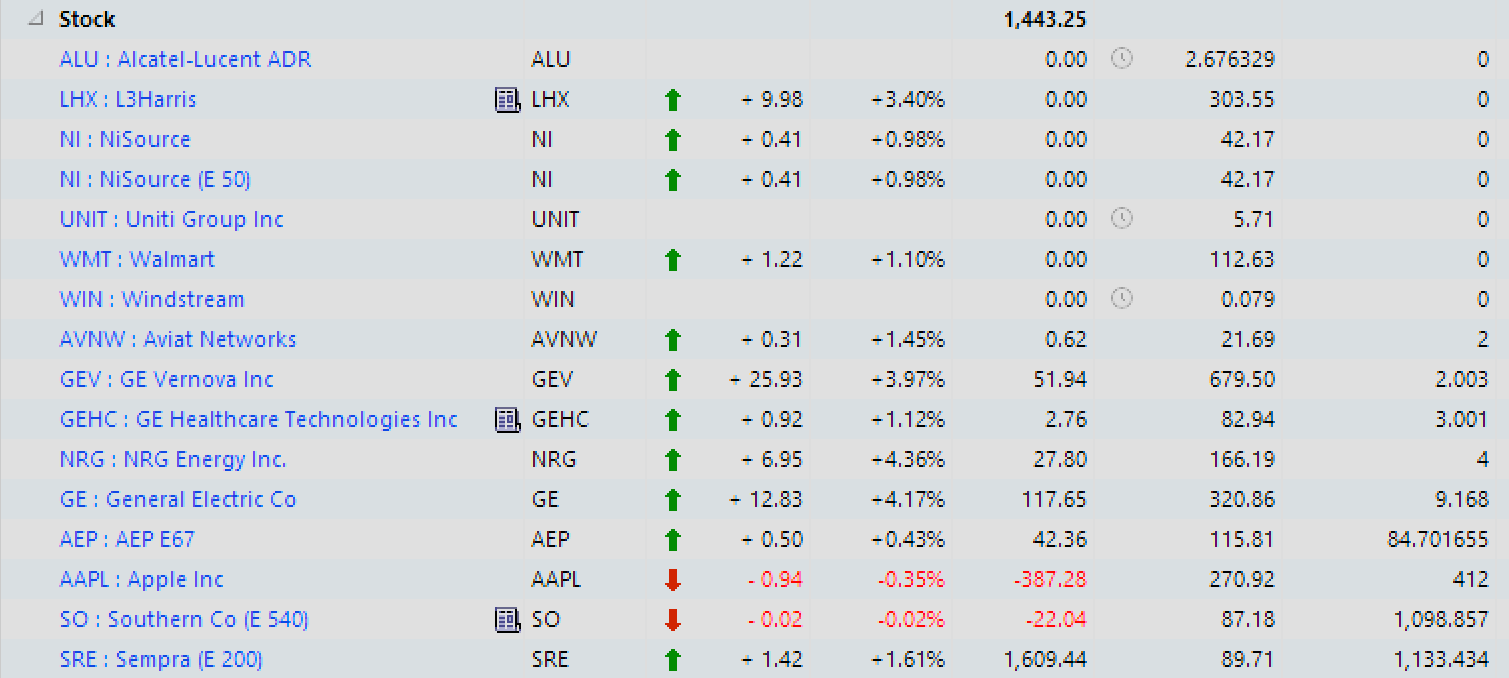
The problem is reproducible and dependent on the Show All Lots OPTION. I doubt this is due to file corruption. It is more likely a programming issue or an issue with the grid attributes.
Thank you for your time. Happy New Year.
Fred J.
Quicken Classic Premier on my
Windows 11 Home ARM64 release 25H2 on Samsung Galaxy Book4 Edge CoPilot+ PC
Comments
-
Hello @FredArthur,
Thank you for sharing your experience. I tried to replicate the issue in my Quicken, but had no luck. Just in case this is related to which columns are in the portfolio view, would you please tell me which columns you're using? It's not visible in the screenshots you provided.
I look forward to your response!
Quicken Kristina
Make sure to sign up for the email digest to see a round up of your top posts.
0 -
Quicken Kristina,
Thank you for looking into this.
I simplified the 'View'. I am displaying only 4 columns in the grid:
'Name', 'Ticker Symbol, 'Quote/Price' and 'Shares'.
In the image below I show the columns used in this view.
As indicated, the 'Show Closed Lots' Option is not selected.
I am holding positions in 11 securities. However, the SHARES in the red rectangle are 'blank'. [The correct SHARE amounts for SRE and SO are displayed in the 2nd image.]
I sold my position in UNIT and LHX but they are on the 'Watch List'.
For these securities the SHARES show '0', rather than 'blank', which is correct.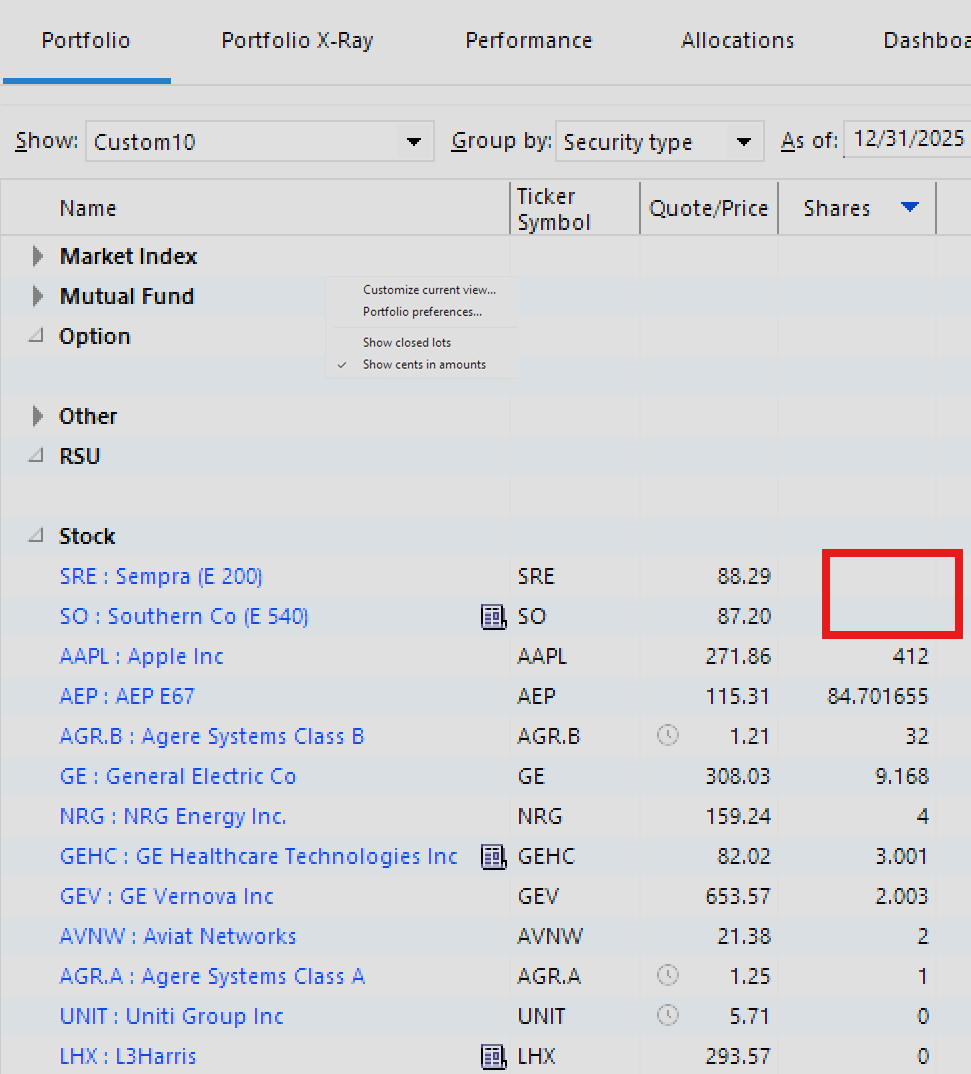
In the image below I toggled the 'sort order' for the Shares column.
The 11 securities I hold a position in show the correct SHARE amount in the grid.
The SHARES in the red block are the ones that were 'blank' in the previous image.
The 'Show closed lots' option remains not selected.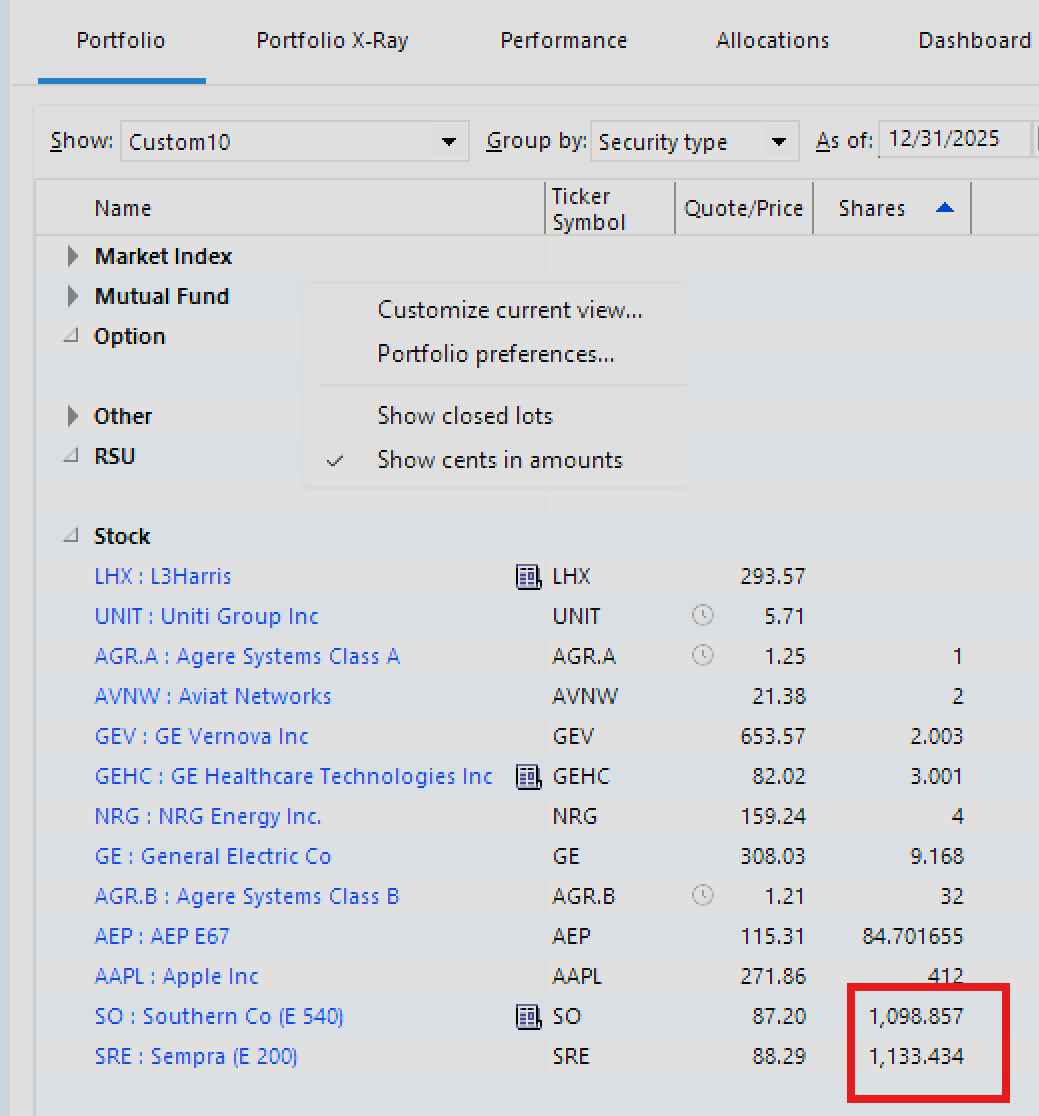
In the image below I have selected the 'Show closed lots' option.
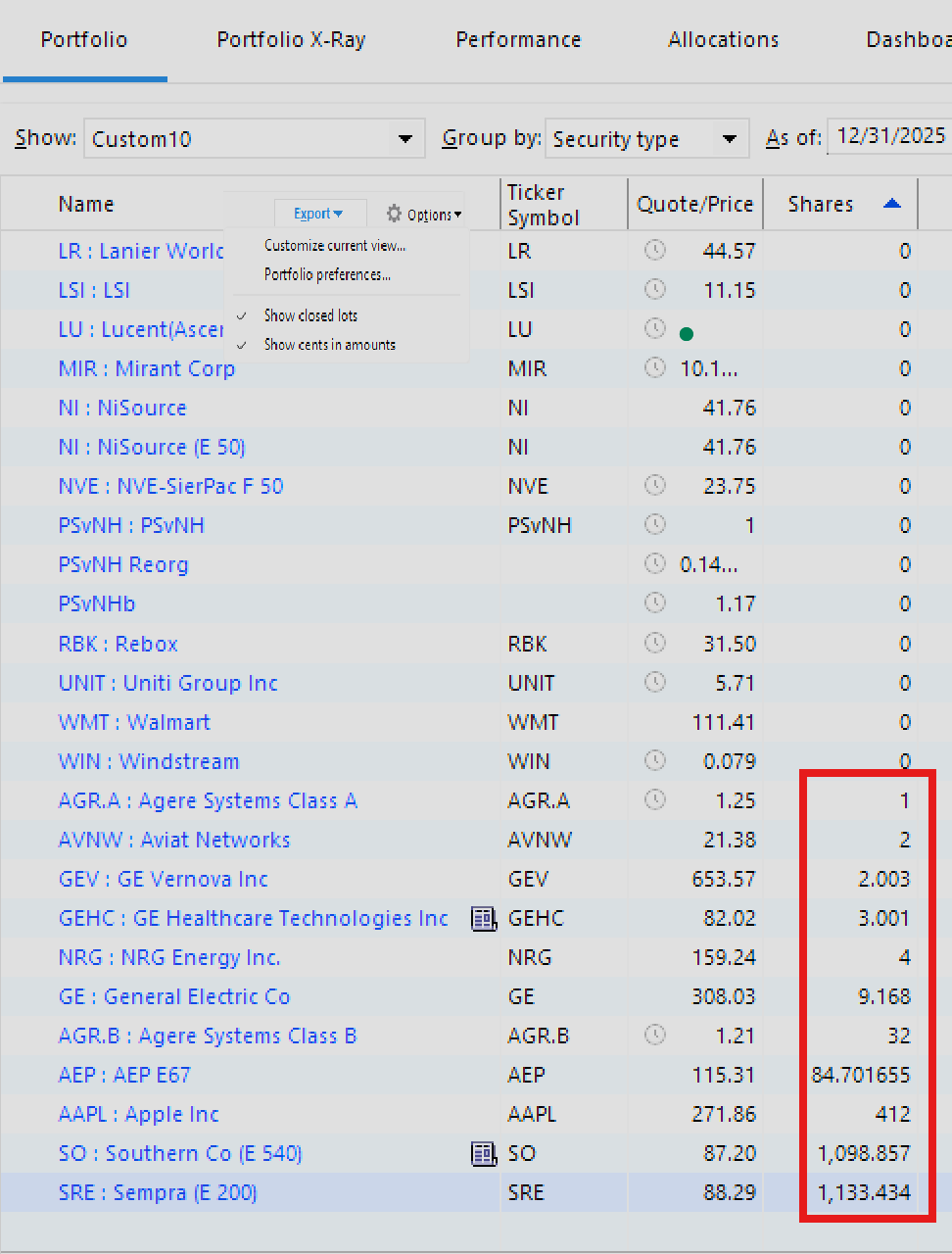
The 11 securities I hold positions in are displayed in the grid with the correct SHARE amounts.
The other 14 securities I no long hold a position in. For each, the SHARE amount is displaying a '0'; It is not 'blank'. [Actually, there are 22 securities without positions, but the screenshot is showing the first 14 for brevity.]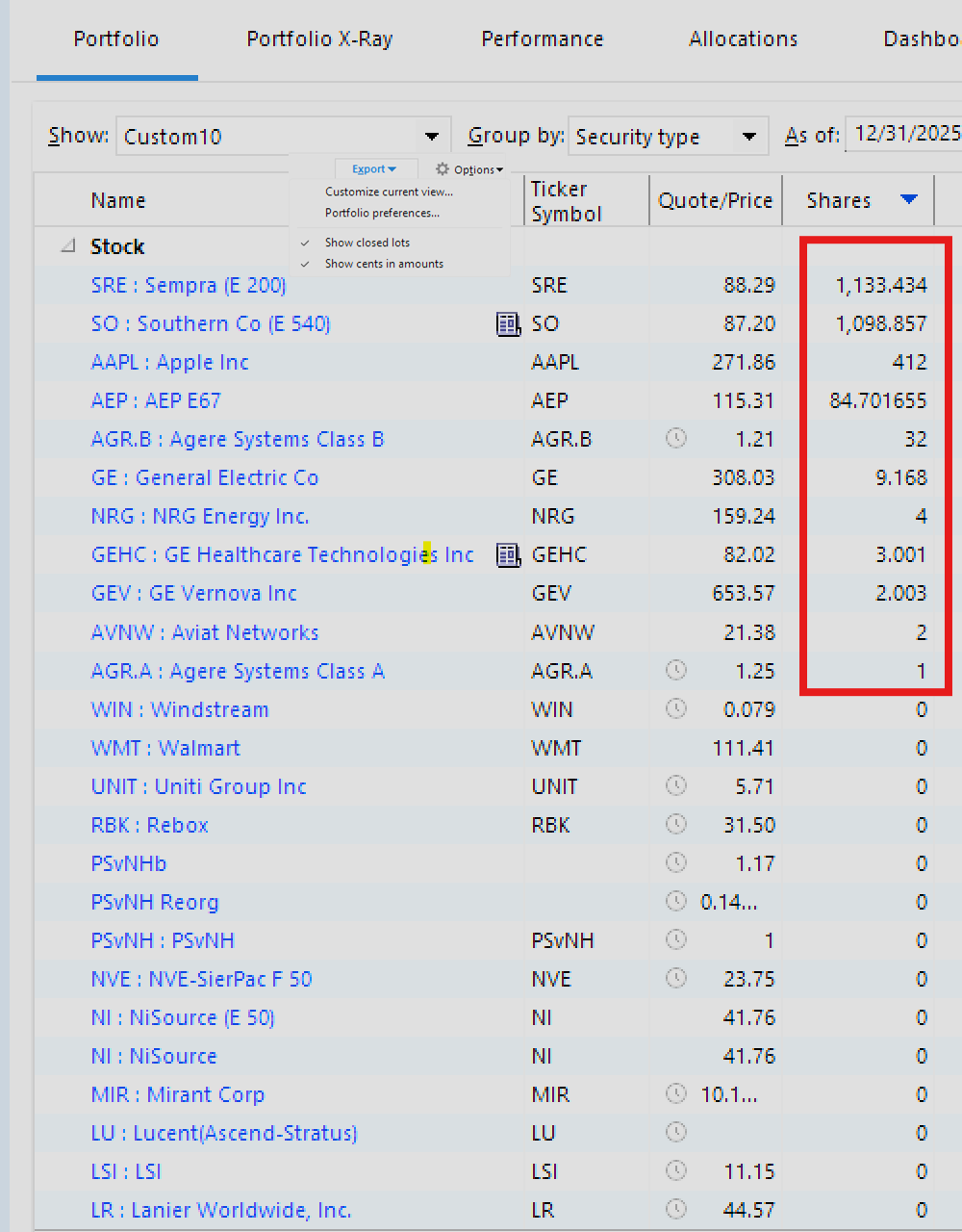
In the image below I toggled the sort order for the Shares column and the positions continue to be displayed correctly in the grid.
Of Note: The problem
- it is intermittent.
- it is not constrained to the two stocks shown in the images.
- is not constrained to this four column view or toggling the SHARES column.
- It can occur by toggling any of the column headers in the 'view'.
- it may can occur when the grid is initially displayed.
- it only occurs when the 'Show closed lots' Option is not selected.
When the SHARES are displayed incorrectly in the grid, they are 'blank', not zero, or an incorrect number.The grid consistently reflects the correct SHARES when the 'Show closed lots' Option is selected.
Thank you,
Fred J.Quicken Classic Premier on my
Windows 11 Home ARM64 release 25H2 on Samsung Galaxy Book4 Edge CoPilot+ PC0 -
This sounds like another intermittent problem where some of the Portfolio view data is not being calculated when it should be.
When the shares are blank, if you set the As of date at the top right back by one day and then return to the problem date, are the Shares shown as they should be? That forces Quicken to recalculate the data in the view. For more information on this issue see
QWin Premier subscription0 -
@Jim_Harman
Thank you for your input.
When I take any action to refresh the Portfolio View data grid, it may display the correct SHARES for the ones that were blank but set another security(s) blank, or come back perfect! It's very much like "Whack-a-mole".
It is interesting that you were getting blanks for the 'price-day-change'. I am looking at my screen and just sorted by 'price-day-change'. Sure enough a security SHARE returned blank but the 'quote' and 'price-day-change' are there. All the other calculations like Market Value, Cost Basis, Gain/Lost, ROI, etc.. are blank as to be expected. Thank goodness the Subtotal lines are correct. They pretty much agree with the 'Portfolio Value' report. Looking real hard I see the Portfolio Value report includes two securities that aren't line items on my grid. Its two securities whose combined value is ~$40; shares I received from a split.
In any event, if I have the 'Show closed lots' Option selected, I get the correct shares for each security listed. Why two securities with small lots aren't showing a is a mystery.Quicken Classic Premier on my
Windows 11 Home ARM64 release 25H2 on Samsung Galaxy Book4 Edge CoPilot+ PC0 -
Thank you for your replies and screenshots,
About how often do you see this issue happen? So far, I haven't been able to get it to happen in my own Quicken. Are you able to reliably replicate the issue?
I suspect @Jim_Harman may be right that it's related to the issue with the Price Day field being blank (reported in CTP-12903).
Thank you!
Quicken Kristina
Make sure to sign up for the email digest to see a round up of your top posts.
0 -
I’d be curious about what appears on paper if you choose print that portfolio view (Ctrl-p) when those blanks are on screen.
2 -
@Quicken Kristina
I can reliably recreate it. I just have to turn off the option for 'Show closed lots'.Quicken Classic Premier on my
Windows 11 Home ARM64 release 25H2 on Samsung Galaxy Book4 Edge CoPilot+ PC0 -
Prints the screen exactly as it is displayed. If a column is blank it appears blank in the screen shot.
Quicken Classic Premier on my
Windows 11 Home ARM64 release 25H2 on Samsung Galaxy Book4 Edge CoPilot+ PC1 -
Shucks. I was hoping for a purely graphical display issue.
0 -
Thank you for your reply,
I recommend that you reach out to Quicken Support directly for further assistance, as they have access to tools we can't access on the Community and they're able to escalate the issue as needed. The Quicken Support phone number can be found through this link here. Phone support is available from 5:00 am PT to 5:00 pm PT, Monday through Friday.
I apologize that I could not be of more assistance!
Quicken Kristina
Make sure to sign up for the email digest to see a round up of your top posts.
0 -
I thank everyone for you feedback.
Fred J.
Quicken Classic Premier on my
Windows 11 Home ARM64 release 25H2 on Samsung Galaxy Book4 Edge CoPilot+ PC0


