Cannot enter transactions since 1/1/26 (Deluxe)

DavidP2
DavidP2 Quicken Windows Subscription Member

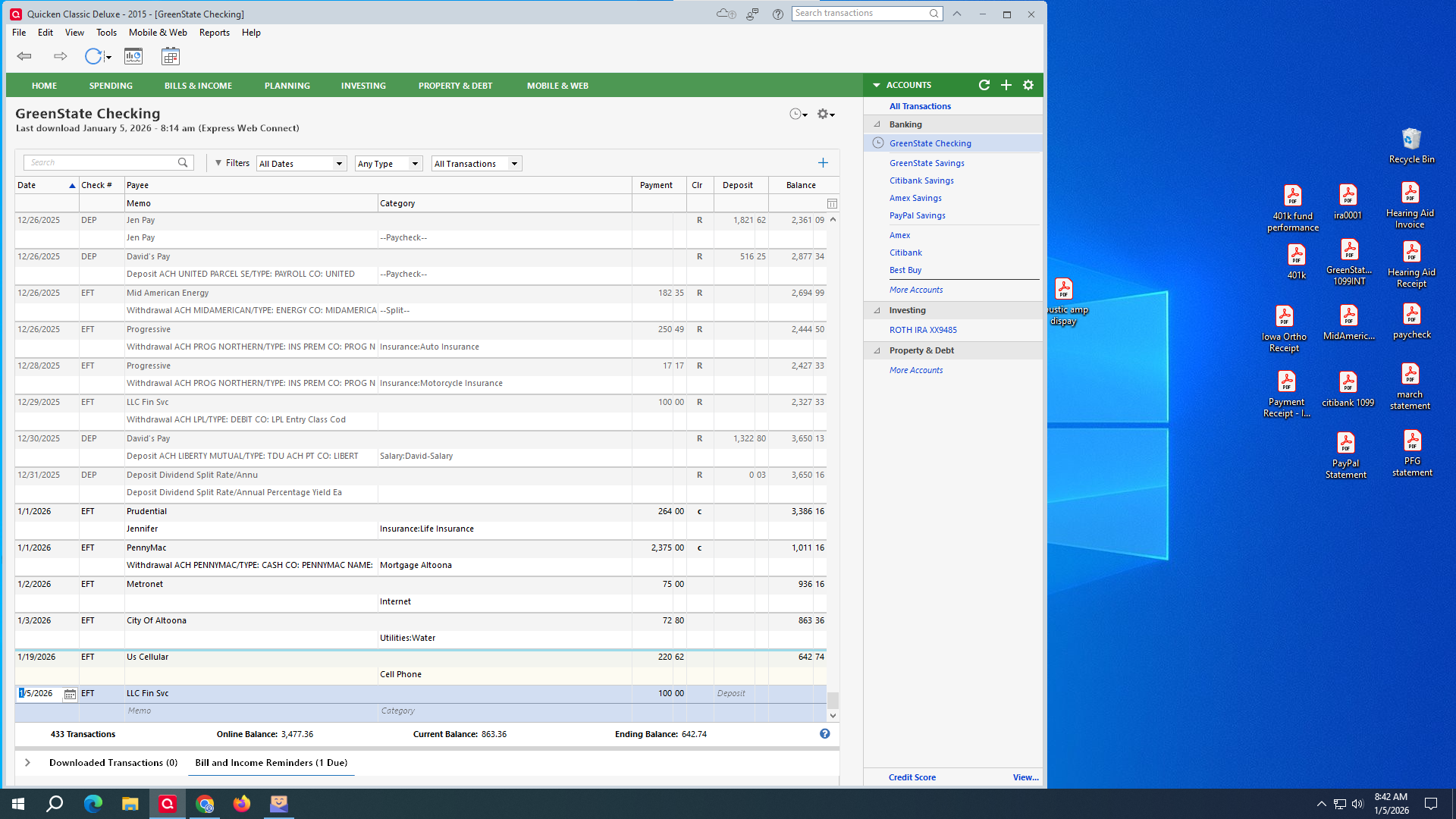
I have not been able to manually enter or accept a transaction on any account since 1/1/26. I have validated my file, reinstalled the software and restarted my PC multiple times. When I try to enter the transaction, nothing happens. I have to hit ESC to back out.


Answers

  • Quicken Anja
    Quicken Anja Moderator mod

    Hello @DavidP2,

    Thank you for reporting this.

    To help us investigate further, could you please provide a bit more information?

    • Where is your Quicken data file stored? Is it on your local hard drive (C: Drive), or on a cloud-based or external location such as OneDrive, Dropbox, or a USB drive?
    • Were there any significant changes to your system or software around the time this began (for example: Windows updates, Quicken updates, or new software installations)?

    Additionally, if possible, please attach screenshots showing what happens when you attempt to enter or accept a transaction. These visuals can be very helpful in narrowing down the cause. If needed, you can drag and drop screenshots directly into your reply or refer to the Community FAQ for attaching images.

    Once we have these details, we’ll be better equipped to determine next steps.

    Thank you!

    -Quicken Anja
    Make sure to sign up for the email digest to see a round up of your top posts.

  • DavidP2
    DavidP2 Quicken Windows Subscription Member
    image.png

    My file is stored on my local C: drive. There hasn't been any changes to my PC prior to this issue. There isn't much to show with the screen shot. After I enter the transaction information, I usually hit enter on my keyboard. It doesn't go anywhere and I have to hit ESC to get out of the transaction. If I try to enter a transaction from a Reminder, it does nothing. I can, however change an existing transaction (ie: adding or changing the category) if that helps.

  • Boatnmaniac
    Boatnmaniac Quicken Windows Subscription SuperUser ✭✭✭✭✭

    @DavidP2 -

    My file is stored on my local C: drive.

    Does the Windows Explorer path for the data file include "OneDrive" in it? If so, that could be causing the issue because it means that while your data file is saved on your local drive it is also being shared with a Cloud storage site (OneDrive) so they are continuously syncing with each other. This can cause issues similar to what you described and can eventually result in data corruption.

    To easily see the full path of where your data file is saved click on the File menu and at the bottom of that menu it will list up to the last 4 data files that were opened. If it shows "OneDrive" or some other Cloud folder in that path or some other non-C drive path you should move that data file from there to another location on your local drive. You can select a location of your choice for this or simply use the Quicken default location (My Documents > Quicken) and Quicken will create the Quicken folder automatically if it's not already there. Then double-click on that moved file and Quicken will open it and remember it as your default for the future.

    Quicken Classic Premier (US) Subscription: R65.29 on Windows 11 Home

  • DavidP2
    DavidP2 Quicken Windows Subscription Member

    I have OneDrive disabled. The only thing (that I know of) that goes to any cloud storage is my gmail.

  • Boatnmaniac
    Boatnmaniac Quicken Windows Subscription SuperUser ✭✭✭✭✭

    OK, great. So, what is the Windows Explorer path for where your data file is saved?

    Quicken Classic Premier (US) Subscription: R65.29 on Windows 11 Home

  • DavidP2
    DavidP2 Quicken Windows Subscription Member
    edited 4:45AM

    C:\Users\david\Desktop\2015.QDF-backup

    I added the 'action buttons' to my register columns to see if clicking the 'save' button would help. It did nothing. I tried using the 'save' option under Edit/Transactions/Save menus and it also did nothing.

  • RalphC
    RalphC Quicken Windows Subscription Member ✭✭✭✭

    What happens if you create a new test file and try to manually enter a transaction?

  • DavidP2
    DavidP2 Quicken Windows Subscription Member
    edited 6:28AM

    Ironically that work(s)ed. I've used Quicken since it started (almost 30 years) and have never had to do this. Is there any way to import memorized payees, calendar Bill/Income reminders, categories?

    Thanks to all the suggestions. Still curious what happened to avoid it in the future

  • Boatnmaniac
    Boatnmaniac Quicken Windows Subscription SuperUser ✭✭✭✭✭

    Not really. But I'll get to that in a moment.

    You said that V&R did not fix the issue for you. Have you tried to do Super Validate?

    1. Back up the data file.
    2. File
    3. Hold CTRL + Shift and click Validate and Repair File.
    4. Super Validate File
    5. Click OK and let the process complete (it can sometimes take a bit of time).
    6. Close the Data Log
    7. Close Quicken (leave it closed for at least 5 secs)
    8. Reopen Quicken and see if the issue persists.   

    If it gets stuck during the Super Validate or if the issue persists after the Super Validate is complete: Try restoring a backup from before when the issue started on 1/1. The backup file might not include that corruption if the corruption actually occurred on 1/1.

    If neither resolves the issue for you then you might want to try doing the following:

    1. File
    2. Copy or Backup File
    3. Create a copy or template
    4. Next
    5. Accept the default file path and file name provided (the file name will be the same as your primary data file with "Cpy" added to the end of it) or give it a unique name of your own choosing.
    6. Save Copy
    7. When prompted, open the copied file

    The copied file will be an exact copy of the primary file with all preferences and other settings, reports, Reminders, transactions, etc., intact. It will, however, be a truly unique data file with a unique file ID, unique Cloud Account ID, unique Runtime.dat file and unique log files. This allows the process to fix many issues encountered with data files and connection issues.

    However, since the copied file is now a truly unique file it means that all the Online Services connections and setups will have been broken and will need to be set up again. So, if you download transactions from financial institutions you will need to set up those connections, again. The same with Mobile or Web syncing, Zillow house values, Credit Score and other Online Services if you use those functions.

    If this resolves the issue then this copied file can be used as your primary data file going forward. If it does not or you do not like the results of the copied file, you can simply reopen your current primary data file and everything will be as it was before the copy was made.

    Let us know if any of this helped resolve the issue.

    Quicken Classic Premier (US) Subscription: R65.29 on Windows 11 Home

  • DavidP2
    DavidP2 Quicken Windows Subscription Member

    Thanks for the suggestion Boatnmaniac. By the time I read your post, I had already restarted everything in the new file. I'll save the old one for reference, but going forward I'm just going to use the new one.

    I appreciate everyone's help!!