US Bank - Error OL-221-A and OL-221-B

Sandee
Sandee Quicken Windows Subscription Member ✭✭

For years, I have downloaded by transactions at the USB website. The transactions then populate into my several accounts in Quicken. (I don't use instant download for these accounts through Quicken because of repeated problems doing it that way - other accounts I do).

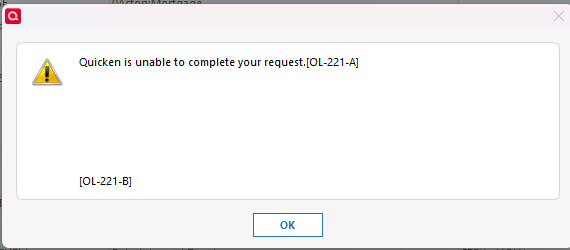
So, now I am getting Error message OL-221-A and OL-221B. USB put me on hold and transferred me to Quicken. Quicken says it's an error on behalf of USB.

Anyone have this problem? A solution?
Screenshot 2026-01-21 143055.png

Comments

  • Rich Urbanb
    Rich Urbanb Quicken Windows Subscription Member
    edited January 22

    I have also had this problem for 2 days now (Jan 21-22, 2026). Called US Bank and got the runaround. I looked at the Connect Log file [CONNLOG.TXT] and see the Quicken logs this error.

    "Not all required fields present. Object: CCSTMTTRNRS missing tag: <unknown tag id>"

    I am using Quicken Classic Deluxe Version R65.29 Build 27.1.65.29 on Windows 11

  • kfoxfoie
    kfoxfoie Quicken Windows Subscription Member ✭✭

    Same problem for 4 days now on all US Bank account .qfx downloads

  • larryg_lslmo
    larryg_lslmo Quicken Windows Subscription Member ✭✭

    @Rich Urbanb @Sandee @kfoxfoie

    There are several other threads citing this issue … bottom line, the QFX files are corrupt, filled with repetitive OFX tags so very BLOATED. Typical file sizes are 3-8KB, but there is so much repetition the files are now 76-300KB.

    Given other threads site other banks, it is likely Quicken either screwed up the file spec or tool the banks use to generate the QFX files. It appears the EWC+ and OSU methods of update are still working but not the QFX manual downloads.

  • drpeggy
    drpeggy Quicken Windows Subscription Member

    When I try to download from my US Bank account I get an error unable to complete request OL-221-A

  • Quicken Anja
    Quicken Anja Moderator mod
    edited January 22

    Hello All,

    Thank you for taking the time to report this issue, though we apologize that you are experiencing this.

    First, can you all please confirm if you are all experiencing this with a QFX file to download transactions, or are any of you experiencing this error with a different connection method as well (i.e.: Express Web Connect)?

    Additionally, please review this support article as it provides more information and guidance on this error.

    However, we will be forwarding this issue to the proper channels to have this further investigated. However, we request that you please navigate to Help > Report a problem within your Quicken program and submit a problem report with log files and screenshots attached in order to contribute to the investigation.

    image.png

    It would also aid the investigation to include a sanitized file when submitting the problem report. A sanitized file is a data file that removes personally identifiable information so you can comfortably share this file with the Quicken team.

    While you will not receive a response through this submission, these reports will help our teams in further investigating the issue. The more problem reports we receive, the better.

    We apologize for any inconvenience in the meantime! Thank you.
    (CBT-1007)

    -Quicken Anja
    Make sure to sign up for the email digest to see a round up of your top posts.

  • larryg_lslmo
    larryg_lslmo Quicken Windows Subscription Member ✭✭
    edited January 22

    @Quicken Anja

    Anja, just got off the Quicken Chat with Luis …

    From other postings, it sounds like EWC+ and OSU are working fine. I can update the accounts that use those methods fine. It is the manual download and import of the QFX WebConnect file that is having the OL-221 problems due to corrupt / bloated files.

    Learned from Luis that Quicken does not control the QFX file specification or tool which financial institutions use to generate QFX files for their customer downloads. Apparently INTUIT controls the proprietary OFX file format (i.e. QFX) used by the various Intuit financial programs and bestowed upon the downstream banking institutions to provide QFX files to their customers.

    However, since Quicken is no longer under the INTUIT corporate umbrella, it is the red-headed step child and does not have any control of that file. One would think Quicken would still have some connections back to the mother-ship but apparently not much more than anyone else.

    Luis recommendation was for affected Quicken customers to contact their banking institutions but he agreed with me, most Level 1 Customer Support Reps will be clueless so recommended asking for their "online banking specialist". I am also looking at contacting INTUIT via their Support channel but have other things to attend to at the moment.

    Happy to provide an example of a [sanitized] bloated QFX file … as opposed to a WHOLE sanitized data file which would seem overkill except for any logs that get included in the ZIP/QDF. However, I have to leave my office for the rest of the day so will try to continue the saga later tonight.

    Thank you for your help.

    LarryG

  • schlegrj
    schlegrj Quicken Windows Subscription Member

    I am having the same problem with my USBank account; when I try to download QFX I get

    "Quicken is unable to complete your request", OL-221-A,.

    Downloading for a credit union account works just fine.

  • PosWeyb
    PosWeyb Quicken Windows Subscription Member

    Looks like the same experience I am having. I will say that on Monday January 19th, I could not find the download transaction button at ALL!. I called USBANK and was told that USBank no longer supported that service. Today I log in, the button is there, download works just fine, but importing does not.

    I don't know what these are: EWC+ and OSU are but I was able to connect a new account to USBank and it was able to download 365 days worth of data. I can deal with that….I know how to copy cut and paste. I sent in the quicken report. (I was not able to include a sanitized data file) The Quicken person I spoke to today: 888-311-7276 Software Data people US Bank Tech support line for Quicken. Told me to call back in one business day and then provided me the link to this page. Sounds like no-one knows what is going on.

  • larryg_lslmo
    larryg_lslmo Quicken Windows Subscription Member ✭✭
    edited January 22

    @PosWeyb

    Quicken has several "Transaction Download" methods … 1) Express Web Connect+, 2) One Step Update (OSU) which just runs all your EWC+ enabled accounts, 3) Direct Connect (think this has phased out for EWC+) and 4) Manual File (e.g. QFX) download.

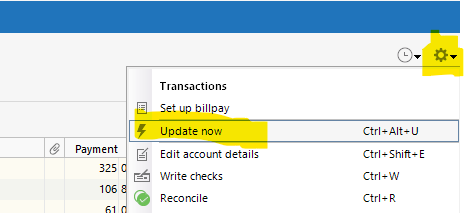
    The EWC+ seems to be working fine (i.e. I personally do not have a USBank account setup for EWC+ but heard others do and those are working OK), so if you can setup your account(s) to use it, then you will be able to use the UPDATE NOW feature under the Settings (gear icon) →Update Now (see below snapshot) when you are in the ledger for a particular account. Disclaimer … it may redownload alot of historical transactions if you have been using manual downloads to update your USBank account.

    image.png

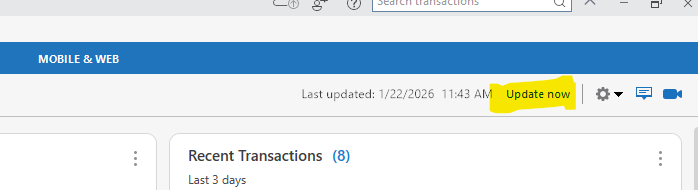
    There is also and UPDATE NOW in the top right corner (see below snapshot) when you are not in a specific ledger. This Update Now activates the OSU feature for all EWC+ accounts.

    image.png

    Use TOOLS → Account List (CTRL+A) to see what "Transaction Download" method each of your accounts are setup for … a " Yes (Improve Connection) means you use the manual QFX download; a "Yes (Express Web Connect +) means you use a more automated download, where you entered all your Account Details and chose to use "online services" to update when you setup or edited the account vs the manual download.

    It is the MANUAL DOWNLOAD QFX files that have a problem, and not just for USBank as other people have chimed in saying they are having same issue with other banks. These manual download files are being generated by the various banking institutions based on a QFX file specification controlled by INTUIT (not Quicken), and whether the banks are screwing up or INTUIT put out a bogus spec is still TBD.

    In the past, these kind of issues eventually work themselves out when the right technical people finally figure out there is a problem. We just do not seem to be there yet.

    And by all means, if anyone has corrections to the above, feel free to chime in. I am just an avid user who was a Software Engineer in a previous life, not necessarily a Q-Guru, just familiar with how software generally works.

  • Sandee
    Sandee Quicken Windows Subscription Member ✭✭
    edited January 22

    @Quicken Anja and @larryg_lslmo. Yes. It's the QFX file. The other methods still work for me. I have been a Q user for decades. I had repeated problems with USBank using OSU and web connect. Downloading by QFX has been my work around. So frustrating.

  • schlegrj
    schlegrj Quicken Windows Subscription Member

    I have tried calling USBank, and was told that they have "no issues", and that I should contact Quicken. In the meantime, I see that on 1/16 a QFX download of my checking from USBank was 7K; today (1/23) it is 347K. Similarly, my savings download on 1/8 was 2K; today it is 38K. Yet USBank is refusing to acknowledge that there is a problem with their formatting. Is there anyone with Quicken who can actually get USBank's technical attention to deal with the insanely bloated downloads?

  • Quicken Anja
    Quicken Anja Moderator mod

    Hello everyone,

    Thank you all for the detailed reports and for continuing to share your findings—this information is genuinely helpful.

    Based on what we’re seeing so far, this issue appears to be isolated to manual QFX (Web Connect) downloads from U.S. Bank. Other connection methods (such as Express Web Connect / One Step Update) do not appear to be affected at this time, which aligns with what several of you have already observed.

    While QFX files are generated and provided by the financial institution, Quicken still opens an investigation on our side whenever we see a sudden increase in reports or signs that files are failing to import consistently. Reviewing logs and sanitized files allows our teams to:

    • Confirm the failure point during import
    • Identify whether Quicken is correctly interpreting the file structure
    • Provide details to the financial institution when escalation is required

    At this time, we’ve only received a limited number of problem reports and logs, so additional submissions are still needed to move the investigation forward. If you haven’t already done so, please submit a report via Help > Report a Problem, and include:

    • Log files
    • Screenshots of the error
    • A sanitized data file, if possible

    Although we don’t yet have an ETA, the escalation remains open while we continue gathering data. Ultimately, if the QFX files themselves are malformed or excessively bloated, the correction will need to come from U.S. Bank—but having sufficient diagnostic data allows us to escalate with clearer findings.

    Thank you for your patience and for helping us investigate this further.

    -Quicken Anja
    Make sure to sign up for the email digest to see a round up of your top posts.

  • larryg_lslmo
    larryg_lslmo Quicken Windows Subscription Member ✭✭

    Hey @Quicken Anja / @Quicken Kristina … THANK YOU for your help!

    Just submitted a problem report with all logs and sanitized data file, along with a lengthy description.

    A couple items ... from my research on the forum, this is not isolated to USBANK. Other banks have been mentioned in postings since DEC citing the same/similar problem (e.g. Navy Federal), but YES, USBANK seems to be a LOUD one right now.

    It's typical and frustrating when contacting any customer support to let them know of a legitimate technical issue, you get the runaround ... usually from a Level 1 person who does not understand what you are talking about. It usually requires an inside support track communication to do any good ... such as Quicken -> INTUIT -> USBANK.

    It is clearly obvious SOMETHING changed on or about 17 JAN with USBANK manual QFX downloads given the filesizes have exploded and obvious duplication of records/tags are occurring. Just finding out how and why this happened is the $64 question.

    Ran both my BLOATED files thru an OFX/QFX validator (SpreadsheetBroccoli) and they come back with ZERO errors and convertible to CSV/XLSX. Granted they are FULL of duplicated records and tags which can be seen by visually inspecting the QFX files, but the validator is indicating the record syntax is valid (not to be confused with a valid Quicken importable QFX file). This begs the question ... what is Quicken choking on in the file? Duplicated records/tags?

    The problem report tool does not include a file upload for an example QFX file. In my software experience, that is the artifact that needs to be reviewed since the LOGS may or may not be detailed enough to identify the problem.

    LarryG

    There are only 10 types of people in the world who understand BINARY … those who DO and those who DON'T! 😯

  • Rich Urbanb
    Rich Urbanb Quicken Windows Subscription Member

    NOTE: This comment is somewhat on the technical side. It is in observation that may or may not be relevant, but it's worth a look by the experts at both Intuit and US Bank.

    The QFX file format is an XML/OFX variant. I examined several files that I had no problems importing and compared it to the file I was unable to import. I did this because the log entry I mentioned near the top of this thread […CCSTMTTRNRS missing tag: <unknown tag id>…] hints at an XML file formatting or creation problem.

    In the files that imported successfully, EVERY <TAG> had a closing tag </TAG>. This is a snippet from a file I had no problem with.

    		<DTSERVER>20260121115834.385[-6]</DTSERVER>
    		<LANGUAGE>ENG</LANGUAGE>
    		<FI>
    			<ORG>Blaze Credit Union</ORG>
    			<FID>296075933</FID>
    		</FI>
    		<INTU.BID>17739</INTU.BID>
    

    The US Bank file, by contrast is poorly formed, lacks many </END> tags and shows duplication even at the beginning of the file where the ORG tag, identifying US Bank is duplicated (once well formed tag, once with incomplete closing.

      <DTSERVER>20260121134514.274
      <LANGUAGE>ENG
      <DTPROFUP>20050531050000.000
      <FI>
        <fid>1402</fid>
        <org>U.S. Bank</org>
        <ORG>U.S. Bank
        <FID>1402
      </FI>
      <INTU.BID>1402
    

    While many parsers (and importantly, legacy OFX parsers) are tolerant of this format, it seems to me that it's possible the latest update to Quicken may have a pickier parser. Alternatively, the duplication of the organization tag may hint at other problems in the US Bank file creation process.

    FWIW

  • Sandee
    Sandee Quicken Windows Subscription Member ✭✭

    UPDATE - I left a less than stellar response to a survey I recvd from USB re my call to them. A rep called me today to discuss. She advised that USB is aware of the problem and is working on a fix. Fingers crossed they figure it out soon.

  • larryg_lslmo
    larryg_lslmo Quicken Windows Subscription Member ✭✭
    edited 3:56PM

    Hey @Rich Urbanb ,

    Had seen all of what you brought up … and had told myself, just fix the file … so I did.

    Not something I want to do every day but it is not complicated but you do need an editor that can handle XML and have a basic understanding of how XML works. And of course, make backups!

    1. Saved the QFX file as XML. Just SAVE AS and add a .XML extension, leaving the .QFX (e.g. FileName.qfx.xml). This way the editor knows to use XML notation and formatting.
    2. Collapse all tags, remove any LOWERCASE tags in favor of UPPERCASE tags, since my last known good file was all UPPERCASE tags, no smaller tags were present.
      1. NOTE: Should not make any difference which one is used but the LOWERCASE tags had sub-tags did not match the order/format of the UPPERCASE. Again, should not affect the import so long as all tags are present (lower or upper) but decided to err on the conservative side.
      2. NOTE: This is easy for the upper level tags but can get tedious within the transaction list.
    3. There were also some LOWERCASE tags appearing within UPPERCASE tags so I removed those too.
    4. Save the XML file.
    5. Then do a SAVE AS a QFX file with a unique name (e.g. FileName_Corrected.qfx). The initial 300KB file was reduced to 7KB, which is more typical of a good file in my case.
    6. Backed-up my Quicken File.
    7. Did my File→File Import→Web Connect, selected the "corrected" file and worked like a charm.

    Disclaimer: Do not attempt if you are not familiar with XML files.

    LarryG

    There are only 10 types of people in the world who understand BINARY … those who DO and those who DON'T! 😯

    P.S. @Sandee Glad to hear you were able to get some perceived satisfaction with USBank Customer Support. Hopefully they will get it fixed sooner than later. Obviously if this is ONE BANK, then it would no doubt simply be their screw-up in creating the QFX file. However, given I saw a few postings with other banking institutions, led me to believe the problem was more systemic like INTUIT had put out a faulty QFX file spec/tool.

  • heymom
    heymom Quicken Windows Subscription Member
    edited 4:37PM

    Also having this trouble. Error code OL-221-A (and B). Also, tried to update my accounts where they will automatically download from USBank (thought that might fix the problem). Quicken doesn't seem to be able to connect to US Bank at all. I get a screen that says something like "authorize Intuit to connect with your bank". After that, it says to sign on your browser to your bank but nothing ever comes up.

  • Quicken Kristina
    Quicken Kristina Quicken Windows Subscription Moderator mod

    Hello @heymom,

    Since I can see you use Quicken for Windows, I moved your post from the Quicken for Mac discussion to the Quicken for Windows discussion since the troubleshooting steps are different. Please follow this guidance from @Quicken Anja's earlier post:

    Thank you!

    Quicken Kristina

    Make sure to sign up for the email digest to see a round up of your top posts.