Downloaded Sold Transactions Are Tedious - Default to "Individual Lots"

I just spent almost an hour individually accepting a large number of downloaded sold transactions in one of my investment accounts. This process is unnecessarily tedious. For each sold transaction, you need to individually accept it and specify whether to accept “average cost” or “individual lots”.
Why not make “individual lots” the default? Or allow specifying the same method for all transactions? That would save a lot of time.
Comments
-
Hello @Chuck Cobb,
I went ahead and changed your post to an Idea so other users who have the same or a similar request can vote on your idea by clicking the up arrow (see below).

Ideas are also reviewed by our Development and Product teams in order to improve Quicken and implement new features requested by customers.
Thank you!
-Quicken Anja
Make sure to sign up for the email digest to see a round up of your top posts.0 -
In the US, I think the IRS only allows the average cost method for mutual funds, not stocks or ETFs. Unfortunately Quicken allows it for all of these.
Unless you really want to use average cost, make sure the Use average cost box is not checked In the Security Details for the security. I think if that box is checked, Quicken should go ahead and use the average cost and not prompt you each time you accept a transaction.
In Edit > Preferences > Downloaded transactions next to Lot assignment after investment download, for each account you can set options for automatic lot assignment, but the options are limited and may be confusing.

"First shares in for Equities" means FIFO
"Last shares in" means LIFO.
I don't use this option, but as far as I know it works correctly. Unfortunately the other two choices on the Lot Assignment screen are still not available. See this discussion
QWin Premier subscription0 -
I came to this forum to make this exact request. My brokerage accounts are pretty active and average 20 - 30 sales per week. I habitually download all activity to Quicken each weekend and, as Chuck Cobb stated when he posted this, it gets very tedious. I do not use Quicken for taxes (I use Turbo Tax and download the 1099's from my broker), so providing a method to default the lot assignment on sales would be a welcome enhancement and would not have any tax consequences.
1 -
Try going to Edit > Preferences > Downloaded transactions and adjusting the settings for "Lot assignment after investment download." You can select either FIFO or LIFO for each account.
I think to skip the prompt for mutual funds when using these settings, you must have each fund set to NOT use average cost. To adjust that setting, click on Edit Details on the fund's Security Detail page and make sure the Use average cost box is not checked.
Please read my post above for more details, and let us know if that works for you.
QWin Premier subscription0 -
That approach works, but it is not exactly as you described.
Go into "Edit-Preferences-Downloaded Transactions"
Select "Lot Assignment after Investment Download"
Select the investment account and select "Automatic Assignment instead of Accepting on Accept"
0 -
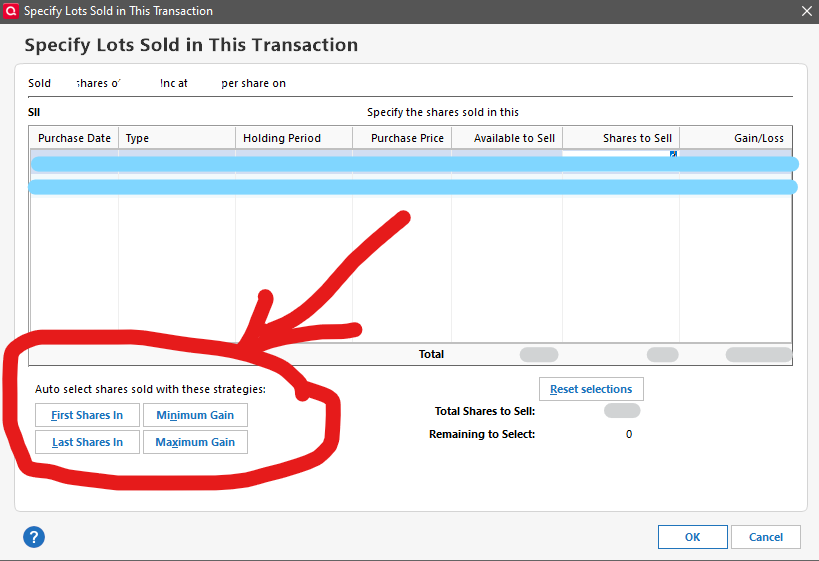
Totally agree. I use TurboTax for taxes and Quicken for investment analysis, and I prefer the minimum gain option for the latter, since most of my transactions are stocks or ETFs.
Quicken developers:
1) Please add the SAME options you allow for EXPLICIT Lot Identification for DEFAULT Lot Identification. Problem solved.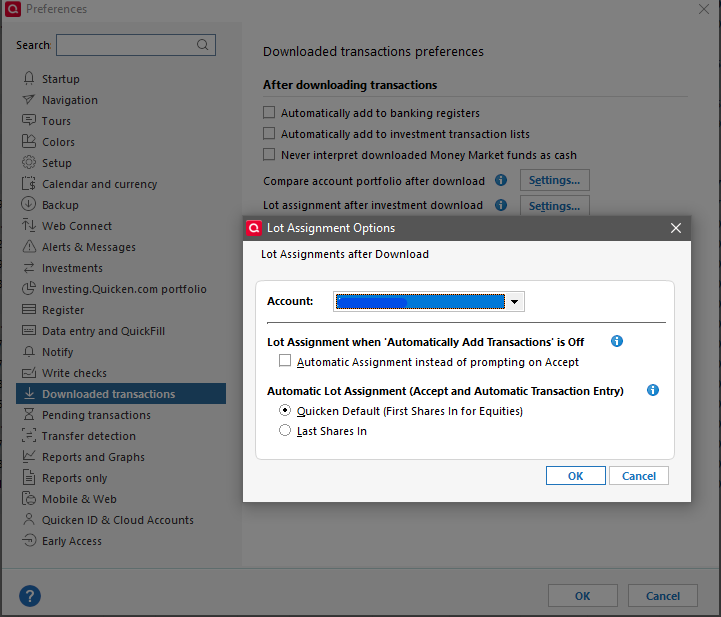
2) For @Chuck Cobb's use case, you could simply add an Info-Popup to clarify US Tax consequences, then add an option to use the default required Per User Preference, based on the Security Type.
Thank you, Quicken for a QUICK solution to this inconsistency, which causes much unnecessary wasted time for those of us with multiple investment transactions per day.
By the way, please add more functionality for Crypto transactions while you're at it. See my other posts for tips/ideas. Thank you!
Sincerely,
Quickenator …since 19920


