Multiple Financial Institutions Prompting Reauthorization After Every One Step Update [Edited]
Answers
-
For me it only happens with Capital One. I have a bank and a credit account with them. No problem with Discover, where I also have bank and card accounts, or with Citi which has two card accounts. No recent restore from backup.
0 -
I'm having the same issue with my Charles Schwab and Chase accounts. This is something that just started happening recently.
0 -
Its spreading for me. First my capital one accounts (which I then reauthorized), the next day it was capital one and american express bank, I reauthorized only capital one, next day it was amex and capital one, and I reauthorized both, the next day (today) it was capital one, amex and charles schawb. (Some of these reauthorizations I just reset the account and today, I deactivated all my capital one accounts and then used the "Add" button to reauthorize them. It almost seems like reactivating makes it spread to another set of accounts. I will also say that I have mutliple accounts at every institution that needs to be reauthorized, may there is an issue with having multiple accounts at an institution.
0 -
Come on Quicken Support. You have a large group of frustrated users that are dealing with the "Re-Authorize" issue in the past week. The change has to be on the Quicken side or the service you use to connect those financial institutions. Please provide an update as to when the developers are going to fix this.
1 -
This has been going on with me for about 5 days now. Schwab is the worst, followed by Capital One. When will this be fixed? Windows 11 all patches, Quicken Premium Subscription all patches.
0 -
I can verify that this fixed the problem for me. Try going to Edit, Preferences. Click on Quicken ID & CLoud Accounts. Click on Sign on as a different user. Sign back in with your normal account. I'm curious to see if it fixes it for others.
0 -
Thanks for sharing!
-Quicken Jasmine
Make sure to sign up for the email digest to see a round-up of your top posts.
0 -
Problem came back for me today after being fine for a few days. Signed out, exited, signed back in (as a few others have done), unfortunately that didn't fix it for me, OSU still bringing up all my EWC+ accounts wanting to reauthorize (though one Chase account did download some pending transactions).
I'm going to try deactivating, signing out, reactivating, see if that helps. But this is frustrating, Quicken needs to get this sorted out. This is a subscription service we're paying for and it has been broken for a week.
0 -
It's not just Capital One. For me, it's Charles Schwab and PayPal. Last week, it was for those accounts and my Citi. Today, I only got the CC-901 for my Charles Schwab accounts and PayPal account. But I suspect it's just a matter of time before it occurs for my Citi accounts.
0 -
Today, it was Charles Schwab and PayPal. Last week included Citi as well.
0 -
Capital One Today, again!
Really I have not had 1 full week of OSU working correctly for about 2 years since accounts were moved from Direct Connect to Express Connect and the Cloud! It's like the weather men, they get paid whether right or wrong. Gotta love it.
0 -
This method did NOT work for me. SIgned out, signed in. OSU run - prompted to reauthorize Cap One and Chase.
0 -
Same problem with everyday reauthorizations with Chase and Charles Schwab. Quicken on Windows 11, R62.16, CC-901. Have not restored this file. Been using same file since March 15, 2025.
0 -
How many Capital One accounts do you have? I am (once again - this crap happens every 3-4 months) having an issue again where Cap one doesn't work properly if I authorize more than 4 accounts. If i limit to 4, it all works, but as soon as I add 5, when it says linking to accounts, only one account links, and the rest say in quicken "Don't add to quicken". I'm about ready to close my Cap one accounts and move to another bank, as other banks are fine. What's worse is Quicken doesn't even say there is any issue, it quietly just ends up showing no transactions were downloaded, but if I "reauthorize", then it downloads them.
0 -
Now after re-authorization Capital One is downloading 2 accounts in one instance, and my 3rd account in a separate instance. It should be 3 accounts in one instance like all the other Financial Institutions. Still screwed up, but at least it did not ask to re-authorize again.
0 -
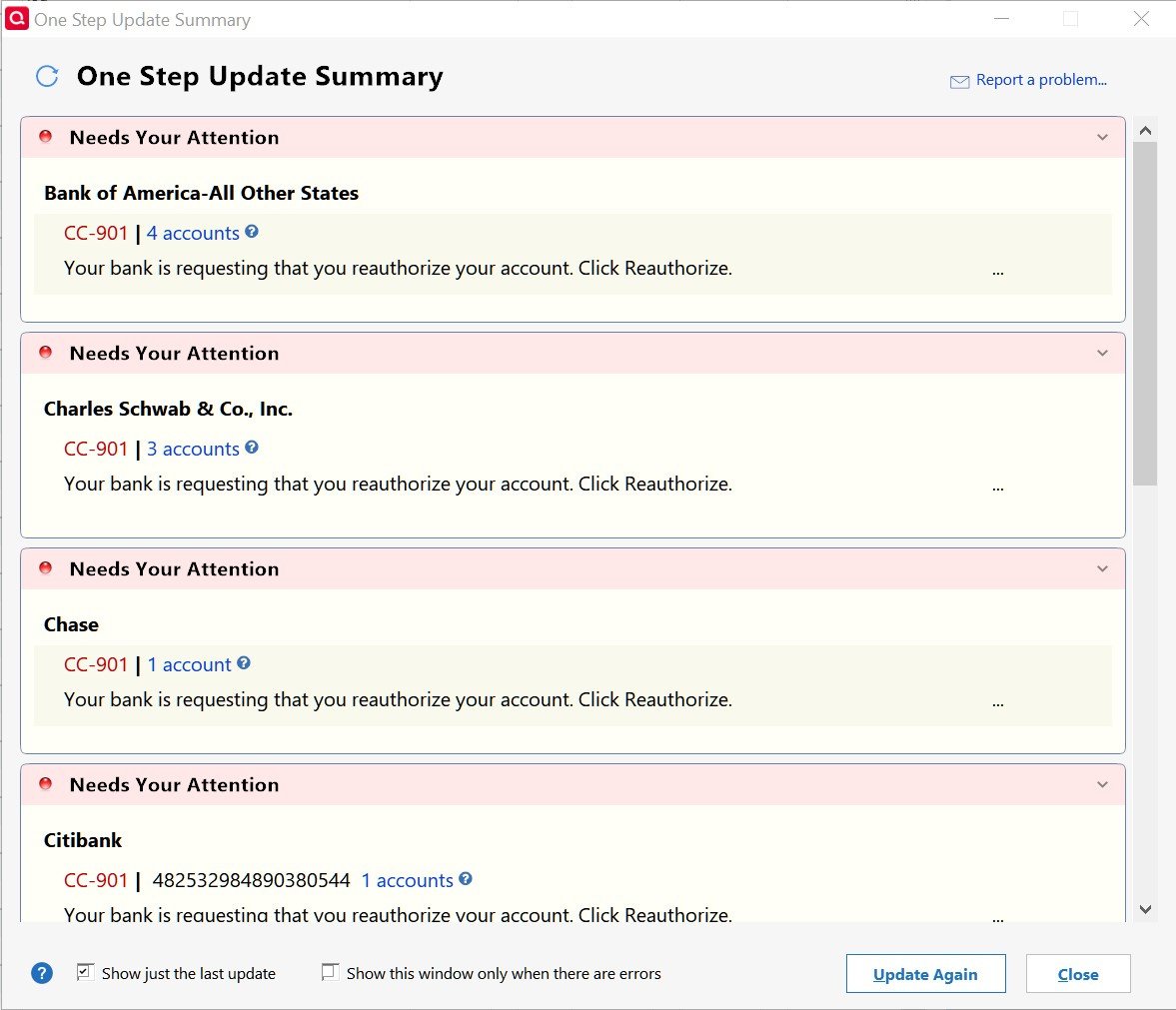
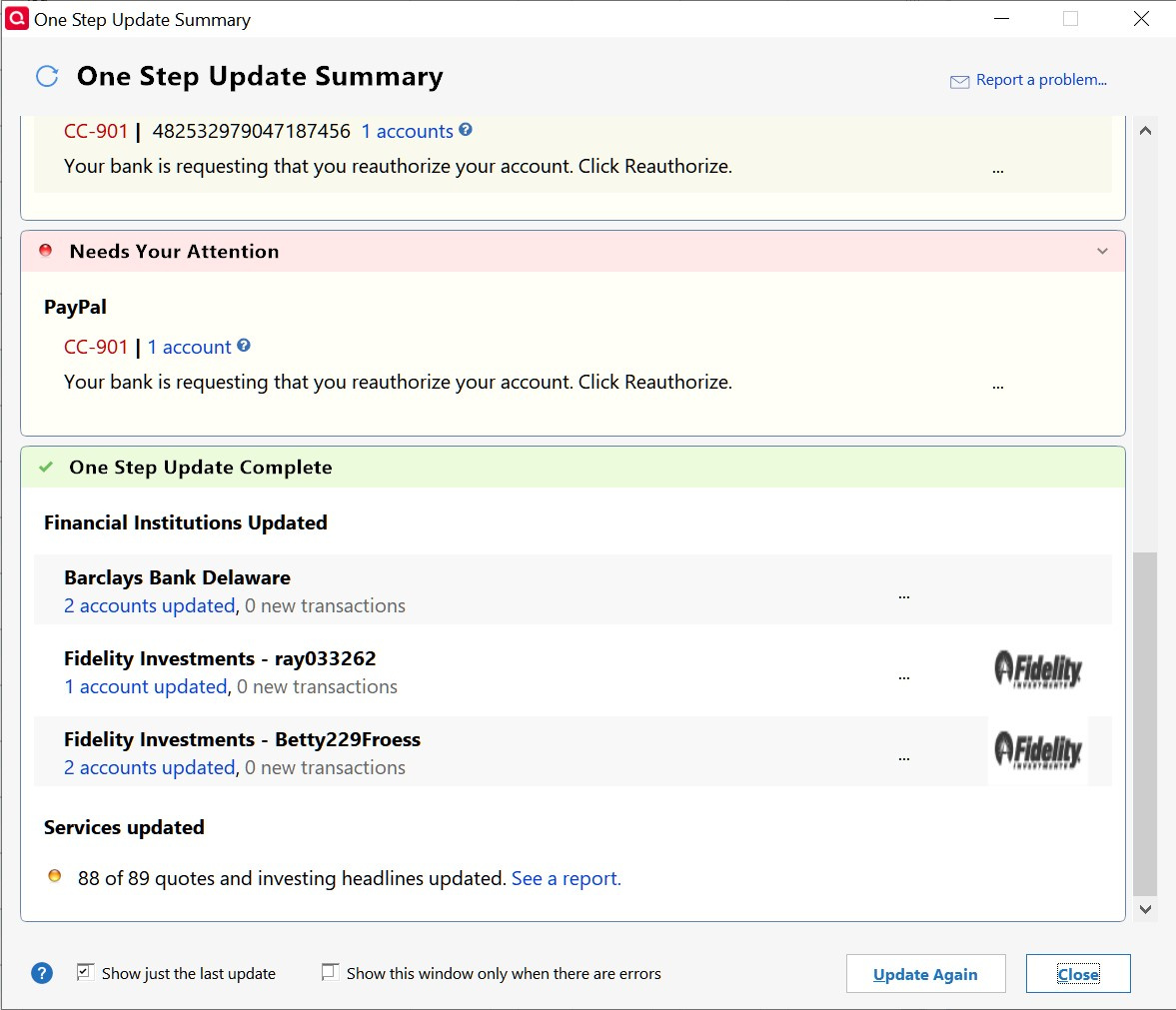
This is frustrating. I have two accounts, one to eventually replace the second that has some issues. Both came up with these requests to reauthorize after running One Step Update. I've waited several hours hoping Quicken would fix the problem on their end. It still occurs.
I can count on Citibank to fail as it has for many years, but not all these at once.
 0
0 -
As reported elsewhere, I tried logging out of Quicken, and then logging back in with same Quicken ID. And for me, and apparently some others, this fixed things.
0 -
In my May 6 post, I erroneously said, " This is frustrating. I have two accounts, one to eventually replace the second that has some issues." The correct statement is, "… I have two datafiles, …"
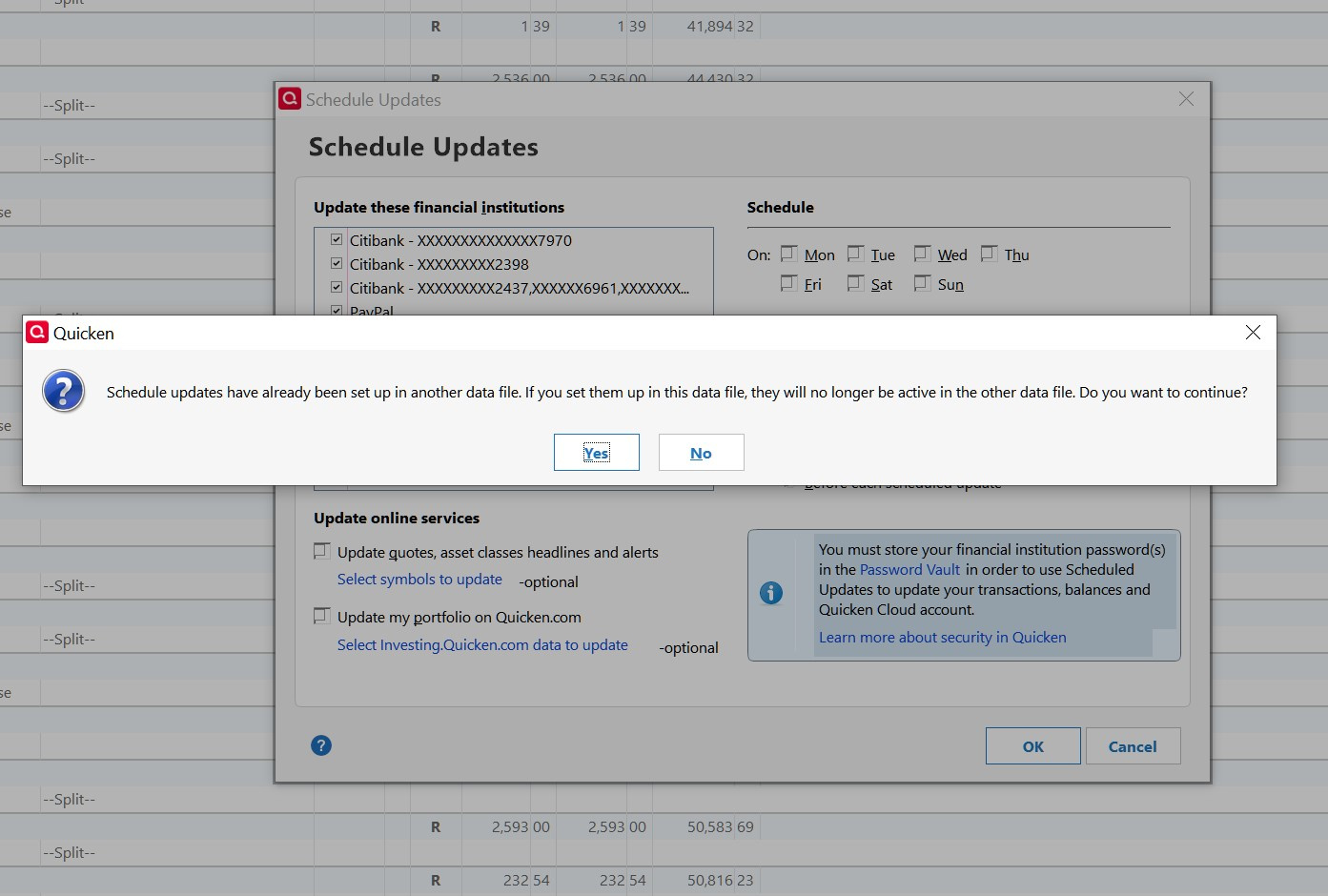
Logging out and back in didn't work for me. Yesterday, the same accounts still failed but with CC-800 errors. I called support. They said to just reconnect the accounts. After reconnecting several, I noticed that One Step Update's (OSU) list omitted them. When I check their boxes to add them back to the OSU list, I got the attached pop-up message. I called support again and was told that Quicken can no longer have more than one data file attached to an account! I confirmed this with a supervisor. It only happens if OSU uses Express Web Connect where Quicken downloads the data from the institution to their servers, and OSU download it from their servers.
This clearly is poor programming by Quicken and is unacceptable! This means that…
- When I restore a backup or create a new datafile, I have to attach all accounts and OSU will work fine. But if I run OSU on the original datafile, it will fail. I can fix it but then OSU will fail on the new datafile.
- If I have Quicken on my desktop and laptop (vacation, business) and run OSU, the other datafile will fail.
- If you have two datafiles and run OSU on both (as I did), both will fail.
- If I need to debug an OSU issue, I can't bounce back and forth between the original and test datafile. I might make issues even worse on my original datafile.
How did Quicken ever let this happen? Support's supervisor said he couldn't escalate this and to post it on the Community page.
 0
0 -
QUICKEN pls fix the problem, it showed up every other week - it's troublesome
remember we paid for the services for the product quliaty
0 -
In looking at my Account List's Transaction Download column, I noticed that only accounts using "Express Web Connect+" fail with 2 datafiles. Barclay uses "Express Web Connect" (no plus sign) and it's fine, even though OSU goes through Quicken servers too. Those using "Direct Connect" like Fidelity, don't use Quicken servers and are also fine.
0 -
Also see
It might be possible to have two datafiles if OSU uses different financial institution logins. One datafile could use mine and the second datafile could use my wife's.
0 -
Hi Quicken Kristina,
I am using a single Quicken file. I did not restore any backups. I am having this issue with Citibank.
The reauthorization will authorize or deauthorize the accounts as selected on the web page, but the Quicken account that is requesting the reauthorization doesn't get the message from the web page that the account is available for Quicken.
For example, if I unselect a different Citibank account on the web page, Quicken will say that the bank doesn't recognize the account. This tells me that the process with the bank is working. If I then reauthorize a second account, Quicken can update it from the bank. The account that is requesting the reauthorization will remain unauthorized in Quicken even thought I suspect it is authorized at Citibank.
0 -
Thank you for your reply @cm_blk,
To clarify, is it only one Citi account that is having this problem? What kind of account is it? Is the account directly through Citi, or is it a retail card that is serviced by Citi?
You mentioned unselecting accounts on Citi's webpage. If you're referring to unselecting them so that they're no longer authorized to connect to Quicken, then that would cause an error in Quicken. As a general rule, if you want to share the account with Quicken, you will want to make sure the account is selected when you go through the authorization/reauthorization process.
Thank you!
Quicken Kristina
Make sure to sign up for the email digest to see a round up of your top posts.
0 -
Citibank is by far the worst of my institutions. Citibank's Costco and American Airlines are generally ok. My personal Citibank with 3 checking, a savings, and a credit card fails about every few weeks. When it fails, I try Reset Account. I select the 5 accounts shown. Quicken might complete the process but OSU may still fail. If this happens, I Deactivate all 5 accounts, then Activate one of them. This usually works.
0 -
For my issue with using One Step Update on two data files, I tried using my institution logins for the original datafile and my wife's for the new datafile. I deactivated all accounts in the new datafile, then used my wife's login for B of A. OSU worked fine. Then I tried OSU on the original datafile. OSU on my wife's caused Schwab, Chase, Citibank (Costco), and PayPal to have CC-901 "Need Your Attention." Interestingly, B of A was ok. Did the deactivation cause these issues?
It would make sense if only B of A was affected but it wasn't. What kind of programming is being done by Quicken that corrupts these other institutions? Why do two logins to the same account cause issues in the first place as data should be read-only from their servers?
I hope management is reading these posts and will fix these issues. OSU has been the weakest part of Quicken for years. I depend on reliable bookkeeping as do most users.
0 -
I've been good for about a week after doing the below. But I had also been good for a week a while ago without doing anything so can't say if it was a permanent fix or not.
-Disconnect online services for all EWC+ accounts
-Sign out of quicken ID
-Exit and restart quicken
-Don't log into quicken ID yet - do a super-validate on the file (been a while since I've done a file copy, so I did a super validate instead of regular validate since it does the file copy as part of it). It didn't report any errors so not sure if this step helped or not
-Exit quicken, delete the OSU .dat files
-Signed back in to quicken ID
-Set up online services for those accounts.Been a bit over a week and so far no prompts to re-authorize.
0 -
Drinkingbird - are you using 2 datafiles with the same login to the financial institutions or your response to a different issue?
0 -
@Quicken Kristina, I have a Citibank username that accesses two credit cards. One is a Citi Double Cash. The other is a Costco card. The problem is with the Citi Double Cash Card in Quicken. It looks like the Double Cash is getting authorized by Citibank, but Quicken desktop doesn't realize that the authorization was successful.
I can grant or revoke access to the Costco card while attempting reauthorization on the Double Cash card. This makes me think that everything is working on the Citibank end. I suspect the issue is somewhere between Quicken desktop and Citibank.
Yesterday, my Chase card in Quicken said the bank is requesting authorization and I had some error messages with the Quicken server. The problem is getting worse.
The last transaction that loaded from the Double Cash card is on April 28. My uncleared transactions start on April 10. My guess would be that the problem started after the 28th, but there could have been some pending transactions loaded by Quicken.
When I unselect the Costco card, it does cause an error in Quicken. Then I try reauthorizing the Double Cash card and select the Costco card. The Costco card will download transactions, but the Double Cash, since it isn't connected in Quicken, will not.
I have a second username that accesses another direct Citibank card. That was downloading fine until yesterday.
0 -
@Quicken Kristina, There is one transaction on April 28. I think I added that one manually. Thus, the last downloaded transactions in my register were from April 10.
0 -
When an institution fails, I can usually fix it using Reset Account.
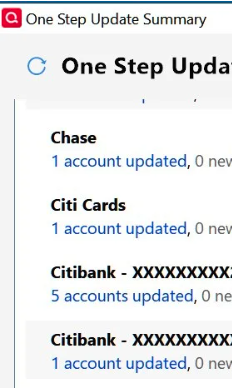
I have 3 Citibank institutions as shown below. Citibank has always been the worst institution. In the middle are five accounts: 3 checking, a savings, and a Double Cash credit card. Citibank often gets confused in setting them up and fails to link the savings account. Deactivating all five accounts usually is successful.
At the top is American Airlines and at the bottom is Costco. Both are just a single credit card. Note that American Airlines is set up using Citi Cards and Costco uses Citibank. You might try using Tools > Add Account and select either Citi Cards or Citibank from the list. Make sure to link it to the existing account so you don't create a duplicate account.
[Removed Personal Information]
0



