First Mac Bill Paid and need a little help
Answers
-
@Bob. I don't have Quicken set up to make bill payments, but my advice is you will want to click the Pay Now button on the transaction for the checking account. I think if you press the Transfer button on the credit card account transaction it's just going to enter a transfer transaction into your Quicken registers but not cause a payment to be sent. (I didn't show it in the screen shot in my previous post, but both of my Citi bill pay entries had a Transfer button. Since I am not set up to transmit Bill Pay commands to either Quicken or a bank, I assume that's the button you get when no bill pay commands will be sent.)
Also, the only transactions that will have two entries will be ones where you are paying a credit card or some other kind of loan that has an account in Quicken. If it's something like a utility bill there's only one Quicken account involved (the one you use to pay the bill) so it isn't a transfer between accounts and only one transaction will appear in the Bill Pay list.
0 -
Interesting logic and you might be right as to Pay Now or Transfer @Jon
However second paragraph is not what I see.
I have two Chase accounts and a Citi account, in registers that when set to transfer:[account} do not create two entries in Bills and Income! And then Amex, as you see, and even more odd Wells do have two entries. If it were consistent I would not be as concerned. And if DOCUMENTED somewhere by Quicken!
What makes Wells odd is you cannot, currently, in Quicken connect to one FI with BOTH Direct Connect for Checking and EWC+ for CC. Used to be ok. Now disallowed. so one or the other. Wells even allwoed Direct Connect to scrape the CC bill at one point. So for Wells, I cannot get the bill in Bills and must pay manually, same as when you say Utility Bill. So surprising Wells creates two entries in Bills for me. And yet Citi, Chase, etc do not.
0 -
Ahhh, sorry. Gotcha.
Still begs the question why some. Has to be something different.
0 -
@Bob. Sorry, I really can't help you on the bill pay issues because I just don't use bill payment in Quicken. (My credit cards bills are paid either on auto-pay with the company, or on the card's website; in Quicken my transactions are entered manually — scheduled or standalone — and I have no problems with duplicate transactions or transfers.)
Quicken Mac Subscription • Quicken user since 19930 -
HUGE progress.
Need immediate help though.
OK, the problems are because the Quicken Mac file was created from a Quicken Windows file. Just accept that for a moment.
I deleted Amex and all instances and started from scratch. Adding the biller auto entered the transfer:[AMEX] and created only one instance of the bill. I suggest anyone with 2 tries this!
I went ahead, changed another account to transfer:[xx} and paid that perfectly. Went to pay the Amex and an issue!!
This is where i need help:
It tells me the number must be negative to pay. I tried editing this instance but it will not take the - sign. How can I fix this?
I have three more accounts to delete and change. Would like to see this Amex fixed before I do.
Thanks!
0 -
Argggg. Making double listing for some biller sin bills. Now BOTH listed as TRANSFER.
Oy.
First need to fix that negative AMEX.
0 -
Transfer:[xx] srtill creating two listings now, but one the bank and one the CC.
Unable to fix Amex Invalid Amount.
So, inconsisentency - 2 billers with transfer look proper. One that has one entry shows Mark as PAid rather than Pay Now. Amex is stuck and two others double listed.
I'll hope someone has he fix for Invalid Amount - needs to be negative number.
0 -
Deleting Amex and reading trying to fix the bill issue. NOW it has two entries. So now 3 and 3.
Will take some time on the Amex. Back with results - hopefully.
0 -
This time Amex paid and now has two instances.
Going to recheck the single instance ones a little later.
Some progress :(
0 -
Got the "mark as paid" biller corrected to "Pay Now" and it remains single entry. So odd. Only one at the moment.
One more to go.
0 -
Stuck in a "pending" status to link this one. I remember it being tricky as it is a fidelity Rewards Visa but links to Elan Financial. I think I selected the right biller. Will give it some time. Back in a few hours.
All this should be easier.
0 -
Good luck with that Fidelity card - I gave up on it after it spent a couple of days in “pending”.
0 -
Works in Windows. WAS working in Mac. Now pending….
0 -
OK, got a bit for you folks:
First, Elan is degraded. Been reported.
Second, read this!!!
Now, why does noone know about this???
The hack works. It is a bug, it is not pretty, but it fixes this absurd issue that some think is the way the program should work. Blown away.
Ok, until Elan links I am not whole, but it brings up hopefully my last question in EBills - at least for a while.
This may be because Elan is not linked again, but
Quicken has added the next payment, not yet made nor even alerted by Elan, to the CC register throwing it off by the next payment due. Full amount. It shows with a little blue clock.
How do I stop this doing this until I choose how much to pay and actually schedule the paymant? Or can I / should I delete this entry?
This bothers me that it is assumed what I will do and when.
0 -
OK, searched and cannot find how to stop a scheduled transaction adding the payment to the account before I decide how much and when to pay and schedule it myself.
There must be a way to turn this off, no?
0 -
Hello @Bob.,
If you're seeing a little blue clock icon, that means it's a reminder showing in your register. Near the upper right of your register, you should see a little clock icon with a dropdown arrow. Click on it and you can adjust whether to show reminders in your register, and how far into the future you want to see them.
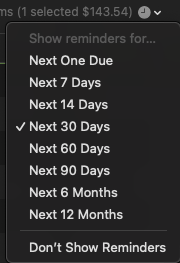
I hope this helps!
Quicken Kristina
Make sure to sign up for the email digest to see a round up of your top posts.
0 -
Thank you Kristina!!
I would not have found that.
Does it need to be done for each account or is there a global setting?
Nice. Two issues solved in one day :)
0 -
Thank you for your reply,
That one needs to be done for each account. I haven't seen a global setting for it.
To see what global settings are available, you can navigate to the Quicken menu option and choose Settings…. That will bring up the Quicken Settings menu.
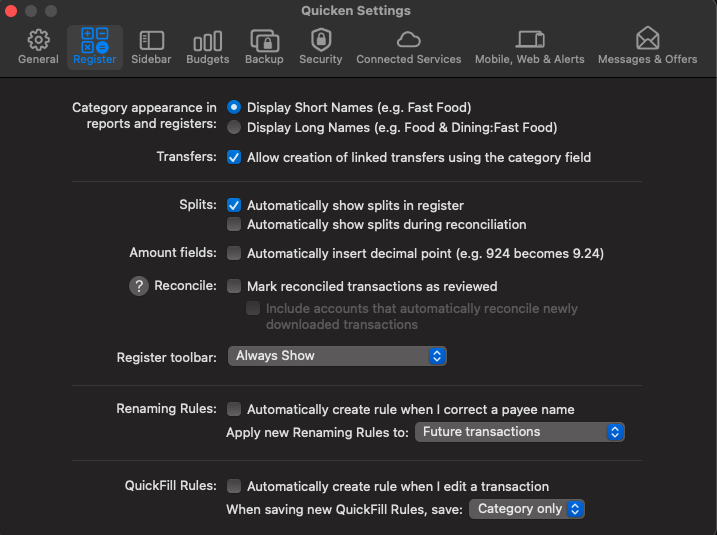
Thank you!
Quicken Kristina
Make sure to sign up for the email digest to see a round up of your top posts.
0 -
Cool. Thanks again. Shall not see those again :)
0 -
Does it need to be done for each account or is there a global setting?
The reminders setting is done register by register (in addition to individual accounts, it can be set for account groups). The reason for this is that you might want to see two months ahead in your checking account, but one month ahead for a credit card, and no reminders for an investment account. Or you might want to temporarily change the time period for an account, and not have it affect other accounts.
One other thing to note here: if you have your left sidebar set to Show Projected Balance in Sidebar, this setting for how far in the future to show reminders also affects the projected future balance. (That is, the projected future balance reflects what is shown in the register.) so that's another reason users might want different time periods for different accounts.
Quicken Mac Subscription • Quicken user since 19931 -
I put this one to bed. Would not have found what was causing that or where to turn off by myself Glad to have that done. Makes sense why it is not global.
Did you see why some billers have two entries and some one and the hack to "fix" that?
0 -
@Quicken Kristina if an eBiller is pending / and or degraded is it best to just wait or might it help to remove the ebiller and readd again? In windows, it seems deleting and readding sometimes triggered the link. Same in Mac?
Appreciate your thoughts on this.
I am going to try to remove and readd. I figure worst that could happened is lose a few days while Quicken contines to try to connect.
Thanks.
0 -
Thank you for your reply,
When a connection is degraded, we recommend waiting and retrying periodically.
I hope this helps!
Quicken Kristina
Make sure to sign up for the email digest to see a round up of your top posts.
0



