Cannot complete Paycheck Setup

Good Day
I am using Quicken Classic Business & Personal on Windows - R63.21 - Build 27.1.63.21
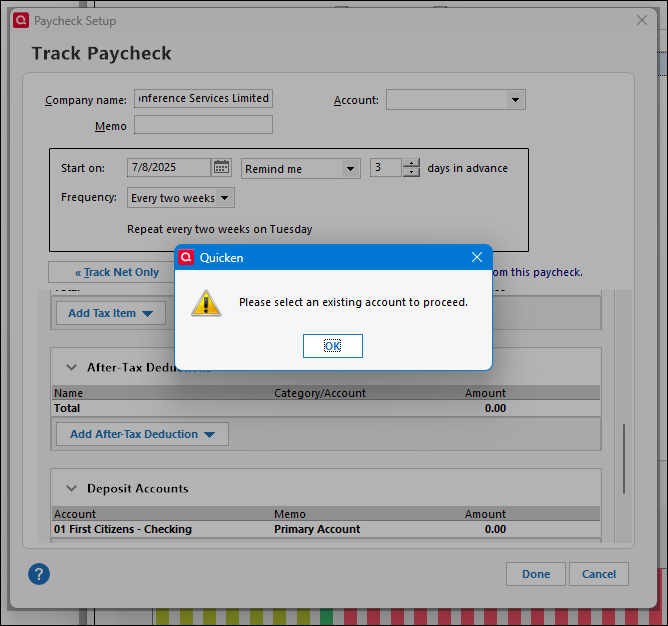
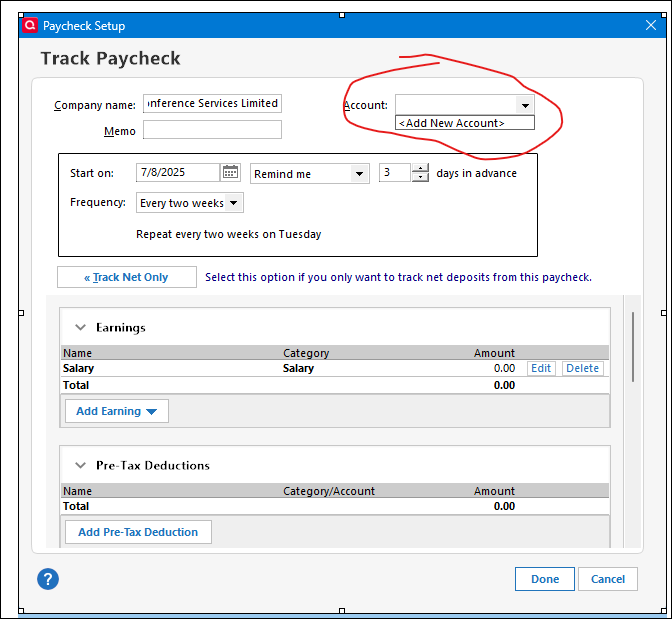
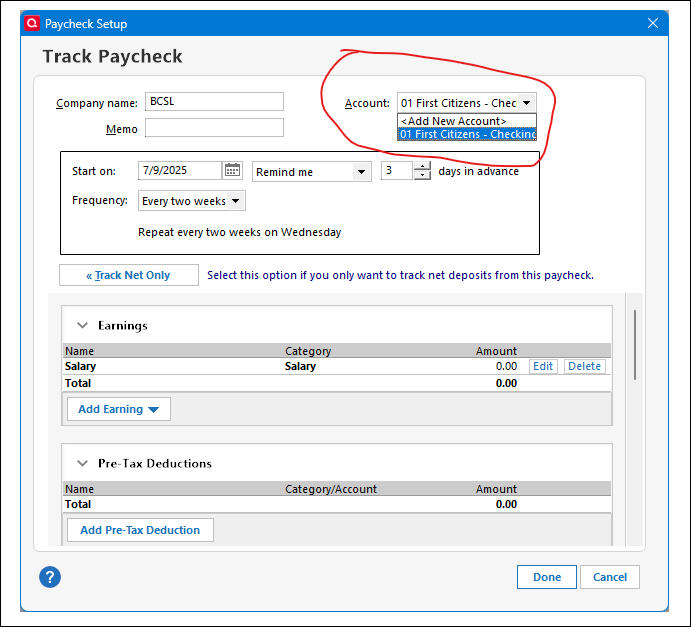
I am trying to add my paycheck, but I keep getting "Please select an existing account to proceed" but the Account drop-down menu only has <<Add New Account>>. I have created 5 new accounts, and none of them are populating the Account field.
I am now setting up, so no accounts are hidden. These are all offline accounts. I used Quicken more than 10 years ago, and I never had these issues. So I would like to know what the problem is.
Any help would be much appreciated.
Answers
-
Hello @kstcdaniel,
Thanks for sharing these details! I attempted to replicate the issue, but was not able to, so I'd like to gather a bit more information to help investigate further. Can you please answer the following?
- What type(s) of accounts did you create (e.g., Checking, Savings, Cash, etc.)?
- When you go to Tools > Account List, do you see those 5 new accounts listed there?
- Is your Quicken file stored locally (C: Drive), or is it located on a cloud-based or external drive (like Dropbox, OneDrive, Google Drive, etc.)?
Additionally, just to confirm, are you following the instructions as outlined in this Help Article to add your paycheck?
Let us know—these answers will help us get a better sense of what might be going wrong!
-Quicken Anja
Make sure to sign up for the email digest to see a round up of your top posts.0 -
Is the First Citizen's account the only checking account you have set up? I think Deposit accounts at the bottom are for additional accounts like a savings account with auto-deposit from your paycheck, so that may remove it from the list of accounts at the top.
Try removing First Citizens at the bottom if that is where your net pay is deposited.
QWin Premier subscription0 -
Good Day
Thank you for your responses. I responded to both posts below.What type(s) of accountsdid you create (e.g., Checking, Savings, Cash, etc.)? → I created 3 Checking Offline accounts before I tried to set up the paycheck, and none appear in the dropdown menu. In the dropdown menu, I clicked the <<Add New Account>>, created an offline account, but when it returned to the Paycheck Setup Wizard, there was still no account listed. I tried 5 different times, creating cash and checking accounts.- When you go to
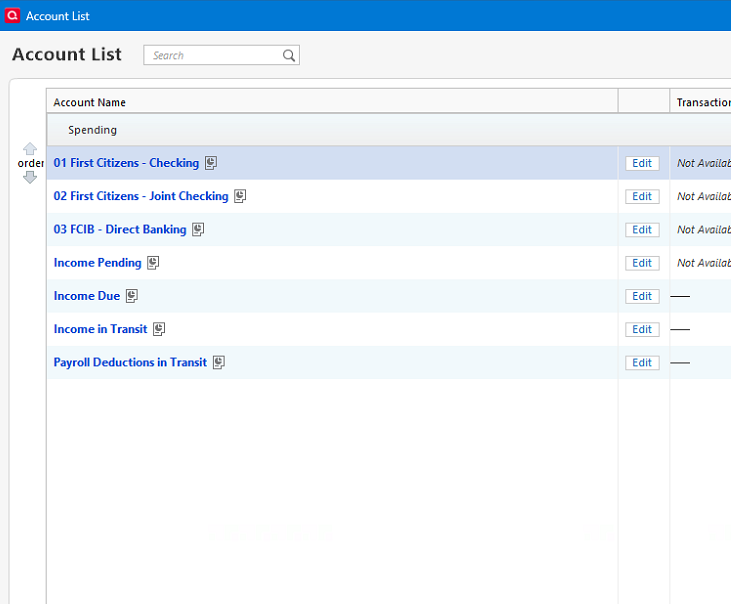
Tools > Account List, do you see those 5 new accounts listed there? → All accounts created, both the ones I created originally and the ones I created via the «Add New Account», show up in my Account List. See photo below. - Is your
Quicken file stored locally(C: Drive), or is it located on a cloud-based or external drive (like Dropbox, OneDrive, Google Drive, etc.)? → I installed Quicken normally. I don't recall being given an option to select the location of my data file when I installed it. It says it is in my Documents folder. Incidentally, I have OneDrive set up to backup my Downloads, Documents, etc folders. So, since it defaulted to the Documents folder, it is also in my OneDrive folder. When I click File > Show this file on my computer, it takes me to the file without issue. I do not have Quicken set up on any other computer. - Are you following the instructions as outlined in this
Help Articleto add your paycheck? → When I had the issue, I did go through the article. When I first installed, the Bills & Income tab was not displayed, once I figured out how to display it, I added an income, then clicked the link to start the Paycheck Setup wizard, I select Gross income, the name of my employer and then I started to fill in the Salary, Taxes, After Tax deductions etc. It was only when I clicked "Done", did I realised I had to select an existing Account, but none were listed. I cancelled because I thought I had done something wrong. I went through it all again, but the Account drop-down was still not listing any existing accounts. I clicked to create a new one, but that didn't show up either. I searched online but found no one with the same issue. I asked ChatGPT and even the Quicken chatbot bot which told me about a recent manual update that fixed a bug that hidden accounts were not appearing in the drop-down. However, I seem to be on the most recent version. So I then decided to post this, hoping someone can help me. - Is the First Citizen's account the only checking account you have set up? → No. I have other accounts set up. My paycheck actually deposits into the one listed in the screenshot, so that is correct. To be honest, I do not understand the difference between the Account drop-down field at the top and the Deposit Accounts sub-table below. However, when I click the "Add Deposit Account" button, it takes me to the Add Account pop-up window. So that button is not detecting any of my existing Accounts either. I had removed the Deposist Account previously, but that made no difference to me being able to save. It is expecting something to be filled into the Account drop-down field at the top. So my question is, why is my installation not detecting any of my existing Accounts?
 0
0 -
Wild guess. Have you closed an reopened Quicken since you created the accounts?
Quicken user since Q1999. Currently using QW2017.
Questions? Check out the Quicken Windows FAQ list0 -
Okay, I think I discovered the issue.
I created a new Quicken file and created a new offline account.
I started the Paycheck Setup Wizard, and the account I created was available in the drop-down.
I cancelled and went to Preferences and enabled Multicurrency support. I then created another offline account in a different currency. I then restarted the Paycheck Setup Wizard, and the test account in another currency is not listed in the Account drop-down.
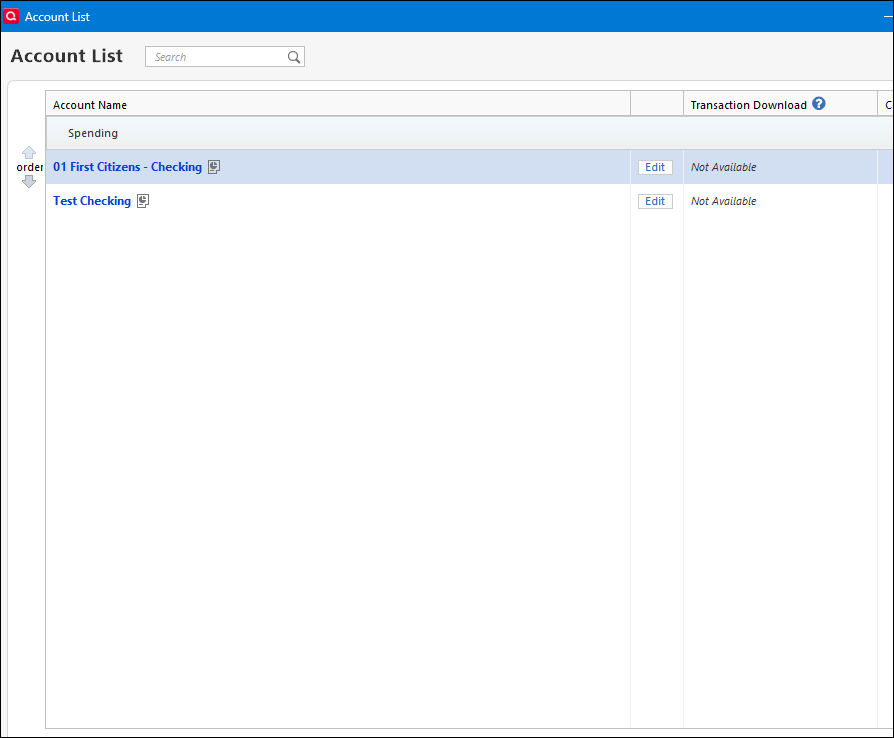
See photos below. Test Checking is not in US currency. As you can see, the account in US currency is in the Account drop-down but not Test Checking. My original data file had all of my accounts in non-US currency.
Also, this new Quicken file is on a local hard drive, so I do not think my first Quicken file being in OneDrive has any effect on this issue. It seems to be the currency I am selecting.So my question: is this by design, whereby on US accounts can be used to set up paychecks, OR is this a bug? I am hoping it is a bug because I need multicurrency support enabled. Please advise.
 0
0 -
Update:
I was able to get the Paycheck Setup wizard to work with a non-US account by going to Tools > Currency List and changing the Home currency to the currency of the account that my paycheck deposits to. Now the correct Accounts are listed in the Account drop-down menu.
However, what happens if I had a paycheck that was depositing to an account that was in a different currency than my home currency?0 -
@kstcdaniel Thank you for all the detailed follow-ups and for taking the time to dig into this so thoroughly!
I’ll be reaching out internally to confirm whether or not this behavior—where only accounts matching the Home Currency appear in the Paycheck Setup Wizard—is by design or a bug. I was also able to replicate this on my end after creating a non-USD account to test, so your findings definitely check out. I’ll follow up here as soon as I hear back.
Appreciate your patience in the meantime!
-Quicken Anja
Make sure to sign up for the email digest to see a round up of your top posts.0 -
Hello again @kstcdaniel,
I heard back from the internal team and was able to confirm that this behavior—where only accounts matching the Home Currency appear in the Paycheck Setup Wizard—is by design.
Since multicurrency support isn’t currently integrated with the Paycheck Setup, I would recommend creating an Idea post requesting this functionality be added in the future. Doing so allows other users with the same or similar needs to vote on your suggestion, and our Development and Product teams regularly review Idea posts when considering feature improvements and new functionality.
Thanks again for taking the time to investigate and share your findings—it’s incredibly helpful!
-Quicken Anja
Make sure to sign up for the email digest to see a round up of your top posts.0 -
Hi @Quicken Anja,
Thanks for the update. Your findings are noted.
I created an idea post as recommended. However, I had to place it under Quicken for WIndows Classic.I think this would be relevant for all versions, but i did not see a way to put the idea in a general category.
By the way, before this issue, I was trying to import transactions from a CSV file and it kept failing even though my Columns matched and were in the correct order. I am wondering if because of Multicurrency support was enabled, and my Home Currency was not matching my accounts, whether that may have been the reason why I could not import my csv file. I will try again, but I was wondering if you had any instructions/notes on importing from csv into non-US accounts?0 -
@kstcdaniel Regarding your issue with importing transactions from a CSV file:
I'm not aware of anything specific that would prevent a CSV import due to foreign currencies. The Amount field in a CSV should be treated as currency-neutral.If it’s defaulting to your Home Currency instead, you can try to move the transactions from the imported account into the one with the correct currency. Let me know if you’d like instructions on how to move multiple transactions between accounts.
Here’s a Help Article that walks through the general steps for importing CSV files into Quicken, in case it’s useful.
Hope this helps!
-Quicken Anja
Make sure to sign up for the email digest to see a round up of your top posts.0 -
@kstcdaniel Please note that the layout for the CSV file that is displayed when you go to File > File Import > Transaction from CSV file is INCORRECT. The Amount and Debit/Credit columns are reversed.
The layout and details that are shown when you click on the ? icon at the lower left of that screen have been corrected.
Hopefully this will be corrected in an upcoming release.
I have not confirmed this, but I would assume that Quicken will treat the amounts in the CSV file as being in the account's currency.
@Quicken Anja as previously requested, can you check to see if there is a open ticket for the issue of the columns being reversed?
Thanks
QWin Premier subscription0 -
Just checked and I do not see one! But I found the thread you initially asked this in (I apologize I somehow missed your tag there). I will respond in that thread so we can get a ticket started for it.
Thanks!
(CBT-736)
-Quicken Anja
Make sure to sign up for the email digest to see a round up of your top posts.0


