Why can I no longer create a Off-Line Mortgage Loan Account against a Home Asset Account?

When I try to set up a new loan account, I can get through all of the required steps except when I try to assign an account to withdraw the payment from, it defaults to an investment account and won't let me change to a different account. In the past I have been able to set up loan accounts without any issues. I have been trying for 6 months and no longer able to create new loan account.
Best Answers
-
Corrupt data and a corrupt program are entirely different animals.
SO, let's take the easier route first.
Take a backup (just in case)
Do FILE, Validate and Repair file, click VALIDATE File and OK.Did that help?
If not, hold down CTRL & ALT and do FILE, Validate and Repair file, SUPERVALIDATE, and OK.Did that help?
If not, do FILE, Copy or backup file, pick check Create a Copy or backup, click Next and Save Copy.Did that help?
If not, NOW is the time to Uninstall and Reinstall Q … but be aware that doing so will require that you re-establish ALL of your online connectionsQ user since February, 1990. DOS Version 4
Now running Quicken Windows Subscription, Business & Personal
Retired "Certified Information Systems Auditor" & Bank Audit VP1 -
By Validating and fixing the file solved the problem.
Thanks to all who provided feedback and suggestions. 😀
1

Answers
-
Which specific Q product are you running, and what BUILD of that product? This info is at HELP, About Quicken.
Q user since February, 1990. DOS Version 4
Now running Quicken Windows Subscription, Business & Personal
Retired "Certified Information Systems Auditor" & Bank Audit VP0 -
Quicken Classic Deluxe'
R63.21
27.1.63.21
0 -
I'd like to see where exactly you get stuck.
Do you have a "regular" bank checking account or are you trying to withdraw payment from a brokerage account's checking feature?Can you please capture one or more images of the parts of your Quicken window showing the issue, sensitive information blacked out as necessary to protect your privacy but annotated to describe the situation, and attach the image(s) here?
How do I post a screenshot in the community from a macHow do I post a screenshot in the community from windows
Please save images to files of file type PNG or JPG only. They're easier to work with than PDF files.
0 -
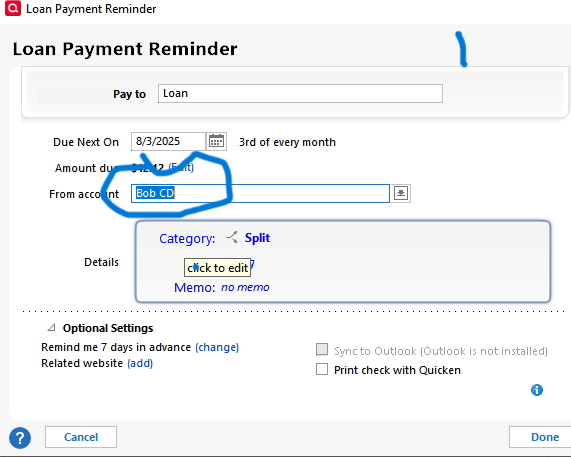
First screen shot shows the default page that shows the default account to use. It always comes up as the first account in my account list.
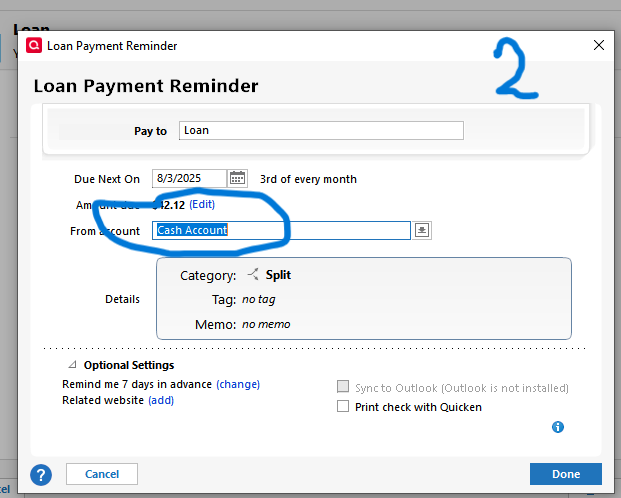
Second Screenshot shows my selection for the account to be used.
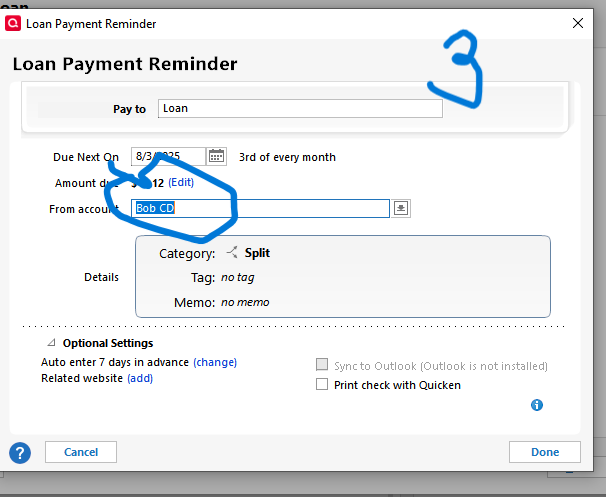
Third Screenshot shows the window after "next" is hit. the window defaults back to the account that showed the default account to use.
The default account is not an open account. If I delete it from the account list then the next account in the account list will show as the default.
0 -
What happens when you click on this button?
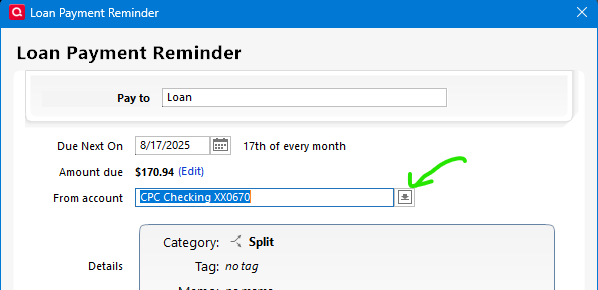
Expected result:
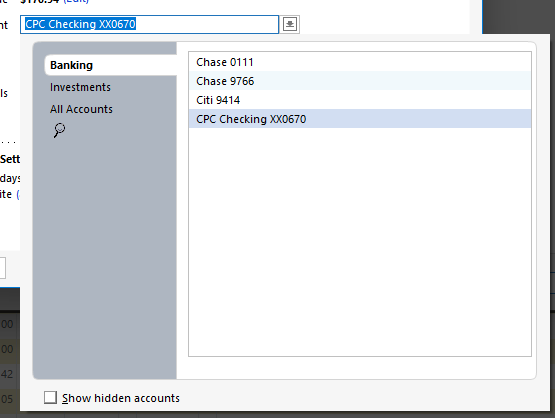
Also, note the "Show hidden accounts", maybe the account you are looking for is marked hidden.
0 -
@Meekakaiser1 if you don't see that dropdown button that @Chris_QPW refers to, then check your settings in Tools → Preferences -
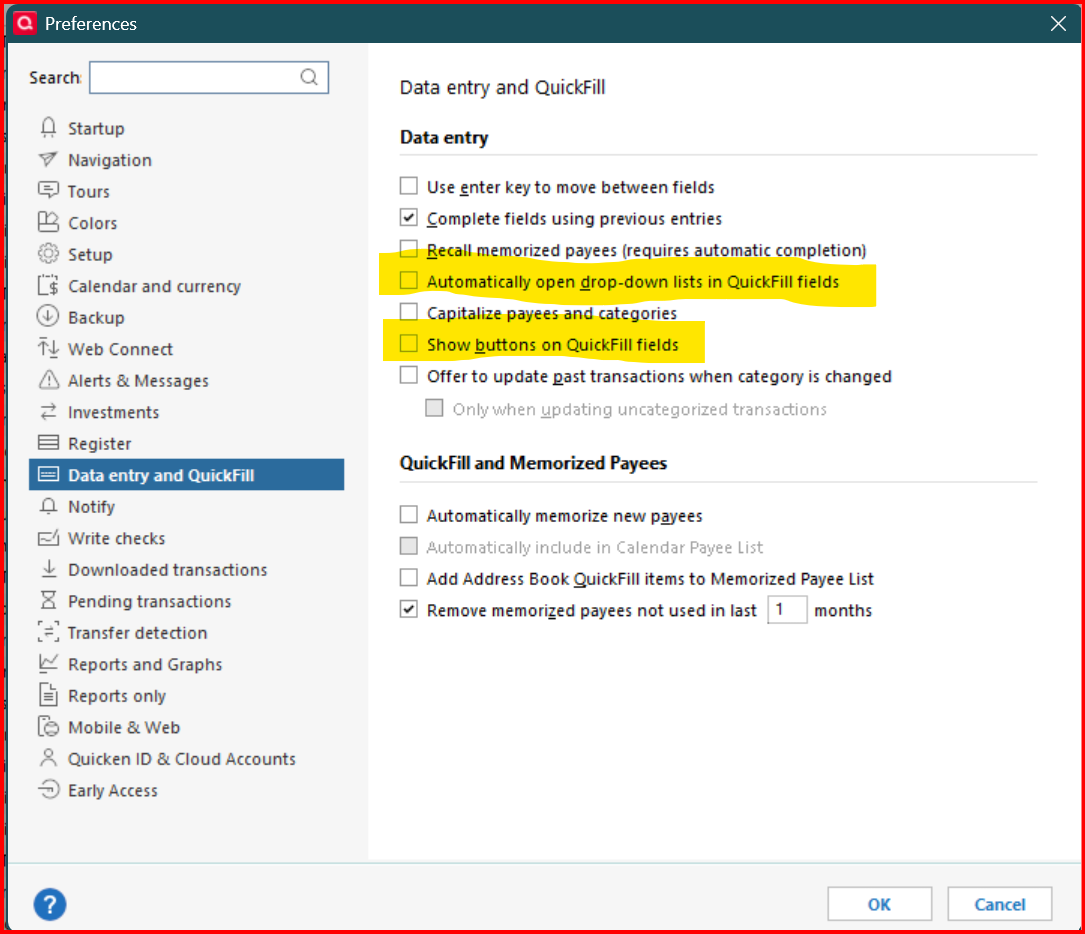
The first highlighted check box will automatically open the drop down list. The second one will show the button that allows you to open the drop down list manually.
0 -
It opens a window showing all my accounts. From the window I pick a checking account as shown in photo 2
when i continue, it reverts back to the default account as shown in picture 3.
0 -
im thinking that the program itself might have a corrupt file and about ready to delete and reinstall the Quicken Program.
I also run Quicken on a Mac and do not have the same issue. I can recreate a new loan account without the issue with my PC
0 -
Corrupt data and a corrupt program are entirely different animals.
SO, let's take the easier route first.
Take a backup (just in case)
Do FILE, Validate and Repair file, click VALIDATE File and OK.Did that help?
If not, hold down CTRL & ALT and do FILE, Validate and Repair file, SUPERVALIDATE, and OK.Did that help?
If not, do FILE, Copy or backup file, pick check Create a Copy or backup, click Next and Save Copy.Did that help?
If not, NOW is the time to Uninstall and Reinstall Q … but be aware that doing so will require that you re-establish ALL of your online connectionsQ user since February, 1990. DOS Version 4
Now running Quicken Windows Subscription, Business & Personal
Retired "Certified Information Systems Auditor" & Bank Audit VP1 -
Yes, reinstalling might help.
0 -
@Chris_QPW I confirmed that they also control the drop down selection in other places (including the account list in question) besides the register. The only place the settings don't control is investment registers and drop down lists.
0 -
Wow! I'm sorry, you are correct. That is one of the stupidest things I have ever seen!
And I'm pretty sure it is pretty new.
The preference makes sense for something like the transaction entry, but no sense in this context.
I will note though that his screenshot does show the button, so he must have that preference on.
0 -
By Validating and fixing the file solved the problem.
Thanks to all who provided feedback and suggestions. 😀
1


