Conflict Between Categorizing and Acct Transfer for Category Field

Periodically, I have transactions that originate from one Quicken Acct going into another Quicken Acct. When this happens, the Category Field displays the Account Name of the other account of the transaction. Because this field is "Shared" and utilized in this way for a Dual purpose, the transaction can then not be "Categorized". Example: Being Retired, I have withdrawal payments being transferred from an investment account to my checking account. My checking account displays the account name of that investment account as it matched those records (Debit and Credit). Because this field now has the account name, I can no longer use the Category field to identify this transaction as "Income". So when I run my Monthly Income and Expense Report, that amount is not included.
Comments
-
Hello @Dan13,
Thanks for explaining your situation—it’s a great question, and a common point of confusion in Quicken.
You're absolutely right: when a transaction is recorded as a transfer between accounts, Quicken uses the Category field to show the account name, treating the transfer itself as the “category.” This means you can’t assign an additional category like “Income” to that same field, which is why it’s not appearing in your Income and Expense reports.
To work around this, we recommend using Tags to further classify or categorize transfer transactions. Tags are flexible and can be included in many report types, allowing you to track the purpose of a transfer (e.g., "Retirement Income") without interfering with Quicken’s transfer logic.
Here’s some Help Articles on how to use Tags effectively and use them with reports:
Hope this helps!
-Quicken Anja
Make sure to sign up for the email digest to see a round up of your top posts.0 -
I don’t have any problem getting transfers from IRA accounts to my Checking account to show as in the income portion of an Income/Expense by Category report. I do not tag such transfers.
If that is the base report you are using, I suggest you customize the report, Advanced tab, and set the Transfers selection to Exclude internal. Other options there may also work to some extent.
Hope this helps.
0 -
Q Lurker, I did not see any affect on my report by setting Transfers to "Exclude Internal". Perhaps explain further what is being accomplished by this change. How does this accomplish my goal of including "Some" transfers but not all to accomplish showing the transfers that are considered a category transaction? (Not all transactions are income but can be other categories including expenses)
0 -
Anja, I tried your suggestion but had no success including the specific transfer in my Monthly Income/Expense by Category Report.
I assigned the transaction a tag "Retirement". Then I went into the report under the Tab "Tags" and Selected "Include Only Transactions with Selected Tags". Then I "Clear All" and then reselected "Not Tagged" and "Retirement". Under Advanced, the Transfers field is "Include All".
My suspicion is that the Tag only Works if the Item is Categorized.
0 -
By customizing the report, I get to this type of breakdown:
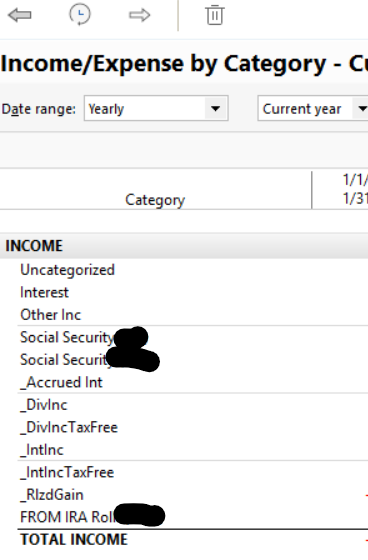
Is that the report you are using or that your report is based on?
In my case, I am limiting the transfers included in the Income section to only transfers from an IRA account. But I am thereby getting ALL transfers from that IRA account shown in the income section. Additional customizations include
- Under the Categories Tab - at the end of that list of categories are a list of accounts. You may need to limit those selections such that transfers from IRA accounts are included and transfers from other investment accounts are not included in the income section.
- Under the Accounts tab - I have opted to include non-retirement investment accounts such that _DivInc and other such transactions show as income but the same transactions in IRA accounts do not get included.
If you are suggesting that you want some transfers from a non-retirement account to be included in the income section and other transfers from that same account to not be included as income, I have nothing to offer you in that direction.
A transfer from a non-retirement investment account to a checking account is not really income. It is transferring money from one pocket to another. A transfer from a retirement account (IRA) to a checking account is only income because the IRS treats it that way.
1 -
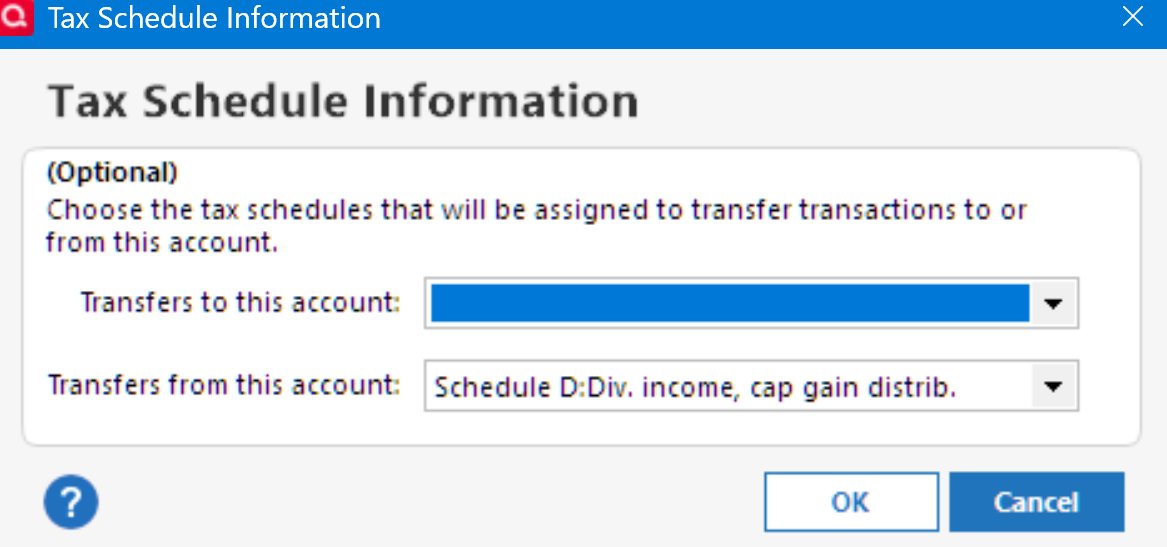
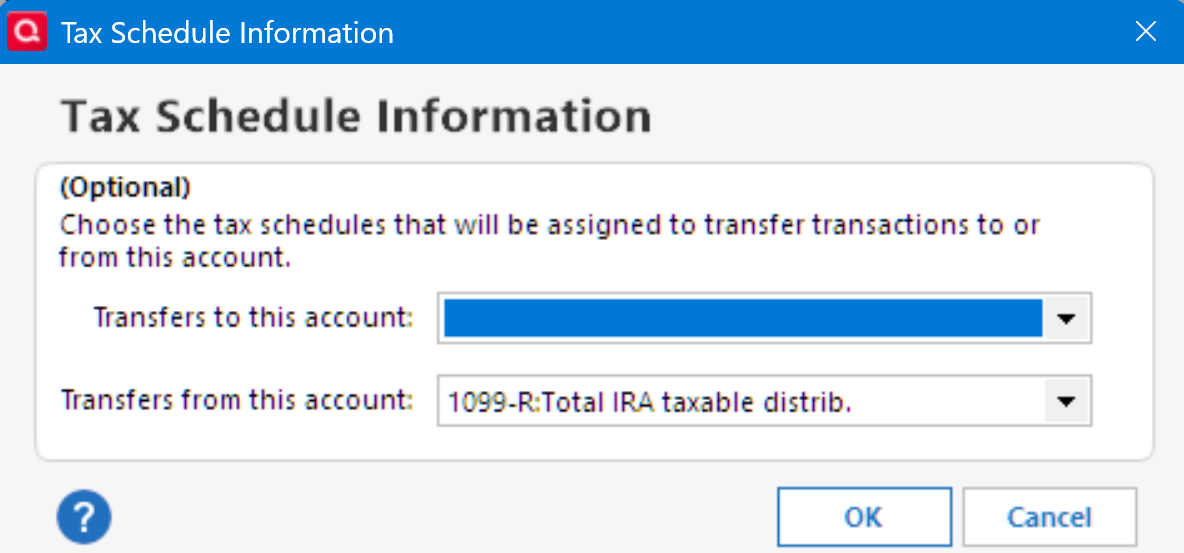
Have you selected the IRS form for the distribution in the Tax Schedule for the account(s)?
Investment account:
IRA account:
 0
0 -
Q_Lurker, Yes, I am trying to include selected transactions. Thank you for your willingness to help.
As you stated the Quicken company/developer line that "a transfer is not Income", that is in the eyes of the beholder and for me, it is income! Income takes many different forms. At the End of the Day, I feel Quicken with that attitude, is very short-sighted and causes my Household Income/Expense report to be incomplete.
0 -
RalphC, I am unfamiliar with the suggestion that you made. I can not find those processes to investigate. If you feel that this selection would somehow Add my selected transfer transactions to my Income/Expense Report, I would be interested in understanding your suggestion and how it would work. Thanks again for your input.
0 -
@Dan13 Please see if this more complete description is helpful:
If you want to treat transfers from an account as income or expenses for reporting purposes, you can customize the report so that it includes the "spending" accounts but does not include the other account(s). Then if the spending account receives a transfer, the sending account will be listed in the Income section of the report as FROM <account-name>. To customize, click on the gear at the top right of the report.
If you are using the Banking > Cash flow report for a transfer you are treating as income, you should select the Account tab and include the receiving account but not the sending account, and on the Advanced tab next to Transfers, select "Exclude internal". The terminology is confusing, but "Exclude Internal" tells the report to ignore transfers between accounts that are selected for the report (payments from your checking account to a credit card account for example) but to include transfers between the selected accounts and other accounts.
Other reports have different default settings, but they work the same way: Include the "spending" accounts but not the other account(s), and on the Advanced tab set Transfers to "Exclude internal". If the report has an Organization setting on the Display tab, set it to “Cash Flow Basis”.
If you want to exclude specific transfer accounts from the report, you can scroll to the bottom of the Categories tab, where you will see all of your accounts listed. Un-check those you want to exclude.
You can control which transfers are included in your Budget reports by clicking on Manage Budget Categories on the Budget page and making selections in the Transfers In and Transfers Out sections.
I hope this helps.
QWin Premier subscription0 -
@Jim_Harman The stumbling block here seems to be that @Dan13 wants some transfers between accounts to fall within his definition of ‘income’, but other transfers between the same accounts to not be ‘income’.
I suppose I could concoct ways to accomplish that with intermediate accounts or independent transactions, but fundamentally it goes against the overall program design and structure.
0 -
@Dan13 the example you gave was distributions from a retirement account. This can be difficult to record correctly, especially when taxes are withheld.
If you want help with that or another specific example, please post back with more details.
QWin Premier subscription0 -
@Dan13 You're misunderstanding the accounting involved.
An income item makes you wealthier (increases your net worth).
An expense item makes you poorer (decreases your net worth).A transfer does neither. Just as moving your wallet from pocket to pocket doesn't change your net worth.
What you can look at to see what you seem to want is a Cash Flow report.
Q user since February, 1990. DOS Version 4
Now running Quicken Windows Subscription, Business & Personal
Retired "Certified Information Systems Auditor" & Bank Audit VP0




