"Save this to Memorized Payee List": Disable new prompt box?

I am running version R63.21 (it auto upgraded recently).
There is a new prompt box when entering the Category field of transactions. The prompt says "Save this to Memorized Payee List". No keyboard key (tab, esc, arrow) exits this field.
I don't mind the new prompt, but I hate having to use the mouse to get out of it. If I just want to tab through the fields and enter the Category the focus stops on this prompt box and I can't type the Category. If I only need to enter the Tag field the focus gets stuck in the Category field and won't move unless I use the mouse.
How can I get out of this field with the keyboard?
Short of that how can I disable the prompt entirely?
Answers
-
Hello @GeneL,
Thank you for sharing your experience. To clarify, is the problem prompt the one in the sample image below?

I tried testing in my Quicken (R63.21), and couldn't replicate the behavior you described. What exact process are you using where the prompt is stealing the focus and not letting you proceed without using the mouse? If the sample image above is not the problem prompt, please also provide a screenshot of the problem prompt (if possible).
If needed, please refer to this Community FAQ for instructions on how to attach a screenshot. Alternatively, you can also drag and drop screenshots to your response if you are not given the option to add attachments.
I look forward to your response!
Quicken Kristina
Make sure to sign up for the email digest to see a round up of your top posts.
-1 -
I have been experiencing the same behavior since the last update or two. It happens every time I update the category of a downloaded transaction. I have disabled "Automatically memorize new payees" in preferences a long time ago because I found it wasn't very reliable.
Unlike GeneL above, I do find the prompt annoying. How do I stop it from asking me to memorize new payees?
0 -
I can't replicate that behavior. The TAB key advances the cursor as expected.
0 -
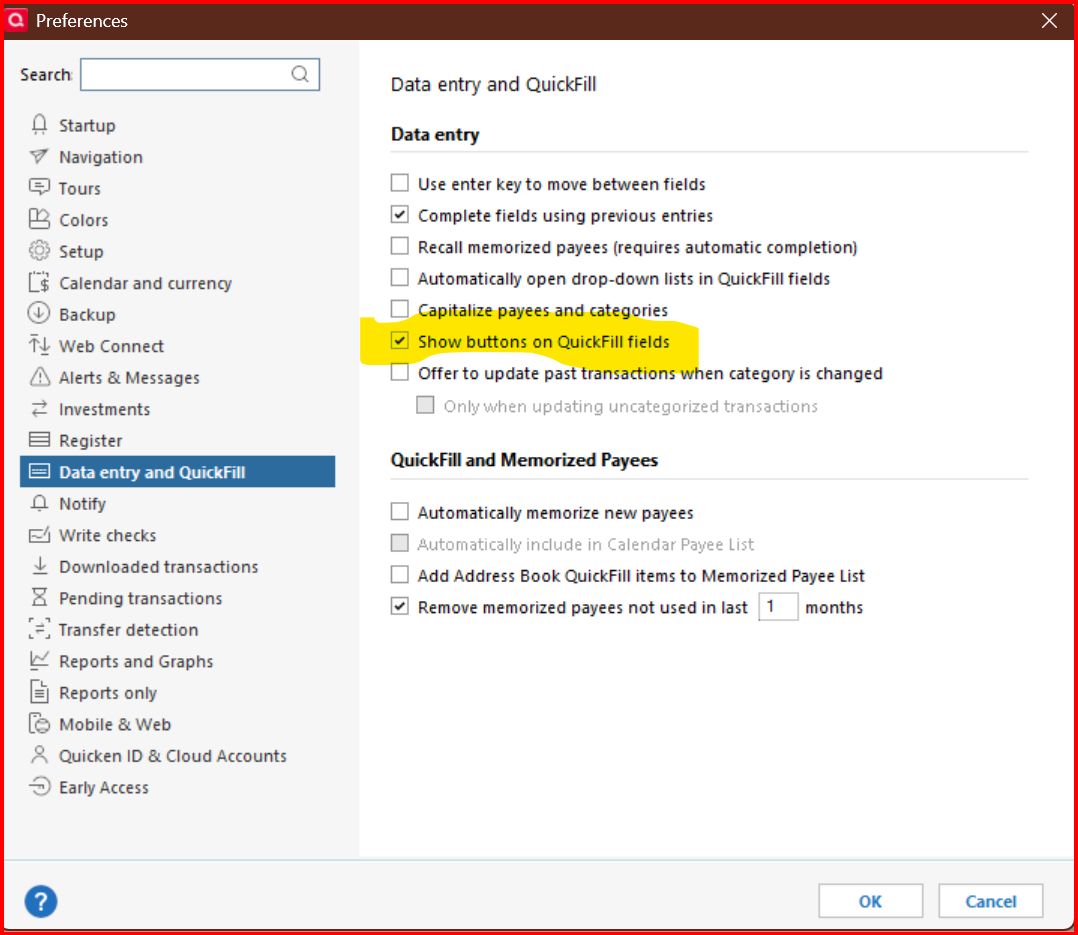
As far as I can tell, there is no way to suppress that pop-up checkbox, but you can stop it from automatically appearing by clicking on Tools → Preferences → Data entry and Quickfill, and deselecting "Automatically open drop-down lists in Quickfill lists".
0 -
I keep getting this pop up box too and it annoys me. How do i shut it off. I did try what CaliQkn suggested (Tools → Preferences → Data entry and Quickfill, and deselecting "Automatically open drop-down lists in Quickfill lists) and it seemed to work to eliminate this new pop up box but caused another problem because it eliminated showing categories in a drop down list which I use all the time. I need a way to eliminate this new pop up without changing any of my other settings.
0 -
@RitaNe even though it won't automatically open, you can still show the drop down list by clicking on the down arrow -

If you don't see the button, you can add it in Preferences -
 0
0 -
I have the same problem. Why would Quicken introduce something new (and annoying) like this dialog box and make it impossible to get back to the previous behavior? I either need to keep the annoying box, or turn off teh drop-down entirely?
0 -
Using Ver R63.21 B 27.1.63.21
I'm encountering the same problem. Why did they decide to add this unneeded option? I need a way to get rid of it or hide it all together.

Using Quicken on and off since Ver 3, Windows 3.1
Using Quicken Classic Deluxe
Retired USAF, Network Security/CYBER0 -
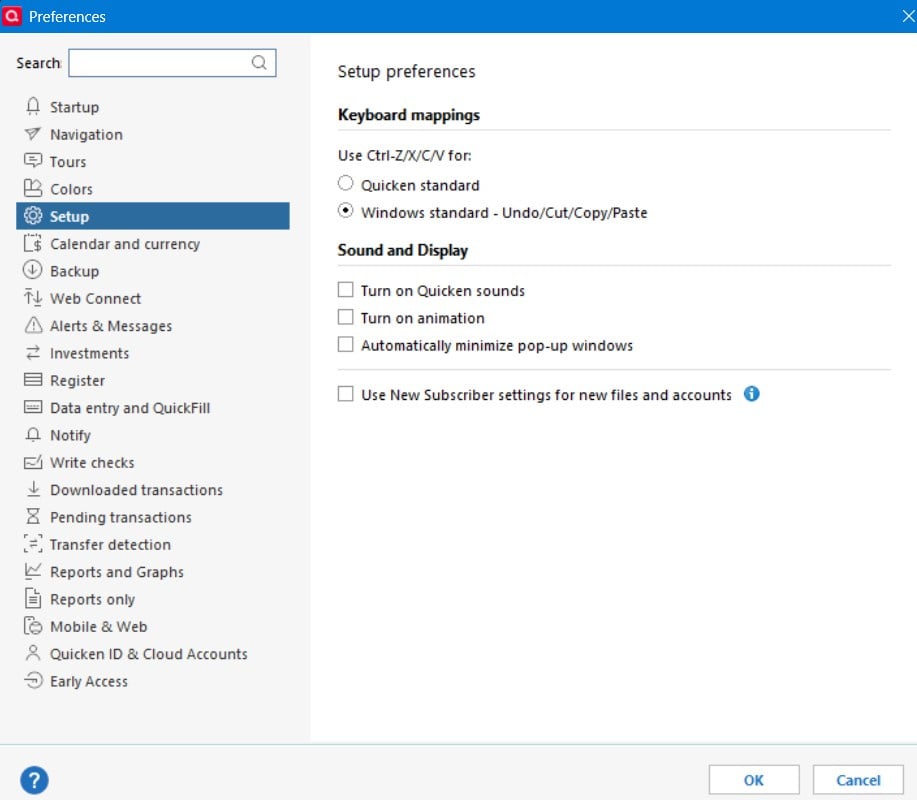
Suggestion: The visibility of this checkbox should be tied to the "Use New Subscriber settings" Setup preference.
For those of us who have been using Quicken for years, this option just gets in the way.
QWin Premier subscription0 -
@Jim_Harman I am not using new subscriber settings and it still shows up for me.
EDIT - now I understand what you meant. You are suggesting that that box should only show if the user has selected "Use New Subscriber settings". Otherwise I agree, it just gets in the way.
That would be another great product enhancement if Quicken doesn't consider it a bug.
1 -
Jim, Does it need to be enabled For the box to be hidden? I never touched that box when I first installed Quicken years ago and it updated automatically up until the current version.
Using Quicken on and off since Ver 3, Windows 3.1
Using Quicken Classic Deluxe
Retired USAF, Network Security/CYBER0 -
I do not think that popup checkbox is the real issue. The issue is that it is defaulted to "checked" - and when you click "splits" - in the splits window, it also defaulted to checked.
This is extremely obnoxious - as it ruins your saved memorized payees with whatever you happen to be doing.
3 -
Jim, Does it need to be enabled For the box to be hidden? I never touched that box when I first installed Quicken years ago and it updated automatically up until the current version.
No, I am saying that rather than the "Save to Memorized Payee List" box displaying for everyone as it does now, one possibility is that it should only be displayed if the "Use new subscriber settings" preference box is checked.
Sorry for the confusion.
QWin Premier subscription0 -
Hello Everyone,
Thanks for reporting this issue!
We will be forwarding this issue to the proper channels to have this further investigated. However, we request that you please navigate to Help > Report a problem within your Quicken program and submit a problem report with log files and screenshots attached in order to contribute to the investigation.

It would also aid the investigation to include a sanitized file when submitting the problem report. A sanitized file is a data file that removes personally identifiable information so you can comfortably share this file with the Quicken team.
Please let me know once you have done so!
(CTP-14260)
-Quicken Jasmine
Make sure to sign up for the email digest to see a round-up of your top posts.
0 -
I have submitted a problem report on this new annoying behavior. I now have SO MANY memorized payees (all different categories) because I didn't catch this was happening at first. Now for every transaction I have to remember to uncheck the box. At least provide a preference to make this box unchecked please.
1 -
Hello @KarenJG,
Thank you for letting us know you're also impacted by this issue. The problem report you sent did not have log files attached. If you're willing, please send us a problem report with the log files attached (they should be pre-selected when you navigate to Help>Report a Problem). Our teams need that information in order to investigate the issue.
Thank you!
Quicken Kristina
Make sure to sign up for the email digest to see a round up of your top posts.
0 -
I submitted the log files as well.
1 -
Thank you for sending logs,
It will help our teams investigate this issue!
Thank you!
Quicken Kristina
Make sure to sign up for the email digest to see a round up of your top posts.
0 -
First of all, I want to say I'm sorry it has taken me so long to respond.
The picture shown in the first response shows exactly the message window I am having trouble with. The window pops up any time I enter the category field in a new transaction (it does not pop up if editing an existing transaction).I took a screen shot, but it contains a lot of personal information, so I can't post it. I will attempt the problem report menu item.
Disabling the automatic drop downs does make the problem go away, but now I have two issues:
- I miss the automatic drop downs.
- If I press the arrow that opens the drop down the "Save this to Memorized Payee List" box appears and the drop down closes. I have to click the down arrow again to get the list.
1 -
I have submitted a "Report a problem to Quicken" problem with all log files attached.
1 -
This "Save this to Memorized Payee List" prompt is a very annoying feature that pops up every time I want to quickly fill in the missing categories from newly downloaded transactions and gets in the way of my navigation, forcing my hand to go back and forth from keyboard to mouse over and over, wasting my time. And there is no current ability to disable it, why? Why would you add such an annoying feature without allowing your customers to disable it? Do you actually do any product testing before releasing new features and updates? Please update the software and push out an update ASAP so we can turn off this annoyance.
3 -
[Removed - Disruptive]
0




Categories
- All Categories
- 22 Product Ideas
- 34 Announcements
- 247 Alerts, Online Banking & Known Product Issues
- 19 Product Alerts
- 265 Welcome to the Community!
- 682 Before you Buy
- 1.5K Product Ideas
- 55.7K Quicken Classic for Windows
- 16.9K Quicken Classic for Mac
- 1K Quicken Mobile
- 834 Quicken on the Web
- 128 Quicken LifeHub