After switching to new Merrill connection, on 7/20/25, cash appears twice in investment account

In a Merrill Investment account, I now have a portfolio entry of 'ML Bank Deposit Fund' with X number of shares in it. It also shows a Cash Balance of $ X.YY in the register.
With both the portfolio entry, and the cash balance, the total appearing in the sidebar is double what is actually in the account.
There are no transaction entries adding those ML Bank Deposit Fund shares. And there does not appear to be any way to add a 'Remove Shares' transaction for the ML Bank Deposit Fund that works to remove them from the portfolio. I can add a Remove Shares transaction, but it does not adjust the balance.
How can I get the sidebar to behave like it did before this new connection method for Merrill Lynch and not show double the amount of cash in the account in the sidebar?
Comments
-
Hello @jniemann,
Thanks for sharing these details!
Before anything else, I recommend saving a backup of your file (File > Save a Backup), just in case you need to roll anything back.
From what you’re describing, it sounds like Quicken may be treating your cash balance and the ML Bank Deposit Fund as two separate holdings.
Just to confirm:
Does the doubled cash total only appear in the sidebar, or are you also seeing it reflected inside the account itself (like in the Portfolio view or register)?
In the meantime, here are a couple of things to check:
1. Check for Placeholder Entries
Scroll to the bottom of the account register and look for any greyed-out-looking transactions — those are placeholders.
If the ML Bank Deposit Fund shares were added by a placeholder, deleting the placeholder may fix the issue.- To delete: Select the placeholder > Delete.
2. If No Placeholder Found:
You may need to adjust either the share balance for the ML Bank Deposit Fund or the cash balance.
Looking forward to your response!
-Quicken Anja
Make sure to sign up for the email digest to see a round up of your top posts.0 -
It only appeared in the sidebar, but there was a portfolio entry as well.
Yes, there was a placeholder there. I was able to delete the place holder and that corrected the issue.
Thank you very much for your help.
Jimmy
0 -
That’s great to hear—I’m glad deleting the placeholder resolved the issue! Thanks for following up and confirming.
-Quicken Anja
Make sure to sign up for the email digest to see a round up of your top posts.0 -
Anja,
I have the same problem after switching, but I don't have a greyed out placeholder in my register to remove.
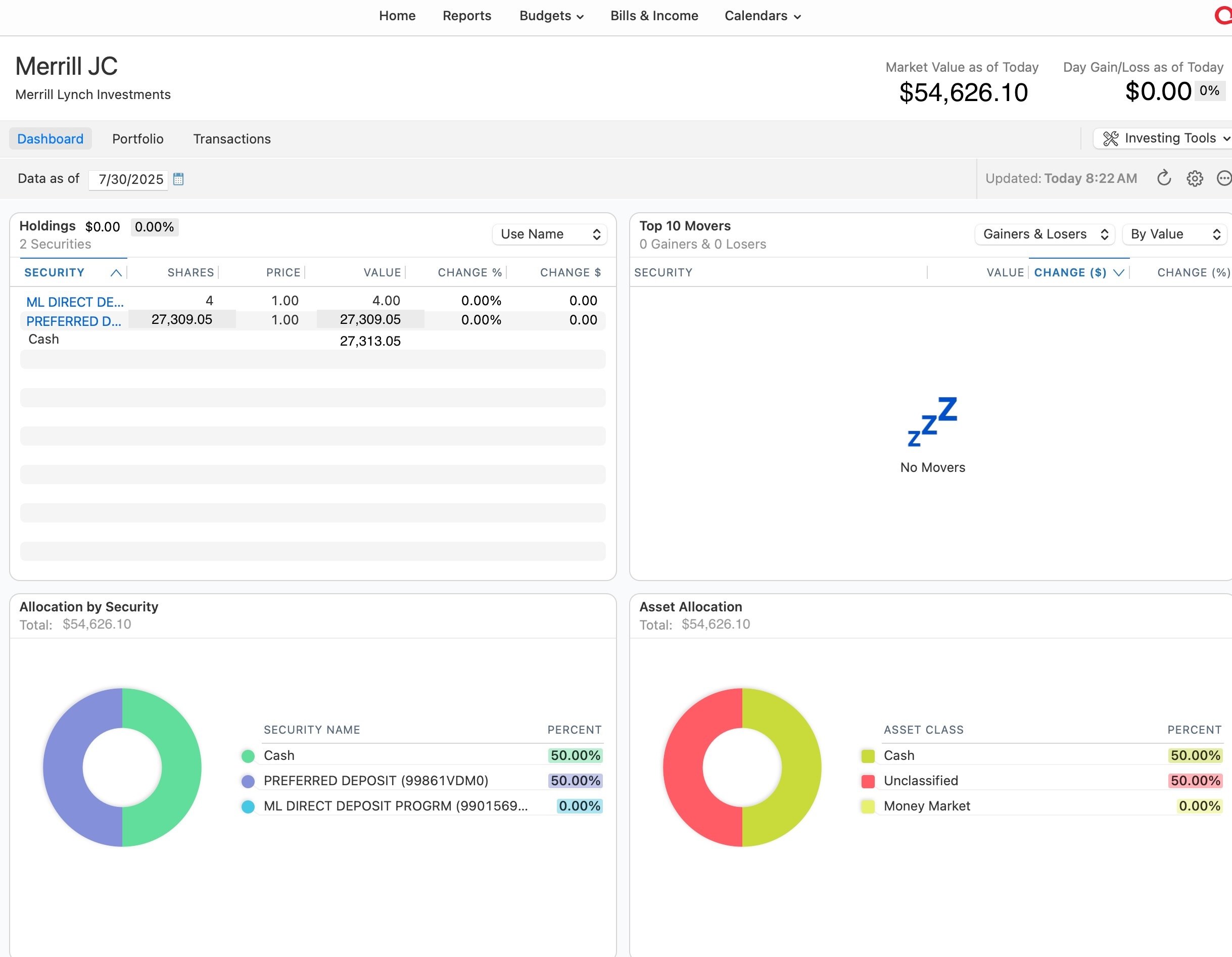
In Transactions the Balance is correct. On my dashboard, in Holdings the Security Value is correct (which happens to be a cash-type security, a Preferred Deposit) so the total Cash is the same as the Security. However, in the dashboard, the Allocation by Security and the Asset Allocation both show a Total that is double the Holdings with Cash showing 50% and the Preferred Deposit showing 50%.
How can I fix this?
If you prefer I create a new post for this rather than jump on this one, I can do that.
Thanks.
0 -
Hello @paladin52,
Thanks for the detailed explanation! Could you share a couple of screenshots showing what you're seeing on the dashboard—specifically the Holdings section, Allocation by Security, and Asset Allocation? That’ll help us better visualize the issue and guide you more accurately.
If needed, please refer to this Community FAQ for instructions on how to attach a screenshot. Alternatively, you can also drag and drop screenshots to your response if you are not given the option to add attachments.
And no worries about posting here — your question is related, so it’s totally fine for now. If it turns out to be a different root cause, we can branch it off later if needed.
Thank you!
-Quicken Anja
Make sure to sign up for the email digest to see a round up of your top posts.0 -
I've edited the amounts for the sake of privacy but here's a screenshot of the dashboard showing what I'm saying. Under Holdings, the amount is correct and matches the register balance (27,309.05) but notice how the value is doubled in both Allocation by Security, Asset Allocation (and Market Value as of Today).
 0
0 -
@paladin52 Thanks for sharing that screenshot—it’s really helpful! Before you attempt any troubleshooting, please be sure to save a backup first (just in case).
Based on what we’re seeing, there’s a possibility that duplicate securities might be causing the doubled values you're seeing in Allocation by Security and Asset Allocation.
Here’s how to check your securities list for any duplicates:
- Go to the Window menu at the top.
- Select Securities.
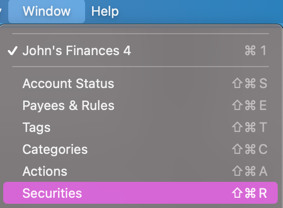
- In the Securities window, look closely for any duplicate entries—sometimes they’ll have similar names or slightly different details (like no ticker).
- If you spot anything that might be a duplicate, please share a screenshot of the Securities window so we can take a closer look with you.
If it turns out there are duplicates, Quicken Mac allows you to merge them. Please refer to this Help Article for instructions on merging securities.
Let us know what you find!
-Quicken Anja
Make sure to sign up for the email digest to see a round up of your top posts.0 -
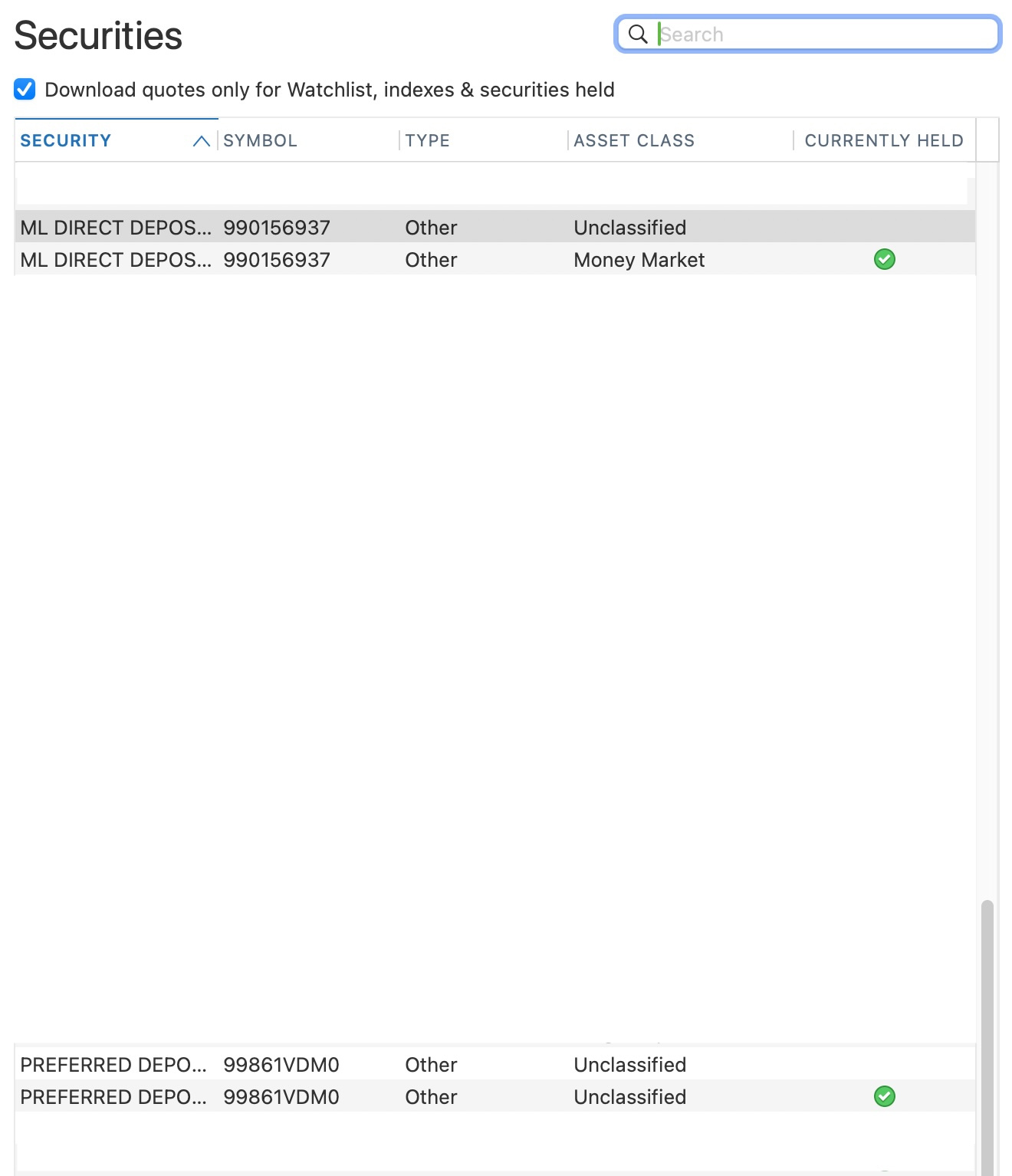
I followed those instructions and under Securities I found entries for Merrill Lynch next to each other that might be duplicates. I merged them and nothing changed so I undid the Merge. Everything in the dashboard was the same as I reported.
0 -
Of these Securities (which appear on the dashboard), I first merged the two ML DIRECT DEPOS… securities, then I merged the two PREFERRED DEPO… securities. Neither of those merges changed the values on the dashboard. Then I merged all four securities and that didn't change the values on the dashboard either. That's when I did an Undo Merge for all.
 0
0 -
@paladin52 Thanks for following up!
I have sent you a direct message, please navigate to the inbox in the top right-hand corner of the Community page and check your inbox.

Thank you!
-Quicken Anja
Make sure to sign up for the email digest to see a round up of your top posts.0 -
What I have noticed in trying to untangle this mess is that prior to EWC+ ML money market funds (e.g. ML Bank Deposit Program and Preferred Deposit - both of these are used in taxable ML brokerage accounts; and Bank of America NA RASP and BLF Treasury Trust - these are used in ML Retirement accounts) were treated as piles of money but not as funds that had to be purchased in discrete share lots. I think that this is where some of the discrepancy in the account balance is coming from. The reason it is so large is because the change to EWC+ has covered a long period of time during which direct connect was the standard and money market purchases were not treated as "shares" purchased.
Receive interest or dividend —> $ swept into cash —> whole dollar amount transferred to one of the money market funds noted above —> shares of that money market fund purchased. This is a 3 step process which direct connect did not account for and now that EWC+ is the download protocol the unaccounted shares are showing up but not seen in Quicken. In the screen shot below I have added two transactions seen at the top, "buying" the whole dollar amount of the interest received. In looking at the ML website this is how money is accounted for, dividend/interest received —> whole dollar shares of money market fund purchased.
The other mistakes that EWC+ has introduced (uncovered ???) are in the accounting for bonds and CD's. These can be rectified with merging "ghost" cd's or bonds with the real one and then deleting the ghost transaction. Careful attention to number of shares tracked in Quicken is essential in this process as I've seen a few times that the share count is off by a factor of one hundred.
I hope some of this makes sense.
 0
0 -
Hello @Quetzalcoatl,
Thank you for taking the time to share such a detailed breakdown of what you’ve experienced with the Express Web Connect+ transition, especially around how money market funds, bonds, and CDs are now being handled. This kind of insight is incredibly valuable—not only for other users navigating similar issues, but also for us as we continue to monitor the impact of these changes.
It sounds like you’ve done some thorough troubleshooting and uncovered some important distinctions between how Direct Connect and Express WebConnect+ process these transactions.
If you have any additional observations or tips, feel free to keep sharing—we appreciate your contribution to the Community!
-Quicken Anja
Make sure to sign up for the email digest to see a round up of your top posts.0 -
New day, new wrinkle.
When brokerage account (non-retirement) is used to pay a bill, money has to be manually moved from the ML BANK DEPOSIT PROGRAM (in this case) to cash by selling shares of the ML BANK DEPOSIT PROGRAM. I was only able to figure out how many shares to sell by the amount of discrepancy in the Quicken reconciliation window. But it worked. The difference in the amount of shares sold compared to the amount paid out is due to an unseen cash balance in the account.
Unfortunately even the ML web page display for activity in this account does not reflect this two step process.

I can only hope that EWC+ is sending more information than is being displayed in Quicken and that the Quicken software whisperers can massage the beast. Full faith & confidence.
0 -
I have the same problem—or so close it smells the same—that began a few days ago with an ML Edge download. At the cash/money market entry, I was prompted for an existing link (or create a new one) and chose ML DIRECT DEPOSIT PROGRM. Upon completion of the update, in the CMA brokerage account, I got the unbalanced shares message showing $41 more at ML than in Quicken and chose "ignore for now." FOR WHAT IT'S WORTH: I had already entered that $41 dollars into the linked cash account at the time of the transaction.
In the attached screenshot, there are two B of A entries—which is also the home of the ML DIRECT DEPOSIT PROGRM—but those both have symbols and cusp IDs—and neither of those values in the cash account are being duplicated. Originally the Type and Asset Class were different for those so, grasping for straws, I made them the same for ML, as you can see, but that had no effect.
0 -
Since I posted my comment above on Aug 5, I have reviewed the earlier posts by Quetzalcoatl in more detail. He/she is a Mac user and I have Windows, but the actions he/she discribed on Aug 2 are virtually the same as mine. There, after the cash is downloaded via Quicken, as though it were a security, then selling the shares in order to get the cash into the linked cash account.
In my case, I generally create the entry in Quicken, at the time of the transaction, which puts any cash into the linked cash account. And everything looks great . . . until the next account download from ML. At which point Quicken thinks it is a new account and puts the cash it, thus, the duplication of the amount of cash already in the linked account.
I was already a Quicken user when I opened the Merrill account seven years ago and have never had the problem until now. I am not doing thing differently—that I am aware of. Quicken needs to address this issue.
1 -
After spending far too much time down the EWC+ rabbit hole, I opened up an old (June 9) backup file, made sure that the Merrill downloading connection was Direct Connect. Other than one CD error (previously sold but shares were never "removed") the stocks were all correct. None of the various money market funds (IIAXX, IIAYY, BLF, Preferred Deposit, etc) show up in the portfolio list or transactions of any of the ML accounts, retirement and non-retirement. Prior to and after the EWC+ conversion these all showed up in portfolio and transactions. But now that I have returned to Direct Connect, they're not. Or am I just fooling myself and I'm not really downloading via direct connect and it's really EWC+. How would I know ???
In one very small account with no holdings except money market funds, the money market funds do not appear on the portfolio list. The cash balance ($118.54) in the account correctly reflects the total balance in the account at ML. But going to the reconcile window the online balance downloaded from ML ($236.54) double counts the money market balance once as cash and again as money market balance and then throws in the $0.54 which is the cash balance in the account per ML.
I could easily see this last problem because the account is so small and is really a placeholder. I have not even attempted to account for the balance differences in the other larger accounts where the money market funds are not showing up in the Quicken portfolio view or in any of the transactions.
0 -
ok, now I'm totally confused, today the money market funds are all showing up in the registers and portfolios. the only change was that the Mac shut down for an OS update last night and Quicken restarted. None of the accounts reconcile just like yesterday, but I'll take the very small win.
0