Multiple currencies in split transactions

I am using multiple currency support, which works fine with normal transactions (amounts entered with shortcut key).
However, with split transactions the shortcut key doesn't work for individual lines. This means I need to calculate the equivalent amount of each line in the account's base currency.
Am I missing something? Why doesn't the shortcut key work in split transactions? Is there a workaround?
Answers
-
Hello @ColdNose,
Thanks for reporting this issue!
Could you please share a screenshot showing what happens when you try to use the currency shortcut key within a split transaction? This will help us better understand what you’re seeing on your end. If needed, please refer to this Community FAQ for instructions on how to attach a screenshot. Alternatively, you can also drag and drop screenshots to your response if you are not given the option to add attachments.
Please be sure to redact or crop out any personal or sensitive information before uploading.
Thank you!
-Quicken Anja
Make sure to sign up for the email digest to see a round up of your top posts.0 -
What "Currency shortcut key" are you referring to?
Quicken currency support doesn't allow for having more than one currency in an account.
Any transaction, including split lines that affects a given account has to be in that account's currency.
The only transaction/split line that would be a bit different is a transfer to another account that has a different currency. In that case, Quicken will ask about the destination amount for each transfer going to an account with a different currency.
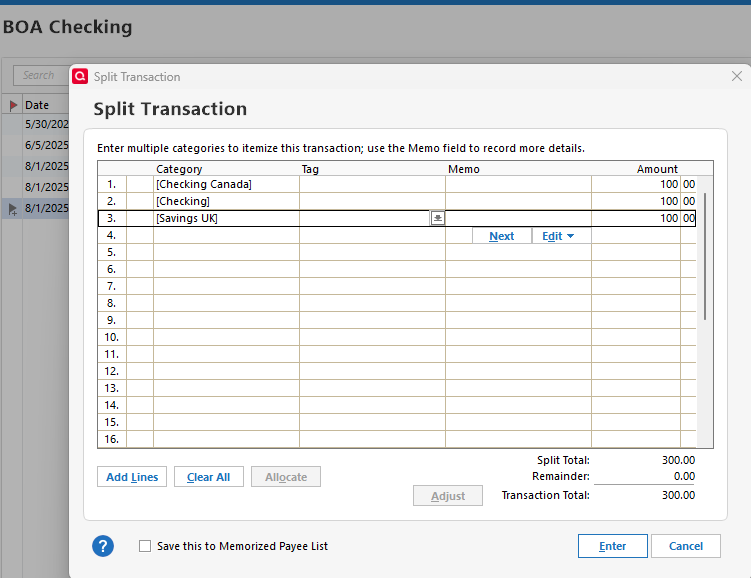
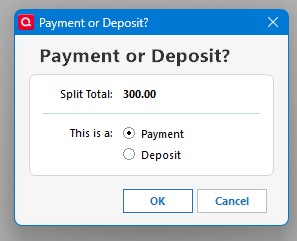
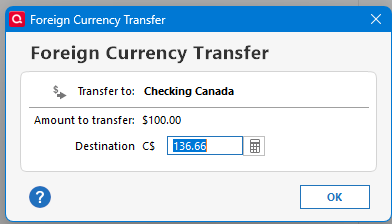
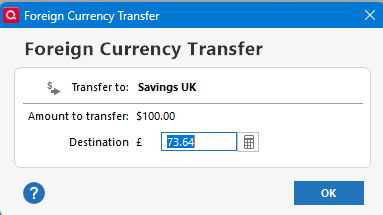 0
0 -
What "Currency shortcut key" are you referring to?
Please see this Help article for more about entering foreign currency transactions directly into the register
How to enter foreign currency amounts using a shortcut letter (quicken.com)
And, after all the setup has been done and, for example, a shortcut key "E" assigned to the Euro currency in the Currency List, you can now record your 50.00€ transaction directly into your US$ credit card register by typing 50e into the Charge or Amount field. Tab to the next field and watch what happens …
However, as the OP states, you cannot use the same shortcut keystrokes in the Split transaction dialog should it be necessary to split the transaction across several categories.
The only workaround for this situation that I can think of would be to
- create and use an intermediate Euro account register
- record the split transaction into the Euro account with categories as needed
- record a 2nd transaction to transfer the total Euro amount into the US$ credit card account
- when the credit card charge arrives in your next statement or download, adjust that 2nd transaction's $ amount as needed, to account for the actual exchange rate used by the credit card company1 -
Thanks @UKR, I didn't know that feature existed. And yeah, they didn't implement it for splits.
But it seems to me that it would be easier to just to do what @ColdNose is doing and calculate it yourself, especially given that in fact I don't really think using the "current exchange rate" is actually accurate.
If you do any transaction involving a foreign currency the likelihood that the amount in the account currency being the "current exchange rate" (or even more precisely what Quicken has at the moment) is next to zero, given that the currency exchange rate is constantly changing and there might be fees too.
Looking at what Quicken does in a normal transaction all it did was take the amount entered (say 50E) and changed it to the current amount in the account currency with what it has for the current exchange rate (which isn't downloaded for every transaction so it isn't even real time) and put in a memo that the entry was 50 Euros.
So, at best this is an estimate, and the true "amount" really would be whatever was deposited/withdrawn from the account in that account's currency. This can certainly lead to the fact that if one could enter these split lines with the shortcut keys, then the total would most likely be wrong (the actual amount deposited/withdrawn from the account).
0 -
All - thanks for clarifying that using shortcut keys in split lines is not possible (which is annoying!). This should be implemented to complete the solution; it wouldn't be difficult. Here's how I suggest it should work:
- Allow the split lines to be entered as usual (50€ transaction entered into US$ account by typing 50e) with the converted amount shown as the "amount", and the original currency amount put in the lines memo field.
- When choosing "Enter", the transaction total (which should be in the account currency (US$)) is entered into the transaction register "Amount" column and the sum of original foreign currency amounts entered is placed in the memo field using the currency of the first split line entered. This would solve 99% of the use cases.
@Chris_QPW - you're correct that the converted amounts are rarely accurate when entered and may need to be adjusted later when the correct amounts are known (i.e. credit card statement). Therefore, the solution should have the very cool feature that if the transactions amount is changed, the individual split lines are automatically recalculated proportionately to ensure that everything is accurate.
0


