This morning zzz- appeared before Fidelity Investments when updating
Anyone know why they added zzz?
I gave up and restored backup from before the [Removed - Language] transition. I'm now successful using the old connection now renamed zzz-fidelity. And it is no longer prompting me to transition to the new so-called improved method. Almost as if Quicken knows it is all messed up. I should know to delay transition to see if it seems to work before becoming their unwitting beta tester, but it didn't look like I had a choice. Why does quicken do these things at month end? Really messed up.
Downloads are coming through with a total of shares from 2008 and 2013 when the accounts were first open with a total # of shares that I own today. As such, it doubles the # of shares and inflates the value of the accounts. I tried to remove those shares since the download tool adds those shares but the remove shares feature does not change the total value for some reason. If I delete the add shares, the next download they appear again.
How do I get rid of these add shares transactions with the new download feature. Yes I mapped/validate my accounts based on forced prompts to move to new download process. I prefer to go direct and not through quicken but was not offered a choice (yes I got the email in June).
Thank you Krisina,
I deactivated and reactivated my Fidelity accounts to update to the new download method. My NetBenefit accounts are still set to "Complete - Positions and Transactions". Since this is a know issue, I had already manually updated the missing transactions.
Failed AGAIN and losing faith in Quicken!
Tried the account reset, went through the re-authorization and it corrupted the quotes, CDs and number of shares again!!!!
Fell back to the backup, but will not touch any suggestions until fixed [Removed - Disruptive]
No downloaded transactions or updates! [Removed - Rant]
There are now 7 pages to this one thread and still NO acknowledgement by Quicken that this seems to be a royal screwup on a product that was improperly tested. The only advice given is "use a backup and we'll fix it later."
When selling and managing a product whose sole purpose is to help them with their money, the bar for performance and reliability is should be VERY high. Quicken has fallen well below the goals of high reliability.
The first paragraph is true, but there has also been interaction from Quicken staff, and indication that they are working on the issues.
I agree that it should have been tested. Quicken has a well oiled beta testing process that would have caught this, had this migration been tested in a beta activity.
I searched for information on beta testers. I didn't find anything indication the program exists. From the dialog in this thread and Quicken Kristina Quicken Windows Subscription Moderatorencouraging us to report the issues with feedback, we appear to be the beta testers.
Quicken Kristina
Quicken Windows Subscription Moderator
I just spent 6+ hours fixing incorrect securities symbols from the download fiasco I reported False New Security & Matching Security Pop Up — Quicken. I thought I'd fixed them but found more.
Frankly, I'm disgusted with Quicken for allowing this update to continue.
Hello @Ray,
Here is an article providing information on the Beta program:
I hope this helps!
Thanks. The page and the FAQ don't answer my questions. Is there a contact email or phone number?
If you join the beta program there is a mechanism for asking questions. Otherwise this page shows the various ways to contact support.
https://www.quicken.com/support/quicken-support-options/
Bugs can and do happen with most products. That doesn't make the end user a tester.
to this extent it does
FIDELITY ACCOUNTS ARE ALL INACCURATE ONCE I GAVE PERMISSION FOR FIDELITY TO SHARE MY DATA. ALL MY FIDELITY ACCOUNTS ARE WORTHLESS!!! I AM MANUALLY UPDATING THEM NOW UNTIL I THINK THIS IS FIXED. DON'T THINK I'LL RENEW AGAIN. THIS IS TOO FRUSTRATING.
This dialog I got during One Step Update doesn't specify the account:
It is frustrating, although since I've been using Quicken successfully for more than 25 years, I'm not going to throw it out and cause myself a lot more work, over this one very annoying disastrous migration, which will get fixed eventually.
My concern is what Quicken considers to be "fixed".
Hopefully, fixed means that all features using EWC+ will work exactly the same as with the prior Fidelity DC connection.
I hope so too.
As I am sure you know, beta testing is when they roll it out to a subset of users with the intent of ironing out the bugs before release (which is what should have happened here but maybe it's not possible to do that with a financial institution connection method change). Since that isn't what happened here, this isn't beta testing and if it were, they would not be paying us to test it (referencing a comment made elsewhere).
I also wish that when people start a new thread about an issue that has already been reported, the moderators would catch that. Having multiple threads about the same issues just makes it harder for Quicken staff to manage and pass on the issues being reported.
disagree. If things like 3 decimal places were not caught, it was not well beta tested. That should have been caught. As should the difficulty to postpone. So in effect we are finding the bugs and by definition are the beta testers.
Enough. With any luck Fidelity will become functional again. And until folks like boatnmaniac report same I shall avoid the change.
Question just came to mind:
Sweep accounts can be checking accounts and they require direct connect to pay bills. I have never tried, but did that ever work with Fidelity and will it work again?
It wasn't beta tested at all. That's the problem. Beta testers would have caught this immediately.
You can use Quick Pay and Check Pay with Bank of America which uses EWC+ - I don't know if that answers your question. If it doesn't, hopefully someone else can answer your question. I have a Fidelity HSA and track the cash separately, but I pay all my medical bills by credit card and then reimburse myself from my HSA so I've never tried to use Quick Pay or Check Pay with it. The Quicken Bill Manager menu does appear to allow the HSA Cash account to be used as a bill payment account, but I'm not going to trying enabling it.
You are correct that the traditional "Bill Pay" as well as many other important features don't work with EWC+. It was very frustrating when BofA switched to EWC+. Quick Pay and Check Pay are workarounds that have advantages but don't compensate for all that was taken away.
One would hope that Quicken developers had arranged to have some Fidelity accounts for which they were able to have tested the migration and not just relied on those subscribers that have Fidelity accounts to uncover problems. Although, the latter seems to be the case.
Why are you continuing to use the EWC+ connection instead of doing what many users (including me) have done to restore the DC connection? If you restore the DC connection then your accounts will be accurate, again.
To restore the DC connection with Fidelity:
[Removed - Off Topic]
This morning, I had 106 notifications of new posts. I don't have time to read all this but do need the information. I asked ChatGPT to read all postings and to create a bulleted list of issues and suggestions for users. I don't know how accurate the results are. I don't intend this to trigger a bunch of discussion as there's enough other comments.
Here’s a consolidated summary of the “zzz‑Fidelity Updates” thread on Quicken’s community forums, based on all seven pages, highlighting reported issues in bullet points:
Ctrl+Click
Nice job @Ray! Just be careful because many chatbots have been caught faking it, but this looks good.
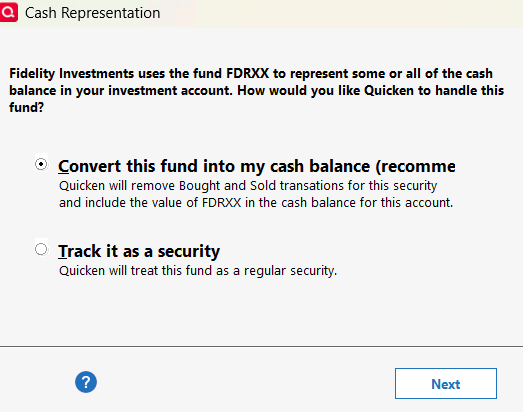
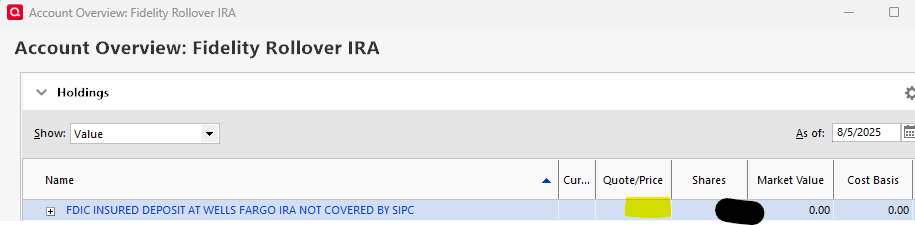
Since my DC copy is so old that it would require hours of data re-entry, I downloaded all the transactions into my 4 accounts, fixed the errors, and, to workaround the cash balance issue, I added the shares corresponding to the cash balance manually then set the price to zero in Holdings
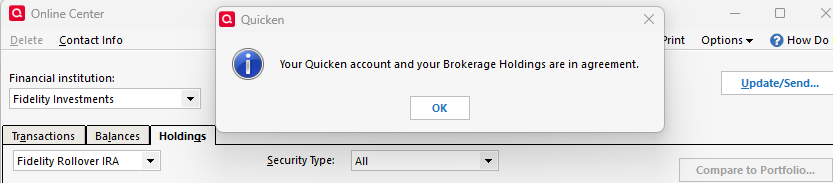
(when you do this, the price is blank). so it doesn't skew the value of the account. I went to Online Center>Holdings and did "Compare to Portfolio" on all 4 accounts and they now match.
The odd this is that the unit price is still $1 even though I set it to zero earlier.
It will be interesting to see what happens the next time there are transactions to be downloaded.
I saw an alert saying that they were pausing migration due to the issues. Has anyone tried to see if the DC options have returned as a connection type?
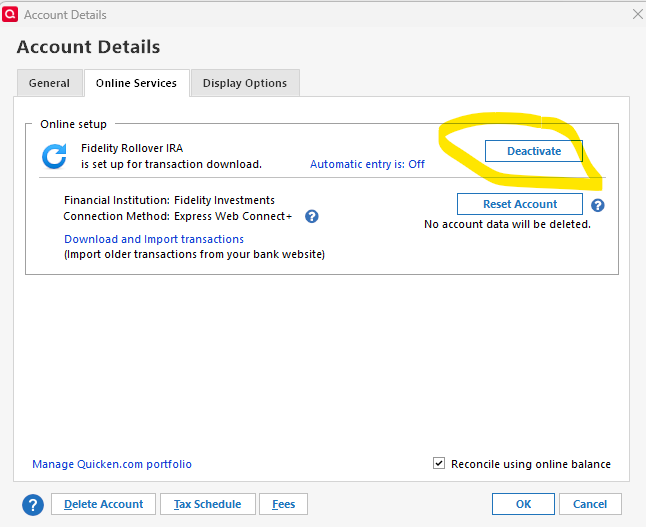
It's a not shown as a visible connection but you can still use them by adding "zzz-" to the start of the FI name on the first tab. Here are the steps:
(1) Deactivate the account.
(2) Switch to the "General" tab and delete all the text in the Financial Institution box.
(3) Click "OK"- this is important otherwise the changes won't stick (and there are instances where it won't stick anyway in which case you can't do what I am describing).
(4) Bring account details back up again (Actions>Edit Account Details)
(5) Type "zzz-Fidelity Investments - DC" or "zzz-Fidelity NetBenefits" in the Financial Institution box depending on which type of account it is.
(6) Go to "Online Services" tab and click the button to set up download.
(7) Enter your userid and password when prompted.
(8) Link the shown accounts to the correct accounts that are already in Quicken.
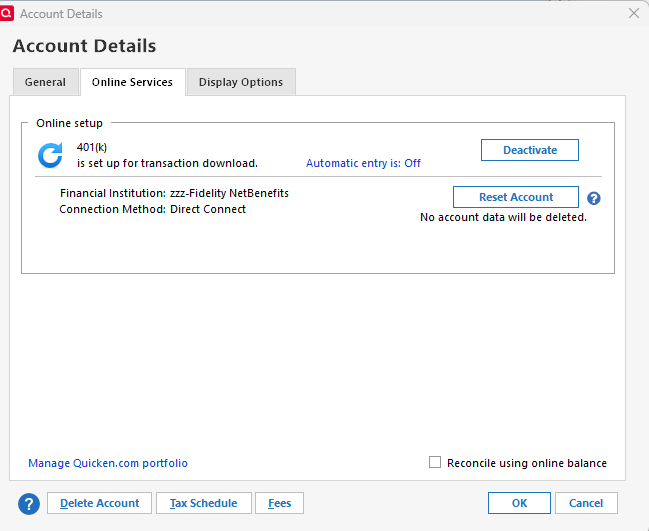
(9) Example after doing this with NetBenefits:
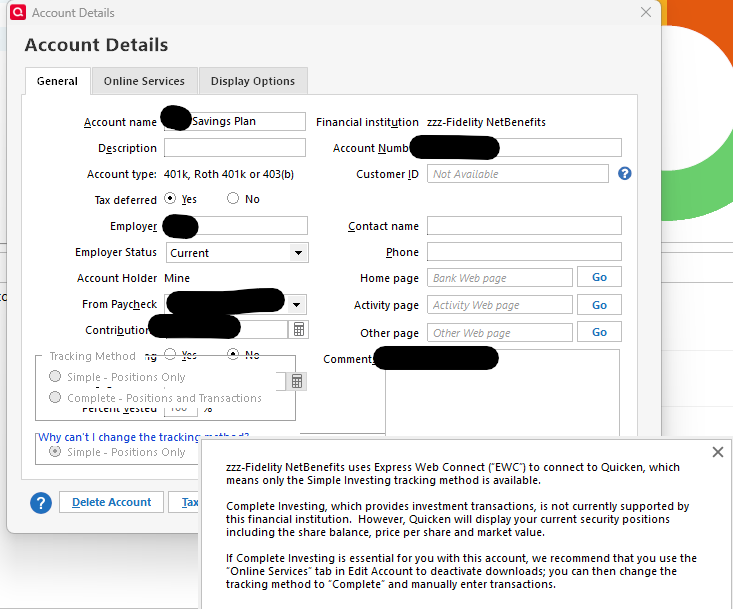
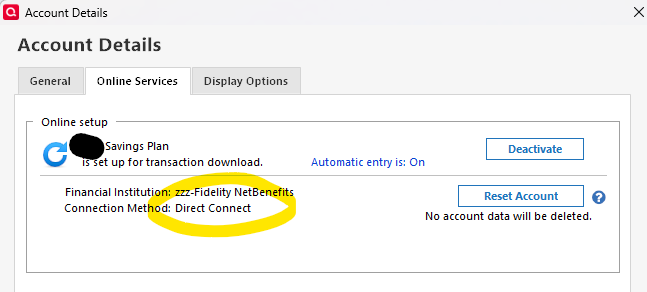
Note that when I tried to do this, as I mentioned above, it insisted on converting the accounts to Simple Tracking. The only way to undo this was to deactivate the account and switch back to Complete tracking. If you are setting up a brand new account using DC with my method, then you CAN use complete tracking, but if your account has ever had EWC+, it seems to object to Complete Tracking when you switch back to DC. It says that you are using EWC even though as you can see in the second image, you are using Direct Connect.
So, in short, the answer to your question is "Yes" - it can be done, but only if you want to use Simple Tracking or to create a brand new account (and import all your old transactions) that are missing).
Thank you for sharing!
I have yet to receive a response from Quicken to my response to them. I would appreciate a reply answering the questions and noting that there are many others experiencing big problems with the EWC+ and when they intend to fix the issue.
Be careful of the Compare to Portfolio. (Tools > Online Center > Holdings tab > Compare to Portfolio button.)
I have 2 data files with 2 Fidelity IRA accounts each. Both continue using the "zzz - Fidelity" Direct Connect. I haven't been prompted to change to EWC+. Considering all the issues, I'll delay as long as I can.
I download their holdings from Fidelity's website and comparing the symbol, shares, and value with those in Quickens Portfolio Value report. In the spreadsheet, I sorted by symbol and use a formula to compare them. I found several with symbols that didn't match. Compare Portfolio said everything matched even though some didn't.
Schwab uses EWC+. I compared a Schwab account. The spreadsheet said they matched. Quickens Compare to Portfolio said they matched also.