R 64.19: New error "Unspecified Bill Presentment Account"

Just updated to R64.19. New error on CloudSync which I've never seen before…
The account Unspecified Bill Presentment Account was not synced. An internal error occurred while processing your request (Requestid=null) Please try again later.
Anyone else seeing this? Any idea how to resolve? Or is it a Quicken bug?
Comments
-
@Metrixtech just for reference, I just updated to R64.19 and did a sync and got no errors.
0 -
@Metrixtech hopefully some other users who have or had this error will respond, but in the meantime, have you tried doing a data file validate?
File → Validate and Repair File → Validate File. Review the validate log for any messages.
You can also do a super validate by holding Ctrl-Shift while clicking on "Validate and Repair File".
0 -
@Metrixtech Yes, I got the same error when trying to do the account update and any kind of syncing. Tried the Validate and Repair File fix but it didn't work. Will try the "super validate."
0 -
Yes, same error when syncing. I also recently updated. I haven't tried anything to fix it yet because I don't really have time to deal with it right now. Appreciate any comments posted to help!
0 -
YES. Does this have to do with Bank of America (BOA) changeover?
0 -
Same here. Just applied R64.19. Now I get this error and Cloud sync fails. Tried Validate as well. No luck.
Update: After applying "Update Now" from my credit card and checking accounts, I tried Cloud sync again and did not get the error.
0 -
Hello All,
Thank you for taking the time to report this issue.
We have forwarded this issue to the proper channels to have this further investigated. However, we request that you please navigate to Help > Report a problem within your Quicken program and submit a problem report with log files and screenshots attached in order to contribute to the investigation.
It would also aid the investigation to include a sanitized file when submitting the problem report. A sanitized file is a data file that removes personally identifiable information so you can comfortably share this file with the Quicken team.
While you will not receive a response through this submission, these reports will help our teams in further investigating the issue. The more problem reports we receive, the better.
We apologize for any inconvenience in the meantime! Thank you.
(CBT-767)-Quicken Anja
Make sure to sign up for the email digest to see a round up of your top posts.0 -
Yes. I see it.
0 -
Do a file validation and repair. That fixed it for me. The validation did not show any major issues. It must have fixed something internally.
-1 -
Thanks for the suggestions. Unfortunately, the "validate" and "super validate" did not work for me. I still get the "Unspecified Bill Presentment Account was not synced" upon every syncing. I did submit a problem report. Thanks again.
0 -
@Metrixtech the sync initially worked for me but then I had some other issues with it. I installed the manual update for R64.19 and it fixed my issues. You might want to give that a try.
Be sure to make a backup of your data file before you update, just in case.
0 -
Thanks. Manual update did not correct. I'm hoping that some smart community member or Quicken support can crack the code on this one. This error is more of a nuisance than a serious showstopper. Thanks again.
0 -
@Metrixtech at this point, I would recommend contacting Quicken Support. I searched through the other posts on this type of error and they where closed without a solution.
0 -
Thanks for submitting the problem report—I really appreciate you taking the time to do that. Unfortunately, only the SyncLog was included. Can you please resubmit the report and make sure all log file checkboxes are selected?
This ensures our team receives all the information needed to properly review and escalate the issue.
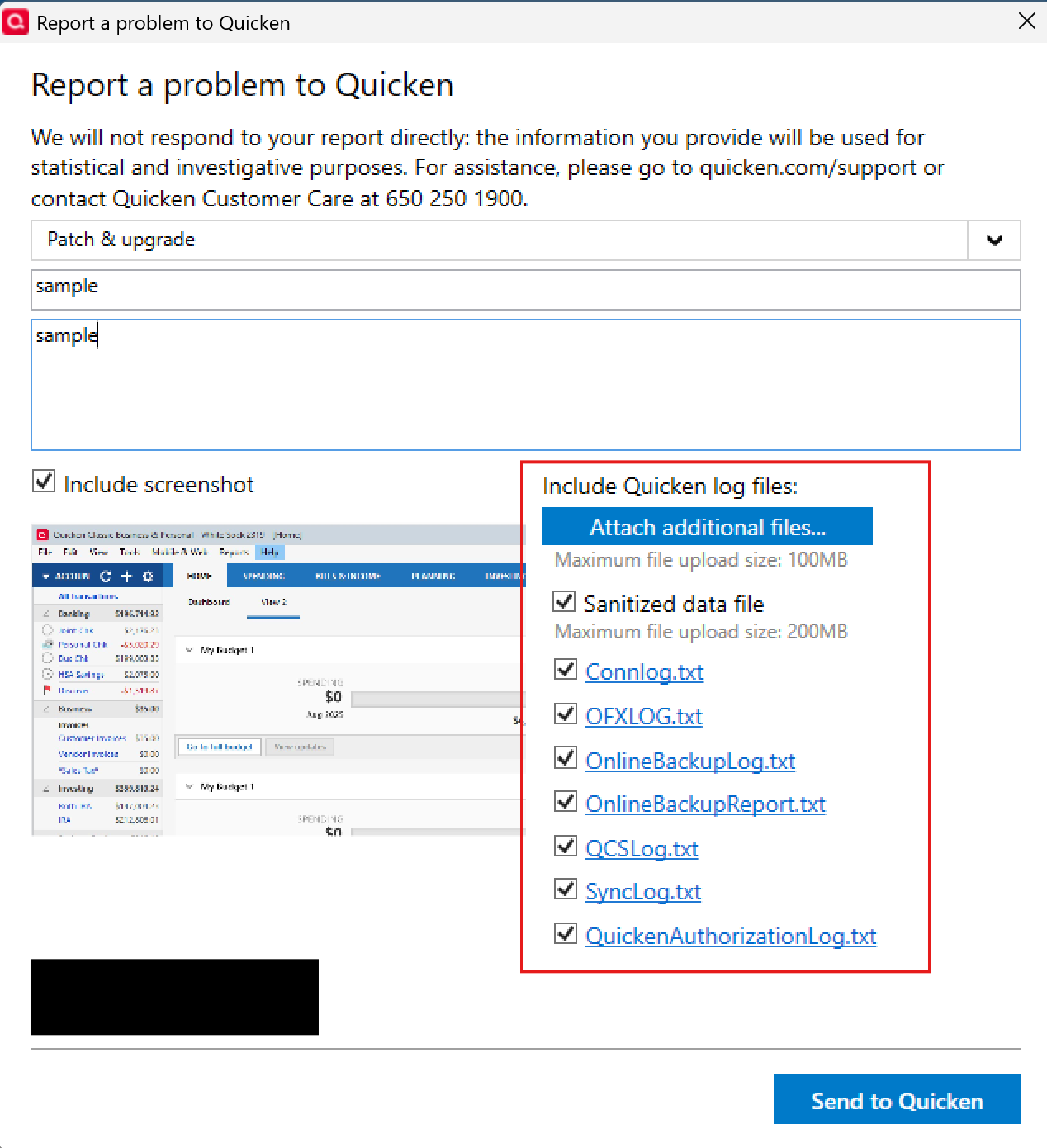
Thank you!
-Quicken Anja
Make sure to sign up for the email digest to see a round up of your top posts.0 -
Also got the Unspecified Bill Presentment Account whenever attempting One Step Update, even to a single account. Tried Validate/Repair, Manual Patch update, nothing resolved so far. The error will pop but there are no account syncs so recent charges/payments are not reflected. Assume this issue is fairly wide spread and not related to a local misconfiguration. Credit/banking accounts now out of sync. Woe is me.
0 -
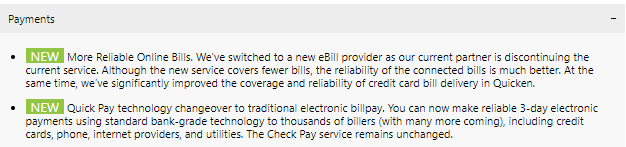
One thing I don't see being asked here is which users are using the Bill presentment/payment system.
Given these statements in the release notes, it might be important:
 1
1 -
@rilingr since your error seems to be related to scheduled bills or deposits:
- Go to Tools > Manage Bill & Income Reminders
- Look for any reminder linked to “Unspecified Bill Presentment Account”
- Delete it, save the file, and restart Quicken
- If it reappears, try deleting it again after a One Step Update
0 -
Anja… remainder of log files uploaded via "Report a problem…" Thanks.
1 -
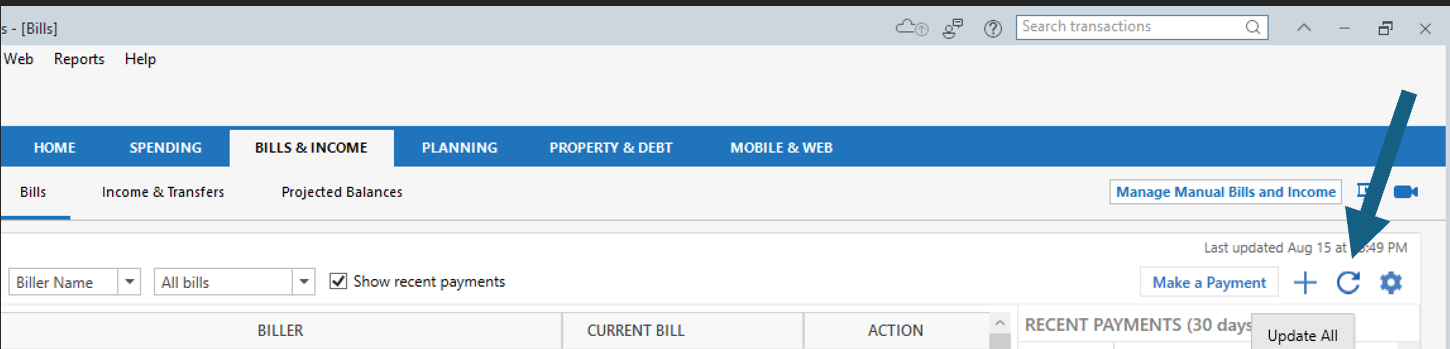
Had the same issue. What worked for me was going to the Bills & Income and clicking the Update All icon. After updating, I ran the Cloud Sync without getting the error.
 7
7 -
I also had this issue today. I was not able to sync.
I have had two erroneous past due reminders under the Bills & Income in my phone app. I could never get them to delete, so I just ignored them. (They were not showing in my laptop data.)
After getting the "Unspecified Bill Presentment Account,” during the unsuccessful sync today, I manually synced my laptop (by adding the transactions that were in my phone app, but not on the laptop) then made a complete backup of the laptop data. Completely deleted the phone app. Reinstalled the phone app. After the data repopulated in my phone app, the two erroneous past due reminders were gone and the error message was gone. I am now able to sync. Hope this helps.
1 -
I have had this issue for the last few days - this morning I set up a bill pay account on quicken to my bank- the error went away - apparently there is a bug in the deployment that they sent out and did not initialize the files that are needed. You should be able to sync after you set up the bill pay.
0 -
Hello everyone,
@Metrixtech—Thanks for resubmitting your log files via "Report a Problem." They have been attached to the ongoing ticket for investigation.
@Anonym & @lindsloulou—Thank you for sharing the solutions that worked for you! That’s helpful for others experiencing the same issue.
@Anonym , @lindsloulou , & @skorponai—If you haven't already—even if you were able to resolve the issue—please submit all your log files (not just the SyncLog) and screenshots via Help > Report a Problem in Quicken. These logs can help us and the team investigating the ticket to better understand the issue and work toward a resolution for all.
Thanks again to everyone for contributing and for your patience while we look into this!
-Quicken Anja
Make sure to sign up for the email digest to see a round up of your top posts.0 -
every since the last update, I have not been able to sync my account to the cloud. I get this message:
The account "Unspecified Bill Presentment Account" was not synced. An internal error occurrred while processing your request [RequestsId = Null]. Please try again later.
I have been getting this message for the last several days. I do not know what account it is referring to. I do not use any type of bill payment accounts on on Quicken.
1 -
I am having the exact same issue
1 -
Please see this thread for a discussion and possible solution for the error -
1 -
The following post by Anonym user fixed the problem for me. Thanks!!!
"Had the same issue. What worked for me was going to the Bills & Income and clicking the Update All icon. After updating, I ran the Cloud Sync without getting the error."
I did have to make my Quicken window really wide to be able to see/click the Update icon.
4 -
I got the same thing! I dont use any Bill Pay within quicken, so why am i geting this
0 -
I have the same problem while doing a One Step Update. I do not use the Bill Pay feature.
0 -
See fix offered by "Anonym" dated August 15. This fix worked for me.
0 -
Thanks for sharing!
-Quicken Jasmine
Make sure to sign up for the email digest to see a round-up of your top posts.
0




Categories
- All Categories
- 22 Product Ideas
- 34 Announcements
- 247 Alerts, Online Banking & Known Product Issues
- 19 Product Alerts
- 518 Welcome to the Community!
- 682 Before you Buy
- 1.5K Product Ideas
- 55.7K Quicken Classic for Windows
- 16.9K Quicken Classic for Mac
- 1K Quicken Mobile
- 834 Quicken on the Web
- 128 Quicken LifeHub