R 64.19: New error "Unspecified Bill Presentment Account"
Comments
-
This worked for me, thanks so much!
4 -
Hello All,
Please be sure to submit a problem report using the instructions previously provided by @Quicken Anja if you have not already done so and are still experiencing this issue.
Thanks!
-Quicken Jasmine
Make sure to sign up for the email digest to see a round-up of your top posts.
-1 -
I was having the same problem and I went to File: Copy or Backup: Chose create full back up. Once that was complete, I was able to cloud sync. Hope it helps
2 -
That's great! Thank you for sharing!
-Quicken Jasmine
Make sure to sign up for the email digest to see a round-up of your top posts.
0 -
-
That fixed it for me as well.
0 -
I received the same error. I do not use bill pay but do use reminders. Thus the page shown with update all does not exist. Any other solutions
0 -
You can go to Backup or Copy File, under File menu, and do a Complete Backup there. At least that worked for me.
0 -
Same issue:
R 64.19: New error "Unspecified Bill Presentment Account"0 -
I tried your idea of the manual update and it worked like a champ. Thank you.
0 -
This worked for me
0 -
@Anonym 's solution worked for me.
0 -
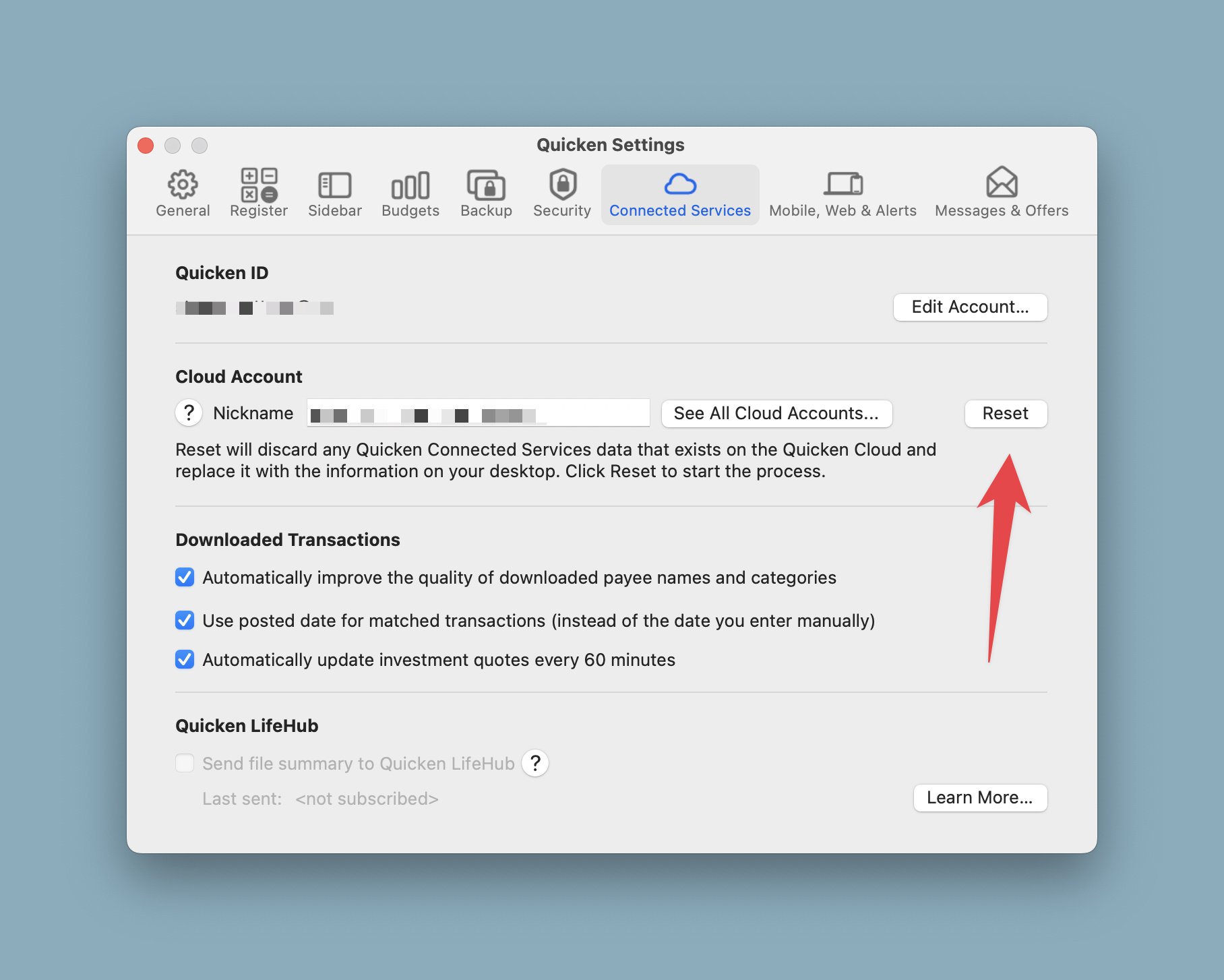
This fixed this problem for me on Quicken for Mac.
 0
0 -
I got that error. I was able to successfully do the One Step update for my transaction downloads by deseIecting Cloud Sync (at the end of the account list).
I then went through my Cloud Sync account list and found a couple old accounts (that were closed and hidden) still marked for sync, so I cleared those. Then I did a Cloud Sync (by itself, not as part of One Step). That seemed to work (without an error) and then the next time I did One Step Update to download my transactions, there was no error.
0 -
I started getting this error too, after updating to R64.19. I was able to fix it by resetting my cloud data.
I used Mobile & Web tab —> Troubleshooting —> Reset your Cloud Data.
After doing that, I just had to log out of and back into my Quicken Mobile App.
1 -
The solution posted by Anonym worked for me also
0 -
This fixed two problems that started with the R64.19 update. I was getting the "unspecified bill presentment error" and missing transactions in the credit card accounts (the transactions were missing, but the Online Balances were correct). Resetting the Cloud Data solved both of the problems.
0 -
Thank you! That fixed my sync error.
0 -
I got this error and I'm not using Cloud Sync.
Deluxe R66.23, Windows 11 Pro
0 -
Hi @leishirsute are you still experiencing this issue?
Quicken Janean
Make sure to sign up for the email digest to see a round up of your top posts.
0 -
I have not had this issue reappear since deleting the strange account.
Deluxe R66.23, Windows 11 Pro
0 -
I had a slightly different issue - this type of account was showing up in my alerts, and when I clicked on the account name, Quicken opened an account page but froze. I was also seeing a scheduled payment to Discover which I could not delete. I removed the Discover bill from my online bills, and did a validate. The scheduled payment is no longer there.
Barry Graham
Quicken H&B Subscription0 -
Hello @BarryGraham,
Thank you for sharing! Was Quicken freezing a one-time issue? Did removing Discover from your bills fix the problem? Did you re-add Discover afterwards?
I look forward to your response!
Quicken Kristina
Make sure to sign up for the email digest to see a round up of your top posts.
0 -
@Quicken Kristina Quicken has been freezing quite a lot recently since this update. But the Unspecified Bill Presentment issue did go away after validating the file.
Barry Graham
Quicken H&B Subscription0 -
Thank you for your reply,
Since validating the file did not correct the issue, the next step is to try restoring a backup from before the issue started, if possible.
Thank you!
Quicken Kristina
Make sure to sign up for the email digest to see a round up of your top posts.
0 -
I'll see if the next release pai fixes the freezing issue. The unspecified presentment account is gone but the fact it was ever there is problematic. I see this has been reported several times over the last few years.
Barry Graham
Quicken H&B Subscription0