Quicken Classic to Quicken Mobile

I have a issue where I can log on to my bank website but when i try to connect my bank to quicken mobile it can not log on the to the bank website i have several FI they all work except this one.
Comments
-
Hello @Richard Sturgeon,
Thanks for reaching out! To help us better understand what’s happening, could you please provide a few more details?
- What is the name of the financial institution that isn’t connecting in Quicken Mobile?
- What is the exact error message you’re receiving?
- Are you seeing this error only in the mobile app, or does it appear in the desktop program as well?
- Are you able to successfully connect to this account in the desktop version of Quicken?
Additionally, please provide a screenshot of what you are seeing. If needed, please refer to this Community FAQ for instructions on how to attach a screenshot. Alternatively, you can also drag and drop screenshots to your response if you are not given the option to add attachments.
This information will help us narrow down the cause and point you in the right direction.
Thank you!
-Quicken Anja
Make sure to sign up for the email digest to see a round up of your top posts.0 -
Town and country Bank Licking MIssouri,
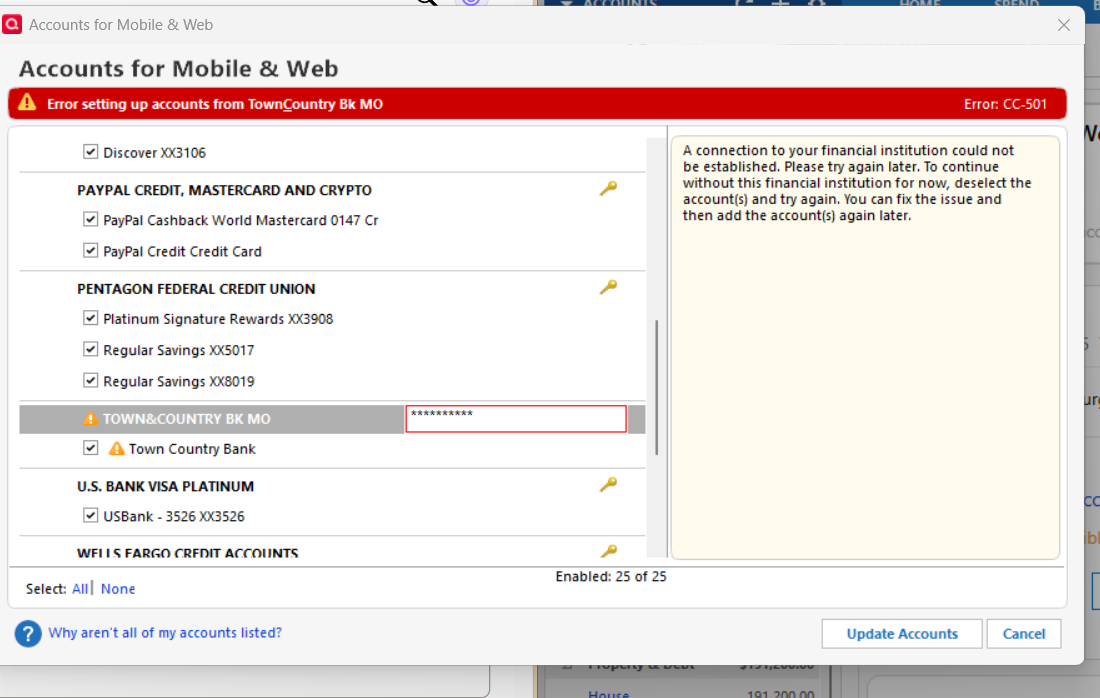
I am only seeing this on the desktop.
I can connect to Town and Country through the Desktop program.
0 -
Hello @Richard Sturgeon,
Thanks for providing more information.
First, I suggest you try signing out of your data file completely and then signing back in to refresh the registration token for your Online Connected Services. However, I do recommend that you first save a backup file prior to performing these steps.
- Navigate to Edit
- Preferences...
- Quicken ID & Cloud accounts
- Click Sign in as a different user (or it might say Sign in using a different Quicken ID)

- Follow the prompts to Sign Out
- Sign back in using your Quicken ID (email) and password (this screen is not a pop-up box)
Let us know how it goes!
-Quicken Jasmine
Make sure to sign up for the email digest to see a round-up of your top posts.
0 -
I followed your instruction still does not work also copied password for FI that did not work either.
0 -
Thanks for the update and for sharing the screenshot as well as trying the steps provided by @Quicken Jasmine.
Based on the screenshot, it looks like you’re running into a CC-501 error specifically during Mobile Sync, which is a little different from a standard desktop download error. Please review this support article as it explains why this particular error occurs in Mobile Sync—either due to a connection time-out during the sync or because the financial institution requires a separate enrollment for Mobile access (since Mobile Sync acts as a second instance of Quicken).
Hope this helps!
-Quicken Anja
Make sure to sign up for the email digest to see a round up of your top posts.0

