Major issues with R64.19
![[Deleted User]](https://us.v-cdn.net/6031128/uploads/defaultavatar/nTYA6S0SVB4GN.jpg)
I usually install updates as soon as they are available and I never had an issue until R64.19. The issues were so bad that they rendered Quicken unusable. I am usually very good at finding solutions but yesterday I spent all day trying to fix the issues but no matter what I tried nothing worked. I restored a backup file several times and then reinstalled R64.19, but each time it ended with the same results.
I figured out that the issues stemmed from the Quicken Cloud file and the new Online Billing. I don't use Online Billing, but I clicked on "Update All" in the Bills tab, Quicken was rendered useless. It took a half hour for it to complete, and then after that the OSU, Cloud Sync, would take an hour to complete. No matter what I did or try, I could not find a way to figure out what was wrong or find a fix.
Even before I clicked on "Update All", I noticed that the OSU and Cloud Sync wasn't working right. It was very sluggish and took a long time to complete. I would watch as it stalled on Transactions, Pending Transactions, and chug through.
I ended up going back to R63.21. Getting it back wasn't easy. I had to reinstall Quicken, restore a backup, and then do a Quicken copy process, and reactivate my connections to get back to a functioning Quicken.
I installed LifeHub recently and linked it to Quicken. I don't know if that is the contributing factor in the issues I experienced with R64.19. I am wondering if LifeHub is not compatible with R64.19? It looks like LifeHub uses it's own cloud file. Quicken now reports that I have 2 cloud files, when I only have one.
At this point I am too leery of doing anymore troubleshooting, but I hope I will eventually be able to go to R64.19. If not I am thinking that LifeHub may be be the issue and uninstall it. If it turns out that LifeHub is the issue, hopefully I can get a refund from Quicken (I purchased it on 7/24/25).
Comments
-
Ok, with zero responses, it doesn't seem like other users are having these issues. The only thing I can think of is that the issue is due to incompatibility between R64.19 and Quicken LifeHub.
If any other user who is also using LifeHub and R64.19 can confirm if they are having any issues or not, that would be much appreciated. Then I can narrow down the issue.
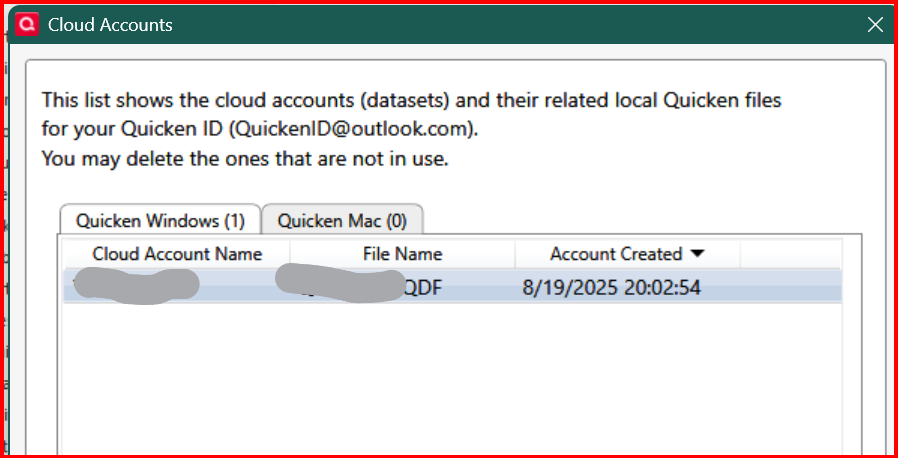
Also, if a Quicken LifeHub user can confirm if they also see a "phantom" cloud file when they click on Edit → Preferences → Quicken ID & Cloud Accounts. It says I have 2 cloud accounts associated with my Quicken ID, but when I click into it, it only lists one.
0 -
This phantom cloud account is very troubling.
0 -
I don't use Online Billing, but I clicked on "Update All" in the Bills tab
I take that you mean that you are using Bill Presentment, but just not paying bills with this system?
Because if you were not using the online bill system at all, you wouldn't have an "Update All".
I can't really help here, and maybe no one can, other than maybe Quicken Support, but I will make this one statement.
As you use more and more features the combinations go up and it makes it harder to troubleshoot.
Just looking at your original comment I get the impression that you are using.
- Sync to Mobile/Web
- Online Bill (presentment)
- Pending Transactions
- LifeHub (and have indicated that there seems to be some kind of overlap with the Quicken Cloud dataset)
Anyone of these have the potential to mess up a data file. And when we add in that the Online Bill system has just changed vendors, that just adds to the possibilities.
At one time I decided that I was going to have my wife play "new user" to give Intuit feedback on that. She looks at a copy of the data file but just looks at the Spending tab and such. So, I thought she would be the perfect "new user". So, I tasked her with creating a new data file and setting up some accounts.
She wasn't more than 10 minutes into the process before I had to show her a workaround to get an account setup. We gave up on the process.
In my personal journey with Quicken I have basically found that the people that have the least amount of problems are the ones that learn what "not to do", and yeah, unfortunately that does mean not using a lot of 99% features (where if you get caught by the 1% it is nasty).
This hasn't improved over time it has gotten worse. I don't really blame it on the Intuit to Quicken Inc transition, it probably would have happened even if Intuit kept Quicken but Quicken has been getting more and more complicated especially in the online parts of it, to the point where you can't even count on backups.
At this point in time of my life I don't need Quicken for my finances, it is more of a hobby, but even so, I went from trying every new feature, and trying to reproduce everyone's problems on here to help them, to the point where even trying what seems like trivial problems reproduce can end up with a trashed data file and quite a bit of work to get everything setup and working again. So, I don't do that anymore.
1 -
Re what @Chris_QPW wrote:
In my personal journey with Quicken I have basically found that the people that have the least amount of problems are the ones that learn what "not to do", and yeah, unfortunately that does mean not using a lot of 99% features
That describes me. And I update my Quicken's version maybe once a year - when I have a good version I just stick with it. I do have VM with the latest version, but I use it offline for experimenting changes to my main file; or if I connect it to the Internet I only use a test file.
- Q Win Deluxe user since 2010, US Subscription
- I don't use Cloud Sync, Mobile & Web, Bill Pay1 -
Sync to Mobile/Web - yes it's on at the global level, but no individual accounts are selected -
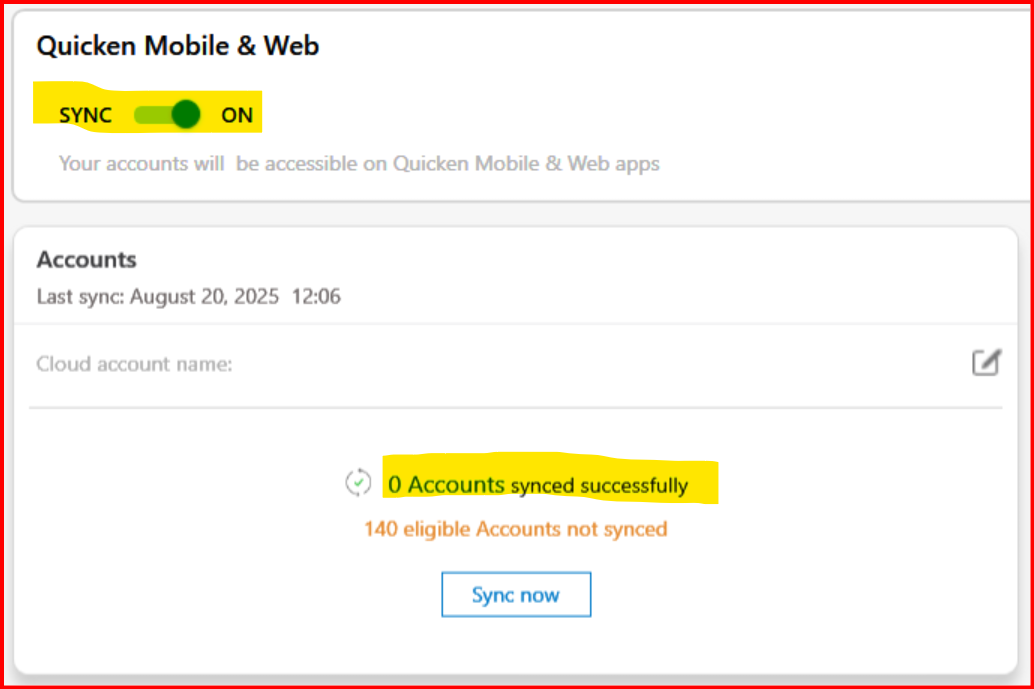
Online Bill (presentment) - NO - all of my bills are automatically deducted by the biller. I do not use bill pay or any kind. Here is the "Select All" button I was referring to -
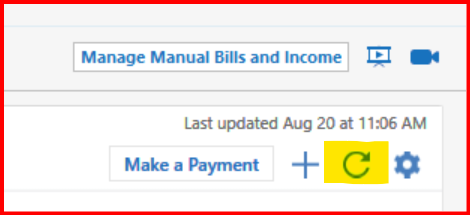
Pending Transactions - NO - never have.
LifeHub (and have indicated that there seems to be some kind of overlap with the Quicken Cloud dataset) - I just noticed the phantom cloud file recently. I am guessing it is for LifeHub, but I cannot see it. It shows correctly in the Mobile and Web tab -
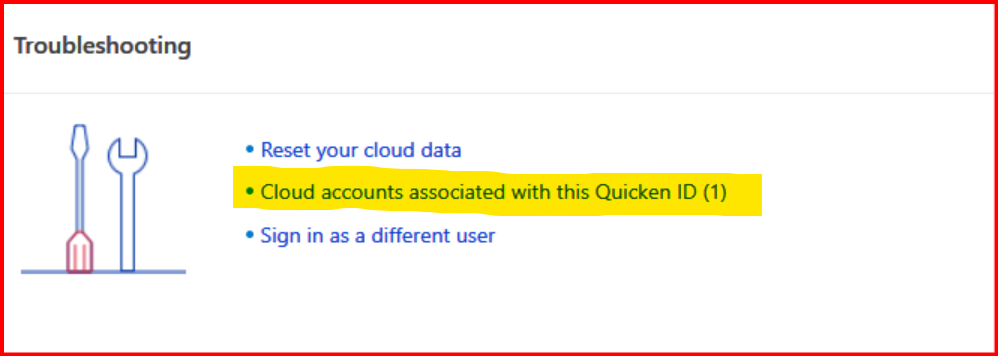
But in Preferences, it shows I have 2 cloud files, but when I click into the link, it only shows 1.
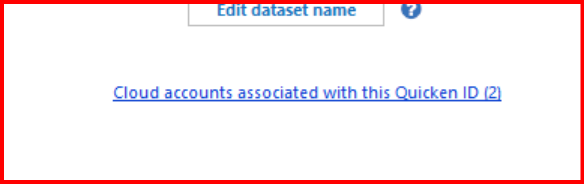
 0
0 -
I'm not quite as "strict" as @BK I do update as soon as the new versions come out. But my lack of using all the features means two things. One is that I seldom have the problems that other people are experiencing, and the other is that I'm not a good choice for finding such problems.
I might be more cautious if I really needed my Quicken data, but that isn't the case.
0 -
OK, I misunderstood, I was looking for an "Update All".

For me it did that for a few seconds and then it went away.
0 -
@Chris_QPW what version are you on? I reverted back to R63.21 and yes it only takes seconds and disappears. In R64.19, it took a half hour to an hour to complete.
0 -
And again, after that the OSU and cloud sync took a half an hour to an hour to complete.
0 -
Hi @CaliQkn,
Thanks for sharing all the details. We did some testing with R64.19 while Quicken LifeHub was connected, and we weren’t able to reproduce the issues you described. From what we’ve seen, LifeHub itself is not causing conflicts with R64.19.
Regarding the “phantom” cloud account you noticed: that’s expected. What you’re seeing is the entry for Quicken LifeHub. It’s not a traditional cloud dataset like the one used with Quicken Classic, but it does appear in the same place since it uses the same underlying system.
If you’d like to confirm whether LifeHub is a factor in your case, here’s a good test approach:
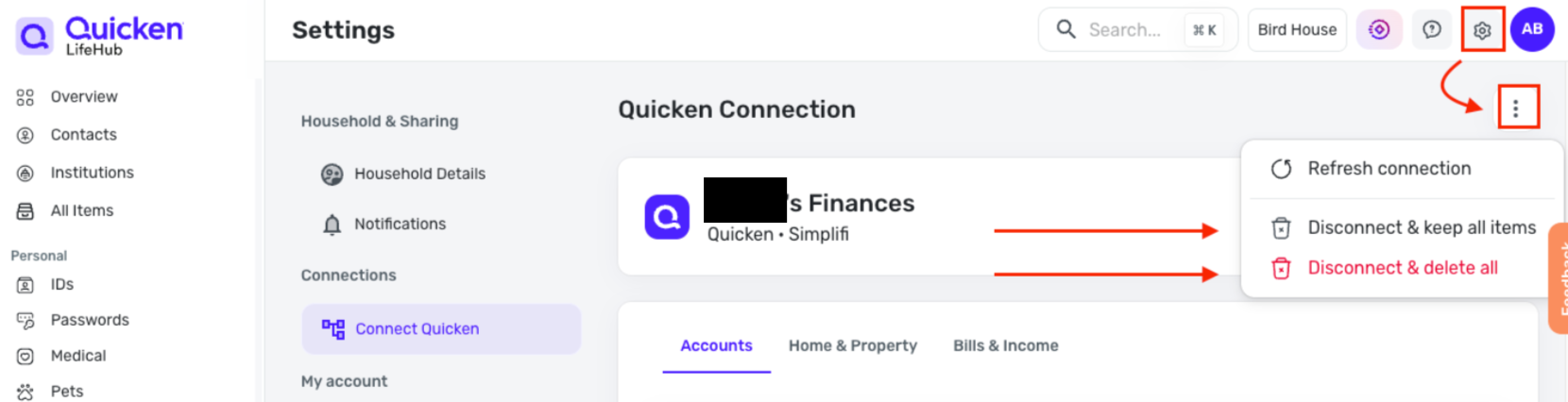
- Disconnect Quicken LifeHub.
- Update Quicken to R64.19 and see how it behaves.
- If everything runs smoothly, reconnect Quicken LifeHub and check again.
Based on our internal testing, R64.19 and LifeHub work together without issue, but this process could help narrow things down on your specific setup.
Hope this helps!
-Quicken Anja
Make sure to sign up for the email digest to see a round up of your top posts.0 - Disconnect Quicken LifeHub.
-
Note I don't leave Sync to Mobile/Web on in my main data file, but with no accounts selected, that may or may not be a good idea. It has been suggested that leaving it on catches when it accounts get synced without you turning them on (for a case where you add a new account and it does it). On the other hand, I don't think people understand that it isn't only the accounts that are being synced. Budgets, categories, and memorized payees are being synced too, but without the accounts syncing, I don't know if this really happens or not.
But I do have a second test data file, that has it on for testing and for just looking at the Cloud datasets and using it to delete them and such.
On the idea that the LifeHub is interacting with your data file's cloud dataset. Have you tried uninstalling it and see if the phantom dataset is still there? But now that I think of it, that might not be a good idea. Because I'm guessing that might be where all your entries are and you might not be able to get them back. I don't know anything about LifeHub, so I can't really give any good ideas on it.I see that @Quicken Anja has you covered in that area.
0 -
I'm on R64.19. And I haven't had any problems with One Setup Update or the "Update All" button for the Bills.
0 -
@Quicken Anja I did disconnect in LifeHub this morning, but then the phantom cloud file did not go away in Quicken. So I then uninstalled LifeHub, but then it still hasn't gone away and is still there.
0 -
@Chris_QPW maybe I should just turn syncing off at the global level and leave it there. But in my troubleshooting yesterday, I thought I did and I still had issues.
As far as uninstalling LifeHub, I did do that this morning. I was just starting to use it so there wasn't much data in there.
0 -
but then it still hasn't gone away and is still there.
Unless you selected "Disconnect and delete all" that sounds like the expected behavior.
Of course, if you do the delete than you might have to re-enter data (I have no idea how much is local and how much is server based in LifeHub).
I turned on Sync to Mobile/Web on my primary data file and did the Bills "Update All", and it didn't change for me, it still just takes a few seconds.
0 -
@Chris_QPW I made sure to chose "Disconnect and delete all". All of the accounts and balances were deleted.
0 -
Then that sounds like the server doesn't delete the cloud dataset. Whether that is a bug or by design I can't say.
0 -
I will say that I would consider that the "special dataset" showing up in Quicken's cloud datasets (but not in all places) is a bug. You can't have it both ways. For instance, Quicken Mac datasets appear in Quicken Windows, but have their own tab. It is wrong to show the LifeHub dataset show up in your Quicken Windows count and then not in the list (hopefully separated out like the Quicken Mac ones are)
0 -
@Quicken Anja LifeHub has been uninstalled, but the phantom cloud file is still out there.
I have also shut off cloud sync per the discussion with @Chris_QPW
Should I just go ahead and install R64.19?
0 -
@CaliQkn Just to clarify—when I suggested disconnecting/reconnecting LifeHub, that was only meant as a way to test whether LifeHub was affecting overall Quicken performance. It won’t have any effect on the “phantom” cloud account you’re seeing.
That entry is expected behavior once LifeHub has been connected at least once. Think of it like a history record—it’s not an active cloud dataset like your Classic Quicken file, but it still shows up in the same place since it uses the same system. Disconnecting LifeHub won’t remove it, and it will stay visible. It only disappears after a long period of inactivity (around 2 years after the LifeHub subscription expires). If you’d like it removed sooner, you’d need to reach out to Quicken Support directly as it requires an escalation.
We weren’t able to reproduce the performance issues you ran into on R64.19 with LifeHub enabled, but running that test on your setup could help confirm whether something unique is contributing. If your testing does point to LifeHub as the issue, we’d recommend contacting Quicken Support so it can be escalated further.
Hope this clarifies things for you!
-Quicken Anja
Make sure to sign up for the email digest to see a round up of your top posts.0 -
Thanks @Quicken Anja I will reinstall R64.19 and see what happens.
1 -
Maybe I missed it but did you try downloading and reinstalling the Manual Patch Update file for R64.19? Sometimes the update installation process does not complete properly and reinstalling it with the Manual Patch Update file fixes it.
I installed R64.19 (with the Manual Patch Update file) 2 days ago and have not experienced any of the issues you have identified. For me, OSU runs normally at at expected speeds. But, then, I don't ever keep Mobile & Web Sync turned ON all the time (I always keep it OFF unless I need it to review/delete Cloud accounts), I don't use QBM nor download eBills and I don't use LifeHub. (There are quite a few posts about eBills issues with R64.19 but I can't speak to them since I don't use that feature.)
My observations so far with R64.19 is rather limited and include:
- FIXED: The missing future paychecks data issue appears to have been resolved.
- UPDATED: The new $6000 tax deduction for 65+ folks is now accounted for in Tax Planner. (This is why I really jumped on updating to R64.19. I am not usually an early adopter. There are supposed to be other Tax Planner updates but I haven't dug into those, yet.)
- ISSUE: In Tax Planner in 4 data files most of the User Entered and Scheduled Bills and Deposits entries were changed to Estimate Based on YTD Daily Average. Of course, these things can really mess up the results of Tax Planner but they were pretty easily corrected. Still it was a nuisance to go thru each Tax Planner category to make needed corrections.
I haven't dug into R64.19 much more than this but so far it appears that R64.19 is a good update regarding the Tax Planner.
Quicken Classic Premier (US) Subscription: R66.23 on Windows 11 Home
0 -
I'm a bit confused. When I look at the description of LifeHub on Quicken.com it says it is a web-based solution, so I don't really understand what there is to "install/uninstall".
Looking at though, I might even be interested in using it.
0 -
@Quicken Anja I thought I had uninstalled LifeHub. I right clicked and selected "uninstall". The icon was deleted, but it seems like I can still access the account (with information) if I go through the browser. It there a way to completely uninstall LifeHub?
0 -
My impression is that the "Desktop icon" is just a shortcut to the URL.
0 -
@Chris_QPW I think you are right. But shouldn't there be a way to delete or uninstall the web based program?
0 -
By definition you can't delete the "web based program", there is one server program servicing everyone. But yes, I would hope that there is a way to delete the data, but I suspect that "way" is going to be the same as with Quicken datasets, you have to request it from Quicken Support.
And just so you know, when you delete a Quicken dataset, it doesn't really remove it. That has been proven many times with people getting the "too many dataset" problem. It seems there is some kind of legal obligation to maintain this data unless the user makes a direct request.
EDIT: I forgot to say the "delete dataset" in Quicken just hides it from the user, it is clearly still on the server.
0 -
Thanks @Chris_QPW that make sense. It still bothers me that that cloud file is out there and one part of Quicken indicates that, but in another part of Quicken it doesn't.
@Quicken Anja after the issues yesterday with R64.19, I am a little hesitant, but I will give it a try and circle back with the results.
Thank you both for your comments and help.
0 -
I guess I'm a glutton for punishment.
As I thought about it, I decided that we might benefit from LifeHub, so I signed up for it.
I connected my Quicken Desktop data file to it and did the resend, and see my accounts, reminders and such in it.
Did One Step Update with no problem. Did "Update All" on the Bills tab and the message about syncing went away at the same timing as before, but then it just totally locked up Quicken. Based on what I see it looks like Quicken has put up some kind of blocking dialog that isn't showing on the screen and that didn't "go away". The result is a grayed out main window that you can't click on (beeps when you click).
0 -
@Chris_QPW it sounds like you are having the same issue I did. The "Update All" will eventually finish after an hour or so. After this point yesterday, I couldn't get the OSU or Cloud Sync to work properly. Both were very sluggish.
0



