Recurring payroll amount is a random negative amount

since the update to r64.19 (W11), paychecks are a random negative amount in bill reminder and projected balance. when i open the income transaction then save, the amount returns to normal but the issue recurs when i open quicken again. i created another duplicate recurring payroll transaction using the wizard but that transaction is negative also. I validated the file but the issue persists.
Comments
-
I'm seeing this too, and it isn't just in the Projected Balances, it shows up this way in the All Bills & Deposits tab in the Bills and Income Reminders (Ctrl+J).

I get the same thing for Edit this instance:
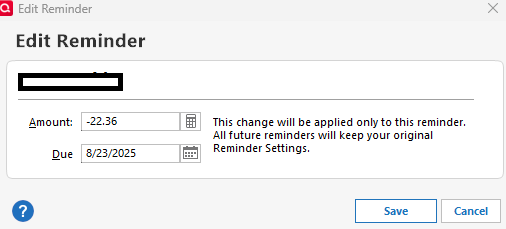
When I select Edit this instance and all future instances the full paycheck reminder is correct.
0 -
Thank you for sharing this information and assisting this user!
-Quicken Jasmine
Make sure to sign up for the email digest to see a round-up of your top posts.
0 -
Is this a known bug?
I re-entered my payroll using the payroll wizard and it appeared to work. Closed and re-opened Quicken and it appeared to work. This morning after running One Step Update the new amount reverted back to negative.0 -
There is a discussion of this issue here:
Quicken user since Q1999. Currently using QW2017.
Questions? Check out the Quicken Windows FAQ list0 -
Hello All,
Thank you for taking the time to report this issue!
We have forwarded this issue to the proper channels to have this further investigated. However, we request that you please navigate to Help > Report a problem within your Quicken program and submit a problem report with log files and screenshots attached in order to contribute to the investigation.
It would also aid the investigation to include a sanitized file when submitting the problem report. A sanitized file is a data file that removes personally identifiable information so you can comfortably share this file with the Quicken team.
While you will not receive a response through this submission, these reports will help our teams in further investigating the issue.
We apologize for any inconvenience in the meantime! Thank you.
(CBT-778)-Quicken Anja
Make sure to sign up for the email digest to see a round up of your top posts.0



