Which forum am I in?

I think I saw a comment somewhere on the website that the different versions of Quicken each have their own forum. I want to ask some questions about Quicken Classic Deluxe. How do I find the correct forum/community? I posted a couple of questions a few days ago, but the responses made me wonder if I was in the right forum. If I have a thread open, is there a way for me to tell which forum community it is in?
Using Office 365 on Windows 11
Looking for financial software to help manage my Vanguard portfolio
Best Answers
-
Hello @Helen Bacque,
Thanks for reaching out and welcome to the Quicken Classic Community!
In addition to what @Quicken Kristina mentioned, you’re already in the right Community, so you just want to post in the category that best matches the product you use. Here are direct links for each section under Quicken Classic:
You can also find more information and an overall introduction to the Community in this Community Training (FAQs) category.
The only product that has a completely separate Community site is Quicken Simplifi. If you’re using Simplifi, you can access that Community here.
Hope this helps!
-Quicken Anja
Make sure to sign up for the email digest to see a round up of your top posts.1 -
Here’s a quick way to think about it:
- Ask a Question – Use this when you have a specific question about how to do something in Quicken. The Community is designed so you’ll get notified if someone answers, and you can vote on answers to help others find the best solution.
- New Discussion – Use this if you want to start a conversation or share something related to Quicken without asking a direct question. Others can comment and discuss, but it’s not tied to a specific question-and-answer format.
For more detailed guidance, you can check out this Community FAQ.
Hope this helps clarify things!
-Quicken Anja
Make sure to sign up for the email digest to see a round up of your top posts.1 -
Two things at the top of the screen tell you where you are in the forum:
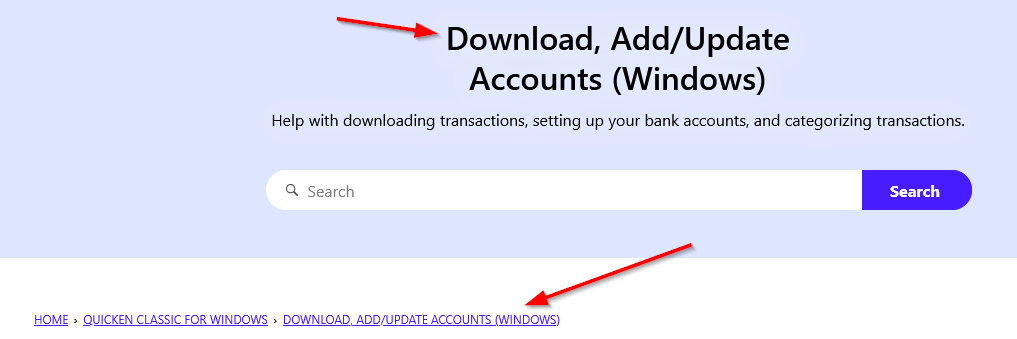
Once you are looking at a single thread, it looks like this:

-splasher using Q continuously since 1996
- Subscription Quicken - Win11 and QW2013 - Win11
-Questions? Check out the Quicken Windows FAQ list1


Answers
-
Hello @Helen Bacque,
Welcome to the Quicken Classic Community. If you have questions about Quicken Classic Deluxe, you're in the right place! There are currently two communities: the Quicken Classic Community and the Quicken Simplifi Community.
The easiest way to tell which community you are in is to check the URL (web address). The Quicken Simplifi Community has simplifimoney in the URL.

The Quicken Classic Community has quicken.com in the URL.

I hope this helps!
Quicken Kristina
Make sure to sign up for the email digest to see a round up of your top posts.
1 -
Hello @Helen Bacque,
Thanks for reaching out and welcome to the Quicken Classic Community!
In addition to what @Quicken Kristina mentioned, you’re already in the right Community, so you just want to post in the category that best matches the product you use. Here are direct links for each section under Quicken Classic:
You can also find more information and an overall introduction to the Community in this Community Training (FAQs) category.
The only product that has a completely separate Community site is Quicken Simplifi. If you’re using Simplifi, you can access that Community here.
Hope this helps!
-Quicken Anja
Make sure to sign up for the email digest to see a round up of your top posts.1 -
Thanks, Anja, very helpful.
I have one more question maybe you can help me with. If I click on the New Post button, I get two options: New Discussion or Ask a Question. What's the difference?
Using Office 365 on Windows 11
Looking for financial software to help manage my Vanguard portfolio
0 -
Thanks, Kristina. I find it just a bit off putting that there isn't a more obvious indication of which community and which section I'm in. How hard would it be to put a title at the top of the screen? I follow quite a few forums, and most of them make it very clear what section you're in so the users are not always posting things in the wrong place and then having to get redirected.
Using Office 365 on Windows 11
Looking for financial software to help manage my Vanguard portfolio
1 -
Here’s a quick way to think about it:
- Ask a Question – Use this when you have a specific question about how to do something in Quicken. The Community is designed so you’ll get notified if someone answers, and you can vote on answers to help others find the best solution.
- New Discussion – Use this if you want to start a conversation or share something related to Quicken without asking a direct question. Others can comment and discuss, but it’s not tied to a specific question-and-answer format.
For more detailed guidance, you can check out this Community FAQ.
Hope this helps clarify things!
-Quicken Anja
Make sure to sign up for the email digest to see a round up of your top posts.1 -
Thanks
Using Office 365 on Windows 11
Looking for financial software to help manage my Vanguard portfolio
1 -
You're welcome! Happy to help. 🙂
-Quicken Anja
Make sure to sign up for the email digest to see a round up of your top posts.0 -
Two things at the top of the screen tell you where you are in the forum:
Once you are looking at a single thread, it looks like this:
-splasher using Q continuously since 1996
- Subscription Quicken - Win11 and QW2013 - Win11
-Questions? Check out the Quicken Windows FAQ list1 -
Thanks, splasher. I just posted a question in the Quicken Classic forum. Now I see the headings you referenced. My first couple of posts were in the Community forum. The header for that section was a little confusing for me.
Using Office 365 on Windows 11
Looking for financial software to help manage my Vanguard portfolio
1 -
Thank you for your feedback,
I forwarded your feedback about the difficulty of knowing which Community you are in to our teams.
I can see @splasher already showed you how to tell which section of the Community you are in.
Thank you!
Quicken Kristina
Make sure to sign up for the email digest to see a round up of your top posts.
0 -
They aren't different forums, just different areas, just like a house (the forum) with a bunch of rooms (the categories).
-splasher using Q continuously since 1996
- Subscription Quicken - Win11 and QW2013 - Win11
-Questions? Check out the Quicken Windows FAQ list0

Categories
- All Categories
- 16 Product Ideas
- 34 Announcements
- 248 Alerts, Online Banking & Known Product Issues
- 20 Product Alerts
- 516 Welcome to the Community!
- 680 Before you Buy
- 1.5K Product Ideas
- 55.6K Quicken Classic for Windows
- 16.8K Quicken Classic for Mac
- 1K Quicken Mobile
- 834 Quicken on the Web
- 126 Quicken LifeHub