Quicken Classic - Poor performance with Investment accounts

I have Quicken Classic for Windows R63.21 and I am seeing very poor performance with my Investment accounts. I have 31 investment accounts (12 active accounts), it takes 21-24 sec to open an account and 20 sec to edit a transaction. The QDF file size is 189MB. I tried running Validate, no change. I have turned off Carbonite, and OneDrive is not installed. I have a Windows 11 machine with an Intel i7 at 1.8GHz, 16GB RAM and 500MB SSD. I have read a number of similar cases in Quicken Community, over a number of years. I did not see any definitive suggestions that that resolved this issue. Have there been any recent developments to address this ongoing problem?
Comments
-
Hello @Rich Gaughan,
Thanks for the detailed info! The large number of investment accounts and overall file size you're working with could definitely contribute to the performance issues you're seeing.
Since your situation aligns closely with known factors that impact Quicken’s performance, I recommend following the steps in this support article.
It covers scenarios like yours — slow account opening/editing, issues tied to investment data, and how to use the Archive Investment Transactions feature or perform Copy & Validate with Rebuild Lots and Repair price history selected, which may help improve things significantly.
Hope this helps!
-Quicken Anja
Make sure to sign up for the email digest to see a round up of your top posts.0 -
Thanks Anja, I'll check out that support article.
0 -
Anja, Sorry for the delay in responding, I had a health issue in the family. I have carried out the following steps:
- I ran ScanDisk following by Disk Defragmenter.
- I turned off Carbonite and DropBox, i removed OneDrive
- I verified that the QDF file was not saved in a compressed drive.
- I ran Validate & repair file, selecting Rebuild Lots and Correct investing price history: Repair.
- Checking an active Investment account it now takes 19 sec to open that account and 16-17 sec to edit an investment transaction. This is a very slight improvement over my previous results of 21-24 sec and 20 sec respectively.
- I carried out some tests on an investment account that has 11 investment transactions in total. Opening that account takes 6 sec and 5 seconds to edit an investment transaction.
I would expect that it should take 2-3 sec to open an account and 1-2 sec to edit a transaction. Currently the performance is nowhere near that. The response time appears directly related to the number of transactions in the account. Archiving transactions does not fix the underlying problem. The performance gets progressive worse as the number of transactions increase. The tool has become too time consuming to use. I am interested to hear how this problem can be resolved.
0 -
Thank you for following up with those details, and I'm sorry to hear about the family health issues!
Have you tried uninstalling/reinstalling Quicken? Please refer to the following support articles for instructions on uninstalling here and reinstalling here.
However, after you have uninstalled and before you proceed with reinstalling, please open your Windows File Explorer and navigate to This PC > C: Drive > Program Files (x86) and delete the folder titled "Quicken" (doing so does not affect your data files).

After you have deleted this folder, go ahead and try reinstalling.
Let us know how it goes!
-Quicken Anja
Make sure to sign up for the email digest to see a round up of your top posts.0 -
Hi Anja,
How exactly does uninstalling/reinstalling Quicken address the performance issue? Can you point me to a case (or cases) where it has made a positive impact?
Rich
0 -
@Rich Gaughan Uninstalling and reinstalling Quicken can sometimes resolve performance issues by clearing cached data, repairing corrupted program files, or resetting application settings that may be slowing things down. While we don’t have a formal case number to cite, many users have reported improved performance after performing a clean reinstall, especially if the program had been in use for a long period or after multiple updates.
Hope this clarifies things!
-Quicken Anja
Make sure to sign up for the email digest to see a round up of your top posts.0 -
I wonder if this will make any difference:
0 -
@Chris_QPW, thank you for threading me in.
@Rich Gaughan, the thread that Chris point you to will help if you are on 12th gen intel processor or newer.
@Quicken Anja I notice that the performance article suggests defragmenting the drive. It's my understanding that one should not defragment an SSD, as it will use up some of the lifetime write cycles without actually improving performance. I suggest that someone update the article so that it is clear that the defrag should not be run on SSDs.
Marc
1 -
Thanks for the feedback! I’ll pass this along internally to the appropriate team so they can review and update the article as needed.
-Quicken Anja
Make sure to sign up for the email digest to see a round up of your top posts.1 -
Hi Anja,
I uninstalled and reinstalled Quicken Classic (Release R63.21). My prior installation was dated 3/24/2018, now dated 8/31/2025. I did carefully follow the instructions in your message. I also disabled Carbonite and Dropbox. I checked in Settings that my CPU is set for performance (not energy efficiency). My laptop is always plugged in, it is not running in battery mode.
I am seeing no change in performance. I opened and closed an investment account with a lot of entries, it still is taking 19-20 sec, I measured this a number of times. The same is true of editing an investment transaction, that is still taking 16-17 sec. I tried that a number of times, that figure is very consistent.
@Chris_QPW : thanks for your CPU setting suggestion. I did verify my CPU is in Performance mode and the unit is AC powered.
Do you have any other suggestions?
Richard
0 -
Have you tried just to see if it makes a difference, (If it helps problem may be file as opposed to something on your computer/Quicken.)
File/Copy or Backup/Create a Copy or Template
This will do a record by record copy.
You can then see if that new file has the same delays. If it works better, the downside of this is you will need to re-establish all online connections for each Financial Institution. If it doesn't help just re-open your original file.
0 -
@Rich Gaughan Have you tried Archiving old positions in your investment accounts? This moves transactions, for which you no longer have an open position, to another account … and by reducing the size of the originating account(s) usually improves performance.
Archiving one of my retirement accounts reduced it's size by well over half, which helped considerably.
Take a backup, then within each active investment account click the GEAR icon in the upper right and "Archive Transactions"
After you've archived the 1st account, close Q, re-open Q and see if there's a performance change.
Q user since February, 1990. DOS Version 4
Now running Quicken Windows Subscription, Business & Personal
Retired "Certified Information Systems Auditor" & Bank Audit VP0 -
@NotACPA, Thanks for the suggestion. Sorry for the delay in responding, I am on the road. I did see that recommendation in another thread. It doesn't really address the performance issue. If I move transactions to an archived file, the account will eventually slow down as new transactions are added. As I pointed out accounts with only 11 transactions in total takes 6 sec to open and 5 sec to edit an investment transaction! I am adding over 50+ transactions a week.
Quicken performance deteriorates as the number of account transactions grow. Other users are reporting similar performance issues. Is this problem being addressed by Quicken?
0 -
Whenever a thread comes up with "performance problems" one of the first questions the SuperUsers ask is "is this in an investment account". The reason for this that it has always been true that there is performance problem in Quicken investment accounts for a large amount of transactions/securities/security lots (which implies that it gets worse as you add these). And when someone is generating lots of transactions, the next statement is usually "Quicken wasn't designed for frequent traders".
The workaround to move investment transactions to another account is all about a long-time user that has built up a lot of transactions, but most of them are in closed lots. Not for people that are going to just fill up the investment account in short order.
Without looking at the code one can't be sure where the bottleneck is. I have my own guesses, and I think it is in the GUI and in the recalculating of the security lots.
But the fundamental thing I take from something that has been this way for 30 years or more, is that whatever is the problem, it isn't a trivial fix, and I wouldn't expect it to be fixed, because clearly Quicken Inc and Intuit before them knew very well about this problem and they do have the code in front of them, and they haven't fixed it.
1 -
@miklk. Thank you for the suggestion. I routinely make backup copies of my Quicken accounts using the "create a complete backup" option. I have opened those backup QDF files and experienced similar performance delays.
0 -
Note that some performance problems are "undefined", as in for some users they have problems that no one can really pin down. Is the data file? Is it something on the machine? …
These are not directly related to this exact problem, but more the fact that Quicken seems to bring out the worst in a lot of cases.
And one thing that keeps coming up is that a "high performance machine" isn't the solution. Most of that extra performance is due to multi-core which Quicken doesn't make much use of (that would take a total redesign).
So, one problem is just in expectations. Quicken is never going to perform at the rate of some other programs that have been designed for such systems. But I will say that your times do look slower than what I would expect. For the same size or even larger investment accounts than what you described in your timings I can get faster results on my mini/slower machine, let alone my faster machine (a relative term, it is by no means "state of the art").
Machines that seem far slower have can have quicker Quicken performance if the "high power machine" has anything that "doesn't get along with Quicken".
0 -
@Chris _QPW Thank you for the detailed response. You make some interesting points about Quicken Classic performance. All those suggestions about disabling Backup apps, validating QDF files and reinstalling Quicken do not directly address the issue. Poor Investment account performance is inherent in Quicken SW architecture and cannot be resolved with a bug fix.
The Investment account performance problem is poor even for accounts with few transactions. I have one account that has 11 transactions in total since I created it in 2022. It takes 6 sec to open the account and 5 sec to edit a transaction! Those figures should be way less.
@Quicken Anja Does Quicken have any plans for a next generation product that addresses this issue?
1 -
@Rich Gaughan, what generation intel processor are you running? This can happen with 12th generation intel I7 processors, not just Ultra Core processors. I don't think you identified this anywhere in the thread, but my apologies if I missed it.
12th generation and newer have both performance and efficiency cores. If quicken gets assigned to an efficiency core, the performance is significantly degraded.
I checked in Settings that my CPU is set for performance (not energy efficiency)
My experience is that Quicken can be assigned to an efficiency core even if you configure the system for "Performance" mode…
Marc
0 -
@marcaronson408 my initial message stated that it is a "Windows 11 machine with an Intel i7 at 1.8GHz, 16GB RAM and 500MB SSD". It is a 8th Generation Intel processor, it is not a slow machine. @Chris_QPW pointed out that Quicken does not make much use of multi-core in any case.
0 -
Hi @Rich Gaughan, I did see that part about it being an I7, but I didn't see any reference to which generation.
The 8th generation intel I7s do not have "efficiency" cores, so, as you have already concluded, there is no issue of Quicken being assigned to a low-performance core.
Quicken does not make much use of multi-core in any case
Agreed, but it is worth nothing that the single core performance on the latest processors is much better than the 8th generation I7. Having said this, I agree that 8th gen processors are still very good.
FWIW, I recently upgraded from a 16GB 8th generation I7 to a 32GB 2nd generation Ultra Core processor, which if I am doing my counting right 😉, is about 6 generations newer. Once I figured out how to force Quicken to a performance core, I did find that things ran noticeably faster than they did on the 8th generation I7.
In any event, best of luck solving this issue. I know from experience that nailing down these performance issues can be quite a challenge. If I think of anything else, I'll let you know.
Marc
1 -
Thanks @marcaronson408, appreciate your feedback. If you get a chance I would be interested to know how long it is taking your Ultra Core processor to edit an investment transaction as well as opening an existing investment account.
0 -
Hi @Rich Gaughan, always happy to help out. Here are some timings:
- Quicken launch to quicken asking for my data file password: 2.5 seconds.
- Time from entering that password until quick is fully launched: 9.5 seconds
- Time to open a credit card account or checking account: 1-2 seconds. Typically 1.25
- Time to open an investment account: 1.5 - 3.5 seconds. Typically 2.0.
- Time to enter a "div" transaction: ~1.25 secs.
- Time to delete the "div" transaction: ~1.25 secs.
My registers go back to 1/1/2023 and have multiple transactions each month.
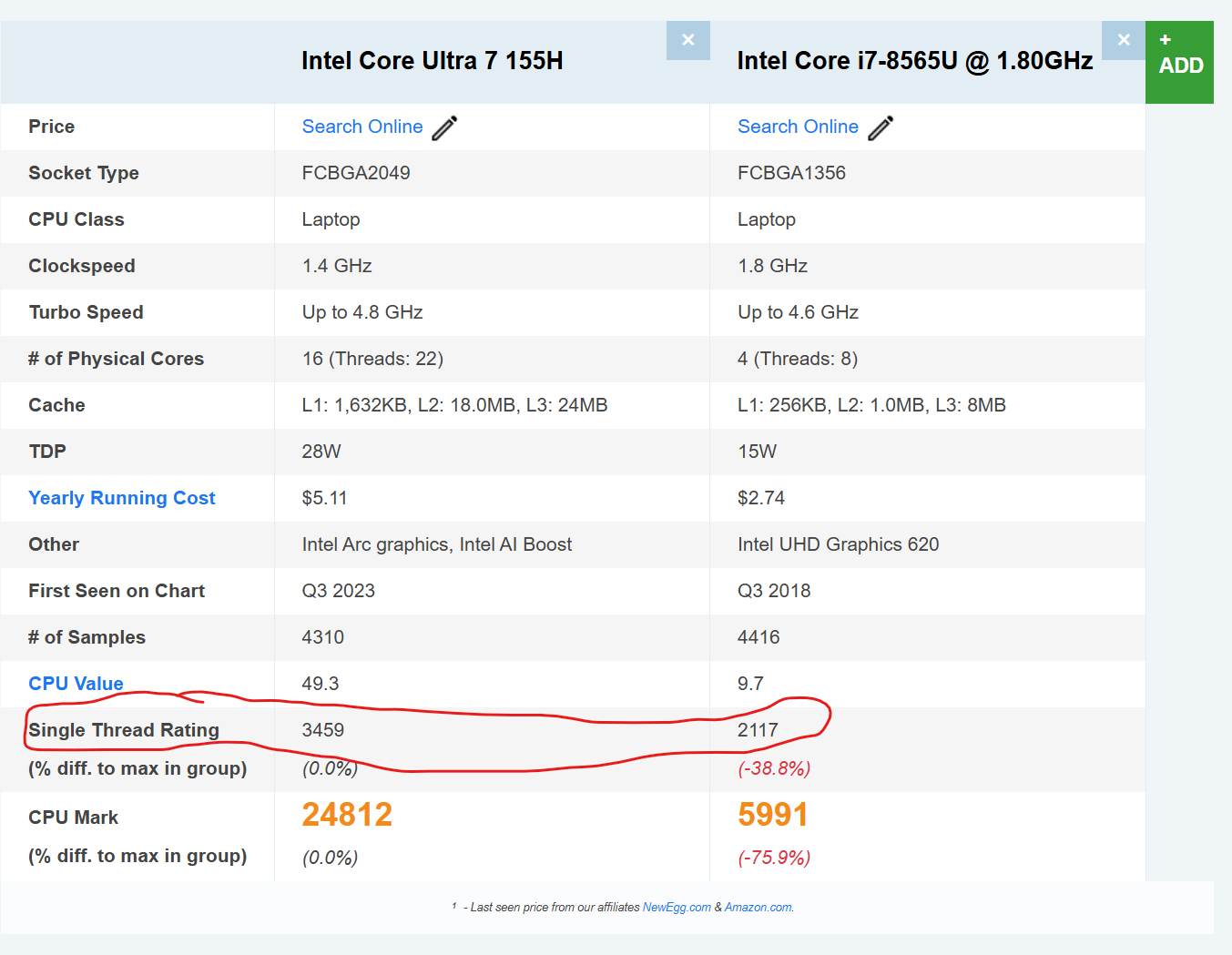
I've done some more research on the single-core performance difference between the core I7 8th generation and Ultra core 7 on Passmark — screenshot is below. The ultra core 7 has a 63% faster rating. The processors in the table below are the ones that are in the new LG GRAM 16 and my old Acer Swift 15.
I do wish that the Quicken team would investment more energy into improving performance, but I will also acknowledge that the new laptop made a world of difference and pushed things from being "barely acceptable" to being "pretty good".
Marc
 2
2 -
Thanks @marcaronson408, I had given up on this performance issue! This is really useful information. How exactly did you "force Quicken to a performance core?"
0 -
Hi @Rich Gaughan, happy to help out. See the 5th post on this thread:
Improve performance on 12th gen & newer Intel processors by using “CPU affinity” — Quicken
Here is an extract of the key information:
I am using "Process Lasso" and it works well for me. It clearly indicates which are the "Performance" cores and which are the "Efficiency" cores, per the screenshot below.Marc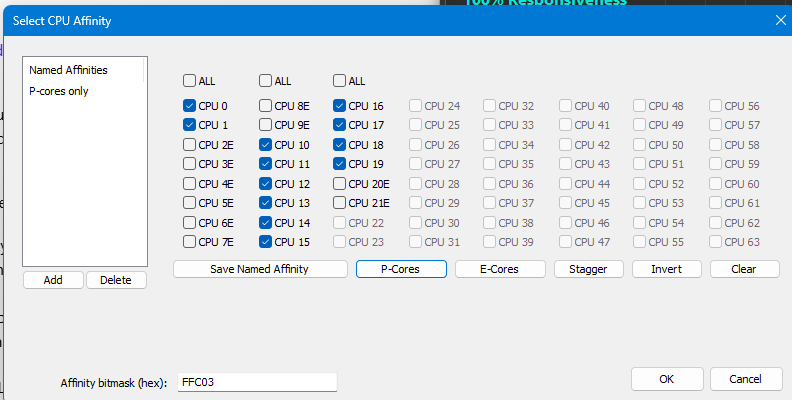 0
0 -
Thanks Marc, Good luck getting Quicken to utilize the Performance core feature!
0 -
@Rich Gaughan, did it work for you?
0 -
@marcaronson408 - I just wanted to update you. I have not yet taken the plunge to purchase a new Ultra core 7 machine!
0



