Investment >Account Overview Holdings Cash Balance Does not Equal Linked Cash Balance

Notes: I have done Validate and Super Validate because I notices some strange issues with Cash Balances on Investments - which are setup with Linked Cash Account Registers. I logged off and back on, which helped on some accts. I fixed all place holder entries which helped cash difference but still issue with one account.
I have reconciled the linked Cash Account - did a small balance adjustment to reconcile, but issue is the following:
Under Investment Register »Account Overview -
- Holdings has a line item Cash after the securities list (which does not agree to the Linked Cash account)
- Investment Register>Account Status - has a Security Value (which is correct), Cash Balance (is incorrect but on my it shows an amount that is actually the difference of Holding Line Item Cash and the Linked Investment Cash Acct (which is correct/reconciled).
Note sure how to fix this?
Comments
-
Hello @BRETTB,
Thanks for bringing this up!
I have just a few questions to help zero in on what’s going on:
- In the Investment Register, is the cash balance line showing as part of the investment account itself, or is it pulling directly from the linked cash account?
- Does the Account Overview > Holdings cash line match any cash entry in your transaction history, or is it showing something entirely separate from what’s in the register?
- Have you ever unlinked and then re-linked the cash account? If so, did the discrepancy start after that?
- If you go to Ctrl+Shift+E > Display Options for the account, is "Show cash in a checking account" still selected?
- Are there any lingering placeholder entries, either hidden or with zero shares, that might be affecting the displayed cash?
- When viewing the Account Status, does the incorrect cash balance change based on the date you’re viewing it (i.e. historical view), or is it static no matter what date is selected?
I look forward to your response!
-Quicken Jasmine
Make sure to sign up for the email digest to see a round-up of your top posts.
0 -
This doesn't line up with Mac Quicken Classic… same problem, the balance on my sidebar is spot on. But the Quicken balance is WAY off for some reason, it has three holdings, when there is only one holding… it shows cash, and something else…
0 -
Of course it doesn't. This is a QWin thread, and how QMac and QWin handle investments is very different.
I'd suggest that you re-post in the QMac forum of this website.
Q user since February, 1990. DOS Version 4
Now running Quicken Windows Subscription, Business & Personal
Retired "Certified Information Systems Auditor" & Bank Audit VP0 -
Update:
Note: I did backups and did try the unlink and then relink - WOW this procedure took hrs to do. After looking that at the link account that this procedure added a hugh cash opening balance when I only had a $0.00 amount before, I decided I did not trust it and put back my backup data that I had prior to do this procedure.In meantime, I did another super validate. My linked cash account is correct after a balance adjustment BUT ON the Linked Investment Register Account I'm off $1829.59 too high.
Looking at "Account Overview" for Investment Acct»"Holdings" shows the cash balance line after the list of securities as $1829.59 too high.
Looking at next section of "Account Overview" > "Account Status" shows "Cash Balance" line shows $1829.59 which is the amount I am off??? But not the correct cash balance amount (it's way off)
It shows also shows the linked Cash Acct which is correct.
- Are there any lingering placeholder entries, either hidden or with zero shares, that might be affecting the displayed cash? No I don't have that.
- When viewing the
Account Status, does the incorrect cash balance change based on the date you’re viewing it (i.e. historical view), or is it static no matter what date is selected? On "Account Status" cash balance line does not change - stays on the $1829.59 amount above. On the Holdings screen - after the list of securities the cash balance line there will change when I change the "As of date"
Not sure how to fix. I tried to make an entry misc expense entry but it changes the amount on the linked cash account??
Hope you can help or maybe there is a bug?
0 -
Thank you for the update @BRETTB,
Since there is a linked cash account, trying to adjust cash will make adjustments to that linked account. It is strange that the cash reflecting there doesn't match though. It sounds like you've already done quite a bit of validating and that did not resolve the issue.
Just in case something got out of sync between the linked cash account and the investment account, please try backing up your file, then navigating to Tools>Account List and clicking the Edit button next to the problem account. On the General tab, where it gives the option to use a linked checking account, try turning that option off, so that it has to consolidate everything into the investment account. Then, turn the option back on, and test to see if that corrects the issue.
Please let me know how it goes!
Quicken Kristina
Make sure to sign up for the email digest to see a round up of your top posts.
0 -
I did that as I mentioned but not sure what happed but it gave a hugh opening balance on the linked cash account while on original data had a 0 opening balance. It's as if it lost something and plugged in this huge amount to fix issue. I did not like that since I'm off only $1829.59 and have a extremely a large number of transactions with covered calls and don't want to have to try to track that down.
Wish there was a way to adjust the investment cash balance or the linked cash balance without affecting the other (like a one sided adjustment)?
Is there a way to do that?0 -
Thank you for your reply,
Honestly, the only way I can think of to do that is to consolidate it all into the investment account, make any necessary adjustments, then split it into the linked cash account again. If you've already tried that and it didn't work, then I suspect the issue may be something specific to your account or to that file.
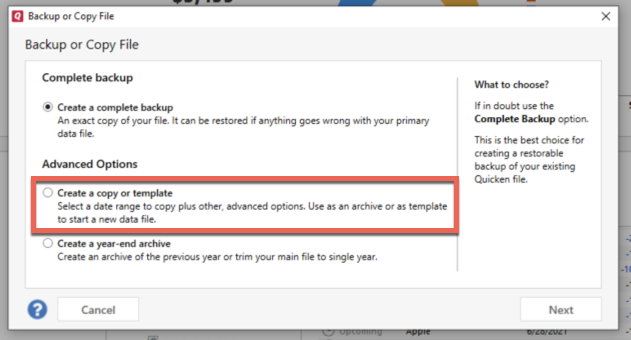
If you haven't already done so, please try creating a copy of your data file. Doing this will rebuild all of the internal lists and database tables. If successful, you would then move forward with the copied file. To create a copy, please navigate to File > Copy or Backup File... > Create a copy or template (see examples below) which will also allow you to select a date range to move forward with.
If you wish to move forward with your entire data file, please check the full date range of your entire data file before copying so you can enter the correct date range if you do not wish to "shrink" your file by eliminating certain dates. Note - The only reason to "shrink" a file is if you suspect older data is causing the problem.
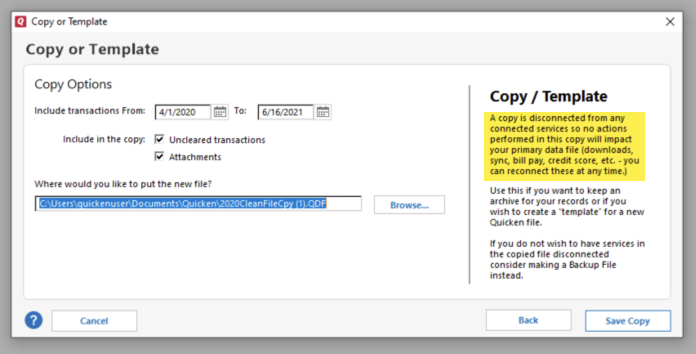
It's important to know that all online services will be disconnected in the copied file, and you will need to sign back in with your Quicken ID and reconnect all of your online accounts, online billers, Quicken Bill Manager services, etc if you plan to use that copied file going forward. The reason for this is that the new copy also creates a new and separate dataset ID.
Test to see if the issue is resolved before connecting your accounts. If the issue is resolved, then I'd recommend connecting your accounts as using the copied file going forward.
If the issue is not resolved in the copied file either, then feel free to switch back to your original file. For instructions on switching between files, please see the How to alternate between multiple files section of this article:
I hope this helps!
Quicken Kristina
Make sure to sign up for the email digest to see a round up of your top posts.
0 -
Hi Kristina
I created the copy of databae and let it rebuild. After it was done, I looked at the account in question and there was no change in the cash balances on accounts in question.
I'm going back to the old file because what's the point?1 -
Thank you for your reply,
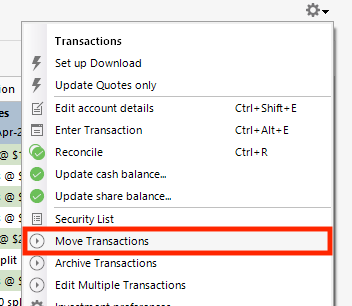
Since creating a copy did not correct the issue, just in case the issue is being caused be a problem specific to the impacted accounts in your Quicken file, please try making a backup of your file, deactivating the problem accounts (if they're connected), then navigating to Tools>Add Account and adding the accounts as new accounts rather than linking to the existing. Once the problem accounts are added as new, test to see if they are behaving properly. If they are, then you can copy your historical transactions from the original accounts to the newly added accounts by using the gear icon near the upper right of the register, and selecting the Move Transactions option.
Thank you!
Quicken Kristina
Make sure to sign up for the email digest to see a round up of your top posts.
0 -
Ok will look at this again over the weekend.
I have a lot of linked accounts and it would not be a simple task to reset up connections to online portals.
Thanks
0 -
Thank you for the update,
If it's easier, you may want to test with one account first, then if it works, follow the same process with the rest.
Please let me know how it goes!
Quicken Kristina
Make sure to sign up for the email digest to see a round up of your top posts.
0


