How to turn off the automatic categorization of downloaded transactions (Q Mac)

How do I make it so Quicken will stop automatically adding payee/category/tag/memo/etc data to my downloaded transactions?
This topic has been brought up multiple times in recent years in both the Mac and Windows forum, but seems to always either receive a vague answer that doesn't address (or even acknowledge) the issue or seems to be completely misunderstood by the moderator/support team.
As simple as I can put it, in my mind, if I have the box UNCHECKED for "Automatically categorize transactions" in Settings > Connected Services > Downloaded transactions, then *all data* downloaded from the financial institution should come in completely *unmodified*, with the payee exactly as supplied by the financial institution, the category as "Uncategorized", and all the other fields blank (including tags, memo, transfers, and so on).
Many of the threads reference the fact that Quicken "ignoring" the "Automatically categorize transactions" checkbox is an issue that only affects a certain number of users. To me, this is clear acknowledgment that some type of bug exists, but there seems to be no effort being put in to fixing the issue.
Having Quicken automatically apply data from my QuickFill transactions, the Payee list, or some other random place makes it very difficult for me to determine which transactions I have addressed. Just to be clear, I'm aware of the "blue dot" "feature" to designate the review status, but this does not allow me to sort by "Uncategorized" to quickly enter details for all transactions that need to be reviewed.
Right now, after every download, I multi-select all the newly downloaded transactions and then edit all the categories to "Uncategorized" and make all the other fields blank, then revert all the transactions to the downloaded payee name.
Having to do this every time I download transactions is a profound waste of my time when remedying the faulty check box in Quicken would fix the issue.
Please help.
Comments
-
Hello @smali,
Thank you for reaching out to the Community with this issue again. It looks like the last time you brought up this issue, other users did point out that you can configure the blue dots to reliably highlight transactions you have not yet reviewed:
Our help article on the Automatically Improve the Quality of Downloaded Payee Names and Categories feature does not specify if turning it off prevents Quicken from making any changes. It just states that having it on allows Quicken to clean up the downloaded data:
I reached out to our teams for clarification whether this is working as intended or not. In the meantime, I can see that you created an Idea post requesting the ability to completely block Quicken from making any changes to downloaded transactions.
If anyone else would also like to see this functionality added, please add your vote and a comment to the Idea post (linked below):
I hope this helps!
(CBT-793)
Quicken Kristina
Make sure to sign up for the email digest to see a round up of your top posts.
0 -
Looking through these forums, I'm not the only one who is bothered by this issue.
I would be interested to see what clarification you are able to obtian.
0 -
For what it is worth, this is possible in Quicken Windows.
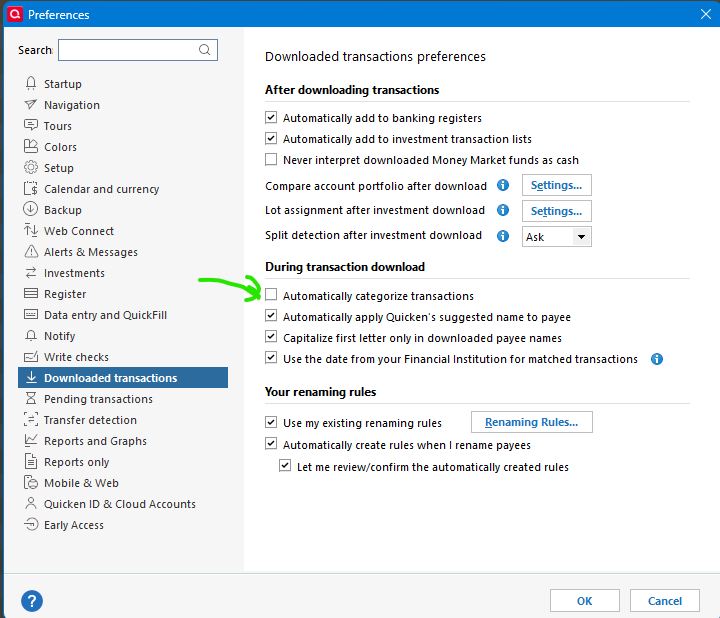
I can certainly say that if I was using Quicken Mac and this didn't work, it would drive me nuts!
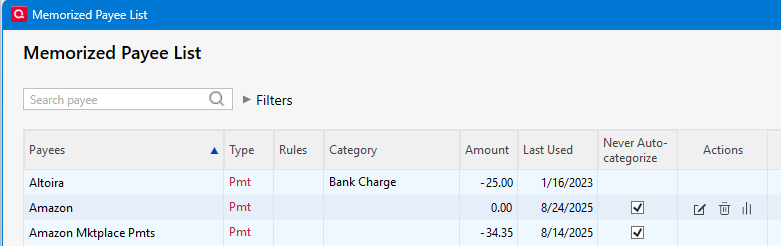
A blank category is exactly how I find new payees that I haven't yet memorized (they are called memorized payees in Quicken Windows which are about the same as QuckFill in Quicken Mac). I also have a memorized payee for Amazon that has the Never Auto-categorize flag on because I have to manually enter the category because it can't tell what category to give it based on just that payee name.
 0
0 -
I appreciate your acknowledgement regarding how frustrating the uncontrollable automatic categorization is for me.
I've been a Mac user since the early 1990s and can honestly say that there aren't many times I've been jealous of Windows. However, your screenshot of the preference settings available in Windows Quicken sure makes me realized how lacking the Mac version is-even after all the promises that Quicken (and Intuit before that) has made over the years that the gap between the two platforms would be narrowed.
I can only imagine how powerful Quicken Mac would be if it had even half the settings/features I can see on just the single pane shown on your screenshot.
0 -
Having Quicken automatically apply data from my QuickFill transactions, the Payee list, or some other random place makes it very difficult for me to determine which transactions I have addressed.
If you have QuickFill rules, then it is functioning as it should. That is, QuickFill rules exist specifically to apply categories (and possibly other fields) to downloaded transactions. If you want to “turn off” that behavior, you need to delete all your QuickFill rules, and make sure your Settings are set not to automatically create QuickFill rules.
The Setting for “Automatically improve…” applies to Payees which do not have QuickFill rules.
Here’s a simple test you could try… Create a new test file, set the “Automatically improve…” setting to be unchecked, and then set up one of your accounts like a credit card or checking account. It will download your recent transactions, and with no QuickFill rules and the “Automatically improve…” setting off, the transactions should come in uncategorized. Do they?
this does not allow me to sort by "Uncategorized" to quickly enter details for all transactions that need to be reviewed.
Are you aware of the Dashboard card for uncategorized transactions? This is a fast way to review and categorize uncategorized transactions.
Quicken Mac Subscription • Quicken user since 19930 -
This is exactly what I'm talking about when I say the issue seems to be misunderstood by the moderator/support team.
I'll try to be more clear.
QuickFill is a great tool that I really enjoy when I'm *manually* entering data. I just don't want the QuickFill data automatically applied to every transaction that I download.
Here's a simplistic example: when I go to the grocery store and all I buy is groceries, which is 99% of the time, I can type the first portion of the grocery store's name and QuickFill completes the rest of the payee name as well as entering "Groceries" as the category and the memo.
This is a phenomenally useful feature-especially for more complex common purchases such as some common recurring business expenses that require multiple splits, but are not predictable enough to set up a recurring transaction.
However, when I go to that same grocery store and buy flowers for my wife as well as some groceries, I want to split the transactions into one line for groceries and the other for the flowers. The problem is that, regardless of the settings I select, when I download all my transactions, all transactions from that grocery store automatically populate with "Groceries" as the category and "Groceries" in the memo. Unless I can somehow remember the "code of the blue dots" that's remained a mystery to me for the last two decades despite my best efforts, I have no way of knowing that this transaction was automatically populated versus my having entered it.
The same thing happens in many instances. Occasionally I buy groceries at the gas station mini-mart and I don't want it to download every transaction at that gas station to be categorized as being only fuel. The Warehouse Club? I certainly don't want that automatically QuickFilled every time I download-I buy different things each time. Car repairs? Why does Quicken show I got the muffler bearings replaced three times this year? Oh…it's because Quicken automatically applied the same transaction details from when I got them replaced last year to each transaction this year when I got my oil changed.
The automatic application of QuickFill transactions makes it easy for me to not realize that this transaction has been automatically populated and, if I run a report on groceries for that month, the numbers will be inaccurate because a certain portion of the total was actually flowers.
For my personal workflow (and, based on the other posts in this forum, many others, too), having transactions download with the financial institution's default payee name, "Uncategorized" as the category, and all other fields blank makes it easy for me to identify which transactions I still need to deal with and allows me to run a report (or filter) to show just those transactions. For me, this makes reconciliation of receipts/invoices and any needed manual data entry much easier and faster. It also doesn't mess up the reports I run.
Basically, in my mind, QuickFill and the automatic application of payee name/category/memo/etc are each very valuable tools, but each has it's own distinct benefits and drawbacks that vary depending on each user's workflow. As such, they should be two distinctly separate options and be able to be turned on and off independently. Just because I have something saved from a past transaction doesn't mean I want it automatically applied to all future transactions.
Why can't we have the option to have QuickFill continue to work as it does for transactions I'm *manually* entering and then have a checkbox in the settings that turns on/off the automatic application of QuickFill data for newly downloaded transactions?
This is how Quicken worked back in the day (Quicken Mac 2007 or so through just a few years ago) and, based on what @Chris_QPW said above, is how Windows works now.
Honestly, I don't understand why this is so confusing.
0 -
Why can't we have the option to have QuickFill continue to work as it does for transactions I'm manually entering and then have a checkbox in the settings that turns on/off the automatic application of QuickFill data for newly downloaded transactions?
I suppose that could be possible; I just don't know if it would be very useful to a lot of users. You explain well circumstances where you don't want a QuickFill rule applied (e.g. buying flowers at a gas station), and I get it. But if you were able to turn application of QuickFill rules off for downloaded transactions, it would mean that in order to catch the exceptions, you'd be turning off the feature for the majority of transactions where you'd actually want the rule to apply (e.g. buying groceries at a grocery store). You're saying that you'd prefer to have no auto-categorization, even though 90% might be categorized correctly and only 10% would warrant changes.
And this is where I think utilizing the blue dots should solve your problem. I don't know what "code of blue dots" befuddles you, because I find them very straightforward. When transactions download, they have blue dots to indicate they have not been reviewed, or a blue pencil if they were downloaded and auto-matched to a manual transaction. Click on a blue dot/pencil and select Reviewed if you determine the transaction is okay, or you edit it to be okay, and the blue dot/pencil goes away. If you make a transaction as reviewed and realize you din't want to, or you need to come back to it (say to create a split), Control-click the transaction and select Set Status of Selected Transaction to Not Reviewed — and the blue dot/pencil returns. Maybe you can explain how this workflow of marking downloaded transactions as reviewed doesn't work for you.
I don't see most users wanting the functionality you've described for the reason I cited, and therefore don't know how likely it is for the developers to tackle it as a new feature — but you could create a new Idea post to request such a feature in the Product Ideas section of this forum. If enough other Quicken Mac users vote for it, the request will get forwarded to the developers for consideration.
Quicken Mac Subscription • Quicken user since 19930 -
OK, I also misunderstood the use case. It works the same way with Quicken Windows. If you have a memorized payee (which would be the equivalent of the QuickFill) it is used for both manual entry and downloading of transactions.
At times I have wondered about the fact there isn't a different list or some way to separate them like an option on each. But since I almost never manually enter anything, it certainly hasn't been on my list, and I don't see anyone requesting it.
Note that the "Never Auto-categorize" option on the individual memorized payee applies to both manual entry and downloaded transactions that match that payee. And the global "Automatically categorize transactions" is Quicken's guess at the category if the downloaded transaction hasn't matched a memorized payee.
I also almost never override categories since I like simplicity over accuracy. For instance, it would have to be a pretty large "off category" purchase for me change it from my primary category. I tend to remember these and like @jacobs change it while I'm reviewing the transactions. I think if I was going to make a regular practice of it I would manually enter these exceptions and then matching transactions would take care of it. Or it falls into my "always manually enter category" for instance, Check and Amazon, never get a category because the payee's name simply doesn't "translate" into a given category.
The situation I thought you were referring to was say like you got a new payee, and Quicken gave it a category, I want that one to be blank, not a guess that Quicken makes. And what I do is give the new payee and category and memorize that as a rule for the future.
0 -
BTW I just remembered a quirk in Quicken Windows. If you deselect the filling in of the category/other information while doing manual entry, it will still fill in the information for a matching downloaded transaction. So, it is exactly backwards from what you want.
0


