Fidelity EWC+ Account Switches to Simple Tracking after switching to DC

I was looking at this thread
I have a similar issue when switching back from EWC+ to DC with Fidelity Investments and NetBenefits which I am trying to do because of the failed migration to EWC+
When switching back to DC (zzz-Fidelity Investments DC and zzz-Fidelity NetBenefits), it switches the accounts to Simple Tracking and, as with the referred thread, incorrectly states that the account is using EWC and that this is why Complete Tracking can't be used. The only way to get Complete Tracking back are to deactivate and enter transactions manually, or to make a template copy, which does allow Complete Tracking with the same accounts, but that requires reactivating all my accounts.
Why does Quicken say the account is being managed using EWC when it says in Account Details that it's Direct Connect?
Quicken H&B Subscription
Comments
-
Hello @BarryGraham,
Thank you for sharing your experience. Did you get back onto Direct Connect by restoring a backup from before your accounts were migrated to Express Web Connect+? If not, what process did you use to force Quicken to reconnect to zzz-Fidelity Investments DC and zzz-Fidelity NetBenefits?
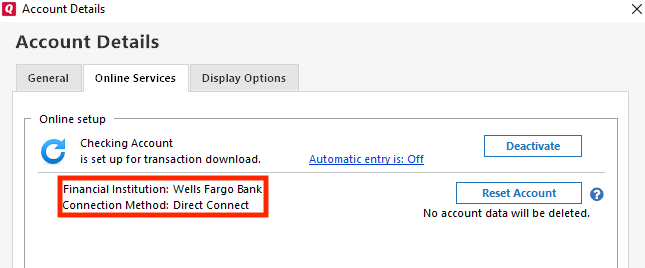
When you navigate to Tools>Account List, click the Edit button next to one of the problem accounts, then click the Online Services tab, what financial institution and connection method does it show there?
I look forward to your response!
Quicken Kristina
Make sure to sign up for the email digest to see a round up of your top posts.
0 -
@Quicken Kristina since I didn't discover the issue with EWC+ until I had entered too many transactions in other accounts to make it viable to restore a backup that had DC, I had to do it another way. Restoring from a backup at this stage is not an option, it would take half a day of work at least to re-enter all the new transactions correctly since you can't just accept downloaded transactions without deciding how to handle each one.
I described this in the zzz thread and this issue is already known there. The way I restored DC was by deactivating the accounts and replacing the Financial Institution on tab 1 of account details with "zzz-Fidelity Investments - DC" for the brokerage accounts and "zzz-Fidelity NetBenefits - DC" for the 401k. I then reactivated them. They did switch to DC and they showed "zzz-Fidelity Investments - DC" or "zzz-Fidelity NetBenefits" as the Financial Institution and "Direct Connect" as the connection method.
Barry Graham
Quicken H&B Subscription0 -
@BarryGraham I think the FI name you must type in to restore the DC connection to Fidelity brokerage account is "zzz-Fidelity Investments - DC"
with a space before and after the second dash. Could you check this please?
QWin Premier subscription0 -
-
I posted a solution to this in another thread. Here it is. I figured this out with the help of @Boatnmaniac and @geoffj
Here is a way that doesn't require making a Template copy of your file and therefore doesn't require setting up download for all your accounts and doesn't break Vanguard.
(1) If you have Brokerage accounts create a new manually tracked account (call it anything, say "TempBrokerage"). You will need to complete the dialog. Since this account will be deleted later it doesn't need to be perfect.
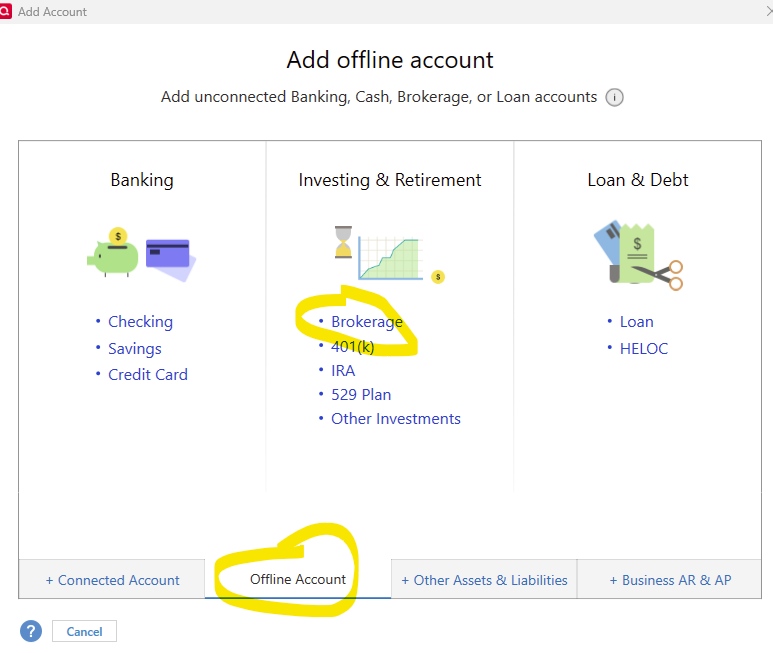
(2) If you have 401k accounts create a new manually tracked account (call it, say, Temp401k), using the same method but selecting "401k" instead of "Brokerage" on the screen above. You will need to complete the dialog. Since this account will be deleted later it doesn't need to be perfect.
(3) Go to the Account details of each of these.
(4) For the new Brokerage account on tab one type "zzz-Fidelity Investments - DC" for the financial institution and for the 401k account type "zzz-Fidelity NetBenefits".
(5) For each of the affected accounts, deactivate the account then on the first tab of "Account Details" blank out "Fidelity Investments" and click "OK" to close Account Details.
(6) On each of the new manual Brokerage and 401k accounts, go to Account Details, go to the second tab and click on "Set up Now"
(7) Connect to Fidelity and when it shows you the accounts, select the "Link to Existing account" option and link it to the right account (you will need to make sure you know the account numbers from logging in to the website - and you can hover over the account name in the menu that asks you to match accounts, in order to see the account number
(8) This will result in the accounts being set up or DC, with complete tracking - and won't break any other accounts. You can now delete the TempBrokerage and Temp401k accounts that you created earlier since you don't need them anymore.
(9) Backup your file then Super validate the file using CTRL+SHIFT+File>Validate and Repair File, select the box shown and press OK -then wait a few minutes.
 Barry Graham
Quicken H&B Subscription2 -
What about IRA and ROTH accounts, I have one brokerage, one IRA and 3 Roths at Fidelity.
I am missing all of Aug transactions in my ROTHs, will this solution bring all those transaction back?
Is this workaround approved by Quicken or will they provide a full fix and avoid a whole lot of customers having to do this extra work.
"No Matter Where You Go, There You Are"Windows 11 Pro, Quicken SubscriptionIntel Core i7-12700, 32GB Ram0 -
At this point you are better off waiting for the fixes, rather than doing all this extra work. As a result of my posting this, Quicken published more detailed information on their plans to fix the issues and asked me to encourage people to wait for the fixes rather than doing what I showed how to do above.
Barry Graham
Quicken H&B Subscription0 -
Thanks for the response….
Guess I will wait, but a month of missing Fidelity transactions does not feel good.
Thanks for your help.
"No Matter Where You Go, There You Are"Windows 11 Pro, Quicken SubscriptionIntel Core i7-12700, 32GB Ram0 -
Hello @Movie Nut,
Unfortunately, missing transactions is currently one of the known issues that our teams are working to resolve. If you haven't already done so, I recommend bookmarking the Community Alert linked below to be notified of any updates, once available, and to know when the issue is resolved:
Thank you!
Quicken Kristina
Make sure to sign up for the email digest to see a round up of your top posts.
0 -
Thanks, I have bookmarked the suggested alert.
My concern and question is I am missing all of Aug transactions (over 50) in 4 Fidelity accounts (Brokerage, IRA, and 2 Roths).
Will these and any ongoing transactions be applied once a fix is found. I am sure you and Fidelity are getting lots of ugly customer feedback, and while I am NOT happy about this serious and ongoing issue, if a full fix and reinstatement of all missing transactions is provided, I will avoid any ugly comments.
But, these kind of changes MUST be better tested going forward. We customers have been very content and trustful of the Direct Connect method and this change to EWC+ casts doubt on other institutions that have transitioned from DC to EWC.
"No Matter Where You Go, There You Are"Windows 11 Pro, Quicken SubscriptionIntel Core i7-12700, 32GB Ram0 -
But, these kind of changes MUST be better tested going forward. We customers have been very content and trustful of the Direct Connect method and this change to EWC+ casts doubt on other institutions that have transitioned from DC to EWC.
When I think back to the very first transition to Express Web Connect + with Charles Schwab I remember month(s) long threads of the problems. (I personally have only gone through this with Chase and Citi Cards; this is just looking that the thread on here).
Every one of these seems to have a month or more of problems (Chase did). My rough guess is that it is getting "slightly better", but that is about it.
0 -
[Removed - Off Topic]
0 -
Thank you for your reply @Movie Nut,
Most financial institutions make the last 90 days of history available for download. Assuming that the issue with transactions not downloading is corrected before your August transactions are more than 90 days in the past, I would expect that they should download into your Quicken.
Thank you!
Quicken Kristina
Make sure to sign up for the email digest to see a round up of your top posts.
1 -
Chris just mentioned Citi so I think it was on topic.
0 -
Sooooo, Quality Control and testing procedures didn't learn from Schwab and Chase EWC+ cutovers. To paraphrase Meatloaf from album "Bat out of He!!", "Two out Three ain't bad", BUT THREE OUT OF THREE is BAD.
Just Sayin.🤐
"No Matter Where You Go, There You Are"Windows 11 Pro, Quicken SubscriptionIntel Core i7-12700, 32GB Ram0




