Fidelity CD Pricing Dowload Completely Wrong

For several months now, the Fidelity download of CD prices has been completely wrong. When transactions originally downloaded when purchased months or years ago, all prices were 100.xxx. They have successfully downloaded for years and then suddenly began downloading as 1.00xxx. Obviously, this make entire account balances wrong. I called in August and was told it would be fixed by August 20, 2025. I checked as recently as today (Sept. 9, 2025) and all CD prices are still downloaded wrong. Another call to Customer Support yielded no resolution - just a "please wait" and enter all transactions manually in the meantime. No estimate of resolution available.
- Why is it taking so long to fix?
- Why doesn't Quicken / Fidelity just revert back to the sofware method that worked correctly until they are able to program new version correctly? Releasing defective software to customers is not acceptable.
Answers
-
Hello @DavidS,
Thank you for reaching out and sharing the details of your experience. I completely understand how frustrating it must be to see your Fidelity CD prices downloading incorrectly, especially after previously downloading accurately for years.
I wanted to provide you with the latest update from our ongoing Fidelity issue alert:
- Incorrect CD Balances: This is a known issue affecting some Fidelity accounts where CDs show the correct total value, but the individual share/price details are wrong.
- Status: A fix is scheduled.
- Workaround: You can manually update the prices in Portfolio view to reflect the correct values; however, note that they may revert on the next download.
Our teams are actively working on a permanent resolution. While I don’t have an exact ETA beyond what’s already scheduled, staying connected via Express Web Connect+ is currently the best approach, and we will continue to provide updates as fixes go live. You can bookmark the ongoing Community Alert to be notified immediately when the issue is resolved.
I completely understand your concerns regarding releasing software with known issues, and your feedback is valued. We appreciate your patience while we work to restore full accuracy for all affected accounts.
Thank you for your understanding, and we’ll continue monitoring this closely!
-Quicken Anja
Make sure to sign up for the email digest to see a round up of your top posts.0 -
@Quicken Anja what is the timeline for getting this issue with Fidelity downloads resolved? This is extremely frustrating.
0 -
Hello @Lars88,
Thanks for reaching out, and I completely understand your frustration!
At this time, our product development teams have not provided an ETA for when the Fidelity CD download issue will be fully resolved. I realize that’s not the news you were hoping for, but please know this is a priority issue and is being actively worked on.
In the meantime, the best workaround is still to manually adjust CD prices in the Portfolio view as needed, though I know this isn’t ideal. We’ll continue to post updates in the Community Alert as soon as new information or fixes become available, so I recommend bookmarking that thread if you haven’t already.
Thank you for your patience while we work through this with Fidelity.
-Quicken Anja
Make sure to sign up for the email digest to see a round up of your top posts.0 -
Why can't you just revert back to the software version that worked until new version is corrected and tested properly. I have about 60 CD's and it's virtually impossible to manually adjust the price on each one only to have them all revert to wrong prices every time I download Fidelity transactions. Not a good workaround.
0 -
@DavidS I understand how this can be frustrating, especially with the number of CDs you’re managing. Unfortunately, once an account is migrated to Express Web Connect+ (EWC+), reverting it back to the previous Direct Connect method is not an option. This is because the connectivity method is controlled by the financial institution and our service provider.
We recognize that the workaround of manually updating each CD price isn’t practical for larger portfolios. While we don’t have a faster solution to offer at this time, this issue remains a high priority for our teams, and we’ll continue to provide updates in the Community Alert as soon as progress is made.
Thank you again for your patience while we work with Fidelity toward a permanent resolution.
-Quicken Anja
Make sure to sign up for the email digest to see a round up of your top posts.0 -
@DavidS - Do you have a backup file dated prior to when your Fidelity accounts were migrated to EWC+? If you don't know when that occurred, then you might need to see what backup file(s) you might have that are dated prior to 7/29…so 7/28 or before, the closer to 7/28 the better.
If so, make a backup of your current primary data file first, then you could try restoring that backup file. Your DC connection with Fidelity should still be intact and functional so you should be able to download all transactions for Fidelity using DC.
However, you should note a few things:
- There is a possibility that a couple of weeks of Fidelity transactions might not download since Fidelity sometimes downloads only the last 30 days of transactions. If there are missing transactions, then they will need to be manually added.
- Some or all of your EWC and non-Fidelity EWC+ connections might need to be set up, again.
- It is suggested that you first enter and save the Opening Balance transaction dollar amounts for all EWC accounts and all EWC+ non-investment accounts into the Memo fields of those transactions. Doing can help to easily resolve any issues that occur should the reconnection process change the opening balance dollar amounts.
- In EWC and EWC+ reconnected accounts: If the account balance is not correct, check and correct the Opening Balance dollar amount as needed. If account balance issues are not resolved, then scroll backward through the register looking for and deleting any newly downloaded duplicate transactions you might find. If there are duplicate transactions, they will most likely occur within the last 90 days.
- Restoring a backup file will not include any manual updates you did to your data file after the date of the backup file. Those will need to be manually done, again.
It can be a fairly time consuming process if you have a lot of accounts and if you did a lot of manual updates. But when done you will have a DC connection for Fidelity that provides good downloaded data until such time that Fidelity forces us all to switch over to EWC+ (which hopefully will not happen until all of the current EWC+ issues are resolved).
If the restored backup file does not produce the desired results, then you can restore the backup file you saved earlier and all will be as it was before restoring the older backup file.
9/12/2025 EDIT: If you do what is suggested in this post, you might get a popup during OSU to reauthorize your Fidelity account(s). DO NOT click on/accept that prompt as it will change your account(s) from DC to EWC+, again. Instead in the bottom right corner of that prompt click on the link that says "Remind me later." That will then allow the OSU connection to remain with DC…at least until Fidelity/Quicken force us to reauthorize to EWC+ which hopefully will not happen until after the many Fidelity EWC+ downloading issues are fully resolved.
Quicken Classic Premier (US) Subscription: R66.23 on Windows 11 Home
1 -
I don't have a Fidelity account with CDs so I can't confirm this, but you should be able to stop the incorrect prices from downloading as follows:
- In your Fidelity account, click on Holdings and for each CD that has an incorrect price, set the price to the correct value, typically about $100.00.
- Click on the security name to open the Security Detail view.
- Click on Edit Details then Other Info
- In the Additional Security Information box that opens, check the "Ignore prices from broker download" box.
- Repeat with the remaining CDs.
This should stop incorrect prices from being downloaded for these securities going forward. Quicken will continue to use the most recent price it has. If you need to correct earlier incorrect prices, you can do it by going to the Security Detail view as above and clicking on More then Edit Price history.
Please let us know if this procedure stops the incorrect price downloads for you.
The actions you will need to take when the pricing problem is eventually resolved depend on what Quicken and Fidelity do to correct this problem. If that involves reverting the prices to the $100 range, all you will need to do will be to un-check the "Ignore prices from broker download" box. If the solution is to go forward with prices in the $1.00 range, there should be further instructions on how to proceed.
QWin Premier subscription0 -
That is a good suggestion, @Jim_Harman. But the pricing and shares issue for brokered CDs is just 1 issue with Fidelity's EWC+ and there are still many more to be resolved. Because of that I cannot in good conscience recommend to anyone to stay with Fidelity's EWC+ connection if they have a viable means to get back to a DC connection.
@DavidS - I added an additional comment to my post above. It is in bold italics. You might want to view it.
Quicken Classic Premier (US) Subscription: R66.23 on Windows 11 Home
0 -
Yesterday, I updated my Quicken from r63.20 to r64.25. The first thing it asked me to do when I started Quicken after the update, was to switch to the new connection method for Fidelity Investments. I had been delaying both of these changes because Quicken has a long history of breaking things with updates and I was seeing issues reported in this community with both updates (I typically wait to see what is reported in the community before accepting updates). After applying these updates, I started running into this problem of wrong CD prices being added to the price history for Fidelity Investments.
Personally, I usually hold my CDs to maturity, so I've always thought about going back and doing what @Jim_Harman recommended (changing the price to 100.000 and then preventing new prices from downloading for that CD, so that Quicken basically uses the maturity value rather than the current price it could sell for today). I will probably do that now since I don't want to have to keep fixing price history every day. However, price history is still necessary for some CDs. It would be nice to have a feature in Quicken that allows price history to continuously come down for the CDs but allows you to override it with a maturity price (like an additional $ box on the security details of the CD allowing you to put in an override price that gets used in reporting and balance totals, instead of using the latest price in the price history). Just a thought.
As far as the likelihood of this getting fixed soon, I wouldn't hold my breath if this issue is impacting you. I have been waiting since April to get an issue with passwords being exposed in plain text for Sallie Mae connections (Adding Sallie Mae Account Is Still Broken — Quicken), and even though that is a clear security issue they still have not fixed that. I suspect this Fidelity CD price issue will not be high on the fix list either. About the only thing Quicken seems to be proactive about, is closing issues like these without resolving the problem, which then prevents customers from asking for follow-up or status updates.
Unfortunately, Quicken is the only personal finance product which doesn't require storing all of your information in the cloud so there is no choice for customers to drop them. The only option is to lower your expectations and accept that you will be in an endless cycle of applying updates, reporting things that broke, waiting for fixes with no real idea of when they will come, reopening issues because the original post was closed and you can't ask for a status update, and crossing your fingers the latest update that just came out, fixes your problem instead of breaking something else.
0 -
This content has been removed.
-
Beleive it or not - this is now fixed! Of course without notice. The reason I found out is that I was rich for ten seconds- since the temporary fix showed up as 100 times overstated.
1 -
This has worked better for me as well for the last three days. However, it is not 100% fixed. It looks like the price history that now comes into Quicken is in the format xxx.xx (to two decimal places). My actual Fidelity account online uses the format xxx.xxx (to three decimal places). That means my balance showing in Quicken will always be a little off from my real balance. Although I can live with this minimal difference (I'm planning to switch them all to a static 100.000 value and stop price history from downloading anyway) other customers may find the slight balance difference annoying.
…but this is certainly much better than it was!
1 -
Tried it today and it looks like Fidelity download of CD prices is now working. Never got a notice from Quicken or Fidelity, though. Hope it continues OK.
0 -
Good to hear. How many decimal points ? Two or three.
0 -
Still coming in with only two decimal places for me.
0 -
Me to.
0 -
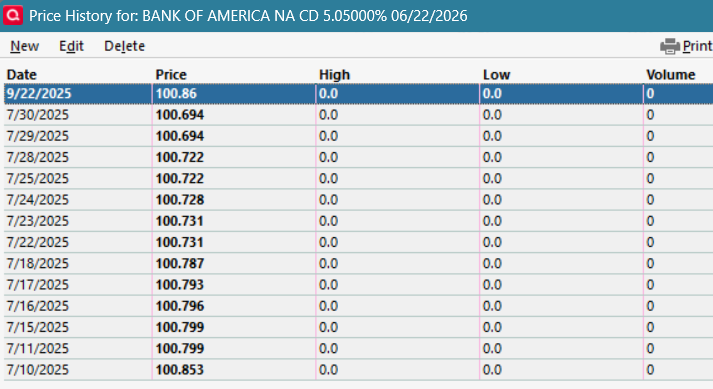
Just 2, but at least it's not 1.xxx
0


