zzz-Fidelity Updates
Comments
-
I'm on R64.25, but I believe it's more of an issue of account type. Looks like maybe only brokerage accounts using EWC+ have the setting.
0 -
Brokerage accounts using EWC+ do not have that setting.
1 -
OK then maybe only NetBenefits BrokerageLink accounts, or it's another random bug.
0 -
I'm still on DC. I have 2 Fidelity brokerage and 2 IRA accounts and I don't see the Cash Representation Button, although I definitely did see once in the past 3-4 weeks when I saw another post about it and looked for it. I also have 2 Merrill Lynch brokerage and 4 IRA accounts and no joy there either. I just upgraded to r64.25 a couple of days ago. Perhaps its some combo of account type/connection type/release version. Or as you said, just a weird bug.
0 -
Also got the setting with an HSA (using EWC+).
0 -
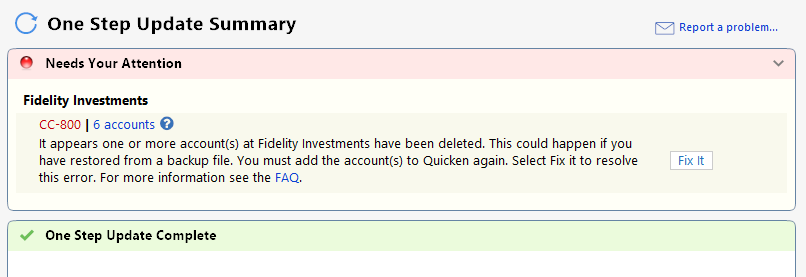
I created a blank file and imported my six Fidelity accounts using EWC+. With the simple option, all account balances show 0. With the complete option all account balances only show the manually entered cash balances. No stock, mutual fund or CD balances are importing. When I attempt OSU, I get a CC-800 saying all my accounts have been deleted. Wow! I'm extremely frustrated.
 1
1 -
I just upgraded Quicken for my test datafile to R64.25. The datafile has Fidelity using EWC+ for all accounts. There is no Cash Representation selection for any of the accounts. Is there a certain version upgrade procedure to have this option appear? I checked Update Cash Balance as well as Account Detail. So, currently, all my Fidelity accounts show the core money market fund as a security rather than cash. Quicken states that Fidelity has sent a cash balance of $0.00 for all accounts. If I select Online → Fidelity Investments → Balances → Fidelity Account → Compare to Portfolio, Quicken reports that the core money market (i.e. cash) account does not match holdings. With the DC connection, Quicken was "smart" enough to realize the the core money market account IS the cash and did not give this error when doing a comparison. Over time I have determined when Quicken states what Fidelity is sending really means what Quicken interprets Fidelity to be sending, which means it is sometimes Quicken that is in error. I hope this mess is fixed by the cutover date.
It is upsetting to see Quicken report some issues fixed that are not fixed and some issues that are not even being addressed.
Deluxe R66.23, Windows 11 Pro
3 -
It is showing up as an investment in the MM fund I have set as my core position at Fidelity.
Quicken Classic Premier (US): R66.28 on Windows 11 Pro
1 -
Sorry to duplicate this, but just making sure everyone sees this update:
My OSU this morning converted all my Fidelity CDs back to the original Price & Share values:
Price approximately $100 (new as of this morning)
Share values in sets of 100 (10 shares for a $1000 CD, this was corrected a few weeks back)
I had to go back and correct my original purchase and historic prices (which I had edited when things broke), but everything is back to "normal" for the Fidelity CDs.
3 -
With the DC connection, Quicken was "smart" enough to realize the the core money market account IS the cash and did not give this error when doing a comparison.
For many years (since at least the early 2000s) Fidelity downloaded the Core Account MMF and Bank Sweep Accounts value as Cash Balance. Fidelity even stated that on their website in their Quicken FAQs. There was nothing for Quicken to interpret because that is how it was downloaded.
Something at Fidelity has changed because their Quicken FAQs no longer says they do this with the Core Account MMF. They only mention that they do this with the Bank Sweep Accounts, now. My guess, is that this Fidelity change is somehow tied in with the changes needed to support EWC+ because with DC we still see the Core Account MMF value being downloaded as Cash Balance and not as Shares (with a few exceptions). But this change is problematic because for many the Core Account MMF is being downloaded as both MMF Shares and as Cash Balance creating a duplication of value.
Then there are others who are seeing the Core Account MMF downloaded only as Shares and not as Cash. But in many cases the previous Cash Balance was not removed as it should have been. In my EWC+ test files, in some accounts I could do "Update Cash Balance" to remove the Cash Balance but in other accounts "Update Cash Balance" did not remove it.
The recent addition of the option with EWC+ for how Quicken is to report the Core Account appears to me to be an attempt to get Quicken to start interpreting Core Account data downloaded from Fidelity based upon user preferences. I must say that so far it is not working well for reasons stated here and in my 9/13 post in another thread:
These Core Account reporting issues seem reminiscent of the issues encountered when Schwab cut in EWC+ and first gave their customers the option of how to report their settlement MMFs in Quicken. I would hope that Fidelity and Quicken are looking at how the Schwab issues were resolved to see if what they did there might be applicable to Fidelity EWC+
Quicken Classic Premier (US) Subscription: R66.23 on Windows 11 Home
1 -
I was hoping that when I upgraded Quicken to R64.25 from R62.16, there would be an option in the accounts to select Cash Representation in order to designate the core money market fund. But no such option appeared. Is there some procedure to get this option to appear when upgrading to R64.25 from R62.16? I guess my backup procedure when forced to use EWC+ will be to keep a manual cash balance in Quicken that matches the core money market fund, and ignore the Holdings discrepancy for the core money market fund when doing a comparison in Quicken.
Fortunately, I followed your advice and am doing all testing on a copied datafile template and on a separate laptop. So I still have my "production" datafile using DC connection.
By the way, in the test datafile, the Fidelity credit card had the correct cash balance using EWC+, but I reconnected it to Elan Financial Services which I find more reliable.
Deluxe R66.23, Windows 11 Pro
1 -
Hello @Mark Wagner,
You may need to change the Money Market representation for the problem account(s) if you were not prompted. You can do this by clicking the Cash link in the problem account or by clicking the gear icon, selecting Account Details, then going to the Online Tab and clicking the “Reset Money market securities/cash options to trigger the choice of cash or security again.
Please let me know how it goes!
Quicken Kristina
Make sure to sign up for the email digest to see a round up of your top posts.
2 -
I have been following this issue related to the Fidelity cut-over to EWC+, and one of the factors I am trying to think about it whether it helps to have the "Reconcile using On Line Balance" box checked under the "Online Services" tab of the Account. I currently do not have the box checked for my Fidelity accounts which I believe limits the number issues I have seen between the balances at Fidelity vs the balance on Quicken (many of which are timing). I'm hoping not having that box checked will reduce the issues with conflicts between Quicken recognizing transactions as "cash" versus a "money market" fund. Any thoughts on how the "On-Line Reconcile" function might affect the conversion???
PGAVON
Quicken Premier - Windows Subscription
0 -
Quicken KristinaQuicken Windows Subscription Moderator mod12:52PMUPDATE 9/15/25Below is the latest update on what’s happening, what’s fixed, and what you can do in the meantime.Fixed or Being ReleasedGood news! Several issues are already fixed or in the process of rolling out.Duplicate Transactions (Windows): Some customers saw up to two years of duplicate transactions after switching to EWC+.Status: Fixed.
Missing Transactions: Affected 401(k), Brokerage, and IRA accounts.Status: Fix verified for all but 401(k) accounts. 401(k) accounts are no longer missing transactions, but there is a mapping issue our teams are still working to resolve.
Bond Redemptions Showing as Cash: Bond sales were coming through as a cash deposit, leaving the bond in Quicken.Status: Fixed.
$0 Account Balances (Windows): Some Brokerage and IRA accounts temporarily showed zero balances.Status: Fixed.
Cash Balance Doubled (Money Market Accounts): Cash and Money Market security both show, doubling the total.Status: Fixed.Incorrect CD Balances: CDs show the right total, but the share/price details are wrong.Status: Fixed.
Thank you!This will be my last posting on this Quicken sub-forum related to Fidelity/Quicken DC →EWC+ migration. We updated our connection on 07/29 and, subsequently, pending issues have been resolved for us. Thank you. All success to everyone on this forum! @HKB
2 -
Hi Quicken Kristina. I see the "Cash Representation" button under Update Cash Balance for some of my accounts but not all. For the accounts I don't see it I only see a "Reset Account" button under "Online Services." Is this the same as the “Reset Money market securities/cash" button you refer to? If not, how can I reset my cash option for the accounts that don't show the "Cash Representation" button?
Thanks.
0 -
Hello @Rich,
Thank you for reaching out. No, Reset Account is not the same. That button will prompt you to go through the authorization/connection of your account again.
If you're not seeing the option for cash representation for some of your accounts, it may be due to the account type. Is there any pattern to which accounts do not give you the option (such as being IRAs, brokerages, 401k, etc.)?
I look forward to your reply!
Quicken Kristina
Make sure to sign up for the email digest to see a round up of your top posts.
0 -
Hi Kristina, Thanks for the quick. There is a pattern… the cash option representation button is only available for my retirement accounts. We have 3 non-retirement accounts where this option is not available.
0 -
I have 5 Fidelity accounts (HSA, regular brokerage, 3 IRAs) and the only account that gives me the Cash Representation button is the HSA which uses FDRXX as the "cash" account. The other 4 use SPAXX as their "cash" account, which Fidelity/Quicken currently don't understand as cash, but are treating as a security instead. When I converted to the EWC+, Quicken asked me how I wanted to treat the FDRXX, but did NOT ask me about the SPAXX on the other 4 accounts. Previously, SPAXX was treated as "cash" for all of the 4 other accounts before the conversion to EWC+.
So, @Rich do your retirement accounts use a different security for cash from the 3 non-retirement accounts? Maybe it is more related to the security being used instead of account type?
1 -
None of my 6 Fidelity accounts, which are Individual and regular IRA and Roth IRA accounts, show the Cash Representation option after updating to R64.25 from R62.16.
Deluxe R66.23, Windows 11 Pro
1 -
After updating from R62.16 to R64.25, there is no Cash Representation option nor is there any Reset Money option for any of the Fidelity accounts. Contrary to the recent update status saying this is Fixed, it is not.
Deluxe R66.23, Windows 11 Pro
1 -
leishirsuteQuicken Windows Subscription Member ✭✭✭✭4:25PMNone of my 6 Fidelity accounts, which are Individual and regular IRA and Roth IRA accounts, show the Cash Representation option after updating to R64.25 from R62.16.Ditto for me.
1 -
I rechecked the setting on my HSA today, and it was gone. So the Cash Representation & Reset Money Market securities/cash options buttons can disappear! This interface is terrible.
1 -
Thank you for your replies @Rich, @bmbass, & @vnolin11,
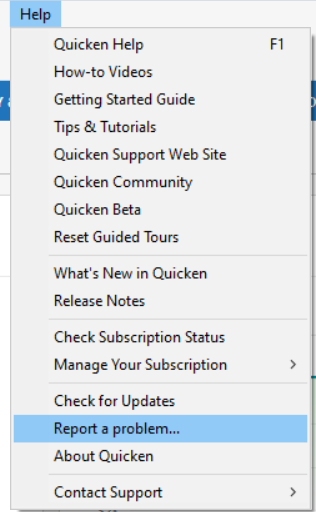
Since this issue with cash not being represented properly in accounts is persisting, and the option to correct it is not available in all your accounts, I forwarded this issue to the proper channels for further investigation and resolution. If you have not already done so, please navigate to Help>Report a Problem and send a problem report with log files attached. Please include CBT-816 in the subject line.
Thank you!
(CBT-816)
Quicken Kristina
Make sure to sign up for the email digest to see a round up of your top posts.
0 -
Quicken KristinaQuicken Windows Subscription Moderator mod7:53PMThank you for your replies @Rich, @bmbass, & @vnolin11,
Since this issue with cash not being represented properly in accounts is persisting, and the option to correct it is not available in all your accounts, I forwarded this issue to the proper channels for further investigation and resolution. If you have not already done so, please navigate to
Help>Report a Problemand send a problem report with log files attached. Please include CBT-816 in the subject line.Problem report sent….
0 -
Thanks for your willingness to help but as I mentioned in my other post I have reverted to DC and will not be changing to the new connection method until forced and have no choice. Hopefully by then this issue will actually be fixed.
Quicken Classic Premier (US): R66.28 on Windows 11 Pro
0 -
I have been following this very helpful thread and have not downloaded anything or transitioned to a new connection method since the issue began. Have just waited until things were fixed.
Does the post above mean it is safe for me to download transactions? Any tips other than obviously backup etc. I don't want to wait too long and get beyond Fidelity's history download window. Is that like 90 days?
My understanding is the forced migration is 9/25. Do I have that right?
Thanks
0 -
It is perfectly safe to download your Fidelity transactions using DC. I just did it today. I would recommend you doing so now while it is still an option and get your accounts up to date.
3 -
Thanks
0