What’s Going On Between Fidelity and Quicken?
Comments
-
Quicken Classic goes to wrong Fidelity site, not the Netbenefits site to authorize Quicken downloads.
0 -
Ditto. The new universal one step update has already been janky enough since it was forced on me, and now this is making it unusable. It also crashes for good measure when I stop the update after the fidelity re-auth fails, and I have to kill it in task manager.
Posting in the hopes that I'll get notified when someone fixes the bug and returns it to its previous state of "bad, but usable."
1 -
Another day another Quicken event.
I went to do the One Step Update under the EWC+ connection method.
It did the OSU then Quicken presented a screen about listing the Fidelity FDRXX fund as a security or using it as the base Cash account and recommended the latter. I took the recommendation. Quicken proceeded to give me a negative cash balance of almost $5000. In fact my cash balance per Fidelity is under $500.
Fortunately Quicken allows manual update of the cash balance and I corrected it. Then I Accepted a new transaction.
Quicken proceeded to crash, presenting a screen asking me what I was doing at the time. I restarted Quicken.
This may be the same problem discussed in the thread: "
Quicken R64.25 is not getting correct Cash Balance for Fidelity accounts w/ EWC+"
I wonder what will be tomorow's Quicken event.
0 -
Quicken should start over with the R64.xx update!!!!!!!!!!!!!!!!!!!!!!!!!!!!!!!!!!!!!!!
0 -
When the cash goes negative, check to see if there is a holding for the core money market fund too. That happens from time to time with me. You might find there is -$5,000.00 in cash, but 5,500.00 shares hanging around in the core fund. If that's the case, remove 5,500 in the MMF shares, and update the cash balance to $500. Quicken will then remove the MMF from the account's portfolio entirely, and show $500 cash balance. It's a very satisfying experience!
What you did was half the equation - updating the cash balance. Maybe that was enough, or maybe you also need to clear out the core shares.
I wouldn't know about the crash, though.
0 -
this problem has taken many hours!
I was able to “reauthorize” but ended up with double NetBenifits accounts. Ok, start over from backup and deactivate those two accounts so can link. Now nothing works! Can not “reauthorize” or deactivate. Goes to high CPU but very little internet traffic.
0 -
Day 5 and still no Fidelity transactions.
when will this be resolved?0 -
Quicken Premier fully patched on W11. I have the same issue except I do not get a crash. I keep getting the prompt every time, go through the same steps and get erroneous confirmations that re-authorization was successful, but cross-checking with Fidelity on line shows me that Quicken is not updating the Fidelity account at all. On the last Q screen it shows the Fidelity account / number with "do not add to Quicken" which I assumed meant that since the account is already in Quicken, not to duplicate it. Anyhow there is no option to do otherwise, like trying to "add it to Quicken."
0 -
Followed the steps as requested to link to Fidelity. To my horror the registers disapeared from my accounts. I write checks and transfers from the accounts, post dividends and all other actions are shown in the register. There is no way that this change is acceptable.
0 -
Similar. I was able to reauthorize some accounts, although Quicken thought they were new and I had to link them manually, but then it re-downloaded EVERY txn from all 3 accounts since about June 1. Ugh.
I have two other accounts that I closed years ago, that Quicken keeps asking me to reauthorize, and with those I go through what the OP is seeing, but without the crash.
0 -
This morning (9/18) Quicken asked me for each of my 3 Fidelity accounts if SPAXX was a MMF and did I want to treat it as cash balance. I accepted their recommendation to do so. Worked (finally!) I have not had to re-authorize access to Fidelity since fighting through that when this started (and I had not yet found these threads).
Quicken R64.25, build 27.1.64.25, Win 7 Home Premium
1 -
Every day Quicken is asking me to re-authorize my Fidelity account. Doing so does not stop it from continuing to ask. Once, recently, I did so and ended up with duplicate transactions and other issues I had to manually resolve. Yet, now, it continues to ask me to re-authorize.
I have two Fidelity references in my one step processing: Fidelity, and zzz-Fidelity. The latter always reports an error. Don't know which one I am supposed to have, or how to get rid of the extra one.
The one-step summary no longer shows any errors, even though at least one obviously occurred.
A never-ending story of problems.2 -
Go to the General tab of Account Details. There you should have the ability in the Tracking box to select Complete. That should restore your transactions details view.
If it doesn't work for you or if you simply don't want the EWC+ connection at this point because of all the issues that have been identified with it:
- If you have a recent backup file dated from before you updated your connection to EWC+ you can try restoring that backup. The restored back file should have the Fidelity DC connection (and any other DC connections you might have) intact.
- You might need to do Add Account or Set Up Now for some or all of your EWC and EWC+ connected accounts because restoring backup files can sometimes break those connections.
- If you do this, when you do OSU in the future and you get the prompt to reauthorize your accounts: Be sure to click on "Remind me later" or "Remind me next time" at the bottom of that popup. For now, at least, that will cause the popup to go away and will keep your DC connection intact.
At some point (currently announced as 9/25) we will be all be forced to migrate from DC to EWC+. Hopefully Fidelity and Quicken will have all the issues resolved by then.
Quicken Classic Premier (US) Subscription: R66.23 on Windows 11 Home
0 -
I "reauthorized" our Fidelity accounts this week and had many duplicate old transactions downloaded as part of the reauthorization process. I could not match them as they were already reconciled, so I manually deleted them; there were many so it took quite a while. Unfortunately, after updating our Fidelity accounts today more even older duplicate transactions were downloaded, some way back to early June. So more scanning for the few recent transactions to accept and then delete the many old duplicates. I hope this does not turn into a daily occurrence as this would eliminate any time savings that Quicken provides me. Any suggestions how to limit what transactions are downloaded, perhaps only transactions after a specific date?
Next, after this morning's Fidelity update, Quicken asked me again, for only 2 of our Fidelity accounts, if a specific money market was to be used as the core cash value. I screwed up and said "No" to one of these accounts. Is there a way to manually assign a specific money market fund as being assigned as cash?
Thanks in advance tor any assistance with this. (I wish I had seen this before reauthorizing.)
Quicken R64.25, build 27.1.64.25, Windows 11 Home 24H2
0 -
Wow wasn't aware of the 9/25 hard switchover. Will wait until the last minute to convert, kicking and screaming 😀
0 -
Movie Nut - Love Buckaroo Bonzi! One of the best cult movies with very young, now famous actors
-1 -
I just got this dialog on ALL of my Fidelity accounts that were using SPAXX and was not treating it as Cash after the EWC+ conversion:
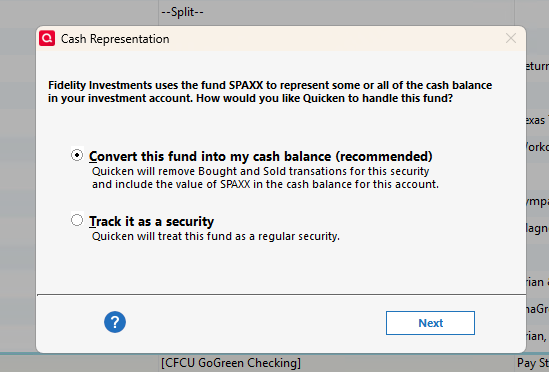
After selecting Next and then Yes on the next question, I now have both the Cash Representation and Reset Money Market cash option options included in those accounts. So, All my Fidelity accounts are now treating my CASH correctly!
0 -
Well, we'll find out if 9/25 remains firm or if it slips again (it originally was scheduled for 8/25) when we try to do OSU on that day.
Like you, I will not voluntarily switch my primary data files to EWC+ because of all the issues reported and that even those that have been announced as being "fixed" are still being reported by some as not fixed. I am looking forward to seeing posts by others starting today stating what the actual resolution is.
There are many who have not yet updated to R64.25 because they have been happy with an older version. But for them they will need to update to R64.25 because it includes some of the fixes that Quicken has announced.
Quicken Classic Premier (US) Subscription: R66.23 on Windows 11 Home
1 -
So now have to choose between these being fixed by updating to R64.xx and the loss of the Portfolio X-Ray feature that is needed by any serious investor. Really Quicken, you need to fix all of these!!! and GIVE US BACK PORTFOLIO X-RAY!
0 -
@Rick8 what version supposedly loses X-Ray? I'm running 64.25 (Windows) and I still see x-ray.
 0
0 -
@AgBrewer97 You don't lose the X-Ray but the "improved" version in R64.25 shows less information than earlier versions and has other issues. See this discussion
QWin Premier subscription1 -
Sorry Jim, I meant lost functionality. Either way, it is not acceptable and should be fixed.
0 -
I have a DC version and an EWC+ version of the datafile ready. I have to duplicate some manual checkwriting transactions while running in parallel but so far everything looks to be matching except for securities shares in the linked cash account. It appears the MMF core buy and sell transactions were not removed during the update to EWC+ on my linked cash account. I'll just remove them manually.
Deluxe R66.23, Windows 11 Pro
0 -
Status today, 9/18/2025 running R64.25, is that conversion of sweep account transactions to cash balance is now working for SPAXX, but it is still not happening for FCASH.
Other than that, once I manually corrected some downloaded transactions from late July/early August that did not have three decimal place accuracy, everything reconciles as expected.
0 -
I have been having difficulty downloading Fidelity transitions since 9/14 when I was prompted to upgrade my connection. I have multiple account and multiple files within Quicken.
One file works, but it has become very frustrating since it wants to treat a MM funds as my cash, duplicating the cash account. It wants to force me into considering it Cash and putting a Placeholder. I have been manually buying and selling that MM account when cash is impacted.
The more frustrating part is that my other 2 files with multiple accounts don't download transactions anymore. I have tried resetting, deactivating/reactivating and everything else that was suggested. Nothing has worked.
Quite frustrating as I believe Quicken has messed up big time!
Any help is appreciated.
0 -
Yesterday, like a few other, I received the "Your financial institution connection(s) need an update" with 2 choices, Reauthorize or Remind me later. Fortunately, I've been following this and the 27-page zzz- Fidelity Updates discussions since they started and chose Remind me later.
I created a new data file for Fidelity to see what happens. I selected Fidelity Investments as the institution, logged into Fidelity, and added my accounts. I chose Compete Investing instead of Simple and completed the downloads. In this new file, Fidelity is connected with Express Web Connect+ (EWC+). In my working file, it's connected with Direct Connect (DC).
Today, I updated my new and working Quicken files. The update to EWC+ is now a daily nag in my working file. The new one offered to Convert my FDRXX file to cash which I accepted. I never received this prompt in my working file when my Fidelity account was created in March this year.
I downloaded my Roth portfolio from the Fidelity website as Excel. I created Portfolio Value reports in my new (EWC+) and working Quicken (DC) and added them to the spreadsheet.
In comparing portfolios, Express Web Connect+ was better than I expected, but I found these issues.
- Fidelity Government Money FDRXX is used for cash. EWC+ incorrectly uses ReinDiv so the cash balance isn't updated. When I enabled FDRXX as cash, it didn't update yesterday's transactions. They have to be manually updated. All it did was removes FDRXX from the Holdings list. It's still listed in the Portfolio Value report. In my file using DC, FDRXX is Div, correctly updates cash, and is omitted from Holdings and the report.
- Fidelity represents the number of shares to 3 decimal places. Quicken is showing 2. For 2 securities it rounds to zero. GM was 32.082 but both Quicken files have 32.00. NOC was 3.012 and Quicken EWC+ has 3.00 and DC has 3.01. I don't think there's a standard for precision but if Quicken uses different share and price numbers, reconciliation issues will result.
1 -
Not so good for me. Only 3 of 9 accounts are working correctly for me. The others are too much of a mess so I think I'll need to trash it all and start over in a new test file. Maybe I screwed something up with those other 6 files and I just can't see it to correct it.
BTW, your signature shows you are running QWin R62.16. The Moderators have announced that some of the fixes to the EWC+ issues are included in R64.25 so you might need to update to it to resolve some of the issues you are still seeing.
Quicken Classic Premier (US) Subscription: R66.23 on Windows 11 Home
0 -
A few things I noticed and had to correct. Some of the DIV transactions for the core MMF had shares associated. I located these by accessing the fund in Securities, sorting by account, and looked for div or divx (if linked cash account) that still had shares associated. Just an aside, there should also not be and buy or sells. I open that DIV transaction (double click on the transaction) and clicked on Enter/Done and the shares disappeared. For one of my accounts, this was all that was needed to have it match the DC connection datafile shares and cash balances.

It wasn't as straightforward for the linked cash account. The cash balance was okay but the share balance was off and the core MMF still showed in the securities for the account. I sorted the investment register by Account and saw that Buy and Sell transactions were not removed for the core MMF. So I removed them and the share balance now matched, but the cash balance was off. There were many DEP transactions in the register for the core MMF after removing the buys and sells. Rather then invest the energy to figure out all the problem cash transactions, I made an adjustment transaction to the cash balance. Later, I went back and removed the adjustment transaction and located each out of balance transaction comparing to the datafile from the DC connection and corrected with adjustments to match the balance in the DC datafile. What made it messy is that I had changed from an FDIC sweep to a money market about a year ago and had kept the FDIC cash balance at $0.00 and allowed Fidelity to use the separte SPAXX security for cash payments. This was before SPAXX was allowed to be a core MMF. Quicken EWC+ conversion did not handle the sells and buys from the older FDIC transactions well. Which makes sense. The Cash Representation wants to know about the current core asset, not past ones.
Now all the accounts are in balance and the datafile passed validation. Finger crossed.
I tested a datafile on R64.25 and on R62.16 on 2 different computers. Both had the same results regarding the pop-up to select the core MMF and the fixes to cash balance. However, I will be upgrading to R64.25 as it seems to be working okay for me.
I don't use anything with Bill Payment or Cloud sync.
Deluxe R66.23, Windows 11 Pro
0 -
Today's Quicken Event …
Started the OSU. Quicken put up a different window from the first "Need to Reauthorize" window, which I already had completed 2 days ago and believe I am operating under the EWC+ protocol. This new window was all in red; it said something to the effect "Fidelity needs you to reauthorize your account." I did not take that and canceled out of the window then re-initiated the OSU. This time Quicken did not prompt me to reauthorize and proceeded to successfully do the OSU. I did the OSU again and was not prompted to reauthorize.
I wonder what will be tommorrow's Quicken Event.
version R64.25
1 -
In the duration of having those accounts, did you change core MMF or FDIC in them? Did you have an MMF as a security that you later changed to the core MMF? I've learned that the Quicken Cash Representation process doesn't handle these scenarios well and it required comparing account cash balances between DC and EWC+ datafiles and adding missing or removing incorrect cash transactions added by the Cash Representation process manually. It appears that the Cash Representation process attempted to place a monthly adjustment transaction to maintain cash balance. These type of transactions I had to delete. Fortunately, for me, it was only 6 months worth of transactions. But, yes, I can see how it can become very messy if the core cash had been changed during the life of the account.
Deluxe R66.23, Windows 11 Pro
0




