Corrupted Data File

I am a longtime Quicken Classic (Windows) user. In the past week, I had two Microsoft bitlocker issues that shut my computer down. The second one occurred while my computer was in the middle of updating Quicken. Since that time, I am unable to launch Quicken or any file associated with Quicken. I time I attempt, I receive the following error - the file or directory is corrupted and unreadable. I have attempted to clean the drive using the command prompt, but still get the same error. I thought about copying my file and attempt to launch on a second computer, but I only have one, so that is not an option currently. Does anybody have an idea how to fix this?
Answers
-
Hello @T-Lo,
Thanks for reaching out! That sounds really frustrating—especially since the shutdown happened right in the middle of a Quicken update.
To help get a clearer picture, could you share a screenshot of the exact error message you’re seeing when you try to launch Quicken or your data file? That’ll give us more detail on what might be going on and the best next steps.
If needed, please refer to this Community FAQ for instructions on how to attach a screenshot. Alternatively, you can also drag and drop screenshots to your response if you are not given the option to add attachments.
Thank you!
-Quicken Anja
Make sure to sign up for the email digest to see a round up of your top posts.0 -
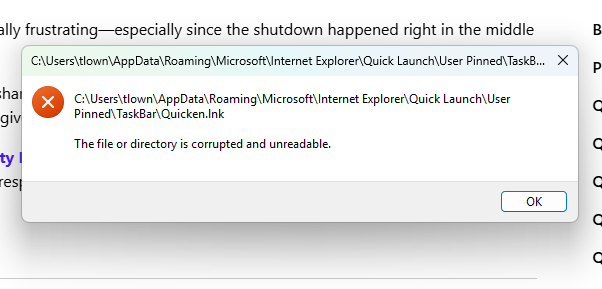
Here's the error message I receive when launching Quicken or one of my Quicken files. Thanks for providing your input.
0 -
@T-Lo It seems to me that there's 2 possible issues here. One, or both, may be causing what's happening.
Issue 1: The Q program may have gotten corrupted.
To test this theory, try holding down CTRL and ALT and clicking on the Q program (NOT data) link. If the program opens with only the FILE and HELP menus available (no data file opened), the program would seem to be OK.
If it doesn't open, have you tried un-installing and re-installing it. Such won't impact your data.Issue 2: Your data file that was active at the time may have gotten clobbered. Once you've got the "no data" version working, try restoring from a backup that you created prior to the crash.
Q user since February, 1990. DOS Version 4
Now running Quicken Windows Subscription, Business & Personal
Retired "Certified Information Systems Auditor" & Bank Audit VP0 -
@T-Lo I agree with NotACPA’s approach and recommend following his guidance to troubleshoot the issue.
Let us know how it goes!
-Quicken Anja
Make sure to sign up for the email digest to see a round up of your top posts.0 -
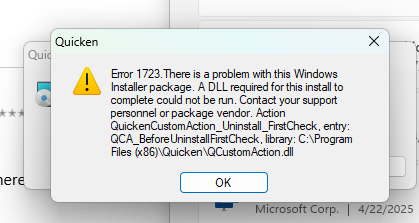
I attempted to uninstall, and received this error message:
 0
0 -
1723 is a Windows, not Quicken, error. I think that at this point the matter has gone beyond what can be handled via this forum … just too complicated.
Try contacting Q Support via the link at the top of this page.
Q user since February, 1990. DOS Version 4
Now running Quicken Windows Subscription, Business & Personal
Retired "Certified Information Systems Auditor" & Bank Audit VP0 -
This sounds like your Windows environment is corrupt and you'll have to troubleshoot the Windows system before expecting Quicken to run without error.
0 -
Thanks everyone for your attempts to solve my problem. I tried one last thing - downloading a new version of Quicken - and I couldn't believe that it worked. All 3 of my files opened up perfectly. Simply amazing! Have a great day.
2 -
@T-Lo Thanks for the update! Glad to hear the issue has been resolved.
-Quicken Anja
Make sure to sign up for the email digest to see a round up of your top posts.0


