zzz-Fidelity Updates
Comments
-
- Thanks for the responses. After I could not figure out how to deal with issue I described, I decided to bail out and opt for recording every transaction instead of using the cash option. I decided that I don't have that many MM transactions per year, and this option will ensure the balances are correct by MM fund. After opting out of the "cash" option, I was able to do a "buy" transaction of FDLXX MM for $10,648.58 (which reduced cash to $0) and now properly reflects the right balance for the FDLXX MM security (agreeing with what Fidelity shows).
Probably not the most efficient way to do this, but I think it will work. I guess downloading and recording the September entries will be the test… Thanks guys!!!
PGAVON
Quicken Premier - Windows Subscription
0 -
Is it feasible to convert just 1 account at a time? Then you'd know what account the cash prompt was referring to. Any downside to converting that way? Seems it might even be less overwhelming to shake out problems 1 account at a time.
0 -
Hello @Boatnmaniac,
Thank you for sharing your experience! The first issue you mention, with the pop ups not giving any indication which account they are for, has already been reported, ticket # CBT-820.
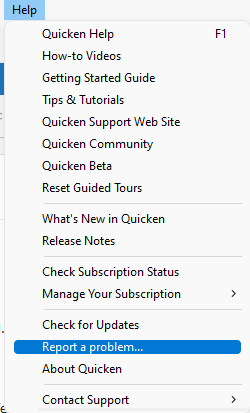
I have forwarded the other two issues you listed to the proper channels for further investigation and resolution. Please navigate to Help>Report a Problem and send a problem report with log files attached to contribute to the investigation.
Thank you!
(CBT-826/CBT-827)
Quicken Kristina
Make sure to sign up for the email digest to see a round up of your top posts.
2 -
Make a backup before you try. When I migrated my NetBenefits account separately from the others in my test file, it seemed to create connections:

one for the NetBenefits and one for the others. I don't know if this would have been the case if I had done everything at the same time. This would result in not all Fidelity accounts being updated if you update one account. I don't know if this was just unique to NetBenefits or whether it would have done the same if I had migrated each of the other accounst separately. If you want to try it, make sure you have a backup to revert to - or you could wait for the fix that is in the works (see post from @Quicken Kristina just above mine) - I think that would be the better move.
Barry Graham
Quicken H&B Subscription0 -
I started Quicken and went to the Cash Balance link for one account and selected Cash Representation. Then I did an OSU and got the question to update the core position for that account. After selecting the core position for that account, I accessed another account and repeated the procedure. This way I could tell for which account the Cash Position update referred even though the account name is not given in the Cash Representation core position pop-up that appears after OSU. The account name still needs to be part of the pop-up info.
Deluxe R66.23, Windows 11 Pro
1 -
Thanks for the update. After this, is it showing one Fidelity connection for each account, in the Update settings, or one connection for all of them?
Barry Graham
Quicken H&B Subscription0 -
I'm not sure what you mean by Update settings. With the procedure I described, it does only one account update of Cash Representation between OSU's. Prior to this procedure, I mistakenly selected Cash Representation for multiple accounts followed by an OSU and that caused several pop-us for core position selection and it was impossible to determine for which account each pop-up referenced. My procedure causes only one pop-up for the account that Cash Representation was selected. It is still unnerving to not have the account identified in the pop-up.
Deluxe R66.23, Windows 11 Pro
0 -
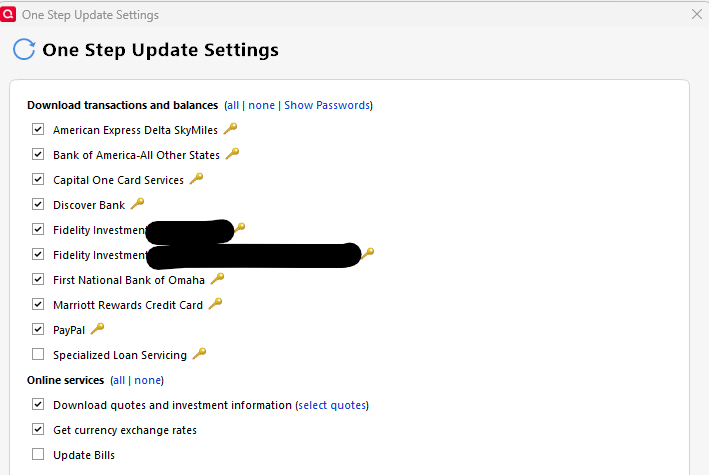
I'm referring to this dialog that appears when selecting Tools>One Step Update. As you can see, for me, after having migrated NetBenefits and the other accounts separately, I now have two lines for Fidelity Investments.
 Barry Graham
Quicken H&B Subscription0 -
I tried converting all my accounts except for one a few days ago (see my post a few pages back) and it caused problems when I tried to subsequently do a OSU. I ended up restoring and converting again but instead selected all my accounts to convert and I then had no problems. Of course maybe it was just me so YMMV.
Quicken Classic Premier (US): R67.7 on Windows 11 Pro
0 -
I've been using Quicken for Windows for about 30 years. In opening a brokerage account at Fidelity in 1998, I mistakenly listed it as a checking account. As there remains no way to easily convert it, I've just keep using it that way. It has generally downloaded most transactions except for some interest payments that I've either manually entered or recorded occasional reconciliations.
I've been dreading doing the required new OSU conversion as it appears I won't be able to link the brokerage account to the "checking" account and will likely end up with two accounts, one with decades of past transactions and another one with just more recent transactions and new ones going forward. (I tried the conversion a week ago and there were so many issues with that account and other ones at Fidelity — I've purchased many CDs in recent years — that I reverted to a saved file and have continued using Direct Connect.)
Does anyone have any advice? For example, I see no way to mass copy transactions from the "checking account" to the brokerage account. I also opened a Fidelity cash management account in 2010 that was set up as a checking account and has generally worked fine under Direct Connect. How do I handle that account?
Any help would be greatly appreciated. Thanks.
0 -
Thanks for confirming the ticket number regarding the lack of the account name on the Core Account Shares/Cash option prompt.
And thanks for passing along the other two issues.
As requested, a report was submitted.
Quicken Classic Premier (US) Subscription: R66.28 on Windows 11 Home
0 -
kOsQuicken Windows Subscription Member ✭✭I have a CMA (MM only) and also a brokerage account (MM and multiple CD's). Both accounts have one MM (SPAXX) which is the Core shares. I converted both accounts last week from DC to EWC+. Conversion went smoothly after deleting all of the duplicate transactions. I believe for now, the only option to successfully convert from DC to EWC+ is not having multiple MM's in your account and making sure the lone MM you have is the one that Fidelity has defined as Core (SPAXX for CMA) and (SPAXX and FZFXX for brokerage accounts). I'm not sure if FZFXX will work. I do know that SPAXX worked for myself. Otherwise, EWC+ appears to have a problem with choosing the correct Core MM when you multiple MM's in your account. From the reviews that have been posted, it does appear that EWC+ may not be as safe for accounts that have stocks, bond, options, etc.
0 -
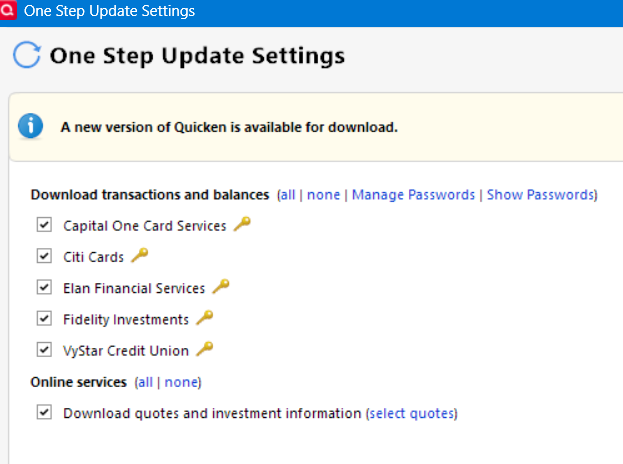
Quicken shows one update setting for all Fidelity.
Deluxe R66.23, Windows 11 Pro
1 -
Ok. Thanks for the feedback.
Quicken user since 1991
VP, Ops & Tech in the biometric space
1 -
My current situation is that in the online center I see a transaction for one of my Fidelity accounts, but it doesn't appear in my register. I can't do an account reset because that transaction is there - but also not 'there'. Also, my last Fidelity 401k download only has about half of the transactions present. I am a victim of this EWC crap - I wonder if this cost saving exercise actually saved any money for Quicken.
-1 -
The connection method change was forced by Fidelity not Quicken. It was about a change in security and had nothing to do with $ AFAIK.
Quicken Classic Premier (US): R67.7 on Windows 11 Pro
1 -
And you know this how? Some people are of this opinion. I have seen nothing to confirm this is accurate.
-2 -
What's odd and disturbing is I have reconnected again over the weekend but never got prompted for the care cash question. Does that mean the way I am trying to upgrade is incorrect?
0 -
I know that the change was forced by Fidelity and it was not a decision made by Quicken as confirmed by both Fidelity and Quicken. Could it be due to money on Fidelitys end…honestly I have no way of knowing but it seems unlikely. IMO it is more likely due to increased security but certainly your guess is as good as mine.
Quicken Classic Premier (US): R67.7 on Windows 11 Pro
1 -
deleted duplicate.
Quicken Classic Premier (US): R67.7 on Windows 11 Pro
0 -
Have you updated to the latest version of Quicken (R64.29 on Windows)? AFAIK that update and the update previous was to fix these issues.
Quicken Classic Premier (US): R67.7 on Windows 11 Pro
0 -
Please show me where this was confirmed by Fidelity. Email? Document? Public statement?
All I have seen is peoples opinions stated as fact.
-2 -
It was confirmed to me by customer service from both companies as I stated. Does customer service, for pretty much any company, make things up, sure, but that is what I was told. You can believe it or not believe it…makes no difference to me.
Quicken Classic Premier (US): R67.7 on Windows 11 Pro
0 -
That's what I mean. It was confirmed to me by advanced support from Fidelity that it WAS NOT their request but instigated by Quicken. So neither of us know for sure and neither of us was in the room when it happened. So you BELIEVE Fidelity wanted the change. But do not know more than hearsay.
Sorry, this is just a pet peeve of mine and not directed solely at you. This is not a fact. It is an opinion or belief and they MIGHT have been responsible. But we do not know. And likely never will. It might have been a lone gunman. Or not.
-1 -
Thanks for the suggestions. I don't want to restore from a working backup since we've entered too many transactions since then. I did try the re-login (and also validate & super validate) with no success. I think I'm just going to bite the bullet and convert to EWC+.
0 -
No worries. You are right, neither of us knows for sure. Could be for a combination of reasons. Based on what I have been able to gather about EWC+ though it does seem to be more secure which lead me to believe what I was told that it was more about security than $ (see here for Quickens explanation of the connection types - . Either way the train has left the station so the reason(s) why, and which party initiated it, are kind of a moot point IMO. But certainly good fodder for discussion.
[Edit - Corrected Link]
Quicken Classic Premier (US): R67.7 on Windows 11 Pro
0 -
As we approach the deadline for forced changeover from DC to EWC+, I would like to test it out first. Could someone please tell me step by step the safest way to do this via Quicken file copy? My plan is to install a copy of Quicken in my wife's computer and run the test there using the copied file. I have tried creating test files in the past, and it has led to some confusion since the Quicken program will run the last file used by default unless a specific previous file name is chosen. Specifically should the copied file have all of my accounts, or just the Fidelity accounts?
0 -
Thanks for that Mark. Appreciate your comments.
Now back to trying to get this work. And I have a new Online Billers bug to report.
1 -
After all of the initial issues, my account seemed to migrate well, and Fidelity downloads were behaving fine in all accounts. Then yesterday, after a Quicken software update I can no longer connect to Fidelity. I keep getting an error code 506. No accounts have been closed so not sure if the software update was a coincidence or affected this. Has anyone else experianced this issue?
0 -
Converted to EWC+ tonight. Converted 6 accounts (IRAs, Roth, Brokerages, HSA)
The conversion went relatively well. A few comments:
- Had to delete about 2 dozen duplicate downloaded entries. My first conversion there were many scores of dups.
- CD prices are now correct.
- Complete investing remains selected after the conversion.
- No issues with share count mismatches between Fidelity and Quicken. No placeholders.
- Conversion of the SPAXX in my brokerages went well. No issues.
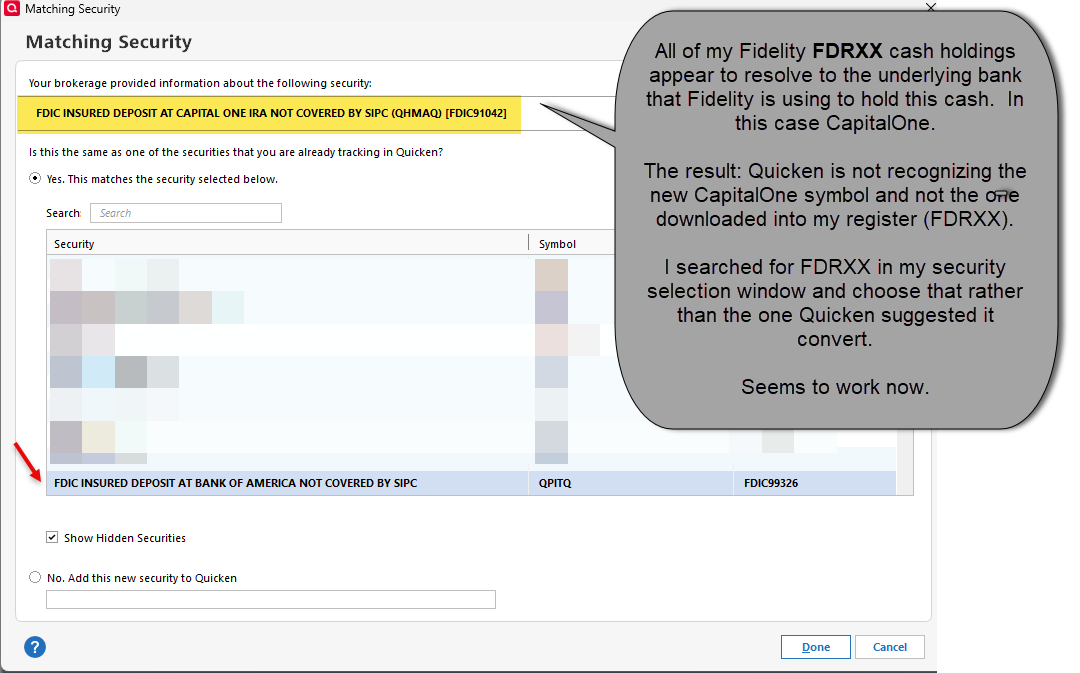
- Conversion of the FDRXX in my IRAs and HSA not so much. See first illustrated image for an explanation and fix.
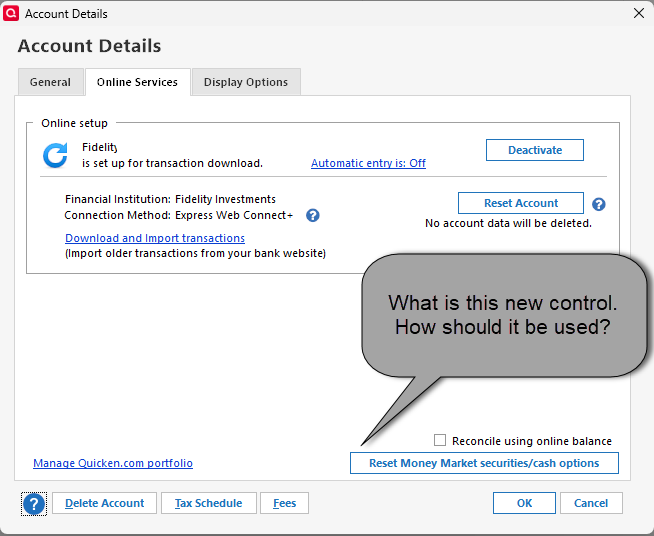
- I noticed in "Account details" there is a "Reset Money Market securities/cash options" control. Is this new? How is it to be used? Nothing in the window help screen. See second illustrated image.
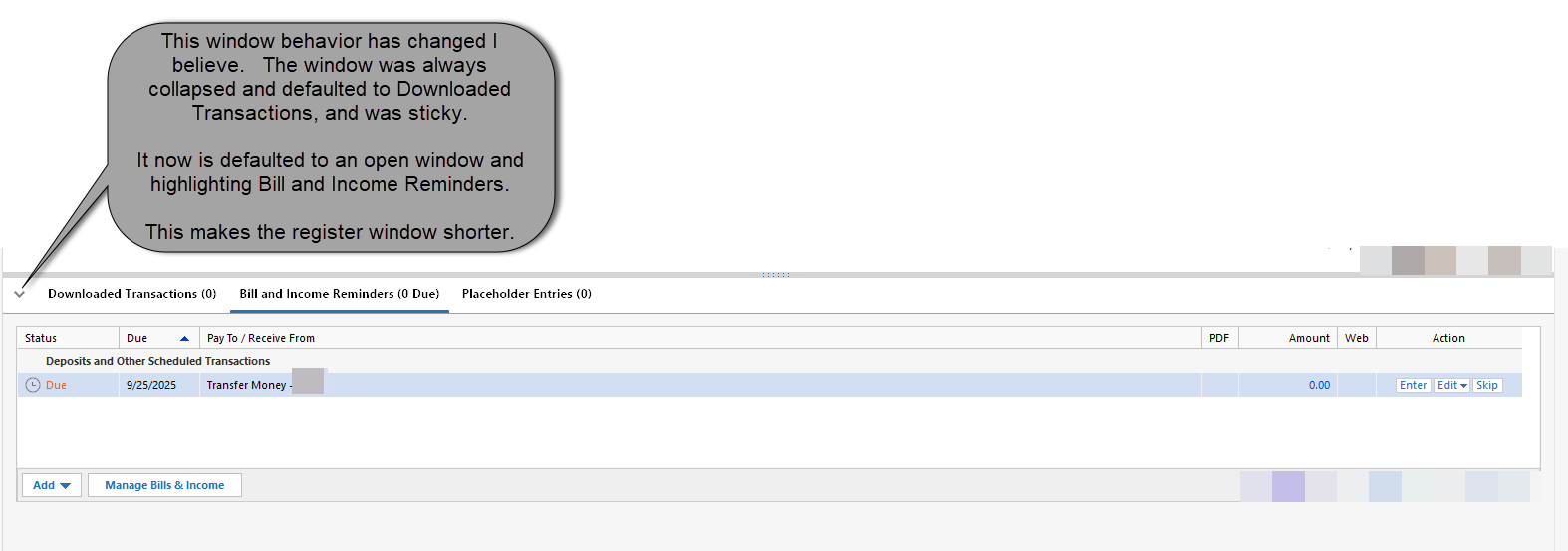
- In the window below the investment register, I think this window behavior has changed. Now, the window is always open and defaulted to "Bill and Income Reminders", even if there are none. I selected "downloaded transactions" and minimized the window. Upon reopening Quicken, my selection is not sticky. I noted that in my banking accounts this window is minimized and defaulted to "Downloaded Transactions". Please make this window sticky or otherwise change the default behavior consistent with the banking registers. See third illustrated image.
- Post conversion OSU not throwing any errors. I will have some Divs paid out in the next several days, we will see if they download correctly and are properly added to my cash line (without a Buy order to a cash security).
- Immediately following the conversion, moving between the investment accounts, Quicken was incredibly slow, even after a restart. Seems better now but still slower than it should be.
 4
4