One Step Update sooo slow

Answers
-
Hello @jkv1229,
Thanks for reaching out to tell us about this issue!
To better assist you, could you please provide the following details?
- Where is your Quicken data file stored? Is it on your local hard drive (C: Drive) or a cloud-based/external drive (e.g.: OneDrive, DropBox, USB, etc.)?
- Have you attempted any troubleshooting steps so far? If so, what were they?
- Are you using a VPN while updating your accounts? If so, does disabling it make any difference?
- Do you have any antivirus or malware protection software running that may be interfering with Quicken? If so, have you tried temporarily disabling it to see if the issue persists?
- When did this issue first start occurring?
Your answers will help us diagnose the issue more effectively.
Thank you.
Quicken Alyssa
Make sure to sign up for the email digest to see a round up of your top posts.
0 -
Hi @jkv1229, if you haven't already seen it, I suggest taking a look at this thread to see if it is relevant...
Marc
0 -
Hello @marcaronson408,
Thank you for adding to this discussion to help other users.
Your contribution is appreciated!
Quicken Alyssa
Make sure to sign up for the email digest to see a round up of your top posts.
1 -
- Where is your Quicken data file stored? Local C drive (moved from external hard drive as a solution with no difference
- Have you attempted any troubleshooting steps so far? see above
- Are you using a
VPNwhile updating your accounts? No difference either way - Do you have any
antivirus or malware protection softwarerunning that may be interfering with Quicken? Yes, disabled that - When did this issue first start occurring? As soon as I got my new machine up and running.
0 -
Hello again @jkv1229,
Thank you for following up with that information.
Can I please have you review this Support Article that addresses performance issues, and follow any steps therein?
Let me know how it goes!
Quicken Alyssa
Make sure to sign up for the email digest to see a round up of your top posts.
0 -
Please take a look at a suggested solution in this discussion and see if it might help your computer
-1 -
Quicken Alyssa
Make sure to sign up for the email digest to see a round up of your top posts.
0 -
I tried all of your suggestions and it is still slow. The only lag is when doing one step update for Express Web Connect+. It used to take less than a minute and now takes close to 10min for each account. This is my issue. Direct Connect is fast, but most of my accounts aren't that type. My solution is going to each site and downloading the transaction history to upload back into Quicken. You all need to find ways to speed this up since we pay for this service to not be an administrative burden.
0 -
Helo @jkv1229,
Thank you for providing those additional details.
Can I have you try updating one financial institution at a time? This way, we can possibly narrow it down to the one that is causing the issue.
To do this, you can run the One Step Update.

In the One Step Update Settings window, uncheck all but one financial institution, then update. Repeat these steps and let me know what you find.
Another thing I was curious about is whether your file is being synced or backed up by any third-party cloud services like iCloud, Dropbox, or OneDrive. Is this the case?
Looking forward to your response!
Quicken Alyssa
Make sure to sign up for the email digest to see a round up of your top posts.
0 -
I already disabled the cloud backup. I only update on account at a time and I do within the registry via the wheel in the upper right corner and then selecting Update Now.
0 -
Hello @jkv1229,
Thank you for that information.
Perfect, so do you notice a specific account that updates slower than the rest? Or a specific financial institution that updates more slowly?
Looking forward to hearing back from you.
Quicken Alyssa
Make sure to sign up for the email digest to see a round up of your top posts.
0 -
I am experiencing the same issue uploading files for Bank of America. I tried this as a workaround because the update for one account takes over 5 minutes.
0 -
Hello @jkv1229,
Thank you for sharing your experience! Is updating your accounts that slow every time you run One Step Update, or just the first time after you connected the accounts?
I look forward to your response!
Quicken Kristina
Make sure to sign up for the email digest to see a round up of your top posts.
0 -
Every time
0 -
Thank you for your reply,
I moved this part of the discussion to it's own thread since you posted to the Quicken for Mac section and troubleshooting steps for Quicken for Windows are different.
Is One Step Update slow only when updating Bank of America, or is it slow regardless of which financial institution(s) you update? To test updating just one specific financial institution, navigate to an account register, click the gear icon, and select Update Now.
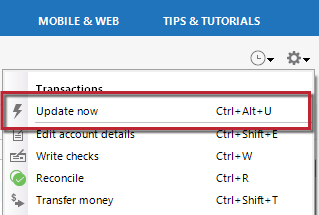
Please let me know how it goes!
Quicken Kristina
Make sure to sign up for the email digest to see a round up of your top posts.
0 -
See details in other thread -
[Edited - Enabled Link]
0 -
Thank you for your reply @jkv1229,
Since it's the same issue, I merged the discussions together. If you haven't already done so, please try the troubleshooting recommended by another user in an earlier discussion:
Please let me know how it goes!
Quicken Kristina
Make sure to sign up for the email digest to see a round up of your top posts.
0 -
I did everything you suggested with no luck. Please update your software.
0 -
Thank you for your reply,
Often times, performance issues can be tracked down to system settings on your device or network settings. In a previous discussion, I can see a customer tracked down the cause of their slow updates to a DNS change:
This FAQ may also be helpful:
Thank you!
Quicken Kristina
Make sure to sign up for the email digest to see a round up of your top posts.
0 -
DNS is already set to Auto.
0 -
Thank you for your response,
To test if the issue is due to a setting specific to your user profile or device, if you have an alternate device, test to see if you experience the same slowness on that alternate device. If you do not have an alternate device, please try setting up a new admin account on your computer and testing to see if you have the same issue using Quicken in that new admin account.
Thank you!
Quicken Kristina
Make sure to sign up for the email digest to see a round up of your top posts.
0 -
A new admin account? Please explain.
0 -
Thank you for your reply,
Creating a new admin account on your computer, and testing to see if the issue persists when using Quicken in that account, can help determine if settings or a program conflict are causing the issue, since that separate account will have the default settings and default programs only (unless you make changes). For information on setting up a new admin account, you can use this article on the Microsoft Support site:
Thank you!
Quicken Kristina
Make sure to sign up for the email digest to see a round up of your top posts.
0 -
That requires setting up another Microsoft account. That doesn't seem right. I already have an Administrator account.
0 -
Thank you for your reply,
Since the issue started when you moved your Quicken to your new device, and this issue doesn't appear to be widespread, it's logical to suspect the issue is being caused by a setting or program on the new computer. If you're unwilling to try testing with a new admin account, I'd recommend contacting Microsoft about the issue. They can't troubleshoot 3rd party applications, like Quicken, but they can help with any settings and/or native programs that may be causing a conflict.
There is also a chance that it's file-specific, if the file possibly got damaged when you copied it to your new device. Have you tried restoring a backup from before the issue started and testing to see if the issue happens in that newly restored backup?
Thank you!
Quicken Kristina
Make sure to sign up for the email digest to see a round up of your top posts.
0 -
This issue occurred on my old device, but wasn't as slow. I restored a backup when I setup the new device. I don't understand why the older connection types are faster. Can you please explain the technical differences between the types of connections?
0


