Bank of America Discontinued Importing of QFX Files - CC-885 (QWIN)

So, it's been about 10 days since I last used Quicken. Launched it last night and it updated so I am on R64.30 on Windows 10.
I do NOT use the One Step stuff. At the end of each month, I manually go to the Bank of America website on my browser and I download the transactions as a qfx file. Then I review each transaction.
Well, last night, this did not work. The qfx would only give this error:
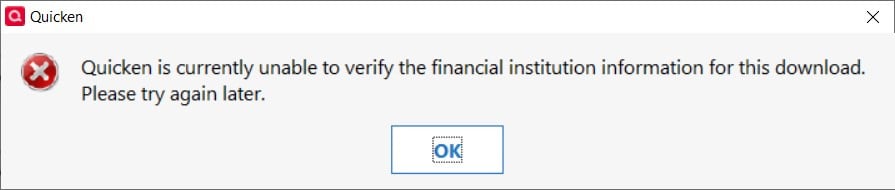
Did a little searching and see the stuff about reauthorization. Truly have no idea what all of that is about since again…I don't use OSU, etc. But figured…ok, why not.
Big mistake.
I was able to reauthorize apparently successfully because as soon as I did, it automatically downloaded a bunch of transactions, including some duplicates, across all 3 of my BoA accounts (checking, savings, credit). Even worse, it put them all directly into the registers even though I have the box for doing that UNchecked. The credit card account had lots of duplicate entries and the balance was off by like $10k!!!
I have currently rolled back to a backup from 09/19. And I removed each of my BoA accounts from online access. And yet I still cannot import the qfx file. I get the same popup about unable to verify.
How can I get Quicken to allow my qfx downloads again without OSU happening and putting unwanted/duplicate transactions into my register and messing up my balances so badly?
I have to assume this happened with x.29 or x.30? Can I roll back to x.25 somehow and prevent the updates?
Comments
-
Hello @justanotheruser2021,
Thank you for sharing the details of what you’ve run into. I know how disruptive it must be to have your workflow upended when you’ve relied on manual QFX downloads for so long.
Rolling back to an earlier release of Quicken won’t resolve this issue, as this change wasn’t caused by the software update—it’s an intentional change made by Bank of America. They’ve discontinued support for QFX (Web Connect) downloads.
You can find more information about this change in this Community Announcement.
I understand this isn’t the answer you were hoping for, but at this point, the only way to continue downloading transactions from Bank of America into Quicken is through the reauthorization process (Express Web Connect+).
Thank you!
-Quicken Anja
Make sure to sign up for the email digest to see a round up of your top posts.1 -
- 1. Why did the reauthorization automatically put transactions into my register when in Preferences, the box for that is UNchecked?
- 2. Why did it download duplicate transactions? (Goes along with #1…if it is going to download duplicates, I should at least have the chance to "match" them instead of them being placed directly into the register.)
- 3. Why did it change the beginning account balance on the credit card account?
Those are not BoA issues. Those are Quicken issues.
0 -
Also…for whatever reason, if I go to the Announcements page, that announcement does not show up. I can only find it by clicking the link you posted.
-1 -
I can no longer download and update my Quicken since the last Quicken update. How to Fix?
-1 -
I ran into this this issue today. My Quicken for Windows (Subscription) updated when i opened it.
Just like the original poster I have the same problem QFX import doesnt work now. I had to manually enter everything.
Now the Quicken for Windows works like the Mac version (I have both). I hate the Mac version since I cannot manually select the transactions to match them to ones I have entered manually in the register. It auto imports the transactions and it never matches them up to existing transactions making it very difficult to balance the account. I have to do it manually post import with the drag and drop or just delete the manually entered item in the register. Stupid process really.
I have stayed on the Windows version for all these year because I could always manually select each transaction and match them up myself. Doing this is far simpler than the so-call auto process. I really hope this manually alignment process is given back to us in Quicken or I will have find another money manager product to use and cancel my Quicken subscription. Been using Quicken for around 20 year or more now.
0 -
How do you download transactions? Are you using One Step Update or are you downloading a QFX file from the bank's website, for import into Quicken?
What error messages, error codes or error symptoms do you get?
1 -
I've also an issue with BoA as of today. Downloading a QFX file I get a message "Quicken is currently unable to verify the financial institution information for this download. Please try again later"
0 -
Definitely me, too! Same error, same type of download as Janner34.
0 -
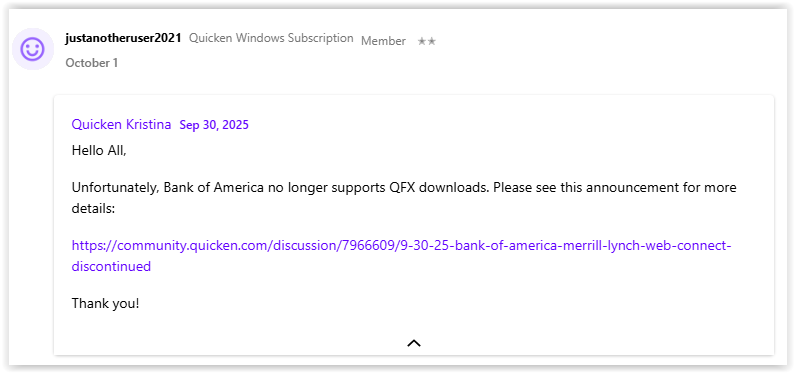
Hello All,
Unfortunately, Bank of America no longer supports QFX downloads. Please see this announcement for more details:
Thank you!
Quicken Kristina
Make sure to sign up for the email digest to see a round up of your top posts.
1 -
I am having the same problem as the two users above. I need to be able to review all transactions before they are entered in to my register. Have been using Quicken for more than 20 years. Would like to not have to change software at this point, but will if this continues.
0 -
Quicken - Fix this B of A won't support QFX anymore - Your program is useless if I can't complete my transactions - I'm going on FB to ask what other programs are good to use with B of A.
1 -
Yea, this is a major problem. I have never liked Express Web Connect. I ran into too many problems with it, Corrupt files etc…If this isn't fixed I'm going to be looking for a new way to keep track of my finances. Just say'n.
2 -
Still looking for answers on the reauthorization to EWC+…
- 1. Why did the reauthorization automatically put transactions into my register when in Preferences, the box for that is UNchecked?
- 2. Why did it download duplicate transactions? (Goes along with #1…if it is going to download duplicates, I should at least have the chance to "match" them instead of them being placed directly into the register.)
- 3. Why did it change the beginning account balance on the credit card account?
-1 -
[Removed - Rant]
1 -
HOW DOES QUICKEN SUGGEST WE RECONCILE OUR ACCOUNTS NOW?
0 -
Just go to Account Settings > Change Connection, and re-setup the connection. The new connection is easier. It downloads all transactions automatically instead of requiring to download and import a transaction file for each billing period.
2 -
The only reason I have Quicken is to import transactions from my bank and reconcile my account. If this doesn't work anymore, there is no reason for a Quicken subscription. I've been doing this since 1996. I see references to Reauthorization and Express Web Connect plus, but can't find that in Quicken software. Also, it's stated that Bank of America stopped supporting .QFX, but they still have the option to save in that format and it successfully saved the file to my computer. The Quicken software seems to be unable to read it.
2 -
Yeah right. We've all looked for other options every time quicken has some pain in the **** problem, yet here we all are, still using it.
-1 -
This is a Windows thread. It is a bit different on Windows.
The person should right click on each account in the Account bar and select "Edit/Delete Account" → Online Service tab → Deactivate. Once all the accounts from the financial institution are deactivated, they should then do Ctrl+A to start the Add Account process and connect to the financial institution and authorized the connection, and the last step in that will be to connect the accounts found to the correct Quicken accounts.
It is the financial institution that decides what is supported. They tell Intuit (Quicken Inc pays Intuit for "connection services") what they want which maintains a list of "participating partners" that Quicken uses to allow/deny the importing of the QFX file. It is BOAs mistake to keep the generation of the QFX file on their website even though they have told Intuit/Quicken Inc they don't want to support it anymore.
0 -
So if Back Of America no longer supports QFX files, why do they still let you download them from their site??. If they don't support them, you should not have the option to download them.
 0
0 -
You would have to ask BofA that question. I would think it is just because either they didn't think of removing it from their website or didn't think it was important enough to take the effort to do it.
In all cases, this is up to BofA.
0 -
Same issue, I also had the same error and only after a lot of searching was I able to find the solution of re-authorizing the bank account in Quicken.
Also had the same issue when it immediately downloaded the reconcile file and added/ignored transactions that were already reconciled and shows an error or reconcile/close for the wrong balance in the account vs register. Only when I un-check Reconcile on those transactions will it show a $0 difference but the bank has cleared them a week ago.
How am I supposed to fix this? Do I have to create a balance adjustment even though it has not been off until now?
0 -
(Meant to post this on Windows discussion)
Bank of America is still downloading QFX files to my computer — Quicken is just not reading them properly. Since these are just text files, comparing a download from 9/15 to one from today, there is no difference in the header lines for financial institution, only the individual transactions. So, why then can't Quicken just read and process ASCII text?
0 -
I have a subscription, its up to date, and I use Windows 11.
I had the same issues as noted above. Quicken stopped accepting my .QXF files. I followed the instructions for re-authorization and failed to notice the drop down box to "add accounts to Quicken." The result was ADDING my BofA accounts to my Quicken, duplicating my accounts.
I do not use OSU. I manually download transactions and import the file to reconcile my accounts.
My questions:
- Does this re-authorization mean that I cannot download transactions and import them into my Quicken database? Is OSU the only option?
- If install the last back up and override the information that was added, will I be able to initiate the re-authorization process?
- Can I delete the accounts that were added and reauthorize the accounts I already have?
Will I be able to manage the downloads without using Quicken's one step update? I prefer to control the data.
0 -
Quicken can read the QFX file just fine, but BofA has told Intuit (Quicken Inc's aggregator) to not support Web Connect/QFX files anymore (yes, even if they allow exporting that file from their website). Intuit then updates a fidir.txt file that Quicken read to see what is supported and what isn't supported. Quicken Inc can't just ignore that file, they have contracts they have to adhere to.
0 -
Yes, what it means is that BofA is only supporting Express Web Connect + now, which only works through One Step Update.
Going back to an older version of Quicken or a backup of your data file will not make Web Connect/QFX files work. Read my comment above on how that process works.
As for the accounts it created. Yes, you can delete them, and it might be best if you do. But what you should do to download transactions from BofA going forward is first go through all your existing BofA accounts to the Account Details → Online Services tab and make sure they are all deactivated for downloading.
And then you can do Ctrl+A to start the reauthorizing of the BofA accounts again, and this time when you get to the dialog in Quicken that shows you your accounts you should be able to link the online accounts to the existing ones in Quicken.
2 -
Thank you! This did the trick!
1 -
The answers from Quicken on this are quite frustrating. Why did I call customer service twice after trying to use Web Connect/ QFX as I always do? Why didn't the popup message say, "BofA no longer supports this and it doesn't work any more." Rather than "we are unable to verify the bank, please try again later?"
And then why didn't tech help know about this when I called to tell them I keep getting this error code?
0 -
The error message is a “generic error message” the error can be caused by multiple different things and as such they can’t just say that it was caused by the financial institution stopped supporting it.
As for support’s response well clearly they aren’t as informed/trained as they should be.
0 -
The following line was deleted from fidir.txt:
06526 06526 05358 Bank of America-All Other States https://www.bankofamerica.com/ 1-800-792-0808 https://secure.bankofamerica.com/login/sign-in/signOnV2Screen.go ACTIVE BANKING,CREDIT,ACCOUNTINFO,PAYMENT&DIRECT BANKING,CREDIT&WEB-CONNECT BANKING,CREDIT,ACCOUNTINFO&EXP-WEB-CONNECT NOT_QBP NA
So, even if BoA supplies a qfx file, you will not be able to process that file. Note: I am not recommending adding that line back to the file to try to get Quicken to process it. It would not be a good idea to try that.
I had a similar, but not quite the same, problem with my BoA account: One Step Update didn't work so I tried downloading the qfx file and got the failure processing it. I fixed the One Step Update issue by deactivating/reactivating online services and that forced a reauthorization.
Another thing I discovered in trying to deal with Merrill Lynch's (Merrill Lynch is owned by BoA) move to EWC+: the transactions generated by EWC+ are not necessarily the same as the transactions in the qxf file even though they perportedly have the same effect. (There's more than one way to skin a cat.) If you try to download and process a qfx file and do a one step update throuhg EWC+, you could get funny results that will require hand editing to correct.
Jim
0





Categories
- All Categories
- 6 Product Ideas
- 34 Announcements
- 253 Alerts, Online Banking & Known Product Issues
- 19 Product Alerts
- 265 Welcome to the Community!
- 301 Before you Buy
- 1.5K Product Ideas
- 55.8K Quicken Classic for Windows
- 16.9K Quicken Classic for Mac
- 1K Quicken Mobile
- 834 Quicken on the Web
- 129 Quicken LifeHub