Fidelity Cutover recognizes the wrong money market fund as cash balance
Comments
-
Hello @Chris_QPW,
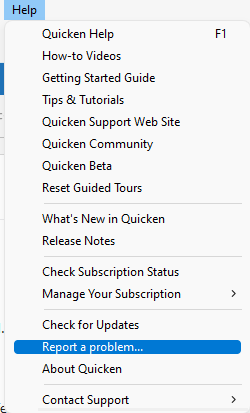
Thank you for providing a detailed explanation of this issue! I forwarded it to the proper channels for further investigation and resolution. If you haven't already done so, please navigate to Help>Report a Problem and send a problem report with logs attached to help with the investigation.
Thank you!
(CBT-847)
Quicken Kristina
Make sure to sign up for the email digest to see a round up of your top posts.
0 -
@Quicken Kristina I don't have any Fidelity accounts. I was just trying to make sense of what others have been reporting in this thread in comparison to how Chase does it.
1 -
Well, I'm still intermittently getting a CC-506 error when using one step update on the retirement accounts with FDRXX as core money market. I keep "fixing" it by either deactivating or resetting the accounts, after which it works a couple of times, eventually leading to that CC-506 error "Quicken is unable to update your account. This may be because the account was closed, or its nickname was changed". That's in addition to not recognizing the core fund as cash.
0 -
Thank you for your replies,
Is there anything that seems to trigger these intermittent CC-506 errors? Are the problem accounts connected in more than one Quicken file?
To troubleshoot this issue, since neither resetting nor deactivating and re-adding is a permanent fix, please backup your Quicken file and try following these steps (they're similar to deactivate and re-add, but with an extra step that may help resolve the issue:
- Open the Account List in Quicken (Tools > Account List OR Ctrl + A)
- If present, select the Show Hidden Accounts checkbox at the bottom of the Account List
- Edit each account with this financial institution to Deactivate (or Remove From One Step Update) on the Online Services tab

- Click on the General tab and remove any info displayed in the Financial Institution, and Account/Routing Number fields. Note: The account must be deactivated first before these fields can be edited.
- When finished, close the Account List
- Close, then re-open Quicken
- Navigate to Tools > Add Account
- Walkthrough this process as if you were going to add a new account, providing the login credentials and answering any security questions/processes presented until you reach the screen where Quicken displays the Accounts Discovered at the financial institution
- Very carefully LINK each of the found accounts to the appropriate account you already have set up in Quicken.
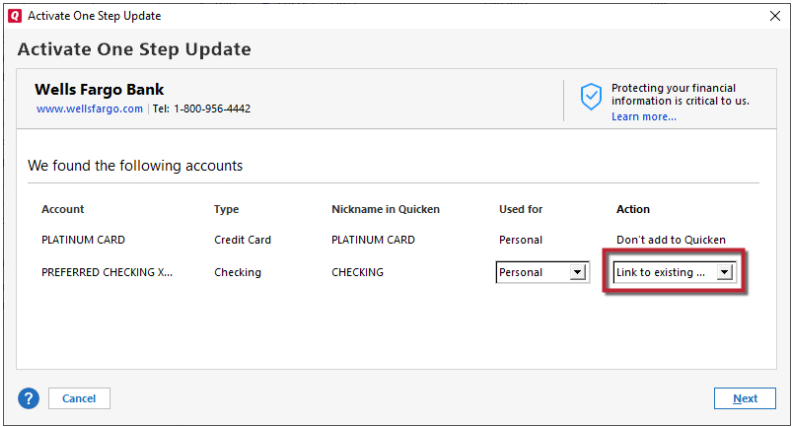
Once that is done, see if the issue still continues to persist.
Thanks for letting me know!
Quicken Kristina
Make sure to sign up for the email digest to see a round up of your top posts.
0 -
Hi Kristina,
"
Is there anything that seems to trigger these intermittent CC-506 errors? Are the problem accounts connected in more than one Quicken file?"
It seems to happen most frequently the first time I run One Step Update in the morning (but like I said, it's inconsistent). And yes— it happened a few times on my second file— the one that has SPAXX as the core money market, although it happens more often on my retirement accounts with FDRXX. However, it hasn't happened on the file with SPAXX since I changed the financial institution for my Fidelity Visa card from Fidelity back to Elan Financial (actually, it was Cardmember Services previously, which developed some kind of connection problem that was resolved on Quicken's end). I followed your instructions for deactivating and reactivating; I won't know until tomorrow whether that fixed it.
1 -
Thank you for your reply @Waitingtoretire,
It is possible that the problem is being caused by the accounts being connected in two separate files. Does updating in one file seem to cause the accounts in the other file to throw this error?
Please let me know if the issue persists tomorrow!
Quicken Kristina
Make sure to sign up for the email digest to see a round up of your top posts.
0 -
Didn't get the error this morning, but it may be too soon to tell, as the problem is intermittent. I don't know how the accounts in two separate files could be connected; when re-authorizing, I only select the account check boxes on Fidelity's authorization page that pertain to the file being authorized. I'll let you know how things go later.
0 -
Frustration— didn't get the CC-506 error on the Quicken file that has my retirement accounts (and the FDRXX core money market), but got the CC-506 error this morning on the non-retirement account with SPAXX core fund. I'll try what you suggested above. Still waiting for that update to re-enable the shares/cash option…
1 -
Thank you for the update,
While they are separate files, they both communicate with the same financial institution. Sometimes, that can cause issues if there are limits on the financial institution's side (such as issuing only one token, so authorizing in one file revokes authorization in the other file).
I can see you are already using version R64.30, which should have added that ability. Is there a specific account type or fund that it's not giving you the option for?
Thank you!
Quicken Kristina
Make sure to sign up for the email digest to see a round up of your top posts.
0 -
This is the same issue that prompted the opening of this thread: in one Quicken file I have three tax deferred retirement accounts (a Roth IRA, a SEP IRA, which are brokerage accounts, and a traditional IRA account), all of which use FDRXX as the core money market fund, which should be tracked as cash (share price = $1), but they are not, and there is no option to reset shares/cash. The separate Quicken file has a regular, non-tax deferred brokerage account that uses SPAXX as the core money market fund, and that fund is tracked as cash, and the option to reset cash/shares is available.
0 -
Thank you for your reply @Waitingtoretire,
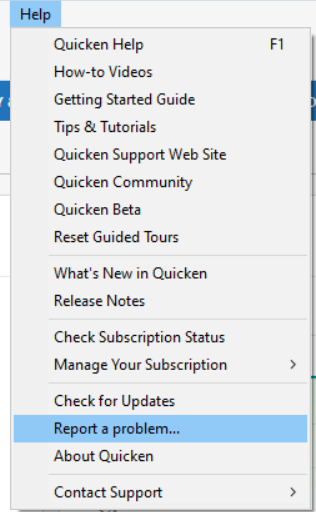
Thank you for the additional details. The issue with no option to reset cash representation in some Fidelity accounts was forwarded to the proper channels for further investigation and resolution. To contribute to the investigation, please navigate to Help>Report a Problem and send a problem report with log files attached (I can see you sent logs when you were using R64.29, but we will need logs from the current version, R64.30, since the current version was expected to fix this issue). If possible, please include a screenshot showing the how the fund is reflecting incorrectly in one of the problem accounts.
Please let me know once you send the logs, so I can add you to the ticket.
Thank you!
(CTP-14825)
Quicken Kristina
Make sure to sign up for the email digest to see a round up of your top posts.
0 -
Hi Kristina,
I sent two reports, because I couldn't attach all four screenshots to the first report. Sadly, the CC-506 error has returned, despite applying the fix you documented above.
1 -
What I have done in the past is paste all the relevant photos (with personal info blurred) in a comment along with the comment description on this forum. Then copy the link of the time of the comment and reference that link in the Report a Problem box in Quicken along with the problem description. That way I don't worry about running out of allowed attachments in Report A Problem.
For example, your prior comment has a link of
https://community.quicken.com/discussion/comment/20513970/#Comment_20513970
Suggestion
Deluxe R66.23, Windows 11 Pro
1 -
Thank you for sending those problem reports @Waitingtoretire,
I added you to the ticket!
Quicken Kristina
Make sure to sign up for the email digest to see a round up of your top posts.
0 -
@Quicken Kristina I am having the exact same problem that waitingtoretire mentions above, with my 3 accounts that use FDRXX. My 10 accounts that use SPAXX are operating fine. My one account with 3 sweep balances is not working but that is a different thread. I have also reported a problem via Quicken.
0 -
Just checking in. Problem with cash/shares persists, as does the CC-506 error.
0 -
Hello All,
We just received word from our teams that the latest update should have corrected this issue. If you haven't already done so, please navigate to Help>Check for Updates to make sure you're on the most current version of Quicken.
Please let me know if you're still seeing this issue!
Quicken Kristina
Make sure to sign up for the email digest to see a round up of your top posts.
0 -
@Quicken Kristina This is fixed for the most part. The downloaded cash balance for the account with FDRXX as the core position still incorrectly shows $0.00 downloaded from Fidelity. I submitted a problem report.
Please note
Deluxe R66.23, Windows 11 Pro
1 -
Close, but no cigar-- in those Fidelity accounts with FDRXX as the core money market fund. (Everything is working well when the core fund is SPAXX.)
To be fair, some progress has been made. On the "Account Details" popup that results from editing the account, on the "Online Services" tab, a button to "Set/Edit" the setting to treat the money market fund as cash is there where it wasn't there before. And in the "Online Services" window, "balances" tab, it properly lists the money market fund balance as cash, and on the "holdings" tab, it lists Fidelity Cash Reserves (Cash Balance) also as intended. And when clicking blue Cash Balance "link" at the bottom right corner of the investment account register, the "Cash Representation" button is restored to the "Update Cash Balance" popup, BUT... the amount listed under "Balance Information" next to the line "The cash balance downloaded from Fidelity Investments as of 12/4/2025 is:" still $0.00 instead of the true cash balance.
I suppose that's progress, but that last little annoyance hasn't been eliminated just yet.
2 -
With this update I was able to manually set FDRXX to my cash position, so I no longer get miscomparisons when I "reconcile shares". Even when I did a new update it did not prompt me to set the position. Note that sweep funds are still not working (reported here: Quicken not handling Fidelity Cash Management Account cash positions correctly (QPIAQ, QPCTQ, QPIFQ) — Quicken ) as it does not appear Quicken can handle the concept of multiple cash positions.
1 -
Thank you for your replies,
I forwarded the information to our teams!
Quicken Kristina
Make sure to sign up for the email digest to see a round up of your top posts.
0 -
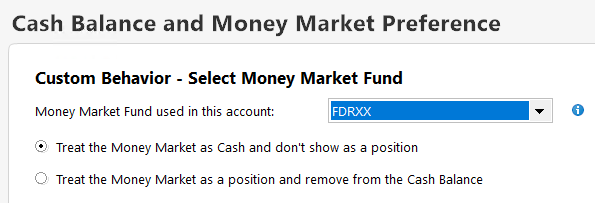
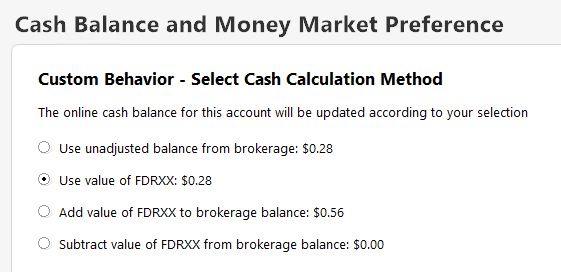
To illustrate what's been said here:
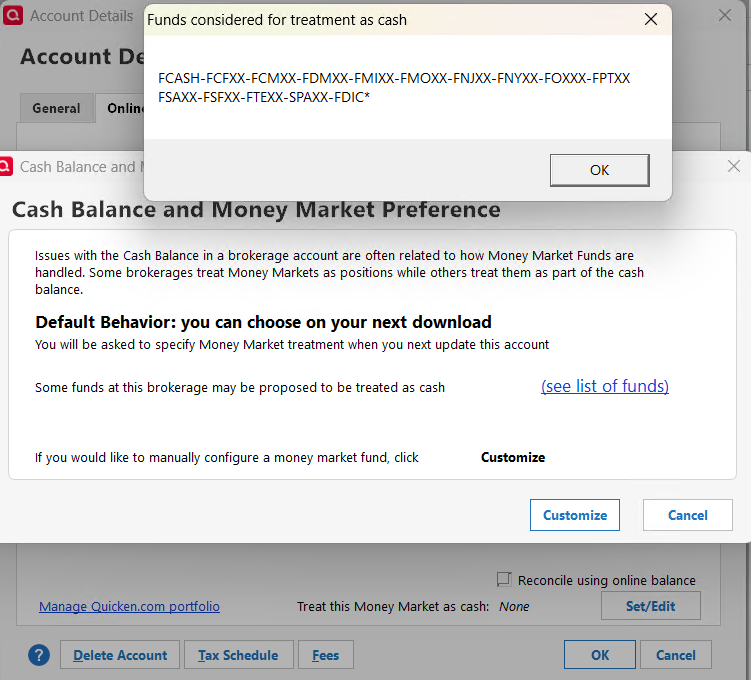
The list of funds is missing FDRXX, but you can set it when you hit the Customize button:
 1
1 -
Forgot to mention one thing: when I went through all my accounts with FDRXX and did the above, one of them still had a BoughtX transaction with FDRXX which needed to be changed to an Xin.
0 -
Thank you for your replies,
If anyone is still unable to reset your Money Market/Cash preference, please let me know.
The word I got back from our teams was if you are able to reset your Money Market/Cash preference, but the amount is incorrect, please contact Quicken Support directly for further assistance. The Quicken Support phone number can be found through this link here. Phone support is available from 5:00 am PT to 5:00 pm PT, Monday through Friday.
Thank you!
Quicken Kristina
Make sure to sign up for the email digest to see a round up of your top posts.
0


