zzz-Fidelity Updates
Comments
-
Ooops. That was the Mac version. Will look at Windows
0 -
OK. Windows was/is a little different. You are saying the DIV should be REINSTDIV - or whatever Quicken calls that, yes. But the other changes work? Thx…
 0
0 -
I did the MiscIncome for the placeholder removal for SPAXX, not the LTCG distribution.. It was a multiple error day :) Easy to lose the bouncing ball…
0 -
Sorry if this posts twice — didn't seem to take the first time. The posts after the post above seemed to take off in a different direction — so I'd like to know if anyone else is seeing this issue: SoldX/BoughtX transactions in a Cash Management account (and their corresponding deposit/withdrawal transactions in the matching "-Cash" account) are not coming down in the EWC+ feed (when they were with DC).
0 -
Duplicate - ignore, sorry.
0 -
So, I got the same 297-A error on Fidelity zzz DC 10/11/25 (232-A yesterday) as others. I did the create template copy after reconciling all accounts. During the reauthorization, only the SPAXX MM funds were flagged the be converted (3 of 7 accents). They have the “cash representation” buttons. The other 4 (FDRXX/FZFXX) do not have any options (same screen options as before conversion).
@Quicken Kathryn UPDATED 9/25/25 Fidelity Cut-Over Migration states it was fixed in R64.30, but I am on R64.30.
I reported it as a problem to Quicken, but, I’m afraid they’ll think is resolved. Any suggestions?0 -
Hello @kla4503,
The issue you mentioned with not having the cash representation issue in 4 of your accounts is already a known issue that our teams are looking into (CTP-14825).
Are you still seeing the 297-A error for any of your accounts?
Thank you!
Quicken Kristina
Make sure to sign up for the email digest to see a round up of your top posts.
0 -
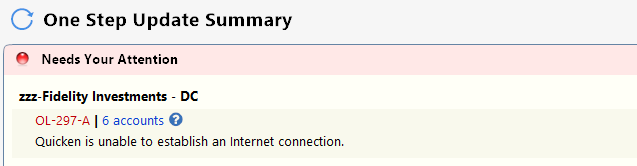
I too received the 297-A error on all accounts uploaded via Fidelity zzz DC starting today (Oct 11, 2025) and am also on Quicken Classic Premier version r64.30, build 21.1.64.30
 0
0 -
hi,
I also got 3 transactions instead of just 1 for ReinvDiv
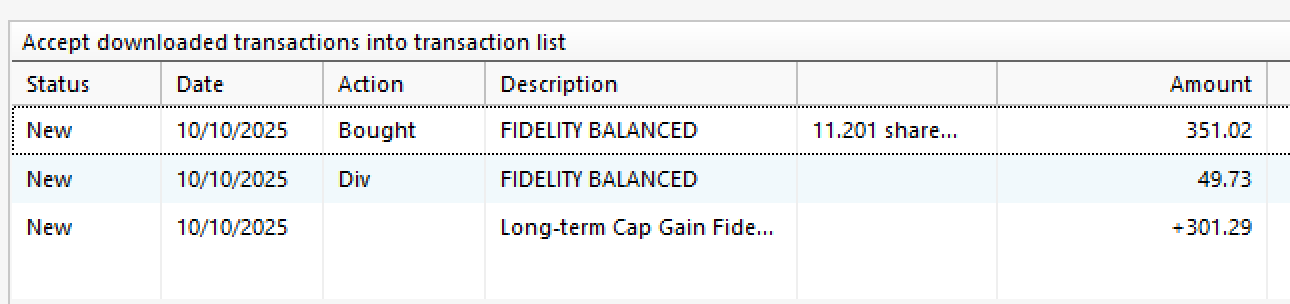
I will change the Bought to ReinDiv and delete the rest.
Is it correct way? or is there better way?
tnx
Best Regards0 -
You're being forced by Fidelity to do the update to the new connection method
- Quicken user since 1992 (back in the good old DOS Version days)
- I don't use Cloud Sync, Mobile & Web, Bill Pay/Mgr, Budgeting, Tax Planner
1 -
Based on monitoring of these related threads and the recommendation to wait until the software is stable and major bugs resolved and we are forced to make the conversion, I was waiting for this day. However, with what certainty is the cutover now being forced? I've seen no communication and when I start the synch process it still gives me the option of not making the conversion and to be reminded later.
1 -
@Quicken Kathryn not in the EWC+ file, only in the zzz DC file.
0 -
I had the same situation "when I start the synch process it still gives me the option of not making the conversion and to be reminded later" but only ever received the "297-A error - couldn't establish internet connection" (paraphrased), which seems to be Fidelity forcing the connection method on groups of folks in waves.
- Quicken user since 1992 (back in the good old DOS Version days)
- I don't use Cloud Sync, Mobile & Web, Bill Pay/Mgr, Budgeting, Tax Planner
1 -
Thank you User @pablomiller for your timely and thoughtful response. Couple of things if you have any additional thoughts/insights/suggestions.
On Windows 11, you are right, I will have to update my aging Dell Laptop in order to upgrade to Win v11, but I am not resisting
On Quicken version, the v53.xx build I cited shows that it is the latest available to me when I check under Help>Check for Update. Perhaps this is related to me running Win v10.x vs. you running v11
On the Direct connect "choice." As far as a I know, I haven't been given an option to convert to EWC for my legacy accounts. The accounts that I've set up recently as a result of a job change are on EWC but my legacy accts. are not. That is a result of Quicken's updates, not anything I selected or didn't select, at least as far as I know. I you can direct me to how to "update" the download method, I'm happy to try that. I don't see any optionality there.
Again, thanks for your thoughtful and timely response earlier.
0 -
Thank you for your reply @kla4503,
So far, this migration was optional, but Fidelity has now started the process of making it mandatory for all accounts.
During this transition, some accounts may temporarily show errors like the ones you mentioned. We also have this Community Alert regarding this error that provides additional information. The best approach is to dismiss the error, wait, and try the account update again later, and follow any prompts to re-authenticate.
Hope this helps!
Quicken Kristina
Make sure to sign up for the email digest to see a round up of your top posts.
0 -
off topic - FYI any on Windows 10 can get free through the Extended Security Updates (ESU) program until October 13, 2026
there are many related youtube and info, just search for it to follow simple steps.
Best Regards0 -
Argghh. Made me look :)
I now believe the correct way is to change BUY to ReinvstDividend. Then leave the other two. Seems this is how Fidelity does it.
BUT, I now see I have dozens of these incorrect buys in Quicken Mac. Unsure if always that way or if this conversion caused it. Too much to change all. I'm beyond frustration.
Going to check all my Windows "Buys".
0 -
Even more in Windows. Dozens and dozens.
Not going to touch them. Maybe starting 1/1/26 I'll correct as they come in.
0 -
Does anyone have first hand experience downloading their monthly transactions from Fidelity as a .csv file and uploading that file into Quicken, thus avoiding OSU for Fidelity accounts? Thanks in advance.
0 -
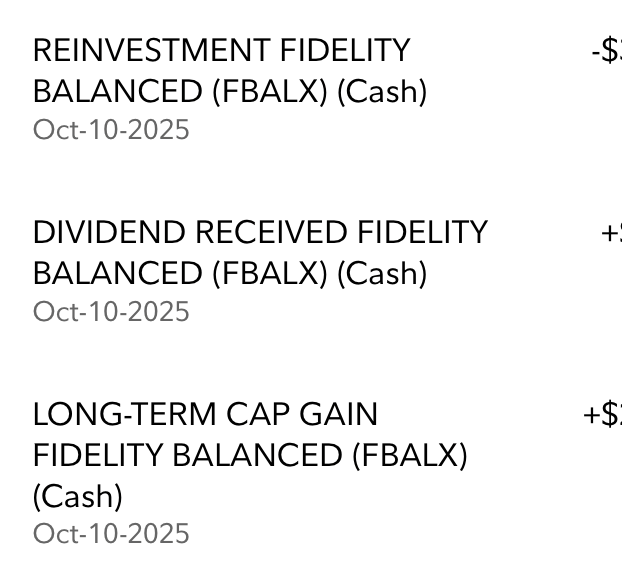
@mikek753b "I also got 3 transactions instead of just 1 for ReinvDiv".
This is the way Fidelity reported the FBALX transaction, it was correctly downloaded and reported in Quicken and I therefore don't see any reason to change any of them - other than the long-term capital gain transaction part, discussed in detail above:
 0
0 -
I downloaded the same 3 transactions for 2 Fidelity funds into my IRA account yesterday. I have seen this same sequence of transactions for a few Fidelity funds in my IRA in the past, BUT - the CG part was always marked as such, not as a deposit. I have other funds in that account, both Fidelity and not, that have always come down correctly. There's a bug in there, that may be occurring bc of a previous bug in the way certain Fidelity funds are treated. I just changed the deposit txn to Income, CGLong to fix them.
0 -
My final follow-up on this issue:
I have confirmed that in the case where there there is a MM fund and a cash sweep (In my case FZDXX and SPAXX), and where Fidelity automatically sells shares of the MM to cover a shortfall in the sweep (which they call a "Redemption" as opposed to a "Sale"), the transaction does not download into, or appear, into Quicken. I've needed to enter manual transactions for the "Redemption" to bring the FZDXX and sweep into balance.
2 -
The Div & Buy combination is equivalent to a ReinvDiv, the latter just making for a more compact register.
1 -
Mutual funds are required to pass their capital gains through to shareholders.
1 -
Hi @berryjt,
Version Question - Upon further consideration of the question of what is the "latest available" version of Quicken presented to a given user, it may be a function of what version of Windows (10 or 11) you're using, but quite possibly it may depend on the specific version of Quicken you're subscribed to … Classic Premier, Classic Business & Personal, or Classis Deluxe … perhaps a Moderator such as @Quicken Kristina could answer that. In any case, if you're on the latest version of Quicken available to you, it should have all the software components to function correctly with EWC+ on Fidelity
Self-Transition from Direct Connect to EWC+ - I believe that the "forcing" of transitions has been phased out in waves, and you apparently haven't been forced yet. Once again, a Moderator may have better advice, but I believe that if you go ahead and Deactivate and then Reactivate those legacy accounts, you will be transitioned, and can move forward. Here is a link to the Deactivate and Reactivate procedure:
Deactivate and Reactivate Online Banking Services for a Quicken Account | Quicken
As with every significant change, you should protect yourself with a good backup so you have something to roll back to if you don't like the results. They have certainly addressed and corrected most of the major issues, at least from my own personal experience, and what remains are some relatively minor cleanups. That said, don't be surprised to have some duplicate transactions show up after your first OSU. You're want to carefully look through them and delete the known duplicates. Hope this is helpful, and GOOD LUCK !
0 -
That's great news. Thanks!
So hard distilling who are the experts. So many conflicting opinions.
Kudos to so many users here sharing their knowledge and time. HKB for explaining Placeholders in a way that pages of documentation on Quicken failed to. Those knowing a transaction has been miscategorized when coming into Quicken. And how to correct it. And for dealing with the seemingly endless threads where many are saying the same thing over and over.
1 -
I tried and it's not straight forward.
Deluxe R66.23, Windows 11 Pro
1 -
Version Question: There is only one software for all the QWin editions (Starter, Deluxe, Premier, Business & Personal). The subscription is what tells the software which features are to be enabled or disabled. The current released version is the same for all editions.
The latest version is R64.30 (applicable to all editions). Those who want to have the best odds for successfully downloading from Fidelity via the EWC+ method should make sure they are updated to it because there have been several "Fidelity EWC+" issue fixes in this and some of the earlier R64.XX versions.
Self-Transition from Direct Connect to EWC+- I believe that the "forcing" of transitions has been phased out in waves, and you apparently haven't been forced yet. Once again, a Moderator may have better advice, but I believe that if you go ahead and Deactivate and then Reactivate those legacy accounts, you will be transitioned, and can move forward.You are correct on all of this. No one knows how quickly or slowly that users will be migrated to EWC+. My guess is that it will be sooner, rather than later, because this migration is no 2+ months behind the original schedule.
Also, I think (not sure) that Reset Account will also force the migration to EWC+.
Quicken Classic Premier (US) Subscription: R66.23 on Windows 11 Home
0 -
@Boatnmaniac , thanks for that insight, and so for the benefit of @berryjt and others contemplating whether to push forward with EWC+ or not, perhaps @Quicken Kristina can you suggest why @berryjt is not being offered an Update when he hits Help / Check for Updates ?
He stated above "On
Quicken version, the v53.xx buildI cited shows that it is the latest available to me when I check under Help>Check for Update"0 -
Upon closer inspection, I discovered that my EWC+ OSU yesterday did NOT download a mutual fund dividend and re-investment in my brokerage account from Oct. 3. which I had to enter manually. :-(
0