Why is this discussion closed?

I have done all updates and this is still a problem.
Answers
-
Is anyone else still having this problem?
Yes! I can get the menu back to appear, but the black bar remains. This is a real PITA.
XPS-8960 32G Ram 1TB HDD
0 -
The discussion from November 2024 was apparently closed because those who reported the issue said it went away after they installed R60.14.
Please go to Help > About Quicken and let us know version of Quicken you are running.
QWin Premier subscription0 -
Is this the issue? An open discussion
0 -
Hello @cschwalm,
Thank you for reaching out!
There’s actually a newer discussion about this same issue that’s currently open and being tracked under an active escalation ticket (CTP-14856). I recommend following that thread and adding a comment there so you can stay updated as progress is made.
You can also help our teams by submitting your log files through Help > Report a problem in Quicken.
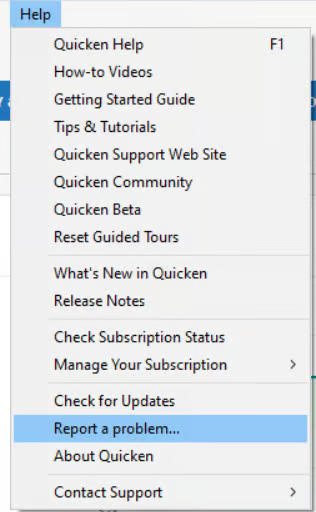
Please add "Attn: CTP-14856” to the title/subject field so it can be linked to the ongoing investigation.
Thank you for your patience while this issue is being worked on!
-Quicken Anja
Make sure to sign up for the email digest to see a round up of your top posts.0 -
Quicken R64.35 Build 27.1.64.35
Dell XPS-8960 32GB Ram 1TB HDD
0


Categories
- All Categories
- 6 Product Ideas
- 34 Announcements
- 249 Alerts, Online Banking & Known Product Issues
- 19 Product Alerts
- 266 Welcome to the Community!
- 297 Before you Buy
- 1.5K Product Ideas
- 55.8K Quicken Classic for Windows
- 16.9K Quicken Classic for Mac
- 1K Quicken Mobile
- 834 Quicken on the Web
- 129 Quicken LifeHub