How to prevent renaming of downloaded transactions

Hello, I used quicken for a long time, was enticed by some of the cloud offerings, and now back with a fresh qcbp subscription last week.
I naively accepted 'automatic add to registers' and connected my accounts. Then discoverd that many transactions were badly renamed and even in the wrong accounts [My wife's Chase CC had payments from my Chase CC, etc]. I deleted most of the accounts last night and have been trying to simply begin with a checking account from Wells - but I can't seem to turn off renaming.
I had no renaming rules and then I added some do not rename rules - but those didn't do anything And I unchecked everything in prefs/downloadtransactions. I unchecked the pref/dataentry automatically memorize new payees and then deleted all of the memorized payees. And still instead of getting 'paypal inst xfer …apple.. user' I get 'Apple / Shopping Electronics & Software' Other paypal transactions are renamed to paypal - without the actual payee that's present in the original downloaded transaction (and available from revert…) and some are renamed to some version of the actual payee. Amex payments are simply renamed "American Express" when I'd prefer to keep the 'pmt'. Various transfers to different accounts were renamed as all transfers to one account. etc.
I'd like to keep the info from the raw transaction names at first so that I can clearly distinguish them and avoid the problems that I had. Of course, I could make some guesses and proceed manually, but Wells downloaded 400 transactions, USAA has 800, and several others have hundreds. I've now deleted Wells & synced & exited & re-added several times and still getting the bad renames.
Is this a caching issue? Is there a bulk revert?
I appreciate any pointers on where else I can turn off anything that is ocntributing to the renaming mess.
Bottom line is there any way to simpy turn off all renaming of downloaded transactions?
Much thanks,
joseph
Best Answer
-
I decided that what was needed is to try to test this myself. One of the things that makes existing users "blind" to this problem is that we all use renaming rules.
So, what I did is create a new data file and deselected all these, even the categorization ones.
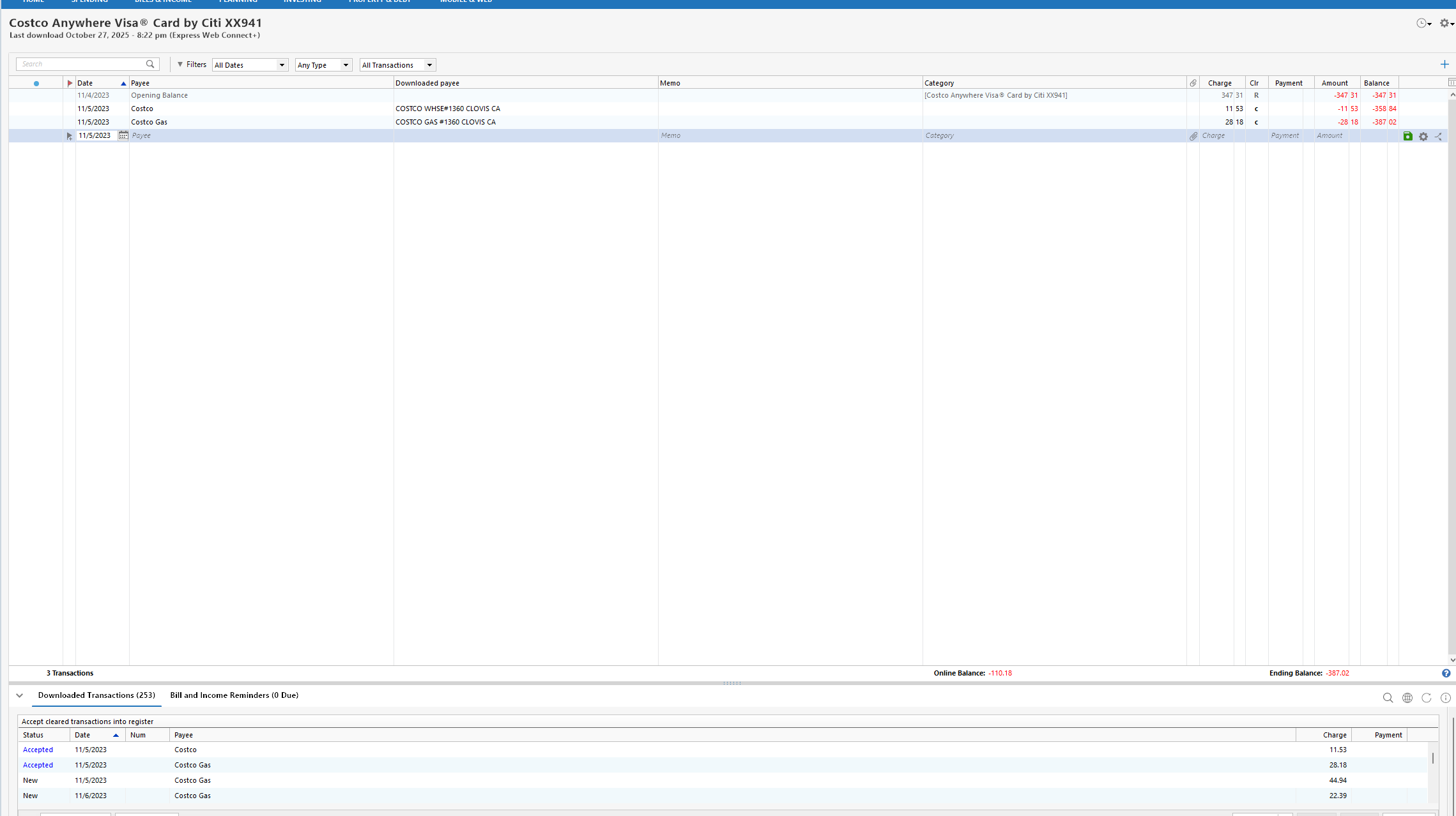
As you can see the payee names got renamed even though every option for that is off.
This points to the fact that this must be happening at the server level, and I think this Cloud Sync log entry bears that out.
{"id":"509682679534822145","createdAt":"2025-10-28T03:22:31Z","modifiedAt":"2025-10-28T03:22:31Z","dbVersion":0,"source":"QCS_REFRESH","accountId":"XXXXXXXXXXXXXXXXXX","postedOn":"2023-11-05","payee":"Costco","coa":{"type":"UNCATEGORIZED","id":"0"},"amount":-11.5300,"state":"CLEARED","matchState":"NOT_MATCHED","knownCategoryId":"6750000000","cpData":{"id":"233100001","txnType":"PURCHASE","postedOn":"2023-11-05","txnOn":"2023-11-05","payee":"COSTCO WHSE#1360 CLOVIS CA","amount":-11.5300,"inferredPayee":"Costco","inferredCoa":{"type":"UNCATEGORIZED","id":"0"},"cpCategoryId":"2","mcc":5300},"mlKnownCategoryId":6750000000,"type":"CASH_FLOW"}
I know that this has always been a long-standing problem with Quicken Mac and looks like somewhere along the lines instead of fixing in Quicken Mac, they have propagated it to Quicken Windows.
Note I believe this is only possible with Express Web Connect +, and that is probably why it is "new".
OFX/QFX doesn't have an "inferredPayee".
0

Answers
-
Your wife's card downloading your transactions has nothing to do with renaming. Renaming can't change the account.
It indicates, instead, that you've managed to cross-link the accounts … so that your transactions are downloading into her account.
SO, carefully inspect each account (TOOLS, Account List) and verify that each account in Q is associated with the proper online account.
Q user since February, 1990. DOS Version 4
Now running Quicken Windows Subscription, Business & Personal
Retired "Certified Information Systems Auditor" & Bank Audit VP0 -
Hello NotACPA,
Thank you for responding quickly. The crosslinks are a possibility - I added several account a few days ago and several had odd transactions like that. For instance several CC accounts had payees that didn't make sense and I have never transferred money FROM a CC TO a bank account and yet there were dozens of those types of bad transactions across several accounts. My 'automatic add to registers' created 366 memorized payees and my suspicion was that the these crosslink examples had been badly renamed. I can't tell now since I deleted all of the affected accounts - but I did take a lot of screen shots yesterday before I deleted them.
Here's an example from the J Chase Bonvoy Visa account register:
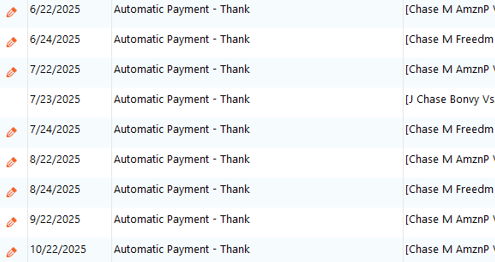
Maybe these are examples of badly aligned renames / transfers?
I did not take screenshots of Tools/AcctList with Edit for each account to verify the customer IDs [logins] were not crosslinked, however here's an excerpt a screenshot from the Accounts for Mobile & Web that shows the FI login account and the accounts associated with that login. I believe that this should match Tools/AcctList when we click edit and look at the customer ID [login]. Please let me know if I'm mistaken.
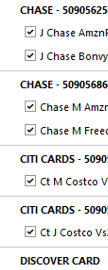
How common is account crosslinking?
I've read scores of community and help pages and it appears that bad renaming is a perrenial issue. I simply want it to be like the old days when Quicken (and MYM) would just download the provided transaction info and I could clean it up and establish solid rules later. [your .sig suggests we may be of a similar vintage ;-) ]
My plan going forward is to first figure out how to turn off all the renaming, then carefully add accounts and carfully check and carfully connect the transfers, etc. - beginning with Wells Fargo since it only has the one checking account.
Bottom line, do you know if it's possible to turn off all renaming - so that all transactions are downloaded and keep the 'revert' payee name? And if it is, how do we do it?
For now, I deleted the WF checking account again and, having turned off everything, I'll try again tomorrow.
Again, much thanks,
joseph
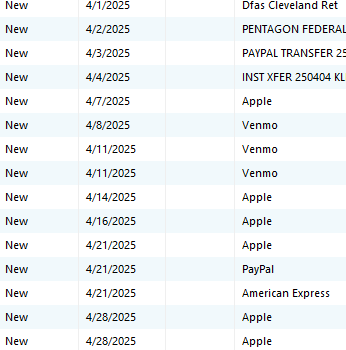
p.s. and here's a screenshot that highlights some of the issues I mentioned in my original post. This is from WF today after I think I've turned off every possible renaming switch I could find. This shows a couple of Inst Xfer Paypal entries that have the original bank payee, but most default unhelpfully to either Apple or Paypal. And the DFAS one - that's all it says - again unhelpfully dropping (via some rename logic) the actually payee.
 0
0 -
There are several settings that you may want to change. These are accessed from the Edit > Preferences.
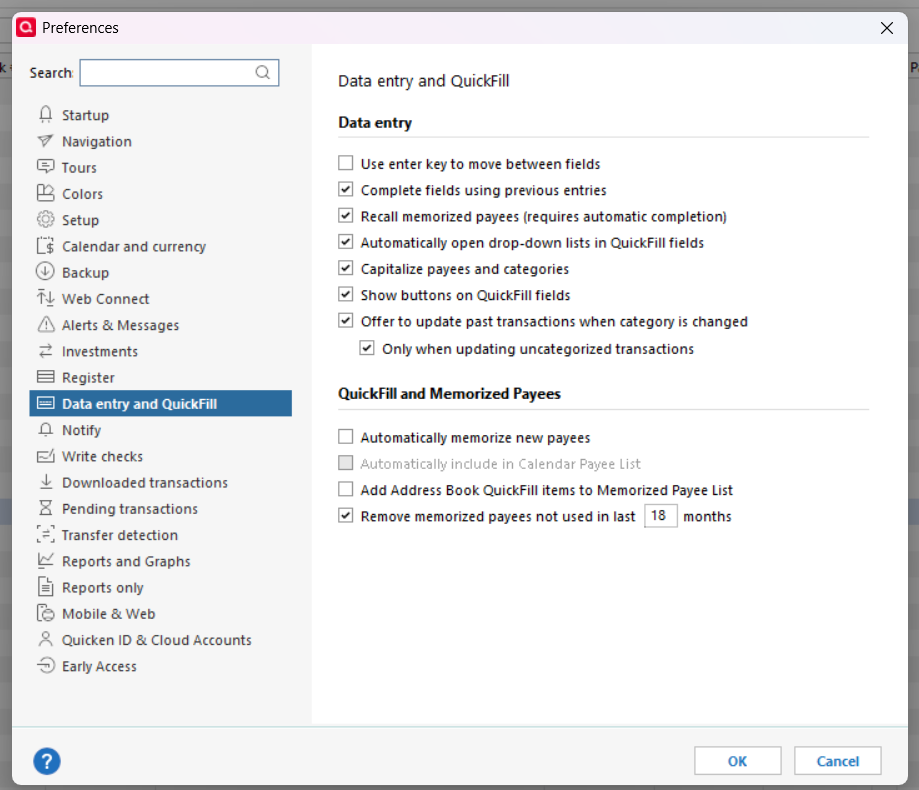
Turn off Automatically memorize…
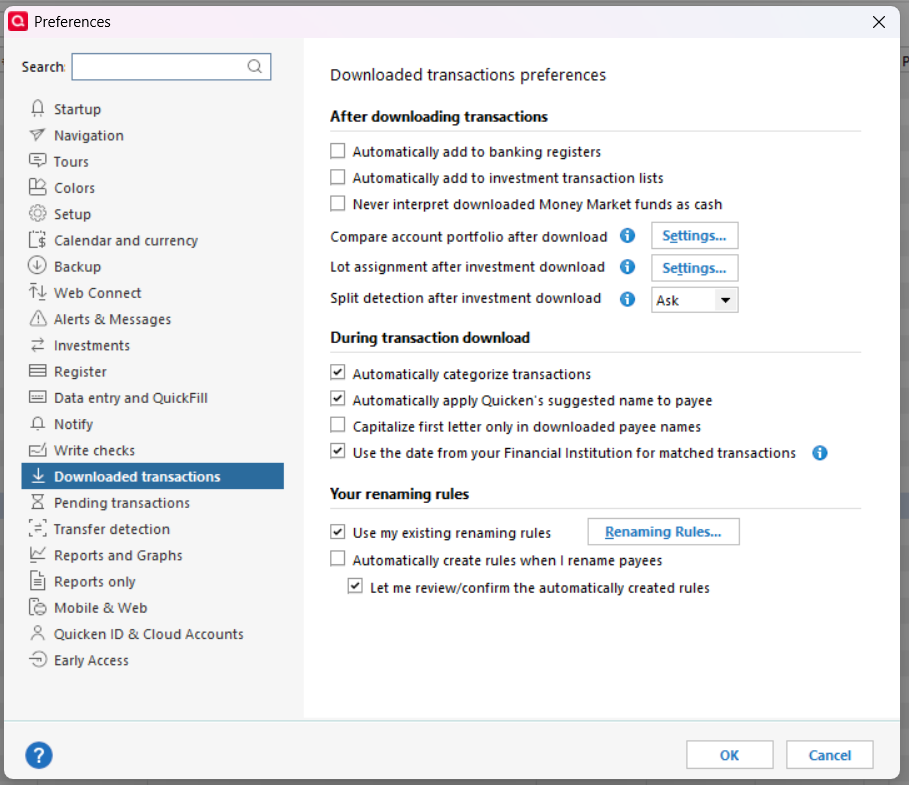
Turn off both Automatically add …
Turn off Automatically Categorize ,,, or carefully review the Categories that Quicken recommends.
Turn off Automatically apply Quicken's suggested name … or carefully review the names it suggests. You can hover over the names in the downloaded transactions area to see what the original name was. For commonly used Payees, you will want to create Renaming Rules to standardize the names and Memorized Payees to assign your preferred Categories.
You will want to review the downloaded transactions to delete any that duplicate ones you have manually entered and to create Renaming rules
QWin Premier subscription1 -
Team,
Thanks again for your thoughts, here are screenshot of the current renaming-related prefs. Please let me know what I missed.

I tried a couple of times with those bottom three unchecked but re-checked the 'Use my esxisting..' when I added the Do-Not-Rename rules.
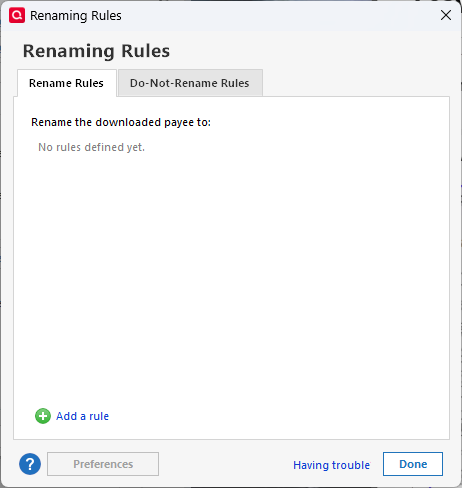
I've never had any renaming rules.
I did add these Do-Not-Rename Rules - but they didn't seem to have any effects.
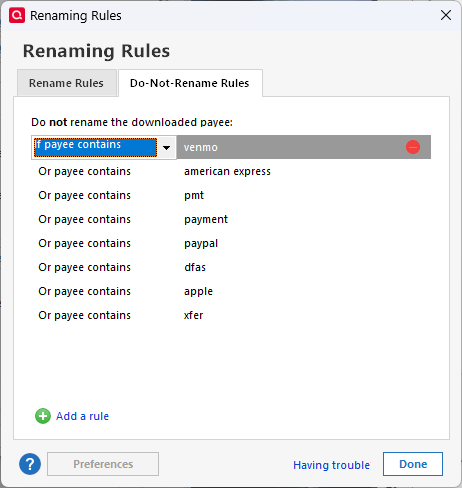
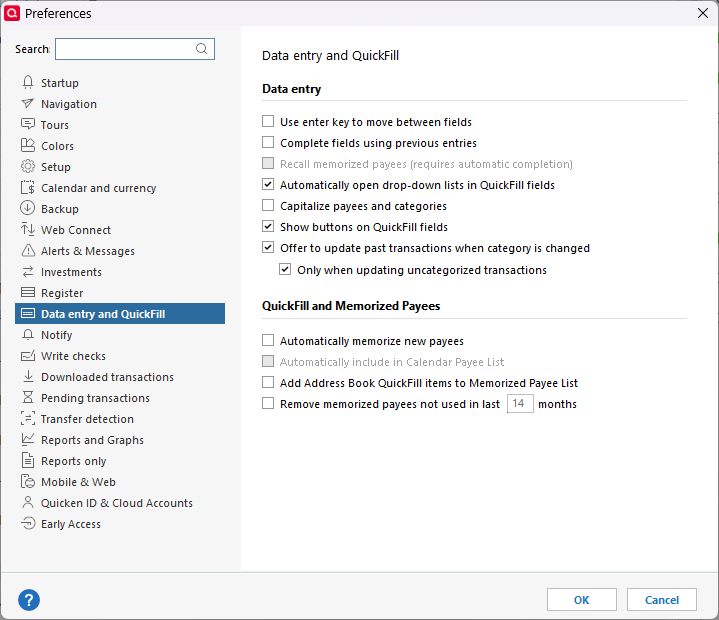
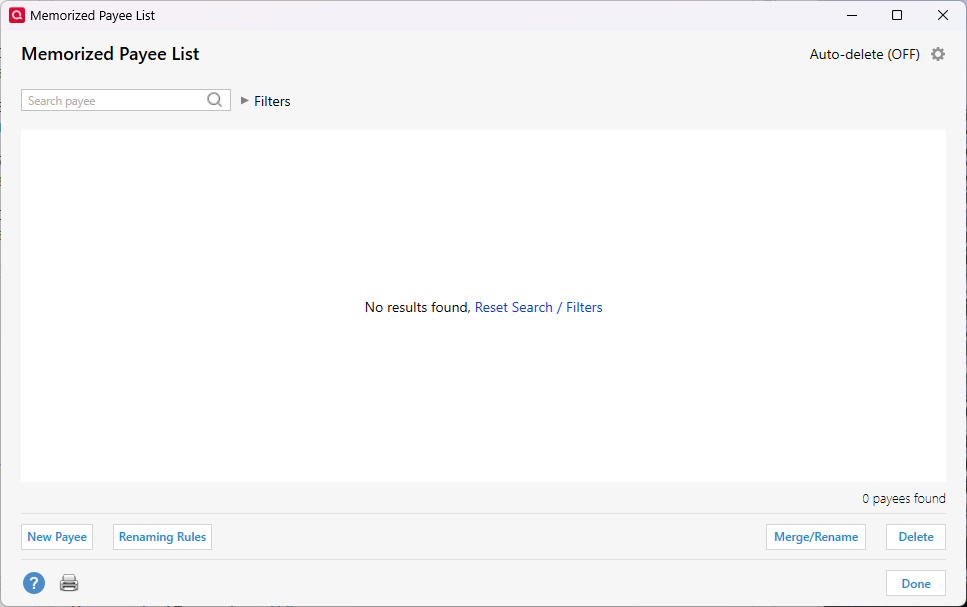
I just want to turn off all renames.
Thanks again,
joseph
0 -
Jim_Harman, thank you.
I was compiling the screenshots when you posted. I think I've already tweaked these and for good measure I've unchecked many that probably have nothing to do with this issue.
I'm just trying to turn off all the automagic maddness so I can get set up intentionally.
Did I miss something?
thanks again,
joseph
0 -
I would not use the Do Not Rename rules, I would create rules for common Payees and/or ones that Quicken's automatic renaming gets wrong that assign the downloaded names to your preferred ones, like these examples

These will trim the store numbers out of chain stores and compensate for different credit cards that download different variations on the names.
QWin Premier subscription0 -
Check what is set under Transfer Detection. This is Quicken guessing that a deposit of a given amount is the same as a withdrawal of the same amount in another account.
1 -
Check what is set under Transfer Detection. This is Quicken guessing that a deposit of a given amount is the same as a withdrawal of the same amount in another account.
Good idea. I have transfer detection disabled. Almost all of my transfers are pre-entered by Reminders and Quicken always matches these correctly. The key is to enter them a few days before they will actually occur. For irregular transfers, I always enter them manually before the transactions download.
QWin Premier subscription0 -
Jim_Harman, thank you. adding the Do Not rules was one of the last things I tried in my efforts to delete WF & re-add as I tried more check boxes.
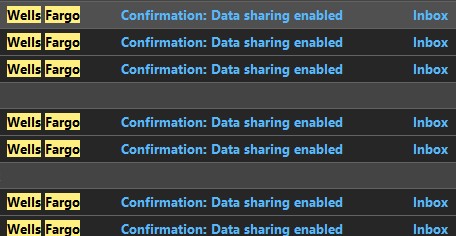
I've now deleted all the DNRRs and and unchecked Use my existing - and everything else on DL Xactions prefs:

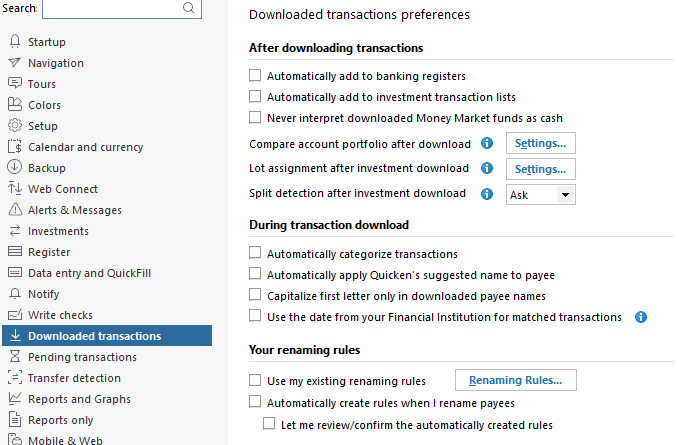
Chris_QPW, thank you. I suspect that transfer detection and all the other automatic things were in effect when I first loaded all of the accounts, but I did uncheck the automatic transfers earlier. I suspect that some of the wrong payee transactions in some of the accounts may have been from badly created automatic transfers (like in the J Chase Bonvoy Visa account register screenshot above) instead of badly renamed transactions - or possibly from crosslinks as NotACPA suggested.
My most recent xfer detectino had the Scan & Confirm boxes checked, but for good measure, I've now unchecked them all.
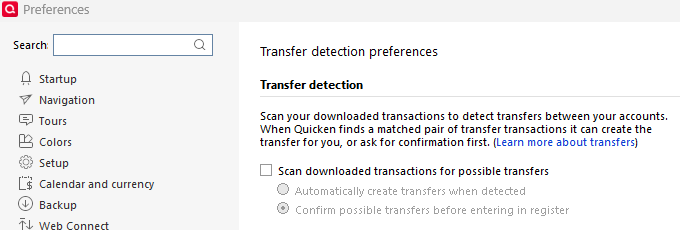
I feel a bit like Graywolf in that I'm making this harder than it should be.
I was wishing for some master switch that just turned off all the automatic renaming and automatic matching.
But I'll settle for collecting whatever spells I need to conjure 'all manual' downloads that go into the Downloaded Transactions list below the register and all the Payees are raw from the FI.
My thinking now is that maybe this is cached somewhere - so having deleted WF cking again and unchecked everything I could find, I'll try again tomorrow.
Surely it must be possible to revert to all manual, right?
I did see posts that quicken has built-in renaming rules / logic - and that may explain some of this - but I can't imagine that it accounts for all of it. Is there a way to turn off the built-in renaming?
And please if someone knows that it's not possible to go full manual download, please let us know so we can stop trying to do something that can't be done.
Again, much thanks,
joseph
p.s. and it seems like having a 'turn off all the magic' button would solve a lot or problems that people are having. And getting away from these sort of one-size assumptions that simplify the cloud pers fin apps (and missing features) are what brought me back to classic.
0 -
Turning off the built-in renaming is what you did when you un-checked " Automatically apply Quicken's suggested name to Payee"
I'm not sure what you mean by "Full manual download."
Do you mean that you want the downloaded payees to be entered intact, without any cleanup? Then if you charge something at one Starbucks, the Payee will be "STARBUCKS T2 WEST SAN SAN DIEGO CA" and if you go to a different Starbucks, you will get "STARBUCKS T5 JFK JAMAICA NY. " Renaming rules will standardize those so that they are all "Starbucks." If you have no Renaming rule for Starbucks or you un-check "Use my existing renaming rules" and you also have the automatic renaming disabled, you will get the raw Payees. Most people don't want that.
[edit to add] If you are reviewing transactions in the downloaded transaction area and the downloaded payee has been renamed by one of your renaming rules, the payee name will be in "quotes." You can hover over it to see what it was originally. This will help you to debug your renaming rules and make any corrections to the Payee that may be needed. if a transaction in the register has been renamed incorrectly, you can right click on it and pick Revert to xxxxxx to change it back to the original.
QWin Premier subscription0 -
Jim Harman,
Thank you for confirming that unchecking auto apply is the built in renaming. That makes sense and what I thought at first but then I doubted since this renaming is still happening. Yes, “Full manual download” is exactly what I’m looking for to get started. I understand the implications. Once I get a look at the raw payees then I can set up the renaming that I want. Right now I’m getting renaming that I don’t want and I can’t even see the raw data without clicking or hovering on each individual downloaded transaction.
I truly appreciate all of the advice from you and the team - and from many other posts. Especially because I now think the symptoms are not just bad renaming, but also bad transaction matching and bad memorized payees. The frustrating part is that I have unchecked everything that i could find and that has been generously suggested and I’m still getting the unwelcome renaming. And I can’t figure out why. The only thing left that I can think of is perhaps some caching or some remnants of the original bad payees. Can you think of any other reason why I’m still seeing the renames?
If it doesn’t work tomorrow a next step to move forward may be to add renaming rules (as you suggested) for the common ones and perhaps some add memorized payees so at least all the Apple Pays aren’t categorized as software. I can defer fixing all the “PayPals” - though i do wish that the do-not-renames worked so all the PayPals that didn’t have a rename rules would retain the actual raw payee info.
But I still feel like I’m missing something since it doesn’t make sense that it should be impossible to turn off all the renaming
Thanks again,
Joseph
0 -
Hello,
I've continued to search and wanted to share that I think I have a better way ahead thanks to posts in Renaming Rules by Chris_QPW that describe the three sources of renaming and in Renaming Rules Frustration [edited] by NotACPA that reminds me that the register (but not the downloaded transactions - which is where I was looking) can display the downloaded payee and memo. So I don't have to edit or hover to see the raw data -once I accept the transaction into the register!
Chris' three sources indicates that we shouldn't be getting renaming if these are unchecked - my experience notwithstanding.
Thanks again,
joseph
0 -
I decided that what was needed is to try to test this myself. One of the things that makes existing users "blind" to this problem is that we all use renaming rules.
So, what I did is create a new data file and deselected all these, even the categorization ones.
As you can see the payee names got renamed even though every option for that is off.
This points to the fact that this must be happening at the server level, and I think this Cloud Sync log entry bears that out.
{"id":"509682679534822145","createdAt":"2025-10-28T03:22:31Z","modifiedAt":"2025-10-28T03:22:31Z","dbVersion":0,"source":"QCS_REFRESH","accountId":"XXXXXXXXXXXXXXXXXX","postedOn":"2023-11-05","payee":"Costco","coa":{"type":"UNCATEGORIZED","id":"0"},"amount":-11.5300,"state":"CLEARED","matchState":"NOT_MATCHED","knownCategoryId":"6750000000","cpData":{"id":"233100001","txnType":"PURCHASE","postedOn":"2023-11-05","txnOn":"2023-11-05","payee":"COSTCO WHSE#1360 CLOVIS CA","amount":-11.5300,"inferredPayee":"Costco","inferredCoa":{"type":"UNCATEGORIZED","id":"0"},"cpCategoryId":"2","mcc":5300},"mlKnownCategoryId":6750000000,"type":"CASH_FLOW"}
I know that this has always been a long-standing problem with Quicken Mac and looks like somewhere along the lines instead of fixing in Quicken Mac, they have propagated it to Quicken Windows.
Note I believe this is only possible with Express Web Connect +, and that is probably why it is "new".
OFX/QFX doesn't have an "inferredPayee".
0 -
Chris_QPW,
Wow, thank you so much for going above and beyond. And for validating that I was not hallucinating and it really is impossible for users to turn off q’s automatically inferred renaming.
I completely endorse your suggestions for enabling the off switches. I don’t want q to guess when I should be able to make select appropriate names & categories.And I suspect that you may have also demonstrated that, contrary to the Renaming Rules post, user rules DO NOT override q’s built in renaming.
Perhaps, worse, unchecking “auto apply q renaming”, in fact, does nothing. A lot of advice needs to be correctedI’ll move ahead without wasting more days trying additional permutations to force what’s impossible. thanks again,
Joseph
0 -
I tried a renaming experiment with my working data file and what I see is different from what @Chris_QPW reports.
I un-checked the options "Automatically categorize transactions" and "Automatically apply Quicken's suggested name to Payee," which I normally leave checked so that Quicken will try to apply a standardized name and Category to transactions that do not match existing transactions or have corresponding Renaming rules. I left my existing renaming rules and Memorized Payees enabled.
Here are two transactions that downloaded this morning in an EWC+ credit card account. The Netflix transaction is selected and waiting to be accepted.

I do not have a Renaming Rule for Netflix and as you can see the unmodified Payee is shown under Downloaded Transactions and it is what will be entered in the register after I accept the transaction. No Category is assigned. I do have a Memorized Payee for Netflix but Quicken does not use it until I edit the Payee in the register to Netflix.
I have a Renaming rule for Stop & Shop and thus it is shown in quotes in the downloaded transactions. The downloaded payee is STOP & SHOP 0653 WESTPORT CT. When I select the downloaded transaction, the proposed transaction is shown in the register, with the Payee of Stop & Shop and my assigned Category of Groceries, using the Memorized Payee.
I see similar behavior in my main checking account, which is also connected via EWC+.
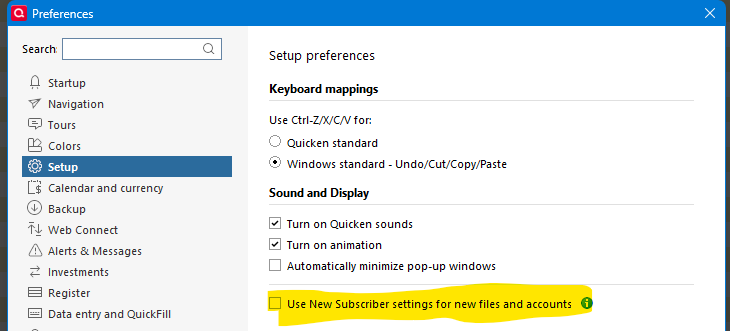
Maybe there is a hidden or broken "New subscriber" setting that is forcing Quicken to use the "Suggested" names for Payees? If new subscriber settings are enabled under Preferences > Setup, you might try turning that off.
QWin Premier subscription0 -
There are a few possibilities. One question @Jim_Harman is your connection type Express Web Connect +? I think that is key. Also, since I just created the data file, this was an initial download, and that might be a key. I also noticed that the Renaming Rules aren't available until you create your first online account. Since I only did this for one account, so I didn't have a situation where the renaming rules were available first, but they should be empty.
@josephc4ms I don't really recommend having all the options off, I was just doing that for testing.
EDIT: I checked the Setup → Use New Subscriber for new files and accounts setting and it is off. It might default to on for new users, but since what I did is start my regular data file and then selected to create a new data file, it remains what I have set before and so it is off.
I would try something more "long term" in a new data file, but it seems that for Express Web Connect + you can only authorize for one data file at a time. And as such I wouldn't be able to also maintain my regular data file. I might still do it…
I will also test now in my regular data file by turning off renaming rules and Quicken suggestions, and see what happens on new transactions.
0 -
As I said in my earlier post, both of the accounts that had transactions to download this morning use EWC+. This is my working data file, so it has plenty of Renaming rules and Memorized payees.
I would certainly not want to operate with all the renaming disabled.
I carefully manage my renaming rules and memorized payees. I do not allow Quicken to create them automatically. For the memorized payees, I set the Lock option, so the memorized Payee does not get changed each time I use it.
QWin Premier subscription1 -
In my regular data file, just turning off the renaming rules and Quicken's suggestions worked.
 0
0 -
I'm setting up with my Chase accounts which have transactions much more than with the CostCo Citi Credit card and will see what they do for new transactions, but for the new accounts they are doing the renaming with all the options off. And in both cases, they have downloaded two years of transactions!

And the stupid bug where it puts in the [Account] "balance adjustment" is here too. Note I have transfer detection off and no automatic categorization, but every time I hit a Chase credit card payment in my checking account it changes the category to the checking account's name.
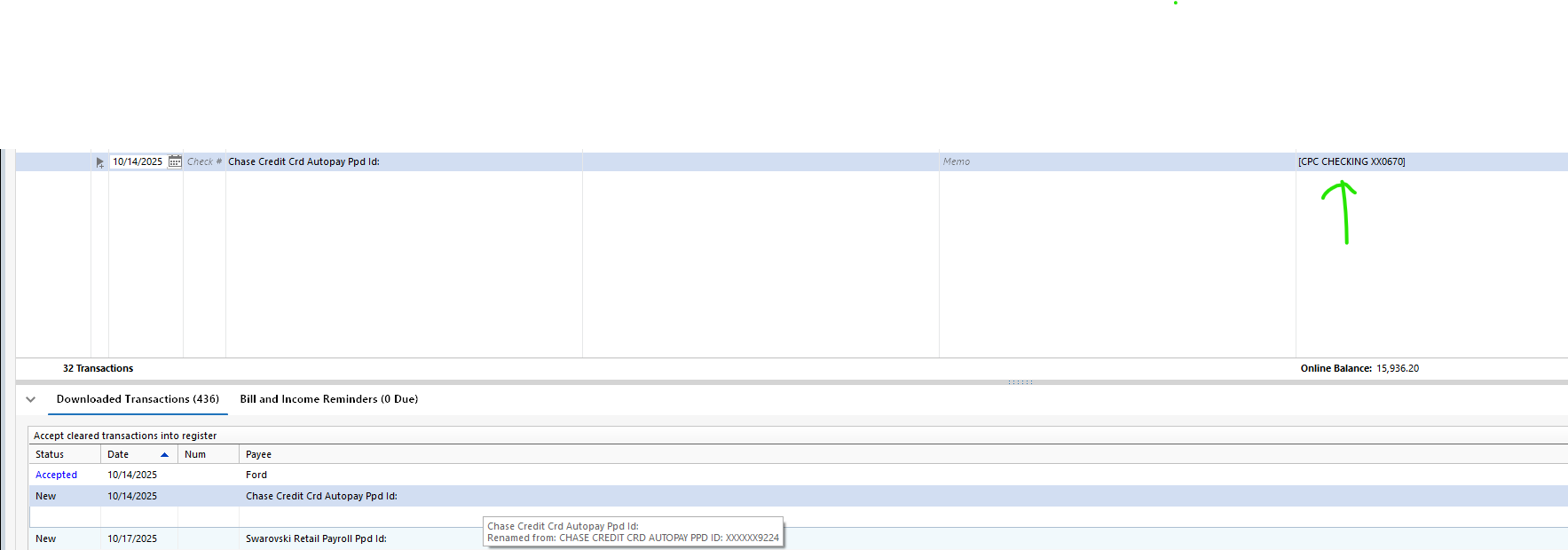
And another new irritating thing is this:
When I started this was selected, even though I had selected not to automatically memorize payees:
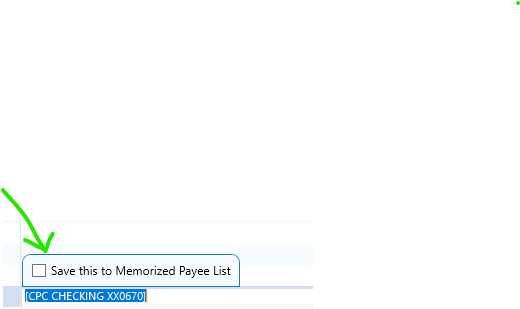
Same stupid bug in happens in the credit card accounts (Note ever since this bug has been introduced the way I have got around it is by memorized payees):

Anyway, I monitor this until I get some new transactions. and see what they do.
0 -
The ability to use the same account in different data files using Express Web Connect + seems to be financial institution dependent. With Citi Cards when I enabled it in one data file it was disabled in another. But with Chase I'm not having any problems with having the two data files connected.
0 -
I deactivated my linked cash management account and added a new cash management account under a different name. Looked promising. But once I re-linked by clicking the show cash button as a checking account I found that nearly ALL transactions were named Cash Advance in the payee column. In addition, many transactions were loaded in a closed credit card account that was of course deactivated as well. Totally worthless. So back to my saved backup file.
0 -
Well, it still doing the renaming in the new data file.
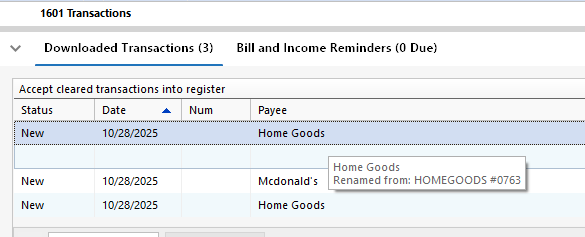
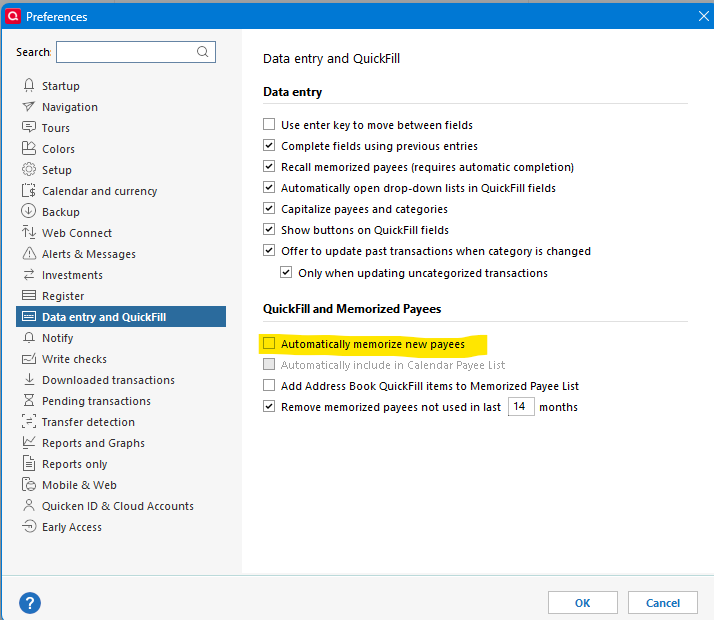
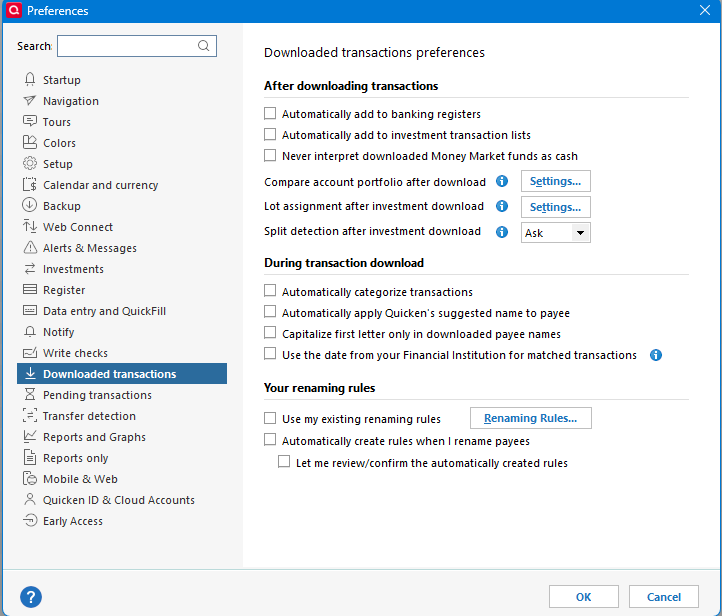

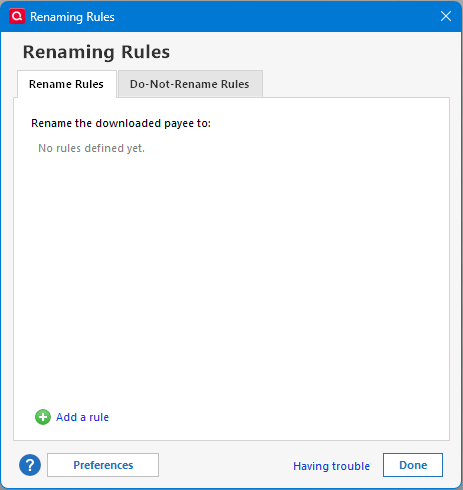
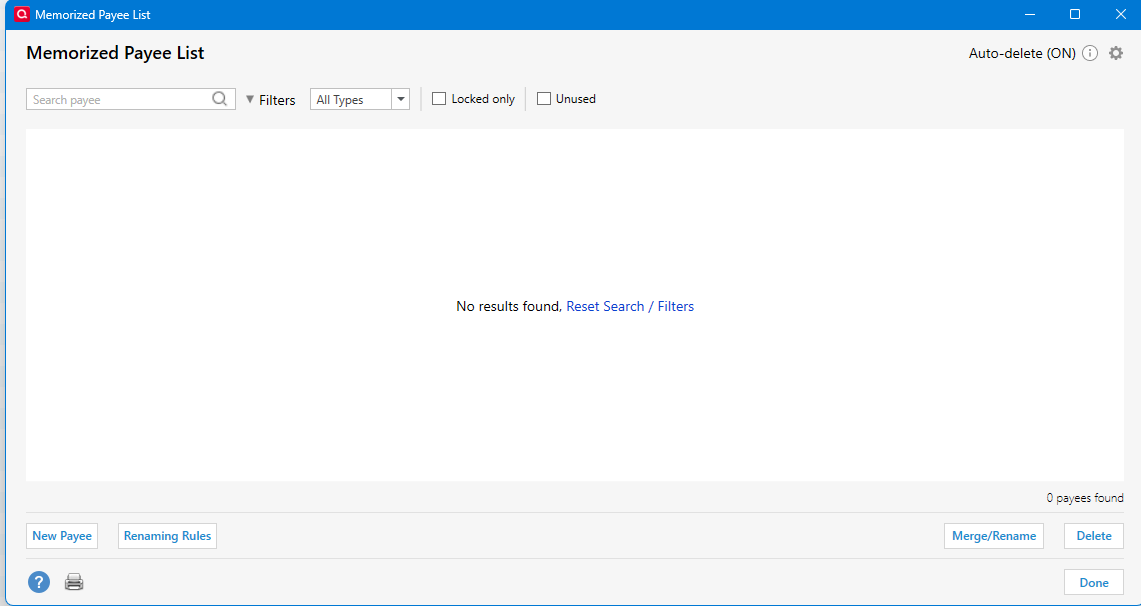
In my old/current data file, I removed the renaming rule and memorized payee for HomeGoods and turned off the using of Quicken suggested name and the use of renaming rules and did the same download.
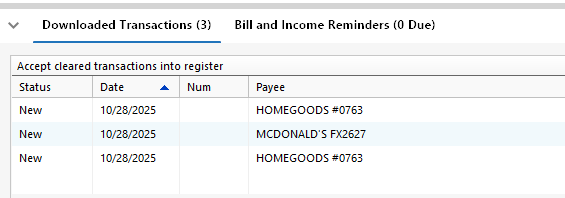
This bug seems to be like the bug for hiding accounts where is does something different in old data files than what it does in new data files.
0 -
@Quicken Kristina I have sent a problem report on this. @josephc4ms I suggest you send a problem report too. Help → Report a Problem
0


Categories
- All Categories
- 18 Product Ideas
- 34 Announcements
- 247 Alerts, Online Banking & Known Product Issues
- 19 Product Alerts
- 518 Welcome to the Community!
- 682 Before you Buy
- 1.5K Product Ideas
- 55.7K Quicken Classic for Windows
- 16.8K Quicken Classic for Mac
- 1K Quicken Mobile
- 834 Quicken on the Web
- 128 Quicken LifeHub