Fidelity Updates Still Broken after Update
Comments
-
Thanks @Mark Wagner. I suspected that would solve the problem. I will do that eventually after all of the Fidelity issues with EWC+ are (mostly) fixed.
1 -
thanks for the suggestion! I tried turning fidelity off and still have errors with schwab and citi. Fidelity was a mess when it first used the new connection. But after editing the hell out of it it worked at least for a couple of updates. Then citi went bad and then schwab and fidelity is not responding. [Removed-Disruptive]
1 -
Today is the first time that I have had problems downloading Fidelity, and I have been on EWS+ for a while. My report is the same as I'm seeing with others here about 10/31 where the download just runs and runs and runs and then fails throwing the CC: 5O1 error code. I downloaded on 10/30 without issue. Running R64.35 since 10/27/25.
0 -
I don't get the forever-running OSU, but I do get CC-501 errors specifically on Fidelity
0 -
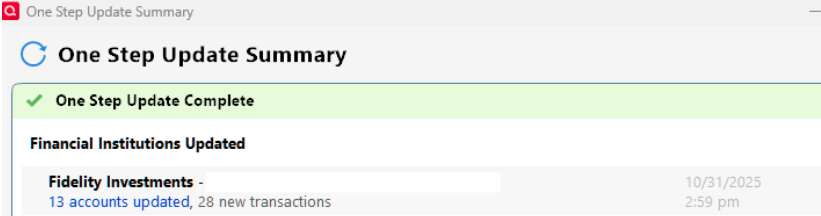
I tried to update again about 20 minutes ago and my remaining 13 accounts successfully updated. At least the updates are working similar to the way they were working prior to this morning.
I did see two end of month transactions that look different from they way they did on Direct Connect. Because of that, renaming rules and memorized transactions did not work. I had do manually fix them. This was the first time I saw these transactions using EWC+. One was an automatic debit and the other was an automatic deposit. I will have a lot more transactions tomorrow including a variety of transactions that I have not yet seen on EWC+.
[Edited - Removed partial account numbers]
0 -
I just did mine again and I was able to log in this time. It went through the download process and nothing came through but there are no transactions due on those accounts right now. There are some pending for today so when I check tomorrow and I assume the month end dividends will download from today. Hopefully everything's working OK now.
0 -
Same CC-501 error this morning on Fidelity accounts. Sent a problem report to Quicken.
Quicken Classic Premier (US): R66.28 on Windows 11 Pro
1 -
Updated Fidelity again manually outside of OSU and it worked this time with transactions from all accounts except my HSA downloading correctly with the following ongoing problems:
1 - Fidelity HSA account not dl'ing transactions.
2 - 401k share sale transactions still dl'ing as withdrawals.
3 - Fidelity brokerage core position still showing as missing shares in Quicken.
Quicken Classic Premier (US): R66.28 on Windows 11 Pro
2 -
Yesterday afternoon I was finally able to download all of the Fidelity accounts. I posted some details above.
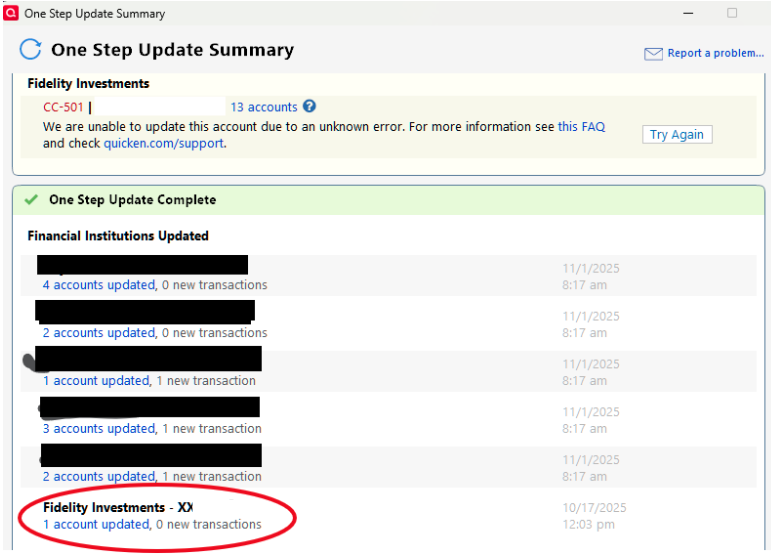
Unfortunately this morning things seem to be worse than yesterday:
- I had exactly 100 10/31/25 transactions at Fidelity including some end of month transactions that I will see for the first time using EWC+.
- After 5-6 minutes I got the dreaded CC-501 error.
- Quicken told me that my one Fidelity account listed separately connected successfully (similar to yesterday). This account had 38 of my100 transactions. Unfortunately none of the transactions were downloaded.
- As always, my non-Fidelity accounts worked fine.
[Edited - Removed partial account numbers]
0 -
UPDATE to last post.
I tried updating the single account with 38 transactions and all of the transactions downloaded this time.
I then tried updating the rest of the Fidelity accounts. All but two of the remaining accounts successfully downloaded - a traditional IRA and a Roth IRA. I still received the CC-501 error because of the two accounts. I tried updating several times over an hour with no success. These accounts only had three transactions each, so manually added the transactions.
I did not find any new problems with the downloaded transactions. Problems I continue to have:
- FDRXX not treated as my cash balance. This is the first time I had dividend reinvestment transactions for FDRXX under EWC+. I had to change the "ReivDiv" action to "Div" for each of the affected accounts.
- Foreign dividends are are still not handled correctly. They are treated as a "Deopsit". For accounts with a separately linked cash account I need to change the "Deposit" to a "Div" and move the cash from "Other" to "Dividends". Accounts with a separate cash account require more work. I had to manually create a "DivX" transaction in the brokerage account with the correct amount and security. I then had to delete to "Deposit" transaction in the separately linked cash account. Everything is now correct in Quicken, but I have lots of these transactions every year and manual fixes are not an attractive option.
- Some if not most of my automated deposits and payments look different than they did with Direct Connect. So my renaming rules and memorized transactions no longer work. I have been trying to fix them and see if my revised renaming rules and memorized transactions work next month.
Manual fixes are very time consuming for me. From Oct 30 through Nov1 I will have more than 200 Fidelity transactions. This is typical for me at the end of each month. I probably have several hundred Fidelity transactions the rest of the months, but they are more spread out. HELP.
2 -
My Fidelity updates were working yesterday afternoon, after the 501 situation was supposedly addressed.
But this morning, not so much.
501 error back again, OSU error screen indicated that there were connection issues for all my Fidelity accounts, however one account actually did download transactions. All IRA accounts did not.
I retried downloading from an IRA transaction screen, instead of One Step Update, again 501 error indicated for all Fidelity accounts.
0 -
Like Mark Wagner above, I was able to download from my brokerage account, but when I tried reactivate the HSA account it doesn't show me an option to link it is grayed out, unlike the brokerage account which gave me the drop down boxes to relink the accounts. Really strange. I just went ahead and manually entered the transaction on 10/31/25 so can balance at the end of hte month to my statement. Hope Quicken/Fidelity gets this fixed quickly.
0 -
Same here on the recent CC-501 errors the last day or two…
Made the switch to EWC+ at the last possible moment a week or so ago and transition went smooth as silk; 2 different logon credentials at Fidelity (my wife's and mine; total of 4 IRA's of different flavors) and cash in each was successfully assigned to SPAXX after Q asked the appropriate, understandable questions. Yay!! The accounts have continued to treat dividends as cash and has also downloaded all transactions. Perfect!!
Until yesterday. Now, the CC-501 error for both sets of logon credentials.
Having worked in IT since the blinking C: prompt and the era where the 286 processor was king, my guess is some mid-level programmer at Fidelity or Q started fiddling around where they shouldn't have and mucked something up…..
We'll see…2 -
Hello All,
The CC-501 issue is a known issue that our teams are already working to resolve. Currently, it seems to be intermittent. To track the status of this issue and know when it's resolved, I recommend that you bookmark the Community Alert linked below:
Thank you!
(Ticket #12028330)
Quicken Kristina
Make sure to sign up for the email digest to see a round up of your top posts.
0 -
No end-of-month transactions downloaded from Fidelity, though they appear when I log into my accounts.
2 -
Same issue with missing EOM transactions for Fidelity (even after resetting accounts).
2 -
Like @jersey42 I had to manually change a Div to a DivX in my Fidelity account. It was a dividend for SPAXX so at least it properly treated it as cash (instead of doing a ReinvDiv) but it's a split account, so it should have been recorded as a DivX. It's getting closer!
As previously reported, FDRXX dividends, while not being recorded as a single ReinvDiv transaction, still have a 'buy FDRXX shares' transaction associated with each Dividend. For those of us wanting to treat the FDRXX money marked as cash, we have to delete the unwanted buy transactions.
2 -
UPDATE: After reading a post by @mrzookie, I was able to download the two accounts that would not download this morning.
Good News: All transactions downloaded.
Bad News: Quicken was only able to match two of the transactions that I manually entered this morning. It would not offer any option to manually match the others. I ended up deleting the unmatched downloaded transactions and then I marked the ones I entered this morning as "Cleared". Everything is now correct.
0 -
Thank you for the follow-up @jersey42,
I'm glad to hear that you were able to get your accounts to download.
Was the Payee and/or amount different when comparing the manual transactions to the downloaded transactions that you couldn't match to them?
Thank you!
Quicken Kristina
Make sure to sign up for the email digest to see a round up of your top posts.
0 -
The amounts were identical. There is no Payee on ReinvDiv transactions, but the Security Name was identical on the manual and downloaded transactions. At least they were visibly identical. If the Security Name on the downloaded transactions had some unprintable characters embedded in it, I would not know.
For whatever it's worth, the two transactions that matched were "Div" transactions for my core fund. In both cases it was FDRXX (the same fund that is causing many of the other problems). The ones that I couldn't match were "ReinvDiv" transactions for the QQQ ETF and the FZDXX money market fund.
1 -
All my Fidelity accounts appeared to update (no CC-501 error) during OSU this morning with the following known continuing issues:
1 - Fidelity HSA account not dl'ing transactions.
2 - 401k share sale transactions still dl'ing as withdrawals.
3 - Both Fidelity brokerage and HSA core position (core position set to FZFXX for brokerage and FDRXX for HSA) still showing as missing shares in Quicken.
Quicken Classic Premier (US): R66.28 on Windows 11 Pro
3 -
Quicken also updated with only the known Citi card connection error. Fidelity had no errors. However, there were no transactions to download during the weekend. The real test will be during the weekdays.
Deluxe R66.23, Windows 11 Pro
1 -
After several attempts to download and reconcile my Fidelity 401ks, I think I finally got it. This has been quite an ordeal over the past couple of days.
First CC-501 errors, the CC-800 errors, then reauthorize. Once reconnected, I again got a bunch of duplicates, missing securities, and a couple of transactions in the download that didn't exist in the portal (transaction date in download didn't exist in portal, no security listed, price/share not even close to current ones).
Once I deleted the dupes and the "phantoms", and properly match the rest of them, I was able to balance the accounts with holdings matching on both sides.
I just hope this isn't going to be "standard procedure" from now on.
2 -
Most who have been following any threads related to Fidelity know that the download has not been working properly since at least August. Most also acknowledge that they have had to spend countless hours inputting missing transactions, correcting cash balances, etc…
[Removed - Off Topic]
Thank you.
0 -
Finally received my EOM downloads. All were Money Market accounts: FZDXX and SPAXX. Each one came as a mismatch. I elected to ignore them for now and will compare with my Fidelity statement.
It used to be so easy!
0 -
This morning I finally finished the last day of end-of-month transactions. This was my first time seeing the reinvestment of core account dividends since I moved to EWC+. All of the accounts had issues that needed to be manually input or corrected. The variations depended on which money market fund (SPAXX or FRDXX) was used for the core account and if the account had a separately linked cash account.
The positive is the other issues previously discussed with the core accounts are now mostly an annoyance. I continue to get the "Securities Comparison Mismatch" screen on some accounts that I just ignore. These are the accounts that use FDRXX as the core. With the exception of foreign dividends, buys, sells and income transactions for other securities in the account seem to be working. The foreign dividends are all in upper/lower case while everything else is in upper case. So it makes it a little easier to spot.
With hundreds of transactions a month across 13 accounts, manual fixes don't work very well for me.
3 -
Forced to "reauthorize" my Fidelity brokerage account. (Note: Before reauthorizing, this account worked perfectly with "complete" tracking and "show cash in a checking account" (SPAXX).) After signing into Fidelity, then back to Quicken, the "link to existing" offers only the Fidelity SPAXX checking, not the main brokerage account in Quicken. Tried that and it created a monster SPAXX account that duplicated the entire value of the brokerage account. Restarted from a backup. Tried again. Same result. 30+ years of investment tracking, so there is no way I am fixing this by editing the SPAXX account in Quicken.
So, what's the secret fix?
0 -
Thank you for your replies,
HSA accounts not being able to download transactions is a known issue. Please see this announcement for more information:
Are all 401k share sales showing as withdrawals, or are only certain holdings doing this? If only certain holdings are impacted, which ones are they?
If you haven't already done so, for the issue with core positions, please try following the instructions in this alert on the issue with the change to money market funds/cash representation:
Thank you for letting us know you encountered all those issues. I'm glad to hear you were able to get it working. If any of the issues return, please let us know!
Thank you for letting us know you're seeing this issue. Are those both core positions? Are they showing in your Quicken as cash or as securities?
Thank you for letting us know which issues you're still seeing. The issues you mentioned are known issues our teams are already working to resolve. To track the status and know when issues are resolved, I recommend bookmarking this Community Alert:
The issue you describe sounds like an issue another user reported earlier. Does the problem account have a linked cash account active? If it does, then you may be able to correct the problem by backing up your Quicken file, navigating to Tools>Account List, clicking Edit next to the problem account, and on the General tab, turning the linked cash account off, and clicking OK.
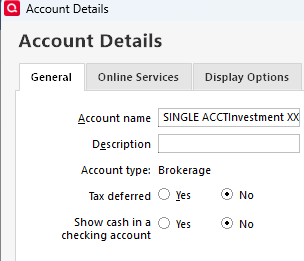
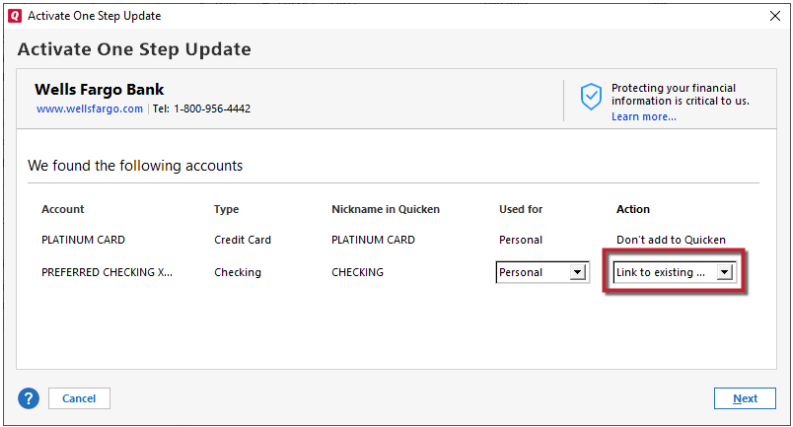
Once that is done, deactivate the account, navigate to Tools>Add Account, and follow the prompts. When you get to the Add/Link screen, you should now be able to link the account as the correct type of account. Carefully link the account to the correct nickname in Quicken.
I hope this helps!
Quicken Kristina
Make sure to sign up for the email digest to see a round up of your top posts.
0 -
For the 401k it is for all 401k share sales not just some.
For the issue with core positions unfortunately I have no “Cash Representation” option showing on the account details, Online services tab.
Quicken Classic Premier (US): R66.28 on Windows 11 Pro
0 -
@Quicken Kristina As far as I know, FZDXX is never a core position. The only mutual funds I'm aware of that are core positions are SPAXX, FZFXX & FDRXX.
0