Issue with Merrill Lynch account since reauthorization - account balance is wrong [Edited]
Comments
-
I did OSU this morning (11/01/2025) and there were 9 transactions with trade and settlement date of 10/31/2025. The OSU downloaded only one of them. I downloaded but did not process the qfx file. I looked at it in Notepad++ and it has all of them.
I really can't process the qfx file because it has 4 of the transactions (Intinc for my brokerage account) collapsed into 2 transactions and that will create a problem if OSU later does download (the 4 of) them. So I'll wait a bit and see if the rest are downloaded later.
The 4 vs. 2 Intinc transactions for Intinc is interesting because it is 4 transactions on the ML website but Direct Connect and qfx file have always reported it in 2 transactions. So there were actually 7 transactions for 10/31/2025 in the qfx fie. In this case EWC+ is more in line with what the website shows.
On the website, 6 of the transactions were Intinc and the other three were Div. The one that OSU did download was an Intinc transaction for one of my IRA accounts.
Jim
1 -
@jdparker225 So all these issues are not consistent, not specific to one transaction type, not consistent to one user, and not consistent with one download type. This makes the Quicken and Merrill Lynch transaction download issue very difficult to troubleshoot.
I wish Quicken the best and I hope they resolve the issues soon because this is costing me, and I'm sure everyone, time and money, and that is never good for the customer…in addition to Quicken just asked me to renew my subscription on 10/23/25, with an increase in price over 2024…
MEL1 -
Referring to my most recent post: I did another OSU this afternoon and it downloaded the 4 Intinc transactions for my brokereage account. Still haven't gotten the 3 Div transactions and the one Intinc transaction from one of my IRAs.
So of the 10/31/2025 transactions I have, I've gotten the one transaction for one IRA this morning, the 4 from my main brokerage account this afternoon. So maybe Merrill Lynch updates the Quicken server by individual account and it will send the transactions for the other IRA later?
Aside from getting everything working reliably there are still a couple of questions I have that are still unanswered:
- Why the drive to switch from Direct Connect to EWC/EWC+? I have one financial institution still on Direct Connect. Am I going to be forced to switch like I was with Merrill Lynch and Fidelity? Who benefits from switching from Direct Connect to EWC+?
- Are qxf file downloads going to still be supported or are we going to lose that? As I have previously reported in this thread, EWC+ treats some situations differently from qxf file which appears to me to mimc Direct Connect. So it can be a little dicey to mix OSU via EWC+ with qxf file downloads?
- Could some of the inconsitency that @MELCO reports be caused by different Merrill Lynch people (and isolated from each other) being repsonsible for doing Quicken stuff for different Merrill Lynch clients?
Thanks
Jim
1 -
Quicken Enhanced Web Connection Plus (EWC+) is generally considered more secure than Direct Connect (DC).
Direct Connect allows for direct communication between Quicken and the bank, but it stores user credentials on the bank's server, which raises security concerns.
Quicken Enhanced Web Connection Plus uses secure tokens exchanged via OAuth2, ensuring that only Quicken can generate and use these tokens, thus protecting user credentials.
Additionally, EWC+ is becoming increasingly popular among banks, indicating a shift towards more secure connection methods.For me, I was able to reconcile my Merrill accounts in Quicken via the Merrill Lynch 10/31/25 statement tonight, albeit with some effort (1.5 hours). Three different Quicken files and 14 Merrill Lynch accounts. In some, not many today, but still adding time, I had to add memo information, verify transaction downloads and change some transactions to match the statement (Interest versus re-invested interest). Some odd things.
The easiest path for me, like every other investment account other than Merrill Lynch today, a direct Quicken download makes my life easier (Direct Connect, EWC or EWC+). Manually comparing transactions adds time, although EWC+ for Merrill Lynch is not giving me clean data like other investment banks. If I do the QFX manual file route via the Merrill Lynch web site, I have to do each account separately otherwise I get data targeted for my other two Quicken data files, but today, this is still my best downloaded Merrill Lynch data, but I also have to do the QFX download before I do an EWC+ download.
Nothing is best case scenario today for me with Quicken Merrill Lynch transaction downloads. Quicken still has work to do. I'm still surprised that Quicken would have forced the transition before fully testing all this out.
MEL0 -
This morning every single one of my Merrill Edge accounts failed, with a CC-505 error. Appears to be a Merrill issue because it also included the message from Merrill Lynch Investments: "The associated accounts can't update right now. We are investigating the issue."
1 -
FWIW, the CC-501 errors disappeared yesterday (11/1), but as of this morning (11/2), I have not gotten the usual end-of-month transactions in 6 out of 7 Merrill accounts. Only a CMA account got transactions. The post-OSU screen shows those account updated, but with zero transactions.
I may end up grabbing my statement and adding those manually because I want to get a true net-worth balance for October. They're a small number of transactions, but gosh, entering investment transactions by hand is so last century.
2 -
I have the same problem with Merrill.
1 -
I switched to the new EWC+ method in late Oct. and found that most things are working to some degree. Many of the transactions are coming in with the memo field and category field blank. Buys/Sells/Dividends/Interest transactions seem to be functioning correctly. Principal payments from Bonds are just recorded as a deposit without a category. Foreign Tax Withholdings are showing up as Withdrawals and blank memos. Since the memo field is blank, these transactions have to be compared to the Merrill Lynch statement or the Online Activity screen to properly categorize the transaction.
Unfortunately, the share balance for mortgage backed bonds (FNMA and FHLMC) are incorrect. My US Treasury Bonds and Notes are working correctly. In the past, under the previous method, when there was a Principal Payment from the mortgage backed bonds, I would enter a Remove Shares transaction reducing the share balance matching the Return of Capital (RtrnCap) for the Principal Payment and to balance against the reported share value by Merrill Lynch. More recently, under the previous method, I would only have to due the Remove Shares occasionally and only in whole share amounts. This would balance the shares and keep the bond value inline with what Merrill Lynch reported.
After switching to EWC+, the share balance reported by Merrill Lynch is the original purchased quantity (in whole number of shares), which does not match the value in Quicken, but the Market Value of the Bonds are very close to what I see at Merrill Lynch Online. If I go back to Quicken and delete all of the "Remove Shares" transactions that I manually entered, the share balance will match, but the Market Value in Quicken is significantly higher than what I see in Merrill Lynch Online.
I'm not sure what the best method to handle this discrepancy. If I leave the "Remove Shares" transactions and I just ignore the share balance for these securities, I might miss an true transaction error. If I delete all of the "Remove Shares" transactions, then my account balance will significantly over estimated.
(I'm using updated Windows version of Quicken and have been using Quicken since Microsoft stopped supporting their Money product.)
2 -
@DrAl I converted to Quicken when Microsoft stopped supporting Microsoft Money as well. Money worked so well for me. I miss Microsoft Money.
But…Quicken is the current solution so I continue to battle the Merrill Lynch EWC+ transition and hopefully this all comes into alignment like the other financial institutions I use via Quicken, and like Merrill Lynch's parent company, Bank of America.
MEL1 -
An excerpt from my Nov 1 post: "So of the 10/31/2025 transactions I have, I've gotten the one transaction for one IRA this morning, the 4 from my main brokerage account this afternoon. So maybe Merrill Lynch updates the Quicken server by individual account and it will send the transactions for the other IRA later?"
I still haven't gotten the 10/31/2025 transactions for that other IRA account. Tried several times Yesterday and serveral times today. Also did a disable and re-enable onlilne services.
It is evening of Nov 3, why haven't all the transactions that were settled on Oct 31 been downloaded? As noted in previous note, the Nov 1 qfx file had all the transactions.
Thanks
Jim
1 -
@jdparker225 As of today, 11/4/25, with a big Merrill Lynch transaction download, for me, manual QFX file downloads directly off the Merrill Lynch web site are still the most reliable, contain the most data and require, albeit some effort, the least amount of work and individual transaction reconciliation. As long as I go to the Merrill Lynch web site first, access activity, and do the QFX file download before the EWC+ update, I'm good. If I do the EWC+ download before the QFX file import, it is a meaningless process because of the Quicken transaction comparison which won't update or download duplicate transactions, even if more detail is in the QFX file.
This Merrill Lynch alert just popped up on their QFX download page too:
Important update: Quicken file downloads no longer supported
You can now connect your account directly through Quicken without uploading files. To update your connection method, visit Quicken Support and follow the instructions to enter your Merrill login credentials.
Quicken and Merrill Lynch have to get this resolved. The QFX file downloads were my last true solution until the EWC+ gets fixed…
MEL1 -
@MELCO I don't like to mix qfx with EWC+ downloads because they handle some things differently and that results in an incorrect set of transactions that need editing to straighten out.
Anyway, this morning I did an OSU that downloaded all the 11/3/2025 transactions that were still pending about 8:00P:M last night. They are not pending this morning and have a settlement date of 11/3/2025. However, the download did not include the 4 outstanding 10/31/2025 transactions that were settled way back on 10/31/2025. Nothing unusual about any of them, one Intinc and 3 Div. So somehow 4 transactions from one of my IRA accounts won't download. To quote a famous philosopher: "Quicken and Merrill Lynch have to get this resolved."
Jim
1 -
I deactivated/activated my ML accounts last night to get a clean start. This morning (11/4), I began getting transactions for dividends paid 11/3.
I had to manually enter end of month 10/31 transactions yesterday. Those transactions have never appeared in a download, including the one this morning. I'm not sure I can trust that I'm getting all possible transactions.
Fingers crossed. Downloads have been pretty fragile.
1 -
Thank you for your replies @jtemplin & @jdparker225,
If the issue with transactions not downloading persists, please follow these troubleshooting steps:
Be sure to follow these steps in order:
1. Go to Edit > Preferences > Downloaded Transactions. The option Automatically add to investment transaction lists needs to be unchecked.

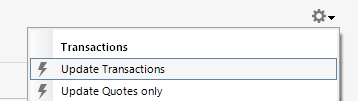
2. Refresh your online account information by clicking the Actions Gear Icon on the upper right of the register, and select Update Transactions.
3. Confirm that the Sort Order in your account is by Date; just click the top of the Date column in your account register. It's possible the transactions are in your register, but not where you thought they'd be.

4. Try refreshing your login session: To do this, go to Help > Refresh Sign in. After completing the log-in process, trying running a One Step Update again.
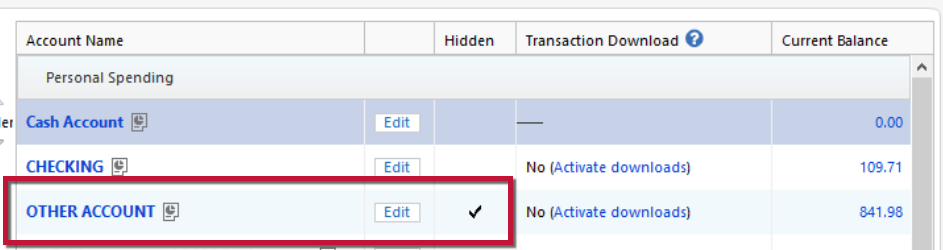
5. Go to Tools > Account List and check Show Hidden Accounts at the bottom left. Confirm the missing transactions haven't been added to a hidden account by clicking on the name of any account that appears with a check mark in the Hidden column.
Thank you!
Quicken Kristina
Make sure to sign up for the email digest to see a round up of your top posts.
0 -
@Quicken Kristina thanks for the tip. But I have a question: What do you mean by "If the issue with transactions not downloading persists"? One day's transactions (for Oct 31, 2025) for one ML account did not download. Transactions for other ML accounts and other days, including, so far, one subsequent day, for that ML account are downloading. But I have still not gotten the Oct 31, 2025 transactions for that one account. What I expect to happen is that I will continue to get transactions for later transactions but never see the missing transactions. Would following these steps result in picking up the missing transactions?
Note: I did send in a problem report on this on Monday. This was before I got the Monday transactions which were still pending at the time of the OSU.
Note: I have entered the transactions manually and left them uncleared.
Final note: The missing transactions had trade date and settlement date (what the ML website calls these dates) of Oct 31, 2025 which is the last day of the accounting month. Is it possible that something going on related to doing end of month stuff (like generating monthly statements) interfered with the OSU processing?
Thanks
Jim
1 -
@jdparker225 This may be a total waste of time for you, but I'm throwing it out there anyway. I also was having some issues with downloads not receiving transactions that should have been there, getting a strange CC-505 from Merrill accounts, etc. I called the Premier support line and they suggested the following, and it actually worked. Your mileage may vary. They asked me to sign out of the Quicken account: Edit — Preferences… — Quicken ID & Cloud Accounts — Sign in as a different user, then to sign back in as the same user as usual. Be sure you know which email address and password you use before you sign out. They explained that this action resets the Quicken servers. I was then able to run a normal OSU, and it completed successfully. In fact, it pulled down some transactions from the past 6 months that I had deleted the first time they were downloaded because they were the monthly account fee waiver for zero dollars. I was surprised to see them again, but I just deleted them again. Everything else was current and correct. Not real confident this will work for you, but here's hoping.
0 -
@WoodCountry Wow! That worked! Thanks.
First I did OSU this morning and got 11/4/2025 transactions but not the missing 10/31/2025 transactions (as expected). Then I signed out and back in and did another OSU and got the missing 10/31/2025 transactions and only the missing 10/31/2025 transactions.
I had tried disabling and re-enabling online services a couple of times. That is something that has resolved problems before but didn't this time. Good to have another trick in your bag.
Having said all that, this does not obsolve Quicken and Merrill Lynch from responsibility of resolving these issues.
Thanks
Jim
1 -
@jdparker225 & @WoodCountry this is what Quicken support had me do, and although it helped with my CC-501 errors, the inconsistent transaction issues persist…
"Quicken Support did appear to help my Quicken to Merrill Lynch EWC+ connection issues today (CC-501). Interestingly, I had to log off and then back on to my Quicken account and then, although I don't use the Quicken Sync, I had to turn on the Quicken Sync, reset the Sync, download my Merrill Lynch transactions, test the success, and then turn the Sync back off. I seem to be, finally, two steps forward on the Merrill Lynch EWC+ connection success. I'll continue to test as month end produces many transactions that will need to be downloaded. We see how the transaction downloads go and the viability of the proper data and transaction account locations."
MEL0 -
@Quicken Kristina, since suggestion from @WoodCountry worked, what if anything should I do about the trouble report I sent Monday? Would another set of logfiles help in figuring out what caused the problem? Whatever I might do, how would I connect it to the problem report I sent Monday?
Thanks
Jim
0 -
My experience (so far) with ML EWC+
I cut over my 6 accounts (2 brokerage, 4 IRA) on Oct 27. It went surprisingly smoothly. No dupes, placeholders or unmatched securities. All balances tied out. Since then, I've received every transaction posted to the accounts, about 40 total. They've included Buys, Sells, Divs, Div Adjustments, Div Reinv, Int and Transfers to/from BOA checking. All have come through as they should have. Cash, so far, is tracking as it should. I have not received any CGs, foreign txns of any type, RMD transfers or tax pmts yet, so it remains to be seen if there are any problems with those.
There are 2 positive surprises: (1) Div Reinvs are now coming in as one txn (like Fidelity does) instead of the old div/withdraw/add combo, which required manual adjustment to add the price into the add txn. This is a real time saver. (2) Interest transactions to my brokerage cash sweep positions IIAXX never downloaded. I always got a red flag, but nothing was there. They worked for the first time this month.
At one point, I was receiving Pending transactions, which was not such a bad thing with buys, sells and divs, since it kept Q exactly in synch with the ML site. That seems to have stopped, not sure yet.
Today, I ran into my first issue. I downloaded the monthly account fees. The Payee field was loaded with the memo info which was truncated, so the acct # was missing, and and the Memo field was blank. Not serious, but an error nonetheless. I submitted a Problem report.
One other thing. ML, for a long time, has not provided a cash balance on the Update Cash Balance dialog, and there is no "Cash Representation" button there as there is in Fidelity accounts. Is anyone seeing anything different?
All in all, so far so good. I will post an update with additional results when they occur.
1 -
@mrzookie for me buys and sells come in while pending but divs come in after settlement and this keeps my Quicken in sync with ML except for cash. This is new since EWC+.
But cash is and always has been a little off most of the time, often even when nothing is pending and all transactions have been downloaded. What I find is, if I compare my ML statement a few days after it has been posted with my holdings where the date is set back to the statement date, things do match.
Jim
0 -
@jdparker225 If what you say about the pending buys & sells pans out, that'll be positive surprise #3 in my book. I could swear I saw the same with non-reinvested divs, but I'm not sure. I have 1 account that trades actively and when it increases and/or decreases positions, there are multiple buys/sells over a period of several days, making it hard to keep Q in synch. The downloaded pendings help a lot in this situation. Divs too. We'll see.
0 -
@jdparker225 and @mrzookie So that fact that we are still talking about this, confirms that the success rate is inconsistent, and the process still needs serious work. My experience to you all, has overlapped a bit, but has other issues. For me, the manual QFX download, for which Merrill Lynch said is being removed, still provides the best, most accurate data with memo fields, albeit also not perfect. The Quicken EWC+ for Merrill Lynch downloads is always a crap shoot for me every day, and although I continue to try and use it, my daily determining factor is how many transactions need to be downloaded so I can use the best method to save me the most amount of work, manually re-entries and reconciliation. Let me also note, I have seen some benefits from the EWC+ transition, but to date, not enough for me to justify total trust in the process yet.
Today, 11/6/25, a light Merrill Lynch download transaction day, no memo fields filled in. More work. Again, my manual QFX downloads, has all of this exact data, plus the memo field in this case. Multiply that times 20 on a heavier transaction download day.
MEL0 -
@WoodCountry, I am now wondering why signing out/in of Quicken account had the effect that it had because I would think that closing/reopening Quicken or rebooting your machine would have resulted in a signing out/in albeit not whille my Quicken app was running. That would seem to imply that something also must have happened to my Quicken app as well as the Quicken servers.
Jim
0 -
Today, 11/7/25, via the Quicken EWC+ Merrill Lynch transaction downloads, disregarding my concerns about the accuracy of the downloads and not using the manual QFX download process, although I do NOT have pending transactions selected as a download option in Quicken, 22 pending transactions were downloaded with zero memo fields filled in. Everything else appeared accurate. This was just one Quicken file and one Merrill Lynch account. Disappointing, and more manual entry work for me.
Quicken, please help. What am I missing? I have shared troubleshooting information via Quicken Support, and I have called Quicken technical support to discuss and I have made the adjustments they recommended.
MEL0 -
This may be a bit off topic but, since misery likes company, maybe you won't be too upset if I post this.
I also have a 401K with Fidelity and it, also, recently was switched to EWC+. It is a remarkably inactive account: 5 transactions a year, four payments for managing the account and one withdrawal. There have been two transactions since the transition: one payment and one withdrawal. Both were botched.
Jim
1 -
I have 4 Fidelity accounts, 2 brokerage, 2 IRA. I converted them about 6 weeks ago, and it went pretty well. Except for 1 particular transaction type, its been fine ever since. I thought ML was going to be the bigger problem, but if you read the postings here, Fidelity looks like its a mess. Of course, Fidelity is a much bigger brokerage, and only people with problems post, so all the noise is probably just a reflection of volume of users. That said, it still sounds bad, particularly with 401ks and HSAs. Apparently, access to 401k.com (Fidellity NetBenefits) has been cut off and is causing a lot of grief.
Back to ML. I got a bunch of buys, sells and a div today. As you said @jdparker225 all, except for the div came down as pendings (which I think is a positive). Still no memos on anything so to help our fellow traveler @MELCO, I've submitted a bunch of problem reports.
Unfortunately, this whole EWC+ process with both Fidelity and ML has caused a real drop in my confidence in Quicken. I'm on pins and needles every time I do a download. Its gonna take some time for Q to earn my trust back.
1 -
Thank you for your replies @jdparker225,
I'm glad to hear that @WoodCountry's suggestion corrected the issue!
To answer your question, since the issue is resolved, you don't need to do anything further about the problem report you sent.
Problem reports aren't the same thing as contacting Quicken Support directly. These reports are reviewed daily to track multiple reports of the same trending issues and/or for troubleshooting/escalation purposes. When multiple reports of the same issue are received, those reports are also investigated further. Reports that can be replicated or verified are then submitted as tickets to the proper channels.
Thank you!
Quicken Kristina
Make sure to sign up for the email digest to see a round up of your top posts.
0 -
@Quicken Kristina, @WoodCountry's suggestion didn't resolve the problem; it temporarily worked around the problem. I would think Quicken would want to know what caused the problem so that they could prevent it from happening again.
Thanks
Jim
1 -
@Quicken Kristina just to be clear, it wasn't "my" suggestion — I simply relayed a suggestion that Premier Support gave me. It worked for me, so I passed it along. @jdparker225's point is correct — Quicken should not have gotten itself into the situation that we have experienced by jumping into making a significant change (to the daily processing that we rely on) without performing sufficient testing to assure that it wasn't going to fail like it did. As others have stated in this thread we're paying customers and we're not getting what we're paying for: accurate, reliable, proven financial management software and services. We're still not back to the point where we were before this mess started (07/18/2025). I'm getting downloads, but I'm still not getting the memo field on any transactions, and I'm getting a new strange blue pencil on a few downloaded transactions that should actually be matching up to previously entered transactions. Even Support couldn't explain that one. Your point about Problem Reports is disappointing and concerning. Sending a Problem Report is not simple, involves a good bit of work on our part, and then it sounds like it's mostly ignored until you get a bunch of them reporting the same problem?? Does that make sense to anyone? It makes me think that submitting a PR is a waste of my time, and that I should just call Premier Support for everything going forward. At least they do try to resolve the problem - even though it's pretty clear that there isn't a direct connection between the folks in the call center and the developers working on the software.
2



Categories
- All Categories
- 6 Product Ideas
- 34 Announcements
- 249 Alerts, Online Banking & Known Product Issues
- 19 Product Alerts
- 266 Welcome to the Community!
- 301 Before you Buy
- 1.5K Product Ideas
- 55.8K Quicken Classic for Windows
- 16.9K Quicken Classic for Mac
- 1K Quicken Mobile
- 834 Quicken on the Web
- 129 Quicken LifeHub