Issue with Merrill Lynch account since reauthorization - account balance is wrong [Edited]
Running Quicken Classic Premier version R63.21 Build 27.1.63.21
On July 17th I got the popup message about changing connection types for Bank of America and Merrill Lynch accounts and was prompted to do that for my Merrill Lynch account when I did one step update. I did not have any problem with that. However, after the one step update, the data in the account was mangled.
Prior to the connection reauthorization, my account holdings had a list of securities with quote/price, number of shares, etc and at the end it had "Cash". The list of securities did not include the cash which was in two accounts: an ML Bank Deposit Program account and a Preferred Deposit account.
After the connection reauthorization, the list of securities includes an entry for each of those two accounts but there still is "Cash" at the end of the list. So basically the cash is counted "twice" making the balance wrong. I put "twice" (in quotes) because the cash is almost, but not quite, the sum of the two cash accounts. It is a little bit greater.
Nothing has changed with my ML account. What has changed is how it is reported by Quicken. I have had both of the two cash accounts for years.
There are two July 17th place holder transactions for the addition of the 2 cash accounts to the securities list. These were "automatically" entered when I did the one step update, Quicken noted the discrepancy of not having those two accounts and I responded by asking it to create placeholder transactions.
What's going on and how do I fix things so the account balance is correct?
Thanks
Jim
[Edited - Readability]
Comments
-
Hello @jdparker225,
Thank you for letting us know you're also seeing this issue. It seems as though the Express Web Connect+ (EWC+) connection with Merrill Lynch may see cash differently than the Direct Connection with Merrill Lynch did.
A couple other users encountered the same problem. One found and deleted the duplicate deposit entry to correct the issue.
The other created a buy transaction for the shares to get the balance to reflect correctly.
I hope this helps!
Quicken Kristina
Make sure to sign up for the email digest to see a round up of your top posts.
-2 -
I don't think these other posts help much. At best they offer a temporary fix. As jtemplin put it: "…ugh, having to manually enter the sweeps from cash into MLDPP like I remember having to do once years ago until they fixed it?) And then what do the transactions look like when you convert MLDPP to cash when you need to buy shares of something else to rebalance your portfolio?"
Further, these new cash accounts are in whole dollar amounts but the cash transactions like stock dividends, interest, stock pruchases or sales rarely are.
Thanks
Jim
1 -
Thank you for your reply,
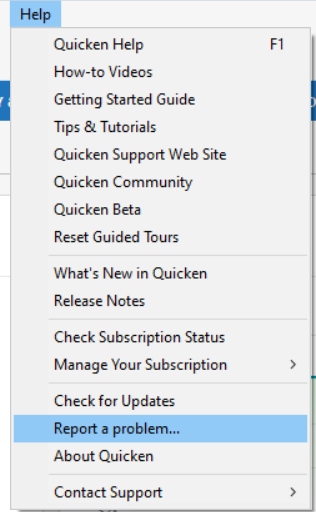
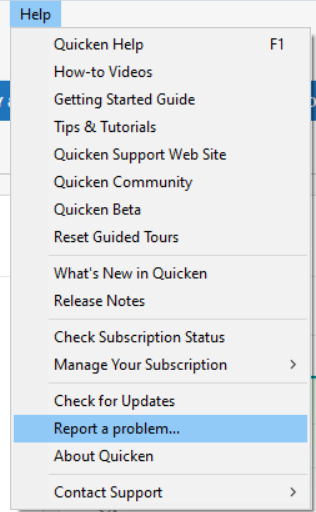
So that we can further investigate this issue, please navigate to Help>Report a Problem and send a problem report with log files attached.
While you will not receive a response through this submission, these reports will help our teams in further investigating the issue. The more problem reports we receive, the better.
We apologize for any inconvenience!
Thank you.
(CTP-13877)
Quicken Kristina
Make sure to sign up for the email digest to see a round up of your top posts.
0 -
I have the same issue. Bookmarked.
0 -
This same issue (counting cash accounts twice in the total) occurred several years when Quicken did an update. I spent countless hours on the phone and opening tickets, providing screen shots as proof, etc. before Quicken fixed the problem. In the meantime, I had to live with my account balances being way off for a very long time before Quicken did another update to fix the problem. As I recall, it was about 6 months of incorrect balances. I can't believe this is happening again.
0 -
I have the same issue, after reauthorization now the ML BANK DEPOSIT PROGRAM shows a mismatch of the dollars in cash (shown in the mismatch as shares) and the Quicken share balance. There should be no mismatch since the cash balance includes the amount, they are not shares in a fund. Therefore, as a temporary fix, I am choosing to ignore the mismatch so that I can reconcile the cash balance with the Merrill Lynch statements (or online balance). This should be fixed as it is confusing and not useful.
Technically what is happening is the ML BANK DEPOSIT PROGRAM refers to the feature offered by Merrill Lynch where uninvested cash in a brokerage account is swept into an FDIC-insured bank deposit program. While it's still "cash" to the user, the program itself treats it like a money market fund, leading to Quicken misinterpretations. If this is the case it should be able to be flagged as a cash account in the investment list and then ignored allowing it to be part of the cash balance as it always was.
1 -
yes, this is the same problem I've been having. EWC+ is now separately identifying money market sweep accounts (e.g. ML Bank Deposit Program, ML Preferred Deposit) which confuses Quicken which has already accounted for those funds under the label of "cash".
1 -
Reply to Quicken Kristina: I sent a problem report with log files included. Hope this helps with investigation.
For others: I am leaving as is, living with the incorrect balance. I am curious about what will happen with the next dividend or interest credited to the account
1 -
I'm also having this problem, and I would send in a report and log files, but I don't know what the log files are nor how to get them. Like jdparker above, I'm just going to live with it for a while hoping that Quicken will get its act together quickly and fix it.
1 -
Hello @obscure professor,
Thank you for letting us know you're also seeing this issue. To send logs, in your Quicken, navigate to Help>Report a Problem and send a problem report with log files attached. The log files should already be pre-selected.
Thank you!
Quicken Kristina
Make sure to sign up for the email digest to see a round up of your top posts.
0 -
I had a dividend posted today. As expected it went in both the ML Bank Program and cash. Well, it did so when Quicken recognized the difference between ML Bank Program number of shares in Quicken vs. reported by ML and I chose to create a placeholder transaction.
Unfortunately it was a whole dollar amount. So I couldn't see what would happen to the cents portion of the transaction.
Kristina, would you be interested in my sending another problem report with more log files for this? Or should I wait for a transaction that is not a whole dollar amount?
Thanks
Jim
0 -
I just noticed this: I have 3 accounts with ML: one normal brokerage account and 2 IRAs. It is only the brokerage account that has this issue.
Both IRAs do have a have "money accounts" that show up as cash in Quicken but they do not show up in the Quicken holdings like the money accounts now do for the brokerage account. So no double counting in the IRAs.
The biggest money account in the IRAs is BANK OF AMERICA, NA RASP. So the name is not the same as the money accounts in the brokerage account. This IRA cash is, more or less, temporary. It is there until used to buy some other kind of security. There is a smaller money account in one of the IRAs, BLACKROCK LIQUIDITY FUND
FEDFUND CL PREMIER. This one is more stable.Does this matter?
Thanks
Jim
0 -
Yes, since the EWC+ connection my accounts at ML are uniformly unreconcilable. Most of the problem seems to be with how money market holdings (BoA RASP, ML Bank Deposit Program, ML Preferred Deposit, Blackrock Liquidity Fund) are accounted for creating a huge difference in the online and Quicken balance.
1 -
Well, I just got a dividend for $60.06. So not a whole dollar amount. That resulted in an increase in ML Bank Deposit of $60 but an increase in cash of $60.06. I looked on line, I could not find my $0.06 anywhere!
This would seem to me to be more of a question for ML. Anybody know what is going on here?
Thanks
Jim
0 -
Thank you for the follow-up @jdparker225,
Yes, sending logs reflecting the most recent double counting of cash would be helpful for investigating this issue.
Thank you!
Quicken Kristina
Make sure to sign up for the email digest to see a round up of your top posts.
0 -
I may be mistaken, but I thought ML Bank Deposit purchases were only made using whole dollars, i.e., the remaining $0.06 should be in cash. The fact you have $60.06 in cash may be indicative of other issues ML clients have seen with how cash is being handled now in EWC+.
0 -
To jtempllin: I think you misunderstood my post. I looked at my ML account online and the $0.06 was not anywhere that I could find. There is a cash balance in that account online, but it is 0.
To Kristina, I have sent the additional logs.
Thanks
Jim
0 -
I checked my most recent ML statement and ML isn't stealing the change. Like the online account, the statement has a cash line item. The change evidently goes into that cash and is eventually transferred to the money accounts. What you can't tell from the statement is the hysteresis when getting a not whole dollar amount dividend between the posting of the dividend and the change portion getting into your cash and then the accumulated change getting transferred to ML Banking. But it eventually all happens.
I am guessing that when the issue being talked about in this thread is fixed, that hysteresis will still exist because it is in the data in the online account and Quicken can only reflect what the financial institution reports.
But, I would think that if the fix involves having money accounts listed in holdings separate from cash, there is going to have to be some way to report transactions that involve transfers between cash and the money accounts.
Thanks
Jim
0 -
"After the connection reauthorization, the list of securities includes an entry for each of those two accounts but there still is "Cash" at the end of the list. So basically the cash is counted "twice" making the balance wrong."
I am having this issue as well. Until there is a fix, I've discontinued directly downloading through Quicken. However, I did download a .qfx file from Merrill containing the last days transactions only. Adding the downloaded file manually corrected the balances. This is not a perfect solution but it's much better than altering data to match the desired balance as previously suggested. It also indicates the problem is in the way Quicken is processing the data. I will be following this procedure in the future, downloading transaction on a weekly bases until this issue is resolved. Quicken should still automatically update share prices to reflect correct amounts unassociated with the cash accounts.
Cheers
0 -
This is kinda ridiculous! Is there no testing prior to such changes?
Yes- I have already reported the issue!
1 -
[Removed - Off Topic]
0 -
Something else weird happened with my ML account. One of my IRAs is managed and they charge a fee. That usually comes in as a withdrawal action with Description and Security = "Advisory Program Fee Inv. Advisory Fee mmm" where mmm is the first three letters of the month. Invariably it appears in OSU on the 2nd of the month.
Well, this month (August) it appearred on the first with Description and Security = "Null". I checked online and there is a pending withdrawal transaction with same amount and trade date of 8/2/2025 and description of "Pending Fee" and a settlement date of 8/4/2025.
Again looking on line, July's fee has description of "Advisory Program Fee INV. ADVISORY FEE JUL" with trade and settlement date of 7/2/2025.
I am sure that this new behavior is not what is expected or desired. I am going to hold off doing anything until after OSU's on 2nd, 3rd, and 4th - but I am sure I am going to have to take some action to fix it.
Is this related to the reauthorization issue? (It is the first advisory program fee since the reauthorization.)
I know that somewhat recently Quicken added some feature to deal with pending transactions but I have taken no action to activate that.
Also, remember that in previous post on this thread, I noted that my IRAs do not have the double cash counting issue that my brokerage account has. Neither of them show holdings of "cash" accounts in Quicken, which, like the brokerage account, they both have.
Would more log files be helpful?
Thanks
Jim
0 -
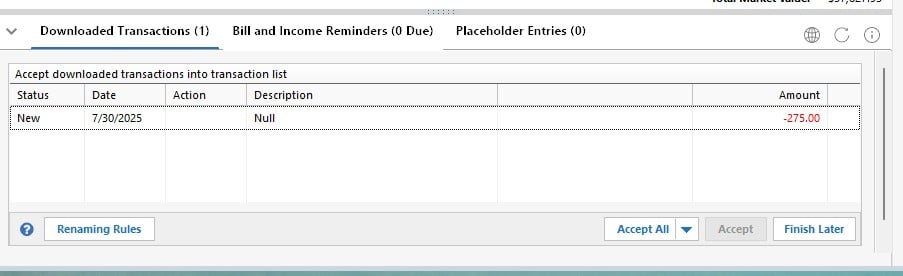
I noticed the same issue this morning as well. Below snips are 1) the downloaded "Null" and 2) what is on the ML website for that transaction. It will be interesting to see what happens when the monthly advisory fees change from pending. Will they download again? We shall see when the settlement date occurs in a day or two.
This is all baffling to me as a software engineer. You'd think that the code that was used to prepare the downloaded transactions in Direct Connect would have been reused to prepare the transactions for EWC+. Below are the two issues I've discovered so far.
Here's the advisory fee downloaded as "Null" (the dividend shown is OK and not germane to the discussion)
This cash sweep transaction wasn't downloaded at all.
0 -
Thank you for your replies @jdparker225 & @jtemplin,
Thank you for letting us know about fees downloading with "null" in the description. I have forwarded this to the proper channels for further investigation and resolution. If you haven't already done so, please navigate to Help>Report a Problem and send a problem report with log files attached to contribute to the investigation.
While you will not receive a response through this submission, these reports will help our teams in further investigating the issue. The more problem reports we receive, the better.
We apologize for any inconvenience!
Thank you.
(CTP-14029)
Quicken Kristina
Make sure to sign up for the email digest to see a round up of your top posts.
0 -
I have the same issue, not just with pending fees, but pending withdrawals as well.
This was reported and acknowledged on a different thread, but just informing anyone looking at this thread with the same issue.
1 -
I'm not entirely sure why, but this seems to have resolved all the issues. I spoke with support, and they had me switch the Merrill Lynch accounts back to "Direct Connect" instead of the "Express Web Connect+" that was enabled during re-authorization.
To make the switch:
- Go to Tools > Account List.
- For each Merrill Lynch account, click Edit, go to the Online Services tab, and click Deactivate.
- Once all accounts are deactivated, repeat the steps and click Activate instead.
- You'll be prompted for your username and password—save them to the Password Vault.
- Make sure to link each account to the correct existing account.
After this, you should be back on "Direct Connect." This cleared up all the errors for me.
1 -
This is wonderful news! One question before I try this - Did it stop requesting reauthorization to switch back to EWC+ the next time you did a One Step Update?
0 -
Yes, it no longer requests the reauthorization. For clearification, I did the reauthorization, got the issues then did the account list, and deactivated the accounts. Then I reactivated them and was on a "Direct Connect" and everything has worked since. Fyi, it worked great again today.
1 -
After 3 hours of manual updates this morning, I was over it and deactivated all of my accounts. Did a manual download for both Windows and Mac. After importing both, the experience was much better than EWC+. Not perfect but better. After reading the above I deactivated/reactivated to direct connect. If they deprecate direct connect again, I will return to manual before I go back to EWC+.
FYI - This works on the Mac side as well.
1 -
Thank you all for continuing to update this thread and sharing the different workarounds and migrations of the issue.
We truly appreciate your patience and support!
-Quicken Jasmine
Make sure to sign up for the email digest to see a round-up of your top posts.
0
Categories
- All Categories
- 56 Product Ideas
- 36 Announcements
- 223 Alerts, Online Banking & Known Product Issues
- 22 Product Alerts
- 701 Welcome to the Community!
- 671 Before you Buy
- 1.2K Product Ideas
- 53.7K Quicken Classic for Windows
- 16.3K Quicken Classic for Mac
- 1K Quicken Mobile
- 813 Quicken on the Web
- 111 Quicken LifeHub