Issue with Merrill Lynch account since reauthorization - account balance is wrong [Edited]
Comments
-
@WoodCountry you feel my/our pain.
I'm trying to be a part of the solution, yet I can't control the process, so it's been frustrating. I've sent in my reports to Quicken via the internal interface, I've called Quicken support, and I continue to test for Quicken (On my dime), not to mention I just paid for another year of subscription, with an increased price. My experience transitioning from Quicken Merrill Lynch Direct Connect to EWC+ has not worked, I continue to receive less data, mis-classified downloads, pending transactions without authorization and on and off again CC-501 errors (For which if I call Quicken, support they tell me I must wait two (2) days before then can assist).
This has all added much time and manual effort to correct and I see no sign or correction coming, nor any communication from Quicken directly that I am aware of. Sadly, this appears to be a replay of the Crowdstrike update rollout, that wasn't properly tested, or staged, before a full push to all customers exposed a failed process and update. Even my Roku devices do a slow testing rollout before a full push to all devices, and that is just a streaming TV device.
MEL1 -
@MELCO I do, and I wish there was more we could do. One thing for you regarding the CC-501 issue - have you tried the sign-out/sign-in step I mentioned in an earlier post?
1 -
Hello @MELCO,
There is currently a known issue with CC-501 errors. It is possible you're being impacted by that known issue. For more information, see this Community Alert:
If you haven't already done so, to troubleshoot the CC-501 issue, please try resetting the problem accounts. To do that, first, backup your Quicken file. Then, navigate to Tools>Account List and click the Edit button next to the problem account. Navigate to the Online Services tab and click the Reset Account button.
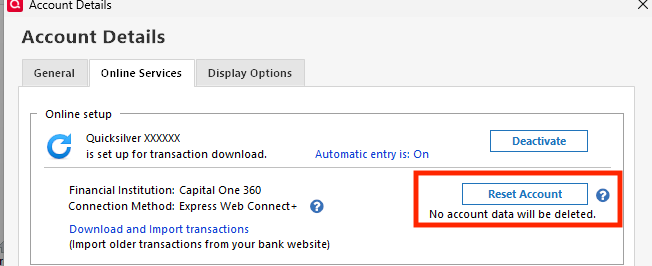
Follow the prompts, and carefully link the account to the correct Nickname in Quicken.
Repeat as needed for each problem account.
If that does not resolve the CC-501 issue, please let me know and please include a screenshot of the CC-501 error message you see. If needed, please refer to this Community FAQ for instructions on how to attach a screenshot. Alternatively, you can also drag and drop screenshots to your response if you are not given the option to add attachments.
I hope this helps!
Quicken Kristina
Make sure to sign up for the email digest to see a round up of your top posts.
0 -
@WoodCountry: "One thing for you regarding the CC-501 issue - have you tried the sign-out/sign-in step I mentioned in an earlier post?"
Yes, after calling Quicken Support for which they recommended it. Quicken also suggested turning off the mobile sync, for which I do not use, so I turned it on, then off again. It worked for one day, then back to on and off again CC-501 errors. Sometimes some Merrill Lynch accounts update on a CC-501 error too, but not all. I then try until it works again.
MEL0 -
One thing I don't think I've seen in your posts, but offer as a friendly suggestion:
Complain loudly to your Merrill Account Team. I've done this in the past, and they were able to work internal contacts to let them know customers were unhappy with the Quicken downloads. Your local team is incentivized to keep you happy.
Belts and braces.
1 -
@Quicken Kristina does reset account do anything more than simply deactivate/reactivate online services? If so, what?
On another note: I suspect that things will go pretty well for me until the end of the month. I suspect that for me there is something going on at the end of the month that causes problems. Something like whatever goes on in preperation for and generation of the monthly statements interferes with sending data to Quicekn server. One possibility is simultaneously updating and retrieving data from the ML database. This can result in whatever process is retrieving data to get inconsistent data and that can result in really wild and inconsistent results. This could happen any time but, for me, the flurry of activity around the end of the month could increase the probabilty of occurrence. Others, with more active accounts, could see it at other times. This would not necessarily account for all the problems but it could account for some.
Oh, I like @jtemplin's idea. I have a zoom call with my ML broker next Tuesday. I will mention this.
Thanks
Jim
1 -
Thank you for your reply @jdparker225,
Resetting the account doesn't do much different from deactivate/reactivate. With most financial institutions (if multiple accounts have the same problem), resetting requires you to reset each account separately, rather than deactivating and reactivating as a group. I recommended it in this instance because it is the troubleshooting step recommended in the alert for the known issue.
I hope this helps!
Quicken Kristina
Make sure to sign up for the email digest to see a round up of your top posts.
0 -
@Quicken Kristina thanks for the reply to @jdparker225, but I have to say that "doesn't do much different" isn't a real good explanation of the differences between resetting and reactivating. One Premier Support rep told me that resetting is primarily for the Quicken servers, while reactivating is primarily for the financial institution's servers. I don't know if that's correct or not, but it is what I was told by Quicken support…for what it's worth.
0 -
If you click on the ? next to the Reset Account button which is on the Online Services tab this is what comes up: "Quicken will deactivate then reactivate your account. Your existing data will remain and nothing will be deleted."
Perhaps the wording of that could be enhanced a bit. Those words are what drove my question.
This is what Google AI has to say when asked "What does reset account do in Quick?" This is mostly for your amusement. I have found that Google's AI responses are not particularly reliable. I wonder what is meant by "Is "softer" than deactivation:"? I have always done deactivation/reactivation when I have connection issues. Never tried Reset Account.
——————————Begin AI Response—————-—————————AI Overview In Quicken, "resetting an account" usually refers to re-establishing its online connection to troubleshoot syncing issues with a financial institution. This process disconnects and then reconnects the account, and may require you to re-enter your password, but it does not delete your local transaction data or change your account balance. A related function is resetting your "cloud data," which discards the data on Quicken's servers and syncs it from your local desktop file instead. What "resetting an account" does
- Resets the online connection: It disconnects the Quicken account from your bank's server and then re-establishes the connection.
- Troubleshoots errors: It is a step used to resolve problems with online banking, such as connection errors or other syncing issues.
- May require re-entry: You might need to re-enter your password to establish the new connection, especially for Direct Connect accounts.
- Does not delete data: It does not delete your existing transactions or change your account balance in your Quicken file.
- Is "softer" than deactivation: It is a less drastic step than fully deactivating and reactivating an account, and you should generally try it before deactivation.
Related function: "Reset Cloud Data"
- This is a different function that resets the data synchronized to Quicken's servers for use with the mobile and web apps.
- It will discard the cloud-based data and replace it with the information from your desktop file.
- You should sync any changes you want to keep from the mobile/web app before doing this, or they will be lost.
Other "reset" functions in Quicken
- Clear register filters: The "Reset" button can be used in the register view to clear any filters you may have applied to the list of transactions.
- Resetting computer accounts (Windows): In the context of a Windows computer network, resetting a computer account breaks its domain connection and requires it to rejoin the domain.
——————————End AI Response—————-—————————
Jim
1 -
Hey @MELCO, I just noticed that ML no longer supports Quicken downloads. So there is no alternative EWC+.

I have accounts where qfx file downloads are the only option. I do not want to lose the capability to import qfx files. Is this the direction Quicken is headed - remove capabilty to import qfx files?
Jim
1 -
@jdparker225 I mentioned this a bit ago…the termination of Merrill Lynch QFX download support.

I understand removing technology and the need to support it while Merrill Lynch focusing on what they believe is the best technology moving forward, however, I believe, at a minimum, this is a bit premature as the new solution (EWC+) isn't mature nor working in a satisfactory manner.
Interestingly, Quicken just added new QFX support in a new Windows application update today too:
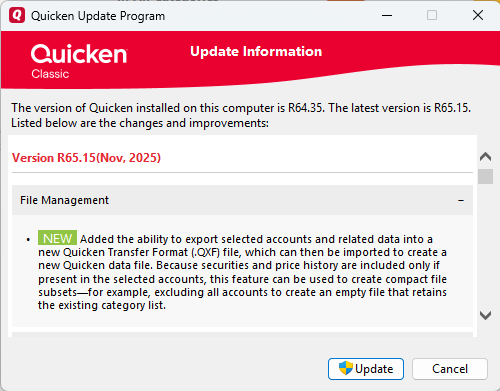
In the end, I just want a solution that allows me to download viable and accurate transactions from Merrill Lynch with the least possible effort, and as of today, although getting a little better, that is not the case for me.
MEL1 -
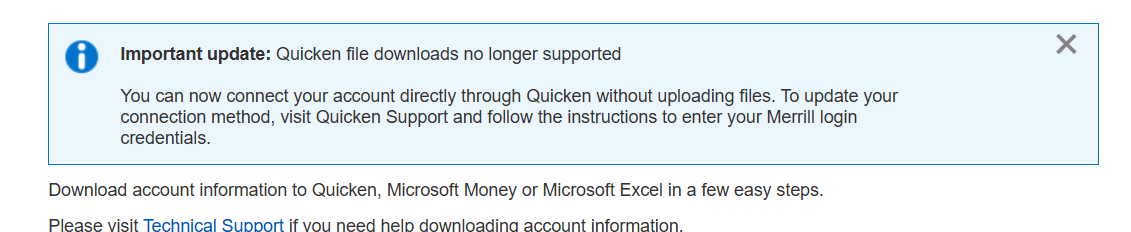
I'm late to this thread but just got this today and welcome a fix from Quicken. If the automatic linking of accounts do not work, it takes away the value of subscribing to Quicken.
2 -
@MELCO I didn't see your post about ML terminating qxf download support.
This may sound like a dumb question but how do you get to the update you mention? I tried Help→Check for Updates and got this:
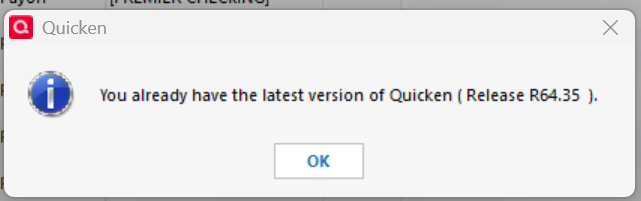
Is this something that is being rolled out slowly and I will see it later?
Thanks
Jim
1 -
@hsu888 I mentioned this a bit ago…the termination of Merrill Lynch QFX download support.
I understand removing technology and the need to support it while Merrill Lynch focusing on what they believe is the best technology moving forward, however, I believe, at a minimum, this is a bit premature as the new solution (EWC+) isn't mature nor working in a satisfactory manner.
Interestingly, Quicken just added new QFX support in a new Windows application update today too:
In the end, I just want a solution that allows me to download viable and accurate transactions from Merrill Lynch with the least possible effort, and as of today, although getting a little better, that is not the case for me.
MEL0 -
Recently I began seeing something with my ML downloads that I do not understand. Everytime there is a transaction downloaded for one of my IRA accounts, I get this popup offering to perform a reconcilation on that account after accepting the transactions. This only happens with this one ML account and no others. This is the popup:
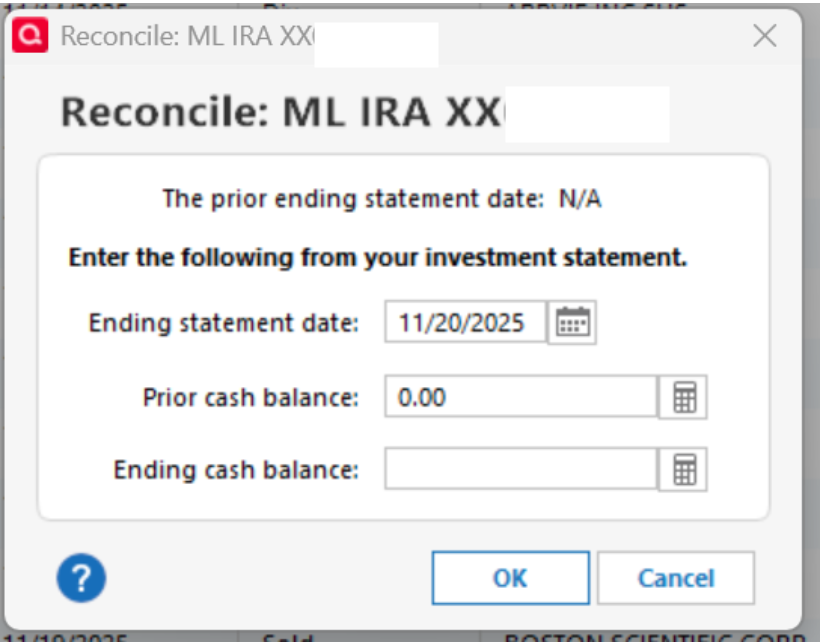
Why is it doing that? How can I stop it? Is this some new issue related to switch to EWC+?
(If I want to reconcile an account, I'll take the actions to do it.)
Thanks.
Jim
[Edit - Removed partial account numbers]
1 -
@jdparker225 the Microsoft Windows Quicken v65.15 update was pushed out to me automatically yesterday (11/20/25). Having been in the technology business, as a rule, staged update rollouts are preferred, especially for final testing and to eliminate update disasters, as with the Cloudflare update, Quicken Merrill Lynch EWC+ transition and other less than desirable updates. I can only surmise that Quicken is staging their rollouts.
MEL0 -
My Quicken Merrill Lynch Direct Connect to Express Web Connect+ (EWC+) transition nightmare continues.
I continue to receive pending transactions, even though that option is turned OFF in Quicken. I continue to receive transaction downloads with no memo. To make matters worse, today (11/21/25), for a "Sale", I only received the whole number, not the fractional shares. I would have never known, except that I went to the Merrill Lynch web site to verify and found the discrepancy. So now, I need to manually review and compare the downloaded transactions with the web site transactions and manually adjust each transaction as appropriate.
Quicken, where are we are resolving all of these issues? It has been 60 plus days that I have been fighting this battle. How can I help you beyond all of the testing, calls and troubleshooting to date? Who is going to reimburse me for my time and effort?
MEL1 -
@MELCO OK, I'll wait for the update. However, the update supports qxf files not qfx files. So the fear that Quicken is phasing out qfx files is still valid.
The notion of being able to export selected accounts peaked my interest because I would like to export a single account from one Quicken data file and import it into another without perturbing the other accounts in the receiving file. I have been trying to figure out how to do that (very, very, very lazily). I haven't even asked about being able to do that in this forum. Maybe I should do that. What I need is one of these:

Jim
1 -
See
Release 65 is being rolled out in "staged release format".
Jim
1 -
Hello @MELCO,
To clarify, the release notes for R65.15 are talking about QXF, not QFX. QXF is a transfer format used to export information from your Quicken file to import into a different Quicken file. For more information on QXF, please see this article:
Thank you!
Quicken Kristina
Make sure to sign up for the email digest to see a round up of your top posts.
0 -
I'm not sure this is related to the Quicken Merrill Lynch DC to EWC+ transition issues, but it is another Quicken update issue. I know that I saw a Quicken note on this, but yes, all my Quicken Bill and Income Reminders were changed, and they all needed to be manually re-configured or deleted and re-added.
MEL0 -
My Quicken Merrill Lynch Direct Connect to Express Web Connect+ (EWC+) transition issues continue.
I continue to receive pending transactions, even though that option is turned OFF in Quicken. This is a double issue, because transactions close to month end, that are not cleared/settled, get posted in Quicken as/on the trade date, not the settlement date, and this doesn't match the Merrill Lynch month end statement, so I need to change all of the dates in Quicken, to match the month end statement, and then reconcile the settled trade against the next month end statement to match the Merrill Lunch statement.
I continue to receive transaction downloads with no memo.
I continue to receive (11/29/25) only whole numbers, for a "Sale", not the fractional shares. I have to go to the Merrill Lynch web site to verify and find the discrepancy. So now, I need to manually review and compare the downloaded transactions with the web site transactions and manually adjust each transaction as appropriate.
Quicken, where are we are resolving all of these issues? It has been 70 plus days that I have been fighting this battle. How can I help you beyond all of the testing, calls and troubleshooting to date? This is very frustrating…not to mention, it still appears isolated to Merrill Lynch transactions only, as my other Quicken download transactions work with little or no issue.
MEL0 -
@MELCO I am seeing pending purchases and sales transactions downloaded but not pending dividend transactions. Like you I have not turned on the option to download pending transactions but I am getting some but not others which is kind of inconsistent. However, this is consistent with how ML has always dealt with holdings on their web site even in the old Direct Connect days. I.e., a pending sale/purchase results in ML updating your holdings which meant, in the Direct Connect days, that an OSU would result in a disconnect between the holdings shown in Quicken and those reported to Quicken by ML if there was a pending sale/purchase. Because pending sales/purchases are now downloaded there is no disconnect reported by Quicken between what it thinks your security holdings are and what ML says your they are.
I found this particular situation under Direct Connect annoying and better under EWC+. I am not saying that what is happening with respect to this is ideal. It is just that I prefer the consistency between Quicken's view and ML's view of my holdings under EWC+ to the inconsistency between those views under Direct Connect.
I don't think this consistency or inconsistency (or any of the isssues discussed on this thread) is (are) inherent to either EWC+ or Direct Connect. Either connection method could be designed to handle it either way. I am still struggling to determine in my own mind what I think the ideal solution would be.
One thing I am not struggling with is feeling that Quicken could have rolled out the switch to EWC+ better.
Jim
1 -
I'm seeing exactly what you've described above and I feel the same way. It's inconsistent, but it mirrors how ML handles and displays its transactions. One other thing I'm seeing is that interest payments on cash that's paid to IAAXX, the core fund used in IRA accounts, is actually being downloaded. In all the years I've used ML & Quicken, that's never happened before.
I haven't downloaded any cap gains yet and I'm hoping they'll be done right, especially going into CG season. Fidelity is still screwed up with those - they download as Dividends. Also, the last time I downloaded ML account fees, they were messed up. Memo was in the Payee field. And, of course, missing memos everywhere else.
It seems that Quicken is coasting now that they've gotten over the hump with all the problems caused by the ML and Fidelity cutovers. My concern is that they'll never finish cleaning up the remaining problems. I hope I'm wrong.
1 -
@jdparker225 @mrzookie Just when I thought I was being to understand and "conform" to the short comings of the Merrill Lynch EWC+ (No Memo fields, no fractional shares on sales, incorrectly distinguishing between money market dividends/interest versus reinvestment, etc), I ran into a new issue today. As I have mentioned in the past, I have seven (7) Quicken data files and 13 different Merrill Lynch accounts. Many have consistent transactions, so I can use this to process to experience the difference between Quicken data files, if there are any. Today, 12/2/25, while doing my daily transaction downloads, two of my main three Quicken data files downloaded transactions fine (~20), however, the last downloaded zero transactions. Six (6) transaction were on the Merrill lynch web site available to download, like the other two. I tried updating the Quicken Merrill Lynch accounts multiple times. Nothing. And because I can no longer use the manual QFX download on the Merrill Lynch web site, I had too manually enter the six transactions. I did not try a reset on the Merrill Lynch accounts, primarily because the download summary contained no errors and resets, given my permission access across seven accounts, has cause more effort to correct.
My goal in all this? As it should be, I just want my transactions downloaded complete, so all I need to do is review and accept. The switch to EWC+ is causing me way more effort daily, and monthly during the reconciliation process. Whether this is a Merrill Lynch issue, or a Quicken issue, or both, or maybe just a transaction mapping issue, why wasn't this tested, why hasn't it been fixed, or what am I doing wrong? Have some things been better? Yes. Has this created more work given the few things that are better, absolutely. Quicken, you are better than this. I've talked to so many people not on this discussion group, so I know it's not just a handful of people on this thread.
MEL0 -
@DrAl, @Quicken Kristina, after reading DrAI's post from November 2, including "switched to the new EWC+ method in late Oct. and found that most things are working to some degree. Many of the transactions are coming in with the memo field and category field blank. Buys/Sells/Dividends/Interest transactions seem to be functioning correctly. Principal payments from Bonds are just recorded as a deposit without a category. Foreign Tax Withholdings are showing up as Withdrawals and blank memos. Since the memo field is blank, these transactions have to be compared to the Merrill Lynch statement or the Online Activity screen to properly categorize the transaction", I, too, am having same experience since forced cutover late September. Additionally, cash transfers from one ML (investment) account to a ML CMA are not working as they did before EWC+ cutover. Like many other posters, I am having to reconcile with live ML website account activity to properly capture "transfer/adjustments" cash transfers, foreign taxes paid, and ML monthly account fees paid.
I believe this to be a field mapping bug. Whose responsibility to fix is not my concern as long as it gets fixed. Either Quicken or ML needs to take responsibility. This Community post stream has been going on for some time without what appears to me as a clear cut solution. I don't have the time to read through all the posts, but have scanned them for relevancy and verifiable fixes. Am I missing a post with a bonafide fix? If so, I would appreciate a repost as a response to mine. Otherwise, a status update on Quicken support's plans to include fix in an upcoming SW release is requested.
Thank you!
0 -
Looks like mrzookie and I have very similar experiences. Things are looking OKish but like him I am waiting to see how capital gains are treated and there have been issues with ML fees. There is a pending fee today so I am anxious to see how it downloads once it setttles. Also he has a Fidelity account and I have a Fidelity 401K. It messed up this year's RMD withdrawal. Prior to FIdelity's switch to EWC+ it always came in as one soldx transaction. This year it came in as simply a withdrawal which left me with a negative cash balance and no sale to cover the cost of the withdrawal so my security holdings in Quicken diidn't match Fidelity's holdings. I had to manually add a sold transaction to straighten it out.
I am wondering if MELCO's issues are related to his multiple data files. Is it possible that EWC+ simply can't handle that for some reason where as Direct Connect could. Is there anyone else having the issues that MELCO is having and has only one data file or is there anyone with multiple data files that is not having the same issues. Is there more than one data file pointing to the same account or do all the data files have disjoint sets of accounts? Are some ML accounts in one data file and some others in other data files or are all ML accounts in one data file? Just putting on my old debugger's hat and wondering what kind of software coding assumption that none of the coders knew was implicitly there he is "violating"? Something like assuming that a certain variable couldn't possibly be 0 so it is safe to divide by it.
Jim
0 -
I was wondering about the multiple files too. @MELCO, have you given any thought to that? Is there any way you can restrict your usage to one file for a short time and see if anything changes?
0 -
@jdparker225 @mrzookie I don't believe my multiple Quicken files have any impact, especially given my testing. This all worked with Direct Connect too. It's just frustrating.
Today, in my main Quicken data file, one of my manual Merrill Lynch transactions was overwritten, a transaction that was downloaded as pending, by my daily download. Just one. It created a new transaction, removed the old one and removed my memo…
This is coming to a head for me.
MEL0 -
Investment Advisory Fee transactions came down with the wrong mapping again. Memo info appears in the Payee field and is truncated, so account #s are missing (I have all my fees taken from core account). As a result, Category and Memo fields are blank.
Reported.
1



