PNC bank upgrade affecting Quicken downloads?
Answers
-
I have never used Quicken Mobile & Web. Sync preference has always been turned off. Per your instructions above, I turned it on just to see what was there in my primary file. All I see, now, under Cloud account details is the dataset name, file name and last sync "never". I don't see anything with an asterick. In the 2022 old secondary Quicken/computer, Mobile and Web sync is also turned off. Quicken ID & Cloud Accounts is identical to the primary (with Mobile & Web turned off)…… only my "Quicken Profile" is shown. The profile is identical in both (same Quicken ID, Email and contact info). I turned Mobile & Web off again in the Primary file and i will leave it that way.
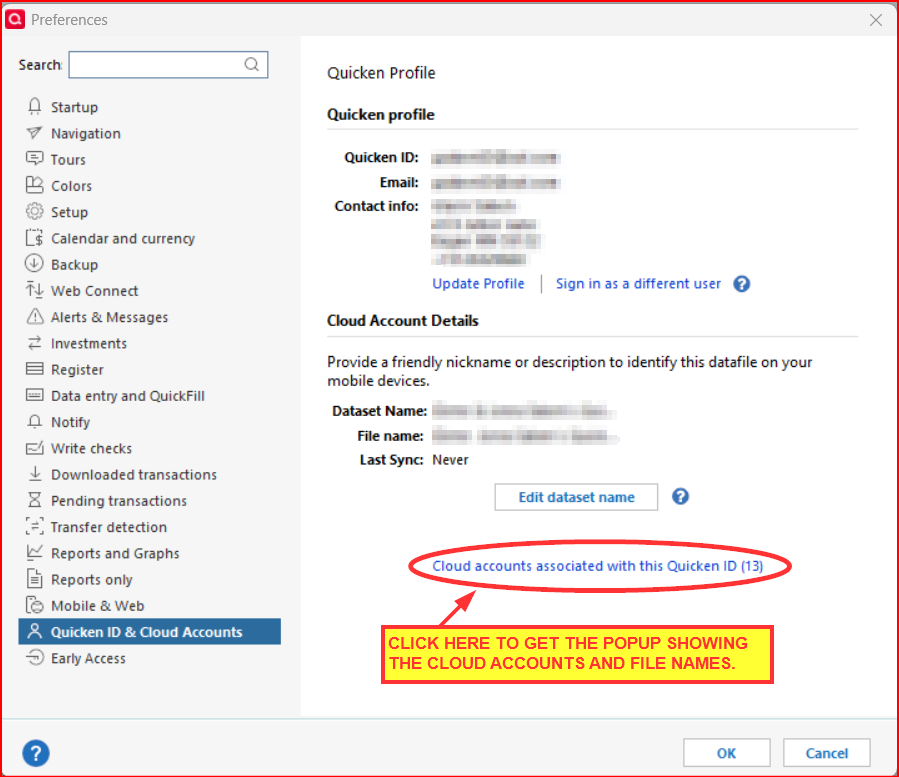
You need to click on the blue font link that says Cloud accounts associated with this Quicken ID (XX).
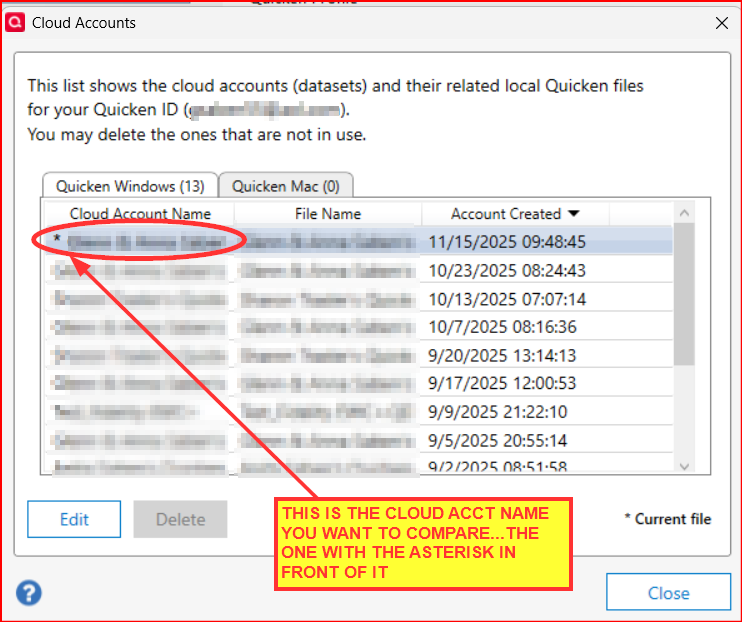
Then you will get this popup where you can see all the Cloud Accounts and the associated File Names.
It is interesting to note that when I turned sync preference "on" in Mobile & Web in my primary file, I do show an option to "reset your cloud data"…. Is any of the Cloud account stuff relevant if I am not using "Mobile & Web" and I only use a single Quicken Classic computer/file?
Every data file will have a Cloud Account associated with it, regardless of whether or not you use QMobile or QWeb. And even with QMobile/QWeb Sync turned off there are somethings that will still be synced between the data file and the Cloud Account. Without a Cloud Account you would not be able to use Quicken and everytime a new Quicken file is created a new Cloud Account will be generated for it. Syncing with QMobile/QWeb is optional but syncing for other things is not optional. Some of the Cloud Account functions that are not related to QMobile/QWeb:
- Validates the software license (i.e., did you agree to the terms and conditions?).
- Tells the software which edition (Starter, Deluxe, Premier, Business & Personal) you are subscribed to so it knows which features are to be turned on (there is only one software).
- Confirms your subscription status so it know when you are authorized to use online services.
- It lets you know when a new version is available for installing.
- When you set up EWC and EWC+ downloading it is where the login information is saved or at least is messaged to Intuit.
There's a lot more than this that the Cloud Account is used for but most of that is just about making and ensuring the software is properly functional. Financial data is also saved and synced with it when QMobile/QWeb Sync = ON.
Quicken Classic Premier (US) Subscription: R66.23 on Windows 11 Home
0 -
I'm curious…what is the purpose of making a copy of the backup file?
And are you suggesting making a Windows copy or a Quicken copy of it?
Quicken Classic Premier (US) Subscription: R66.23 on Windows 11 Home
0 -
I just checked. Under Quicken ID & Cloud Accounts I do NOT see:
Cloud accounts associated with this Quicken ID (XX)All I have there is my profile.
I believe if I turn on "mobile & web" SYNC …. it might be in there.
Let me toggle that on and check.
0 -
Ok. I turned Mobile & Web Sync "on" and the cloud account info is exactly where you said it would be.
I am not sure if the old computer/file from 2022 is using the same cloud account and unless you think I really need to go back into the file and look, I am just going to leave the old installation as is and not enable Mobile & Web Sync to check. I won't touch the old install until this is all fixed……
Thank you!
0 -
Off the top of my head, here are a couple of things to consider:
- For each Spending account (checking, savings, credit card, etc.) enter and save the Opening Balance transaction dollar amount into the Memo field of that transaction. Then back up the file. Sometimes Quicken will change the Opening Balance dollar amount when a connection which really messes up the account register balance. By saving the correct dollar amount into the Memo field proactively it makes it very easy to know when that has happened and very fast to correct the balance when it has occurred.
- All financial institutions limit the amount of time they download transactions for. When restoring backup files some will download transactions for only the last 30 days. So there is the possibility that if you restore an 8/1 backup file you might have transactions gaps of about 2-1/2 months. Some financial institutions support Web Connect (manually downloading/importing transactions from the online account in QFX format files, also sometimes referred to as Quicken or Web Connect) which can be used to fill in such gaps in the transactions record. But if they do not you will need to manually enter the missing transactions.
- Alternately, another option for manually downloading and importing transactions is with QIF, CSV or Excel files. They will need to be modified so they can be imported. A good and safe freeware conversion app is ImportQIF which you can read up on and download from . (The guy who developed and maintains it is a long-time Quicken user and active participant in this Community.)
Quicken Classic Premier (US) Subscription: R66.23 on Windows 11 Home
0 -
Boatnmaniac, No specific reason for copy, except I wanted to preserve the original because I knew it had worked before and wanted a clean database ID, etc. I used the Quicken Copy, but would have tried it with a Windows copy (I keep both, every day, because Q lately can't seem to get anything with a transaction to work). I use only the Q desktop, no mobile or cloud. Q-Latest version, all patches. Win 11 25H2, all patches. Been working perfectly for the last 2 days, except Fidelity, which will probably take another month for all of us to figure out!
0 -
You only need to check the Cloud Account for that 2022 file and compare it to the current file if you are planning on or wanting to do anything in that 2022 file other than to just view it….or if you are planning to continuously use only your 2022 file and stop using your current primary file. If you are planning to do anything in it and are planning to continue using your then you need to know if the two files share the same Cloud Account or not. If they share the same Cloud Account I would not recommend making any changes in it at all unless you made and used a Quicken Copy of it. The Quicken Copy process will give the file a new and unique Cloud Account so it does not cross-talk with the primary data file or even possibly mess up the Cloud Account for one or both files.
Quicken Classic Premier (US) Subscription: R66.23 on Windows 11 Home
0 -
Thanks for the clarification. IMO that was the right approach. (BTW, making the Quicken Copy fixed my PNC connections for the last couple of days, too. Tomorrow will be more telling when I'm expecting some new transactions to download.)
Yeah, that Fidelity thing is certainly a PIA. At least they've made some good progress and are now saying that the pending R65 release will makes some additional fixes. But that's another story.
Quicken Classic Premier (US) Subscription: R66.23 on Windows 11 Home
0 -
thank you for clarifying. I’m not touching it……
0 -
Come on charlieo.Hemlock, Join the fun! Make a copy. Try it. It's calling to you!
2 -
Question: What exactly does "make a copy of" or "using Quicken copy" mean? How does one do that and for what purpose?
BTW, FWIW, I have been opening some of my old back up data files. It looks like the two web connect files (wife's checking and savings) have no transactions downloaded since May 21, 2025. Although they do not get much use, I'm almost positive that I would have checked every time I updated because her social security check and pension check go into those accounts and I would have reviewed them. Is it possible they have been deleted b/c of the PNC issues? Has anyone else actually lost transactions that they knew were there pre-PNC issues?
For my direct connect accounts (my PNC checking and savings), looks like nothing downloaded since 10/25/ 2025 (we were out of country during most of October so I didn't update until around 10/24 or 25, 2025.)
Like most, I will await posts until after tomorrow (Monday, 11/17) before fooling round with anything since I will probably make things worse (though I'm beginning to wonder how that is possible).🤣
Windows 11, Home, Quicken Premier R64.35
0 -
What does "Reinstalled Quicken using QUI," mean? Did you uninstall Quicken and reinstall it from the web site? (I am a Quicken Premier subscriber using R64.35) and then opened a database from before early October? Then updated as before and your PNC transactions downloaded correctly?
Windows 11, Home, Quicken Premier R64.35
0 -
Will making a copy of my primary data file using Quicken and then loading it back help? Do the same thing?
0 -
Crenshaw It will give you an exact copy with no connections and a new quicken id for your database. That way it won't be confused by sync or anything else with the primary Db. Then Uninstall Quicken the windows way, followed by the Quicken Uninstall App. (Get online) This will remove all traces of earlier versions. Re-install and update to the latest version if necessary. Then set up your PNC Connection with Add Account and try it! Do not set up any mobile or cloud. You can always add this later. Good luck!
0 -
I'm not sure if I understand you correctly.
When you make a Quicken Copy of the primary data file it has a totally unique data file ID and Cloud Account ID but it will have all of your accounts historical data in it. It cannot communicate ti the original primary data file nor be blended back into the original primary data file.
But that is OK because if the Copied file works out and fixes the issue then you can make that the primary data file…maybe giving it a different file name so it does not overwrite the original primary data file.
And if it doesn't work you can simply deleted that copied file and continue using the original primary data file.
It really is a very safe and secure process with no risk.
Quicken Classic Premier (US) Subscription: R66.23 on Windows 11 Home
0 -
Thanks. I was just trying to understand exactly what you all are suggesting as a solution.
So….. take my existing Quicken datafile (the one that is on my desk computer currently, not working with DC and is current as of 10/24/25) and copy it using Quicken …. Then in Quicken, load/open the copied file and use the file in Quicken. Correct?
Will this potentially also fix my vault corruption, or should I try to fix the vault issues first …. before doing the Quicken copy?? I’m your opinion should I also do the disconnect-reconnect after loading the copy?
Yea, I am confused….. but still optimistic.0 -
Adding a bit to what @Rick8 said.
The Quicken Copy process will not only give the copied file a new Quicken File ID, it will also give it a new and unique Cloud Account ID and a new runtime.dat file. These things will make the new file truly unique with no connection to the original file other than just the raw historical data and the Preferences settings. This is the only safe way I know of to experiment with the file in a way that will not cause potential issue with the original date file. This process can also fix some file corruption, Cloud Account corruption and runtime.dat file corruption and performance issues.
I personally think the uninstall/reinstall Quicken is only needed if there is some software corruption issue. Otherwise I don't see the need for doing that.
I use Quicken Copy when I am having issues, like with this PNC DC issue, where I want to try out various things to see if they can help fix the issues. If it does fix it I can start using this file as my main data file. If it doesn't fix it I can delete it and go back to using the original data file just like it was before. In this particular instance, it fixed my PNC DC issues and it is now being used as my primary data file.
There are other uses for this Quicken Copy and you can read up on them in this Support Article: .
The other kind of copy is using Windows to make a copy. There are times that it can be appropriate to make a copy this way but generally I caution people against it because it makes a copy exact file with all online services intact and where the two files share the same Cloud Account and runtime.dat file. There is a lot of risk to the original file and to the copied file because of this and it can easily cause issues with data integrity, downloading and a host of other things if it is not managed very carefully, especially if QMobile/QWeb are enabled and synced.
Quicken Classic Premier (US) Subscription: R66.23 on Windows 11 Home
1 -
thank you both.
so if I don’t uninstall Quicken, but do the copy file and load it, will I need to reconnect all my accounts back to DC? I still don’t understand how this fixes my vault? Does it also create a new vault once I reconnect to DC?
sorry if I am not understanding completely. After all the comments today I feel like I have more than one problem … the DC download/send issue and the bad vault. Or is it all the same issue?
Thanks again for the help.0 -
So….. take my existing Quicken datafile (the one that is on my desk computer currently, not working with DC and is current as of 10/24/25) and copy it using Quicken …. Then in Quicken, load/open the copied file and use the file in Quicken. Correct?
Correct.
Will this potentially also fix my vault corruption, or should I try to fix the vault issues first …. before doing the Quicken copy?? I’m your opinion should I also do the disconnect-reconnect after loading the copy?
IMO the vault corruption is the cause of the DC connection issues. Fix the vault and the DC connection issue goes away.
No need to deactivate the accounts first or to try to fix the Vault first. Creating the Quicken copy will deactivate all of the accounts for you and the Vault will be deleted.
After you open the new copied file start to set up your accounts again via Add Account making sure to link the downloads to the accounts that are already in the file.
I probably would start with trying to set up Add Account > PNC Bank - Direct Connect > Advanced Options > Direct Connect first since that is the FI with the downloading issue. Be sure to add it to the PW Vault and then check it to verify that in the PW Saved column it says "Yes". That will confirm that the Vault issue is fixed.
If that fixes the downloading issue for you then you can start to set up all of your other accounts for downloading. No point in doing all the other accounts first if the main culprit does not get fixed.
so if I don’t uninstall Quicken, but do the copy file and load it, will I need to reconnect all my accounts back to DC? I still don’t understand how this fixes my vault? Does it also create a new vault once I reconnect to DC?
Uninstalling and reinstalling Quicken will not fix the vault issue nor will it fix the DC issue.
Whether you uninstall/reinstall Quicken doesn't matter when it comes to reconnecting all of your accounts. The Quicken Copy process will break all the the connections for all of your accounts for all of your financial institutions. So, yes, you will need to set them all up, again.
Yes, when you set up the new PNC DC connection and check the box to have the PIN saved to the Vault Quicken will create a new Vault for it.
After all the comments today I feel like I have more than one problem … the DC download/send issue and the bad vault. Or is it all the same issue?
I can't say what the original cause of the DC connection issue was. But both Quicken and PNC had claimed last week that the issue was resolved, yet many of us were not experiencing that. IMO the Vault is the primary reason why some of us have not realized the DC fix.
There are a few who have already posted the same results. We need more to do the same and post back here. The more who confirm this the more confident we can be that the Vault issue is the problem and the rest of the DC connection issues was simply the symptom of that.
Quicken Classic Premier (US) Subscription: R66.23 on Windows 11 Home
1 -
thank you for all the time you have spent replying!! I have a bunch of work to do tomorrow!! I feel confident with all this help!
0 -
I think what you should do, is to change your passwords. That can fix a lot of problems that Support doesn't really stay is necessary, but can't hurt.
thecreator-bTesting Quicken Subscription Beta B63.19 (Nov. 2023) Installed 24/7.
in Windows 10 Pro 64-Bit Build 19045.3693 Quicken Classic Business & Personal-1 -
Uggghhh…. I thought everything was fixed for me. However, recent One Step Update does not seem to be downloading transactions or uploading transfer or bill pay directions. I'm going to give it another day, as perhaps the weekend might be at fault.
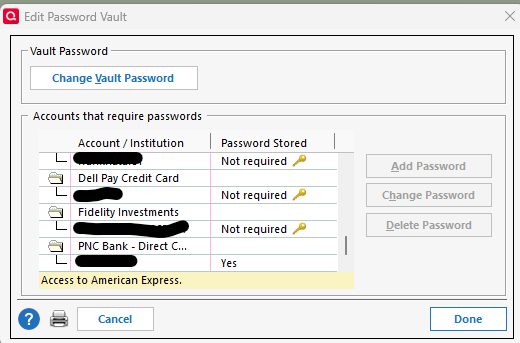
In looking at my Password Vault, I do have a "yes" in the password field for PNC Direct Connect. Therefore, I'm assuming that this "fix" is not going to apply to me.
 0
0 -
As of 11/17/2025 still not downloading transactions on direct connect. I have deactivated and reactivated the accounts each day including today.
0 -
In addition to everyones connection problems (se thread), I have transactions that show when I go to "Tools" then Online Center but they won't update/go into my register. Any thoughts on that?
0 -
Unfortunately, I did not get the expected transaction downloads today….but fortunately that was because the transactions did not post yet are and still Pending in my online checking account so there was nothing new to download.
I did set up a Savings-to-Checking transfer this morning via a Quicken and it appears that PNC accepted the transfer request because I got the lightening bolt in the Savings account register (where I set up the transfer) and Online Center shows that it is scheduled for today.
So, tomorrow (maybe later this evening) will be the true test about whether or not the PW Vault fix really fixed the DC connection issue for me but for now I see no reason to not remain optimistic.
Quicken Classic Premier (US) Subscription: R66.23 on Windows 11 Home
1 -
PNC Direct Connect is finally FIXED for me!!!! Fingers crossed!!
First of all, I need to thank @Boatnmaniac and the other folks who posted in this thread over the last month for their continued help and expertise in getting resolution. Quite frankly, without the suggestions and great advice from this forum, I think I'd still be trying to solve the issue almost 4 weeks later…. PNC Tier 3 support was not very helpful over the last month and today Quicken support was very very interested in the screen shots I offered up as a result of the forum's recommendations. Thank you! I hope Quicken realizes just how valuable this forum can be!
So, I called Quicken Support and had them walk me through fixing my account list (removing EWC+ on two accounts and the incorrect/corrupt vault). I asked about the suggestion to copy the file and was told that might end up being the only fix, but they consider it as a last resort only ….. because it potentially masks too many other issues that might be relevant. Quicken telephone support today was excellent.
Long story short, during the process to reconnect a single account that I had been mistakenly connected as EWC+, as Direct Connect, there was an option to save the DC password to the vault … he had me check that box. Reconnecting that single account as Direct Connect and saving the password evidently fixed all 8 accounts. During the process ALL my account balances updated, all my cleared transactions downloaded, my three future transactions all "sent" (and gave me the thunderbolt confirmation) and my vault was updated and corrected, with "passowrd saved". (I think the C/S rep thought I had a heart attack :-) I yelled so loud).
The rep 100% agreed with you folks that the corrupt vault was the root cause of me not being able to download/send in DC after PNC did their "fix". Sadly, I probably corrupted the vault when I did the first disconnect-reconnect three weeks ago and didn't notice the two accounts set up in error as EWC+.
Thank you again to everyone who posts here!
1 -
Open your Password Vault.
- In the Account/Institution column does it say PNC Bank - Direct Connect or does it say PNC Bank - Web Connect? (It should show PNC Bank - Direct Connect.)
- In the Password Stored column for PNC does it say "Not required" or does it say "Yes".
If it shows PNC Bank - Web Connect or it shows "Not required" then that is likely the reason why you bill payments/transfers cannot be sent to PNC.
You might want to start reading through the 11/15 and 11/16 posts in this thread starting with this 11/15 post:
There's a lot of good information in the last 2 days that might be helpful to you. It's still too early to say that there is a definitive fix identified but there is some early data that looks promising.
Quicken Classic Premier (US) Subscription: R66.23 on Windows 11 Home
0 -
Yay! Now let's hope that the next few days proves that the issue for you really is resolved! But it is quite promising!
Quicken Classic Premier (US) Subscription: R66.23 on Windows 11 Home
0 -
Yes. I have lightened up on the Xanax, but like you, I am taking a wait and see position. I hope I'll know more tomorrow. I am happiest about being able to resume using Bill Pay.
The rep did shed some light on the rumor about the potential demise of Direct Connect. He didn't think it had merit, but believes the genesis of the comnment comes from the fact that BofA stopped supporting DC back in September. I have not a clue if that is true, but I assume he does.
I was able to reconcile all my accounts (the latest online balance was 11/17) and I had maybe 7 items that were duplicates and easily deleted. So far it doesn't appear that I am missing any transactions (the Quicken rep indicated that DC missed payments is the last isssue PNC is still dealing with).
1 -
It looked like it was fixed on Friday and everything working. Then I tried again on Sunday and the problem is back. Any update from Quicken????
0

