Fidelity 3 prices not updating and HSA account not downloading transactions [Edited]

What is the status of this update? I have a 401(k) with Fidelity and the prices no longer update. I have to update the prices manually each day. It was working for a couple of weeks and then stopped again the middle of last week. Our HSA with Fidelity is no longer downloading transactions.
In addition, there is not an institution option for Fidelity Net Benefits when you try to deactivate and reactivate the account. Because of that, when you reactivate it, there is no 401(k) option as account type - just brokerage.
Answers
-
Hello @Tammy Van Buren,
Thank you for reaching out! The issue with no transactions for the HSA account is a known issue. Please see this announcement for more information:
For the issue with prices not updating, is this happening with all your holdings, or only specific ones? Are these publicly traded or non-public securities? Are they holdings in a Fidelity NetBenefits or a regular Fidelity account? Are the prices just delayed, or are they not updating at all? Do the holdings have a valid ticker associated with them?
I look forward to your reply!
Quicken Kristina
Make sure to sign up for the email digest to see a round up of your top posts.
0 -
Kristina, the accounts that are not updating are a 401(k) through Fidelity Net Benefits. This is no longer a choice when adding or resetting an account. They are not actual mutual funds but the are funds that they use for corporate 401(k) accounts. They are not updating at all, I have to go in and update them daily. This used to work flawlessly. I don't know why Fidelity Net Benefits is no longer an option for an institution - it always was an option prior to their update. Something is broken.
0 -
I have the same problem with securities in my 401(k) not updating. Apparenlty, there is still a problem updating prices for non publicly traded assets. e.g. Collective Investment Trusts (CIT). Also, the Complete tracking method for 401(k)s appears not be functioning (previously acknowledged by Fidelity). I have not been able to download any transactions in the 401(k) since the migration to Express Web Connect+.
0 -
It was announced when Fidelity first started to migrate to EWC+ that the Fidelity Net Benefits FI was being eliminated and replaced by Fidelity Investments.
That being said, there are ongoing issues with getting Fidelity Investments to work correctly, especially with HSA and Net Benefits accounts. Since I don't have either of those types of accounts I can't really speak to those issues but you might want to read through this posted Alert. I think you'll find that it does speak so at least some of your concerns/issues.: UPDATED 10/28/25 Fidelity Updates .
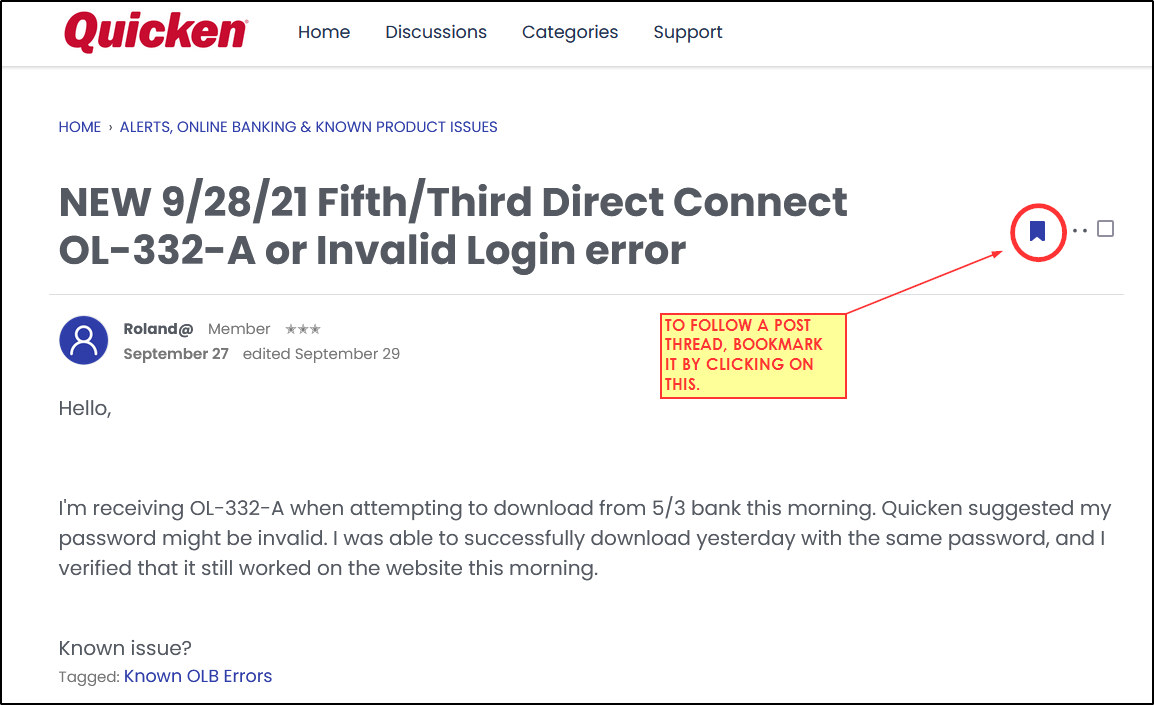
You might want to bookmark this Fidelity Updates Alert (as shown in example picture that follows) to be kept informed of when updates to the Alert are posted.
Quicken Classic Premier (US) Subscription: R66.23 on Windows 11 Home
1 -
I have read the update. My concern was that it was working for a couple of weeks, and then it stopped again. Because it had started working I thought it was fixed.
0 -
What you had said in the post I replied to: "They are not updating at all, I have to go in and update them daily. This used to work flawlessly. I don't know why Fidelity Net Benefits is no longer an option for an institution - it always was an option prior to their update. Something is broken."
Sorry, I had no idea that you already knew the answers to these things.
Quicken Classic Premier (US) Subscription: R66.23 on Windows 11 Home
0 -
Yes. It seems we lost the ability to get the end of day NAV (share price) updates from funds in our Fidelity 401k (and other corporate type accounts) previously available when using direct connect to nb.fidelity.com.
The funds are typically private corporate stock funds or other funds unique to Fidelity 401ks. They don't have symbols that match any publicly traded funds. However, these NAV prices were somehow available when quicken connected through the Netbenefits account login but no longer available through Fidelity Investments (even though the accounts are accessible).
I tried changing the symbols to the numbers Fidelity uses but it didn't help.
An example of a fund not updating is FID GR CO POOL CL S (31617E471)How can we get the prices of funds like these to update like they used to and not have to manually enter them into quicken. Has anyone come up with any work arounds until Quicken comes up with a solution?
0 -
Hello @Geobrick,
Thank you for sharing your experience. The issue with non-public funds not updating is a known issue that our teams are working to resolve. We do not have an ETA, but I can see that the ticket is open and in work.
Thank you!
(CTP-14996)
Quicken Kristina
Make sure to sign up for the email digest to see a round up of your top posts.
1 -
Has anyone seen any progress on being able to get the end of day NAV on funds within our netbenifit accounts without having to manually add them?
Update: I just ran OSU and the NAVs of the private funds are getting updates. This seems to be fixed.
1 -
This works one day and is broken the next. I shouldn't have to look at the online account every day to make sure that the NAV's have updated correctly. When is this going to be completely fixed?
0 -
Thank you for your replies,
I'm glad to hear it's working now! If the issue returns, please let me know and provide a screenshot of the impacted account register(s).
Thank you for letting us know you're still seeing this issue intermittently. To help our teams investigate the issue, please send a problem report with log files attached and a screenshot of the affected account register(s). Note: Problem reports allow a maximum of 10 attachments. If you need to send more than 10, please use a 2nd problem report.

Please let me know once the problem report is sent.
Thank you!
Quicken Kristina
Make sure to sign up for the email digest to see a round up of your top posts.
0 -
It's possible the intermittent problem is because Quicken is often one day behind on capturing the end-of-day NAVs from the brokerage. The brokerages typically update the NAVs late at night. With EWC+ Quicken is probably collecting the day's transactions before the NAVs are updated. With the older direct connect method, we downloaded in real time from the broker, but I believe with EWC+ the transactions are collected by Quicken at a set time of day and that may happen before the NAVs are updated by the brokerage.
0 -
I updated quicken in the morning after Fidelity has update the NAV on their website.
I have to update the prices on my 401(k) account daily again. The last update says this was corrected. I have submitted problem reports and nothing has been fixed. This is in addition to my weekly paychecks and pension checks showing 0.00 in tax planner. And to add insult to injury, now many items in tax planner are defaulting to "Estimate Based on YTD daily average" instead of scheduled transactions, and I'm not able to change it.
I have super validated and repaired my file and it did not fix anything.
At this point, does anybody use another finance program that works?
0 -
…many items in tax planner are defaulting to "Estimate Based on YTD daily average" instead of scheduled transactions, and I'm not able to change it.
I and some others experienced this same issue when we first updated to R65.29. What we found is that closing the data file and reopening it or closing Quicken and then launching it, again, resolved that issue. Have you tried doing that?
Quicken Classic Premier (US) Subscription: R66.23 on Windows 11 Home
0 -
I have closed and reopened the file and the I get the same results.
0 -
I saw another post by someone yesterday who seems to have experienced the same issue. They said they restored a backup file from just before when they had updated to R65.29. You might want to try doing that.
If you let Quicken do the update to R65.29: Quicken will first create a backup file and insert the version of Quicken that was being updated from into the name of that file. For some it can make it easier to know which backup file was the last one before the software was updated. Here is a picture of what that backup file might look similar to….the version being updated from is highlighted in yellow.:

If that doesn't resolve the issue: Maybe the R65.29 version did not install correctly? That sometimes does happen. Have you tried reinstalling the version update, again? You can download the Manual Patch Update File from and install it right over the current installation. Also, an incomplete or incorrectly installed update might also be the reason why you are still experiencing the other issues you described so reinstalling the update file might then fix those issues as well.
Note: Both of these things (functionality issues and installation issues) sometimes happen when doing version updates. It is not a R65.29-specific problem.
Quicken Classic Premier (US) Subscription: R66.23 on Windows 11 Home
0 -
I have tried everything to correct this. I have submitted problem reports. I am not going to go back to a backup file from 4-5 months ago and then have to re-enter all of those transactions. The report says that the issue has been fixed, but it has not.
NetBenefits – Non-Public Traded Funds Share Price Updates Not Downloading (CTP-14996)Fixed
I am getting tired of having to update the prices manually daily. I also still have to correct paychecks each time I open the file. Validation and repair, super validation, etc. Nothing fixes the issue.
0 -
@Tammy Van Buren - You don't have a backup file from more recently than 4-5 months ago, perhaps from just before when you updated to R65.29? That's too bad. I set my Quicken Backup Preferences to automatically back up my data files after every session and then I keep those backup files to cover about 20-30 days when they then automatically start to be dropped off. It's a nice feature of Quicken that has proven to be very helpful many times over for me.
Until the issue is resolved, maybe you would want to consider manually updating the prices less frequently? Maybe 1X per week or a couple of times a month? Don't enter prices for every day, just for the day of the manual update. I know it's far from ideal but it would be less tedious and time consuming. That's what I used to do many moons ago when I had a 401K that couldn't be downloaded….just manually updated the account with the latest day new prices and new shares transactions every pay period (every 2 wks). It sure helped to reduce my frustration level.
Sorry, but I've run out of ideas on this. If I think or hear of anything else I'll let you know.
Quicken Classic Premier (US) Subscription: R66.23 on Windows 11 Home
0 -
I have more recent backups, it’s just that in order to have it go back to the way it was, I would have to go back 4 to 5 months because that is how long the issue has been happening. Also, our pay periods are weekly.
Thanks for your suggestions.
0 -
Hello @Tammy Van Buren,
The issue with HSA accounts being unable to download transactions should now be resolved. Are you still seeing this issue, or is it working now?
I look forward to your reply!
Quicken Kristina
Make sure to sign up for the email digest to see a round up of your top posts.
0 -
@Quicken Kristina, we are not contributing to a HSA this year, so unfortunately, I am unable to give you an answer to your question.
However, I can tell you that our income reminders still say $0.00. and our Fidelity prices are not updating. The last time I tried to submit a problem report (not sanitized) I got an edit saying that my file was too big and the logs could not be submitted.. I have transactions from 2008 and earlier in my file. I have never had issues like these in all the years I have been using Quicken.
0

