Unable to Import any QFX Files after Latest Windows Update [Edited]

My Quicken Classic (on Windows 11) automatically updated to version R65.15 this morning and then I was unable to import any qfx files. I tried Arvest bank and Chase and the files will download to my download folder but when I click on them for Quicken to import Quicken starts looking for an install disk and a quicken msi file.
Comments
-
I have the same problem. I was able to download investment transaction from Fidelity.
0 -
Thanks for reaching out!
First, could you please share screenshots of what you're seeing after attempting to import a QFX file?
If needed, please refer to this Community FAQ for instructions on how to attach a screenshot. Alternatively, you can also drag and drop screenshots to your response if you are not given the option to add attachments.
Additionally, we will be forwarding this issue to the proper channels to have this further investigated. However, we request that you please navigate to Help > Report a problem within your Quicken program and submit a problem report with log files and screenshots attached in order to contribute to the investigation.

It would also aid the investigation to include a sanitized file when submitting the problem report. A sanitized file is a data file that removes personally identifiable information so you can comfortably share this file with the Quicken team.
While you will not receive a response through this submission, these reports will help our teams in further investigating the issue. The more problem reports we receive, the better.
We apologize for any inconvenience in the meantime! Thank you.
(CBT-931)-Quicken Anja
Make sure to sign up for the email digest to see a round up of your top posts.0 -
I saw a similar (or the same) bug a couple years ago. I believe the resolution was to uninstall and reinstall Quicken.
0 -
Hello @Quick92,
Thanks for sharing your insight! It’s helpful to hear what has worked for others in similar situations.
@Kcarb & @deathrs—If you decide to try uninstalling and reinstalling, please let us know the outcome.
In the meantime, this has been forwarded internally. Please be sure to refer to my previous response for instructions on submitting log files, screenshots, and a sanitized file so we can get them attached to the ticket.
Thank you!
-Quicken Anja
Make sure to sign up for the email digest to see a round up of your top posts.0 -
@Quicken Anja your announcement says to OSU first, but you cannot if Quicken automatically installs 65.15 on opening as it did for me. Surprised me.
Not seeing any new issues - yet.
0 -
I have no issues downloading and importing a QFX file in R65.15 (my test setup).
I suspect that the issues reported above are possibly installation issues. Instead of allowing the program/startup to update, I always use the manual patch update method to perform the update.
- Q Win Deluxe user since 2010, US Subscription
- I don't use Cloud Sync, Mobile & Web, Bill Pay1 -
I tried updating using the Manual patch method (mondo patch for windows US). It seems to update correctly. I was able to update investment transactions using one step update with no problem.
When I attempt to download bank transactions, Quicken creates the transaction file. when I attempt to open th file, a pop-up window appears telling me that quicken is configuring ( this does not normally happen). Another pop-up window appears tell me a resource is not available, the another pop-up window indicating quicken cannot find file Quicken.msi
1 -
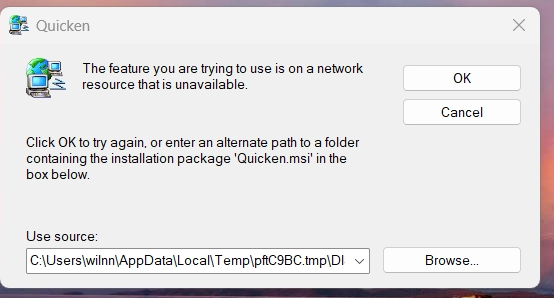
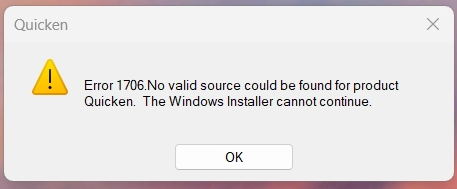
Normally Quicken just automatically imports the file. However, sometimes I have to go into my download folder and click the file and then Quicken automatically imports the file. These screen shots are a result of going into my download folder and clicking to try to get Quicken to import the file. I was later successful importing the file by utilizing the import feature inside of the Quicken program but this problem is still occurring outside the program.
0 -
When I open the downloaded transaction file, I get the pop-up window saying Windows is configuring Quicken. This leads to a pop-up windows as indicated in Kcarb screen shots, in the above post.
Everything was working fine until I updated to version 65.15 build 27.1.65.15 this morning ( 11/20/25)
1 -
I re-installed Quicken this morning and everything is back to normal and working fine.
1 -
See next post
0 -
Kcarb did you do a full uninstall and reinstall? I tried running the manual updater last night and that didn't fix it. Do you have to redo all of your settings or do they follow the data backup?
0 -
I tried the manual update, again this morning (9:37am, 11/21/25) it installs ok, but still cannot import a QFX file. Apparently, it cannot find the Quicken MSI file. I am not sure how to do a full uninstall/ reinstall. I am hoping for a new Quicken update or hot fix soon.
0 -
Hello everyone,
Thank you all for sharing your experiences and details regarding QFX file imports after updating to R65.15. I completely understand how frustrating this has been, and I appreciate everyone taking the time to report what’s happening on your end.
Based on these reports, it seems the problem may be related to the installation process rather than the update itself. For users still experiencing this issue, we recommend the following:
- Full Uninstall and Reinstall: This has resolved the problem for some users. Make sure to back up your data before uninstalling; your settings and data will follow your backup when you reinstall.
- Please see this support article for instructions to uninstall.
- Please see this support article instructions to reinstall.
- Submit a Problem Report: If the issue persists, please go to Help > Report a Problem in Quicken and attach your log files, screenshots, and a sanitized file so we can attach them to the ticket (CBT-931). This helps our teams investigate further.
- Manual Patch Update: For those who prefer, continue using the manual patch method, but note that some installation issues may not be resolved without a full reinstall.
We understand this is inconvenient, and I’ve escalated these reports internally so our teams are aware of the continued impact. While there’s no immediate ETA, reporting your issue ensures it’s tracked and prioritized.
Thank you!
-Quicken Anja
Make sure to sign up for the email digest to see a round up of your top posts.0 - Full Uninstall and Reinstall: This has resolved the problem for some users. Make sure to back up your data before uninstalling; your settings and data will follow your backup when you reinstall.
-
Just an FYI: I've found that after ANY Quicken Update, when it asks you to restart Quicken, I respond NO. This allows Quicken to shut down. THEN I start it up again. This resolves the problem where Quicken cannot find your FILES (or more likely the DISK/Network Drives). Your mileage may vary. :^)
0 -
Yes, I just went here , be sure you click on windows for the proper download. Be sure to make a backup copy of your data file, just in case. However, once my install was complete the program did not ask me where my data file Is. It just restarted and asked me to log in and everything was back in place and working properly.
1 -
Kcarb,
Did you do the UNINSTALL before you did the reinstall? does the reinstall from Quicken.con automatically delete the previously installed version?
Thanks
0 -
no, I didn't uninstall. The reinstall from Quicken.com automatically deleted the previously installed version. It went very smooth.
0 -
the new install failed for me.
I followed steps to uninstall and install new
Fri Nov 21 12:28:17.475 2025 : Log Opened
Fri Nov 21 12:28:17.475 2025 : Getting OS Version info
Fri Nov 21 12:28:17.475 2025 : OS stats:
Fri Nov 21 12:28:17.475 2025 : Microsoft Windows Vista family
Fri Nov 21 12:28:17.475 2025 : Workstation
Fri Nov 21 12:28:17.476 2025 : Checking for multiple setup.exe-s
Fri Nov 21 12:28:17.476 2025 : Checking for admin rights
Fri Nov 21 12:28:17.476 2025 : User has administrator rights
Fri Nov 21 12:28:17.476 2025 : Checking application paths
Fri Nov 21 12:28:17.476 2025 : Module Path: C:\Users\Michael\AppData\Local\Temp\pft9F31.tmp\DISK1
Fri Nov 21 12:28:17.476 2025 : CD Root: C:\Users\Michael\AppData\Local\Temp\pft9F31.tmp
Fri Nov 21 12:28:17.476 2025 : Processing command line arguments
Fri Nov 21 12:28:17.476 2025 : Command line parameters:
Fri Nov 21 12:28:17.476 2025 : OS check OK
Fri Nov 21 12:28:17.476 2025 : Checking to see of QuickenPatch is already open
Fri Nov 21 12:28:17.477 2025 : quickenPatch is closed.
Fri Nov 21 12:28:17.477 2025 : Checking to see of Quicken is already open
Fri Nov 21 12:28:17.477 2025 : Quicken is closed.
Fri Nov 21 12:28:17.477 2025 : msiexecpath found: C:\Windows\SysWOW64\\msiexec.exe
Fri Nov 21 12:28:17.480 2025 : MSI version found: 5.0
Fri Nov 21 12:28:18.9 2025 : UpdateProductName: ProductName is Quicken
Fri Nov 21 12:28:18.13 2025 : Checking if Quicken is already installed.
Fri Nov 21 12:28:18.13 2025 : Looking for version in MSI package C:\Users\Michael\AppData\Local\Temp\pft9F31.tmp\DISK1\Quicken.msi
Fri Nov 21 12:28:18.13 2025 : Loading C:\Windows\SysWOW64\\msi.dll
Fri Nov 21 12:28:18.19 2025 : Found product code {62D93E3E-2F8E-42BD-9343-896F4F0031D3}
Fri Nov 21 12:28:18.19 2025 : Product not installed on this machine
Fri Nov 21 12:28:18.20 2025 : Looking for Quicken install path
Fri Nov 21 12:28:18.20 2025 : Looking for Quicken.ini in All Users\AppData directory
Fri Nov 21 12:28:18.20 2025 : Found: C:\ProgramData\Quicken\Config\Quicken.ini
Fri Nov 21 12:28:18.20 2025 : Quicken.ini found but there's no ExePath!
Fri Nov 21 12:28:18.20 2025 : Looking for Quicken.ini in Windows directory
Fri Nov 21 12:28:18.20 2025 : Found: C:\WINDOWS\Quicken.ini
Fri Nov 21 12:28:18.26 2025 : Quicken.ini found but there's no ExePath!
Fri Nov 21 12:28:18.26 2025 : ExePath NOT Found:
Fri Nov 21 12:28:18.26 2025 : Previous version of Quicken NOT FOUND!
Fri Nov 21 12:28:18.26 2025 : Checking if Quicken is already installed found: Quicken not installed
Fri Nov 21 12:28:18.26 2025 : Closing Quicken agents
Fri Nov 21 12:28:18.26 2025 : Closing class
Fri Nov 21 12:28:18.26 2025 : Closing class
Fri Nov 21 12:28:18.26 2025 : Closing class
Fri Nov 21 12:28:18.26 2025 : Closing class
Fri Nov 21 12:28:18.26 2025 : Closing class
Fri Nov 21 12:28:18.27 2025 : Installing 3rd party apps
Fri Nov 21 12:28:18.27 2025 : msiexecpath found: C:\Windows\SysWOW64\\msiexec.exe
Fri Nov 21 12:28:18.27 2025 : MSI version found: 5.0
Fri Nov 21 12:28:18.27 2025 : Verifying .NET Framework Installation and Health Check-up
Fri Nov 21 12:28:18.30 2025 : Verification of .NET Framework Installation and Health Check-up done
Fri Nov 21 12:28:18.30 2025 : Checking IE 6.0 version
Fri Nov 21 12:28:18.30 2025 : IE version found 9.11.26100.0
Fri Nov 21 12:28:52.883 2025 : Checking for locked files.
Fri Nov 21 12:28:52.883 2025 : File not found : C:\ProgramData\Quicken\\Config\q.dat
Fri Nov 21 12:28:52.883 2025 : File not found : C:\ProgramData\Quicken\\Config\qwpkg.cfg
Fri Nov 21 12:28:52.883 2025 : File not found : C:\ProgramData\Quicken\\Config\pricode.ini
Fri Nov 21 12:28:52.883 2025 : msiexecpath found: C:\Windows\SysWOW64\\msiexec.exe
Fri Nov 21 12:28:52.883 2025 : Quicken Package Path: C:\Users\Michael\AppData\Local\Temp\pft9F31.tmp\DISK1\Quicken.msi
Fri Nov 21 12:28:52.891 2025 : Install Properties: QLOG_DIR="20251121_122817" INSTALLDIR="C:\Program Files (x86)\Quicken" ARPINSTALLLOCATION="C:\Program Files (x86)\Quicken" ISQNUE=FALSE ISTRIAL=FALSE QUILEVEL=1 LAUNCHED_BY_SETUP=1
Fri Nov 21 12:29:15.422 2025 : Check Quicken Version after Install
Fri Nov 21 12:29:15.422 2025 : Build Version: 27.1.64.35
Fri Nov 21 12:29:15.426 2025 : Wrong File Version for: C:\Program Files (x86)\Quicken\SendError.dll
Fri Nov 21 12:29:15.426 2025 : File Version: 27.1.3.4
Fri Nov 21 12:29:15.517 2025 : File not found : C:\Program Files (x86)\Quicken\QHI.EXE
Fri Nov 21 12:29:15.517 2025 : Now Uninstall All versions of Quicken due to version mismatch.
Best Regards0 -
BTW - I can't submit anything to the Support as I don't have working Quicken and there is no options for the Web submit ether.
Best Regards0 -
When you are completely locked out like this your best bet would be to contact Quicken support and see if they can help:
0 -
just update
I had to uninstall Quicken and in addition manually remove:
C:\Program Files (x86)\Quicken
C:\ProgramData\Quicken
only, after I was able to install new Quicken, which was 64.38
and install the patch 65.15 to get it working
looks like quicken uninstall doesn't properly clean up and that causes those issues
hope it helps some
Best Regards1 -
OK, just did the reinstall (11/22/25) for Quicken, windows, US version from Quicken.com. Everything seems back to normal in Quicken. QFX files worked correctly. Many thanks for the tips received in this chain of comments.
0 -
@mikek753b & @deathrs Thank you both for the update! Glad to hear this issue has been resolved for you by reinstalling.
-Quicken Anja
Make sure to sign up for the email digest to see a round up of your top posts.0 -
I followed Kcarbs links and suggestions, I downloaded and manually ran the installer from the Quicken website, I let it uninstall Quicken and reinstall the program. QFX downloads worked OK again. I then downloaded and manually ran the 65.15 patch. So far so good. Thanks for the help!
1 -
@EdH Thanks for the update! Glad it's working now.
-Quicken Anja
Make sure to sign up for the email digest to see a round up of your top posts.0 -
Full reinstall worked for me for same issue .
0 -
FYI, I installed the R65.17 update and had no problems with the update or the QFX file import. Everything seems to be working normally.
Thanks Again
0 -
-Quicken Anja
Make sure to sign up for the email digest to see a round up of your top posts.0 -
I went to download my transactions from my 401k with Principle Finance. The transactions download to my download file. When I click on the file it is looking for the Quicken disk and I get an error message 1706. I have had no problems with this download until now. I just download the update to Quicken and I'm running R65.17. I know that Principle Finance had worked on on their system over the past weekend. Should I contact Principle or just delete the account and open a new account.
0




