Updating Fidelity accounts causes an uneditable "Cash" account to appear

This discussion was created from comments split from:
bill payment users download: unknown error with code+QCS-503 server unavailable
.
Comments
-
Upon updating my Fidelity accounts I am still getting an account simply titled "Cash." It cannot be edited at all. The balance is equal to the current transactions hitting cash. I also have an account for "Fidelity Government Cash Reserves" which reflects the correct cash balance. Like all the other accounts it can be edited. The result of all of this is that my total balance is overstated by the new "Cash" account which, again, I am unable to edit or delete.
Any assistance will be appreciated.
Thank you
0 -
Reposting from Nov 5. I am still having a problem with the way cash is being updated.
Upon updating my Fidelity accounts I am still getting an account simply titled "Cash." It cannot be edited at all. The balance is equal to the current transactions hitting cash. I also have an account for "Fidelity Government Cash Reserves" which reflects the correct cash balance. Like all the other accounts it can be edited. The result of all of this is that my total balance is overstated by the new "Cash" account which, again, I am unable to edit or delete.
Any assistance will be appreciated.
Thank you
0 -
Hello @jpc3,
Thank you for letting us know you're seeing this issue. I moved your posts to a separate thread, since they're a different issue from the discussion you initially posted in.
To clarify, is the "Cash" a separate account, or is it a holding within an account? Did you first notice this behavior on the 5th, or has it been going on longer than that? Was there anything that happened around the same time, such as a program/computer update, or unexpected program/computer shutdown?
I look forward to your response!
Quicken Kristina
Make sure to sign up for the email digest to see a round up of your top posts.
0 -
Hello Kristina,
It is a separate account. "Fidelity Government Cash Reserves" appears and has the correct balance. Since October when the issues with Fidelity updates first surfaced the updates have been showing a second account simply called "Cash". the current activity since the last update is included here, although the account cannot be edited and and does not allow you to click and see the details. The addition of this account inflates the total balance by the amount of the current activity. If I go to "Transactions" (instead of "Portfolio"). I can post entries to zero out the "Cash" account, but this has to be done manually every time there transactions in the "Fidleity Government Cahs Reserves" account.
Thank you for your assistance,
John
0 -
Thank you for your reply,
Please provide screenshots of what you're seeing (make sure to redact any personal information). If needed, please refer to this Community FAQ for instructions on how to attach a screenshot. Alternatively, you can also drag and drop screenshots to your response if you are not given the option to add attachments.
Thank you!
Quicken Kristina
Make sure to sign up for the email digest to see a round up of your top posts.
0 -
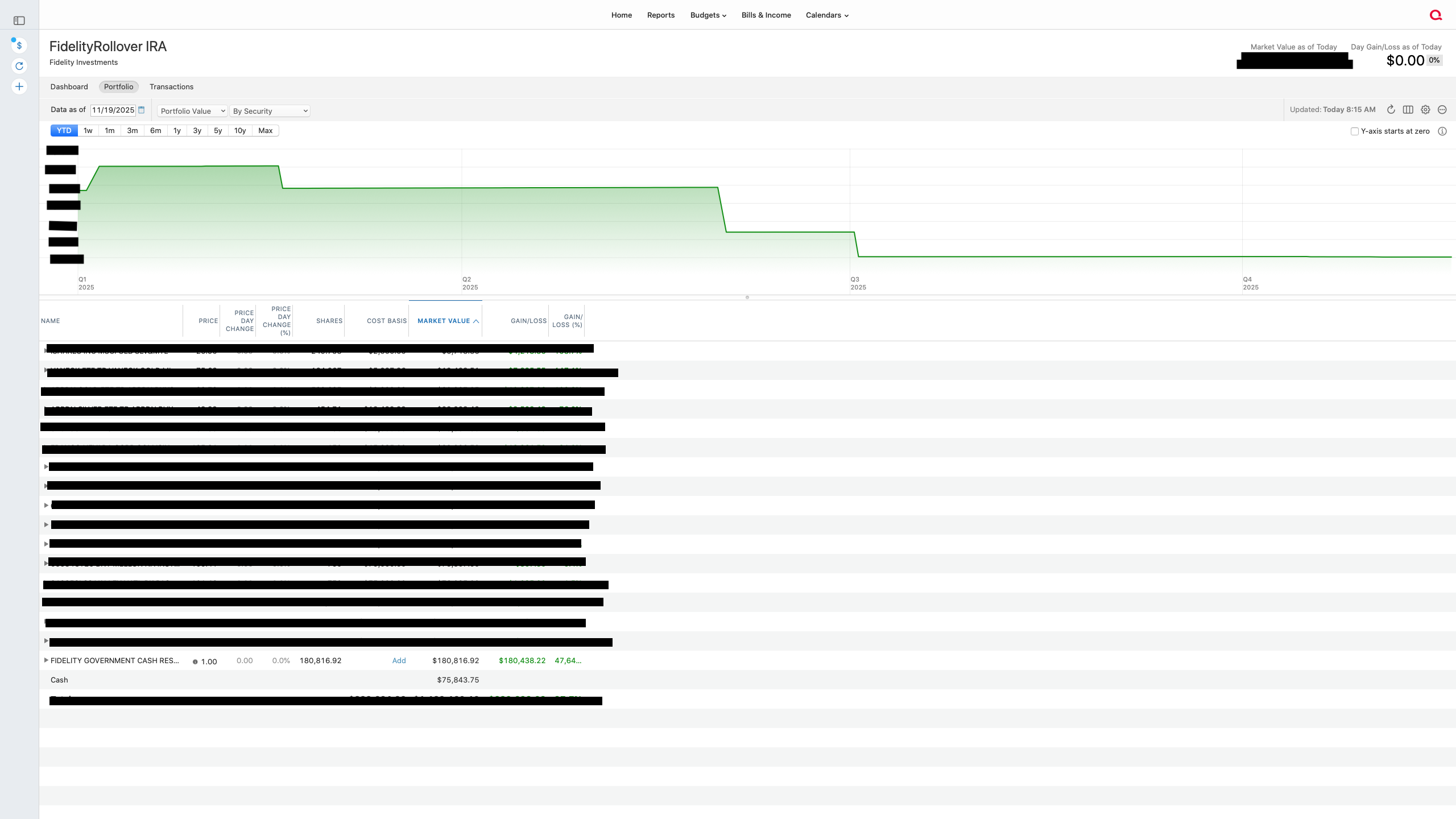
Screenshot of the two cash accounts as they now appear:
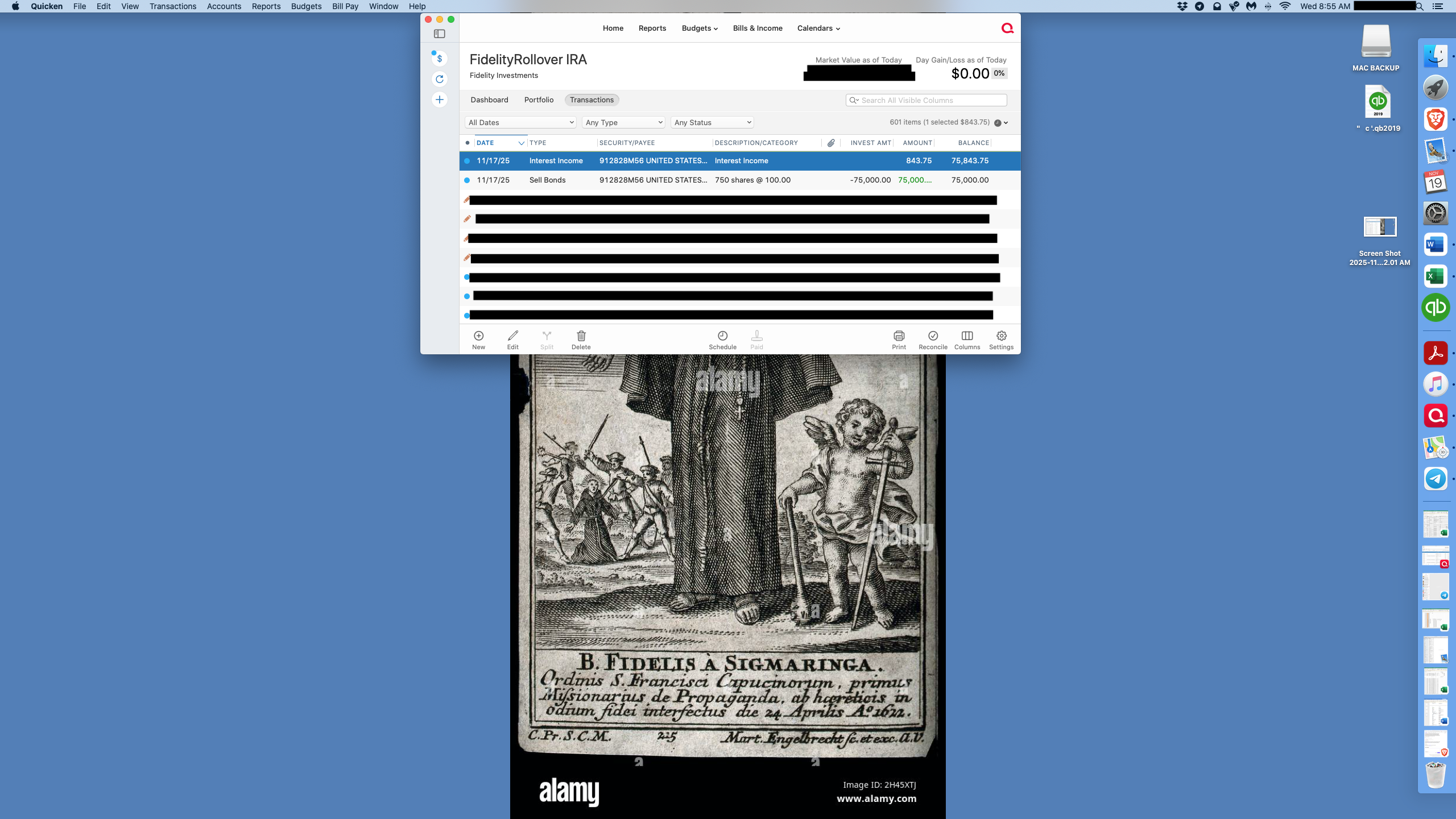
Screenshot of the current transactions that get included in both "Cash" and "Fidelity Government Cash Reserves:
 0
0 -
Thank you for your reply,
Based on those screenshots, it looks like that "cash account" is a money market fund that Quicken is seeing as a security, rather than as part of your cash balance. Are transactions that impact the cash balance, such as the two in the second screenshot, being double counted (both in the cash balance and in the value of that security)?
Thank you!
Quicken Kristina
Make sure to sign up for the email digest to see a round up of your top posts.
0 -
@jpc3 Just to clarify the terminology, an account in Quicken corresponds to a physical account in the real world: a checking account, a credit card account, a brokerage account, etc. These appear in the left sidebar in Quicken. What you're showing in your screenshot is that you have an account called Fidelity Rollover IRA. Within any investment account, the Portfolio view shows the holdings in that account — the individual securities like stocks, bonds, mutual funds, ETFs, plus cash — which comprise that investment account.
So I think what you're describing is what @Quicken Kristina described above: you have a certain amount of money in the Fidelity Government Cash Reserve money market fund which is showing up as part of that security and showing up in the Cash line. Usually, such activity should be reflected in one or the other, but clearly not both. Is that a correct description of the problem you're having.
There have been multiple issues with Fidelity's downloads into Quicken since Fidelity switched its connection protocol several months ago. Double-counting cash is among the problems people have noted. I'm not a Fidelity customer, so I haven't been tracking this closely recently; hopefully some other Fidelity customers will chime in to let you know if they are still experiencing the same problem. Ultimately, you may want to call Quicken Support after the weekend to have them document the issue and/or let you know it's a known issue that has not yet been resolved.
P.S. Your posts here in the Community forum label you as a Quicken Windows user. Since you're now using Quicken Mac, you should change that setting so your posts properly label you as a Quicken Mac user. It will take me three times longer to explain how to do it than it will take you to actually do it! 😂
- Click your avatar icon in the upper right corner(to the right of the envelope icon)
- Then click on your profile name
- On the Activity page which will load, under the About Me heading is where it shows what version of Quicken you're using; to change it, click the little blue person icon with the down arrow, to the right of your profile name, selecting Edit Profile from the dropdown menu
- Finally, click Edit Profile Fields on the far right, and you'll get to the screen where you can select what version of Quicken you're using
Quicken Mac Subscription • Quicken user since 19930 -
Kristina, yes, the current cash transactions are being double counted. They show up in "Fidelity Government Cash Reserves" and the balance for that account is correct but it also creates an account called "Cash" with just the transactions since they changed the update program a few months ago.
0 -
Jacobs, I changed the profile to Quicken Mac Other. The "About Quicken" info on the computer shows "Quicken Classic Deluxe."
As noted above the cash activity since the change in the update program has been posting cash transactions in both accounts. Previously, only the "Fidelity Government Cash Reserves" account was shown in the summary for "Fidelity Rollover IRA". All of the other investments, including the "Fidelity Government Cash Reserves" account have a sideways pyramid/arrow next to them at the far left, the "Cash" account" does not. You can see this to the left of some of the redacted items and see that it is not present for "Cash." Also, I can double click on all of the other accounts and a menu pops up that allows you to edit the security and the share price as well as access a security overview. The "Cash" account does not have this functionality.
Thank you both for your assistance.
0 -
Thank you for your reply,
The cash wouldn't give you that ability since it's not a holding. It's just a representation of the cash balance reflecting in the account. If the balance should be reflecting as shares instead of cash, have you tried adding a balance adjustment transaction to remove the cash balance? If you have, does that resolve the issue, or does the issue return next time your accounts are updated?
Thank you!
Quicken Kristina
Make sure to sign up for the email digest to see a round up of your top posts.
0 -
Hello Kristina,
Yes I have added adjustments to the Cash balance to zero it out but it returns whenever there is another cash transaction. New transactions always post in the Fidelity Government Cash Reserves account and the separate Cash account with the same amounts thereby inflating the total balance. Cash transactions should always be deposited in or withdrawn from the Fidelity Government Cash Reserves account and not posted in some unassigned Cash account. This additional Cash account only stated appearing recently.
Thank you.
0 -
Thank you for your reply,
I recommend that you contact Quicken Support directly for further assistance, as they have access to tools we can't access on the Community and they're able to escalate the issue as needed. Quicken Support's contact information can be found through this link here. Phone support is available from 5:00 am PT to 5:00 pm PT, Monday through Friday. Chat support is available from 5:00 am PT to 5:00 pm PT, 7 days a week.
I apologize that I could not be of more assistance!
Quicken Kristina
Make sure to sign up for the email digest to see a round up of your top posts.
0 -
[Removed - Duplicate Post]
0 -
This is a problem that is it still ongoing by showing a "Cash" that cannot be edited, which is the same amount that shows in the Fidelity Government Reserves. Thus, it is double counted.
0


