QFX import broken after update to R65.17 (Vanguard OL-221) [Edited]
Comments
-
Thank you.
I got a little lucky to find an old Vanguard download that imported w/o any problems. That helped a lot to figure out what changed.
Apparently Quicken does not have a Vanguard account for testing. If they did, they would have seen right away what the problem was. Quicken, if you're listening, consider getting a Vanguard account. I know you can't enroll in every financial institution but Vanguard is a big one - you probably have lots of customers who get upset if the Vanguard import breaks.
By the same token, Vanguard should have a copy of Quicken to test imports if the QFX output code changes. I think it's on sale at Walmart now :) . They also could have quickly figured out what had happened and avoided this whole situation.
Thank you though, Vanguard, for the quick turn around.
As I said earlier, this was not a Quicken problem. In fact, I think Quicken handled it pretty well. They opened an issue and the Quicken error messages posted here were relevant. I didn't notice those message until after doing the debugging grunt work - they would have saved some time.
1 -
Hello All,
Thank you to everyone who shared your experience and updates!
We’re glad to hear that downloads/imports are now working again for many of you. If the issue has been resolved on your end, there’s nothing further you need to do.
However, if anyone is still experiencing this problem, or if the behavior returns, please reply here with the details so we can continue to investigate as needed.
Thanks again for your patience and for keeping us informed!
-Quicken Anja
Make sure to sign up for the email digest to see a round up of your top posts.1 -
I just tried to download from Vanguard and import QFX. I still received the same message. I did a search for "
<INCOMETYPE>REINVEST" and did not have any text in my QFX file. Not sure what the next steps are (wait for quicken ?)
0 -
What do you see in the quicken log files when you import this download? Anything that might be relevant?
1 -
I had the same sequence that I experienced last time. When I double-click on the QFX file, I get a message that the "feature you are trying to use is on a network resource…." and wants me to identify the quicken.msi file location. I don't have the MSI file and not sure why it wants me to reconfigure quicken. I also tried to reassociate the Qfx file with quicken app (even though it is the default app) and got the same message. I am a windows 10 user on latest update with quicken ver. R65.17 Build 27.1.65.17
Not sure exactly what to look for in the quicken log files. The ".QXF file import results" indicates that there are no file import results.
This was working (early November?) and failed recently - along the same time that others reported on this message thread.
0 -
That's a different problem than I and some (most?) others were experiencing. As a workaround, can you try to import the QFX file using the File/FileImport/WebConnect(QFX)File menu option? That might be enough to avoid the problem you are seeing even if it doesn't fix it.
0 -
Hello @qkn-aficionado,
Thank you for chiming in and providing those details. The issue you described appears to be the same as the one discussed in this thread. There is already an open ticket (CBT‑931/CTP‑15415) being worked on, though we do not have an ETA for a resolution at this time.
Some users have reported success by following the instructions outlined in one of my earlier responses within that thread.
Thank you!
-Quicken Anja
Make sure to sign up for the email digest to see a round up of your top posts.1 -
I restarted quicken and re-tried the import (as you suggested), File/Import/Web Connect and it worked !
I had been trying to import it by double-clicking on the downloaded file (which has worked in the past).
0 -
@qkn-aficionado Thanks for the update, glad to hear that worked!
For those still experiencing issues importing QFX files from Vanguard specifically and receiving the OL-221 Error—Our teams have just requested if one of you could please submit one of the Vanguard QFX files itself via Help > Report a problem > Additional files… so we can include it in the escalation ticket.
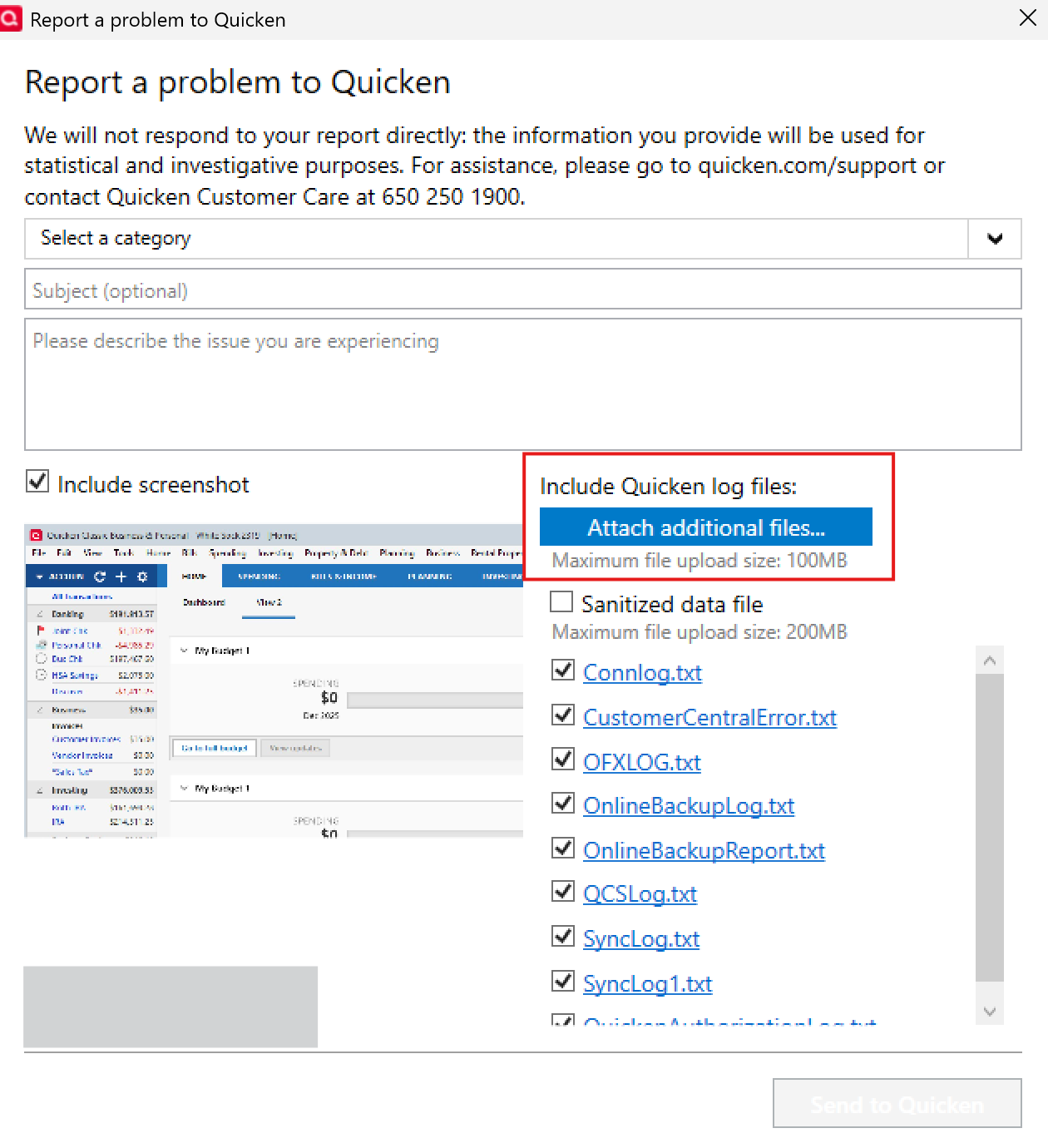
Please let us know once you have done so, thank you!
-Quicken Anja
Make sure to sign up for the email digest to see a round up of your top posts.0 -
Also confirming that this particular Vanguard issue looks to be fixed.
0 -
Hello All,
@Mike.Grills Thanks for the update! Glad to hear it is working for you now.
For those still experiencing this issue—this has been escalated internally, though we do not have an ETA available at this time. In the meantime, we now have an open Alert posted. Please refer to this Community Alert for any and all available updates and information.
Thank you!
-Quicken Anja
Make sure to sign up for the email digest to see a round up of your top posts.0 -
I am experiencing this same issue with both Empower Retirement and Optum Bank. @Quicken Anja
QFX import for both was working fine when I last downloaded transactions two weeks ago, but this morning (12/5) I was forced to enter all transactions manually.
0 -
Yay! The issue seems to have been resolved!
0 -
I have also been experiencing the same issue since the last software update. The QFX data file will not open but tries to reinstall Quicken components. @Quicken Anja
The workaround @dave7865 suggested using the File/FileImport/WebConnect(QFX)File menu option worked for me.
0 -
Hello All,
Thanks for chiming in!
@jwmgm – To clarify, are you seeing the exact same OL-221 error with those banks, or is it a different error?
——@KennyBania – Glad to hear the issue has been resolved for you!
——@rgreenly – Based on your description (reinstalling Quicken components), it sounds like you may be experiencing a slightly different error than the one discussed in this thread. Please refer to this thread instead, which aligns more closely with what you’re seeing. This is also a known issue our teams are actively working to resolve. Other users have reported success with uninstalling and reinstalling Quicken. You can find instructions and updates in this Community Alert.
Thank you!
-Quicken Anja
Make sure to sign up for the email digest to see a round up of your top posts.0 -
[Removed - Off Topic]
0 -
I am having what I think is the same problem, but with every .qfx file I download after R65.17. When I double click the file it launches the quicken installer.
If I go into the quicken menu it lets me import the files correctly, so I'm at least functional.
0 -
I am having a similar problem as @jwmgm with regard to Optum Bank (HSA account). Since the bank does not allow direct access via OSU, I download a QFX file using a button on their website. Recently, when Quicken tries to import the file, I receive the OL-221-A and -B errors. Problem started in mid-December. Using Quicken version R65.29. When I try to open the downloaded QFX file in Notepad, it says, "Error fetching data." I've reported this to Optum, but so far, they haven't been helpful.
–
0 -
This just happened to me, but I'm not sure if it is from the end of November release everyone is talking about. I can't believe I didn't try downloading any QFX files in December. Possible, but it would surprise me. I really don't want to uninstall and reinstall. After a long day at work dealing with software issues, I'm just exhausted with this stuff! It will need to wait until the weekend, and a strong cup of coffee.
0 -
[Removed - Violation of Community Guidelines]
0 -
@mwheeler… at least the current instance of this problem (I am experiencing it myself since 17 JAN and I download two QFX almost daily) and IMHO, it starts with the QFX file from the banking institution. The QFX download is not from Quicken … it is from whatever banking institution being used that formats the file for its customers who use Quicken. Granted, there maybe some bank institution / Quicken middle-layer service formatting the file, but these latest files downloaded FROM USBANK (in my case) are CORRUPTED (Note: the QFX download for my Commerce Bank account still works fine). The QFX files are way inflated size-wise and full of duplicated OFX tags. My normal size file is 3-8KB. Since 17 JAN those files are 96-300KB filled with duplicated tags. One unique <FITID> tag was seen 32x. Quicken is choking on the file. And for those of us in the software industry (yes, I spent a few years of my career messing with ONES and ZEROES too) … this is a GIGO problem (Garbage In, Garbage Out)! Until the QFX files are fixed (by the banking institution or middle-layer service) … Quicken will keep barfing up the OL-221 errors.
How I suspect it works … Quicken obviously sets the QFX file format (a Quicken proprietary flavor of OFX) and publishes that to the banking institutions who want to provide that downloadable format to its customers. Given many banking institutions seem to be having this problem over a time spread, possibly Quicken has changed the specification for that format and banking institutions are picking it up sporadically, changing their files. And Quicken's latest release is not importing it properly. Obviously there is a reason, but the files appear CORRUPT. When a known good file is DIFFd with a problem file, all sorts of BAD JUJU is seen!
LarryG
"There are only 10 types of people who understand BINARY ... those who DO and those who DON'T!"
0 -
My original post was removed for my thinly disguised frustration. I apologize to anybody that may have been offended.
LarryG - thank you for your thoughtful response. The binary comment made me laugh, I actually used to have a t-shirt with that on it.
In any event, I'm only using the QFX file to balance my DDA accounts with Wells Fargo. One day they worked, then there was an update from Quicken, the next day they did not work. However, they have always worked if I go through the File→File Import→Web Connect menu selection. Same files as I've always pulled from Wells, I just can't click on them to automatically have Quicken launch and load them any longer. The file association in Windows is correct, since it launches Quicken, but then fails ultimately asking for the location of an .msi file. I'm not sure what it's trying to setup, but it's like it doesn't know what to do, so it kind of phones home to try and find the installation file. End of the world, no, but what was a simple download and 'click' is now a multi-step process every morning for no solid reason.
0 -
Hello All,
Thanks to everyone who has continued to share details here—your input really does help.
I want to clarify a couple of important points so we can keep this thread focused and make sure issues are routed correctly:
For Vanguard QFX + OL-221 specifically
Our escalation team has requested that anyone still experiencing the OL-221 error when importing Vanguard QFX files please submit one of the affected QFX files directly so it can be attached to the investigation.You can do this by going to Help > Report a problem > Additional files… and attaching the Vanguard QFX file there. Also, please add Attn: CTP-15383 to the title/subject line.
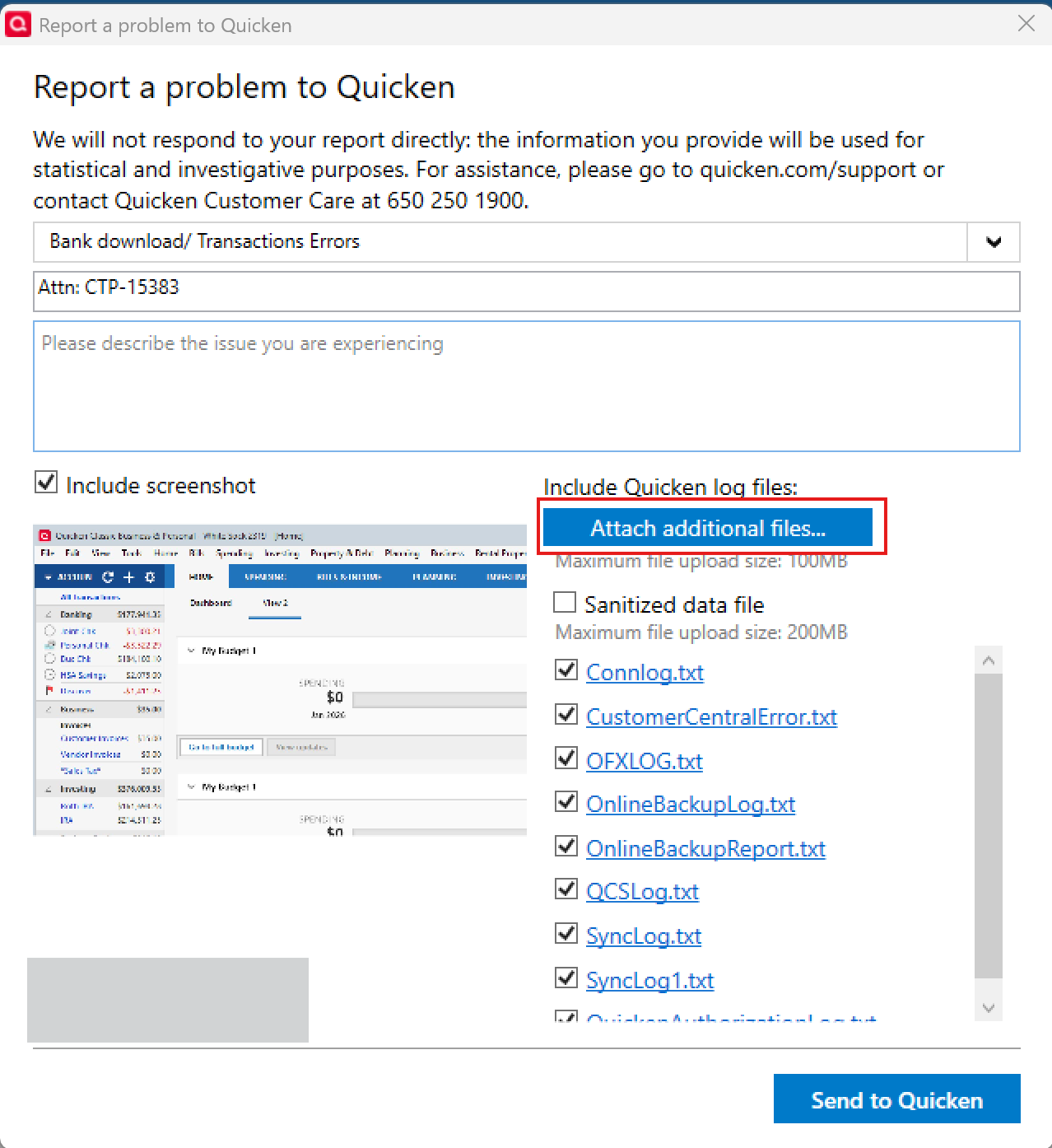
——
Once submitted, please reply here to let us know—thank you!Scope of this thread
This discussion is specifically for users encountering the OL-221 error with Vanguard QFX files.If instead you are experiencing a different QFX-related issue—such as:
- Double-clicking a QFX file launching the Quicken installer
- Being prompted for a missing .msi file
- QFX file associations behaving incorrectly after updating
—that is a separate known issue and is being tracked elsewhere.
You’ll want to review this Community Alert instead. That issue (and its resolution) is discussed in more detail in this thread. In those cases, uninstalling and reinstalling Quicken has resolved the problem for many users.
Thank you!
-Quicken Anja
Make sure to sign up for the email digest to see a round up of your top posts.0 -
Thank you for the clarification, Anja. I'll follow that thread…
0 -
You’re welcome!
-Quicken Anja
Make sure to sign up for the email digest to see a round up of your top posts.0 -
I am having a similar issue where I click on the .qfx file and wants to install Quicken and looking for .msi. How do I associate the .qfx file so it doens't look for an installer?
Thanks
0 -
Hello @KeithSCDC,
Thanks for chiming in!
Please refer to this thread instead, which aligns more closely with what you’re seeing. This is also a known issue our teams are actively working to resolve. Other users have reported success with uninstalling and reinstalling Quicken. You can find instructions and updates in this Community Alert.
Thank you!
-Quicken Anja
Make sure to sign up for the email digest to see a round up of your top posts.0


