PNC bank upgrade affecting Quicken downloads?
Answers
-
Glad to hear that you found the solution that works for you.
Yes, the PNC Bank - Direct Connect setup requires use of the unique DC login info. The website login info will not work correctly or will not work at all with DC…it only works with the EWC+ connection options (PNC - Virtual Wallet and PNC Bank - Web Connect). It's so easy to forget this and I think that could have been emphasized more in this thread than it is.
Quicken Classic Premier (US) Subscription: R66.23 on Windows 11 Home
0 -
Check your Password Vault. If it says "Not required" in the Password Saved column then that is likely the cause of the issue. It should instead say "Saved".
If you do have the "Not required" issue, then read this post:
If you do not have the "Not required" issue:
- Are you getting any error codes or messages? If so, what are they?
- Have you confirmed with your online account that there were transactions posted at PNC that have not yet downloaded? (Note: I have noticed that new transactions at PNC seem to be taking longer to post than they used to with a few transactions taking as much as 5 days to post. Transactions will not download until they are out of Pending status and have posted.)
- Is there anything else that has led you to think that PNC is having download issues? If so, please explain.
Quicken Classic Premier (US) Subscription: R66.23 on Windows 11 Home
0 -
I've been trying to follow all this since PNC website tanked my Quicken connection. I got it to work briefly, but it has gone down again a little over a week ago.
I have deactivated and activated multiple times today and got transactions downloaded but no bill pay. I need to pay my bills and at this point thinking about ending my 20+ year relationship with PNC, but I thought I would reach out here first. Plus, I'm not convinced it is just a PNC problem and might be a Quicken problem as well, though it happened the same day PNC revamped their website.Online services says online setup is set up for transaction download with PNC Bank - Direct Connect. Yes I used Advanced Options to definitely pick DC. Online bill payment says Quicken Bill Manager Online Bill Pay - Yes. I tried Bank Bill Pay when I got out of Web Express+ and signed up with PNC Online Bill Pay. That only got me an email and text from PNC. Then I changed to Quicken Bill Manager and received 2 small deposits in my account and verified them in Quicken. Still nothing. When I try One Step Update I get update complete - PNC Checking, No new transactions downloaded, no transactions to review. Online Balance $0.00 as of 1/15/2023 - YES 2023. I guarantee my balance was more than that. My account is enabled for bill payments.
I have deleted the password vault that had the "not required" key, but I'm still not asked for a pin in update. One Step Update Settings still say PNC Bank - Direct Connect and that damn key again.
I don't know what else to do and at my wits end. I have lost so many hours of my life on this that I will never get back. I hope someone can help. Thank you, and sorry so long.
0 -
I'm with you and responding to stay in loop. I've tried everything you have done and am trying password vault deletion now. Someone has to get this fixed.
0 -
It's not clear that you followed ALL of the steps needed to resolve the PW Vault issue and get a good DC connection set up, again. It sounds like you still have the PW Vault issue.
After you deleted the PW Vault did you:
- Deactivate the PNC account.
- Remove all the financial institution information above the Contact Name field on the General tab of Account Details.
- Repeat #1 and #2 for every other PNC account that you might have.
- Only then go to Add Account (NOT Set Up Now) > select PNC Bank - Direct Connect > click on Advanced Options > select Direct Connect > enter your unique DC login and PW > make sure to LINK the downloaded account data to the accounts that are already in Quicken.
NOTE: If Quicken prompts you to change your DC PIN, do not do that. Back out and contact PNC's Tech Support (you might need to talk with Tier 3). They will likely need to reset something on their end using your original DC PIN (the one that they originally mailed you) so you can complete the Add Account process in #4.
BTW, Quicken Bill Manager is a 3rd party bill pay service that is totally different from DC Bank Bill Pay. Do not activate that service unless you do not intend to use DC Bank Bill Pay.
Quicken Classic Premier (US) Subscription: R66.23 on Windows 11 Home
0 -
I've been having this problem consistently with PNC with 2 checking accounts and a credit card account since the very first day of the PNC site update. I have followed the various procedures to the letter, including the above, with no improvement. The most recent try, about 10 minutes ago, resulted in everything spinning and finishing normally with no error messages but nothing happened. I have used Quicken since 1997. Very frustrating regardless of whose responsibility this is.
0 -
Michael, I'm in the same boat down to the letter. I'm just waiting for a resolution and considering other methods for bill pay.
Frustrated in PA
0 -
I manually enter all my transactions and then using Direct Connect I "Match" the items as they clear.
Since there was an issue last week where Quicken could not connect to PNC (since resolved by Quicken), the uploads have not always contained all of the cleared transactions.
Dan
0 -
If after following the steps in my last post (referenced at the top of this post) you are still not getting a good DC connection you might have a connection/PW corruption in the file. In this case you might want to try doing what I and a some others had to do. Back up the data file before proceeding.:
FILE > VALIDATE & REPAIR FILE: Some have reported this resolved that issue and they were then able to set up a good connection following the steps mentioned in my previous post (as shown at the beginning of this post). If this did not resolve the issue for you proceed to the next step.:
FILE > COPY OR BACK UP FILE > CREATE A COPY OR TEMPLATE > NEXT > SELECT A UNIQUE NAME FOR THE FILE BY MODIFYING THE URL OR ACCEPT THE DEFAULT (WHICH WILL BE THE SAME DATA FILE NAME AS THE ORIGINAL FILE BUT WITH "CPY" ADDED TO THE END OF IT) > SAVE COPY > ENTER A PW. Let the process run to completion, even if it appears to have stalled. When the process is completed, open the new copy.
- The new copied file will be an exact copy of the original file except that it will have a new unique data file ID, a new unique Cloud Account ID and a new runtime.dat file that are specific to this copied file.
- This Copy process can fix some data file and connection issues. And if the issue is with the Cloud Account or with the runtime.dat file it definitely resolves those issues.
- This process will also break all Online Services meaning all download connections with all affected accounts will need to be set up, again. I would start with first trying to set up PNC with DC per the steps in the post referenced at the beginning of this post. If you still get the same issue you can then simply delete this copied file and restore the backup copy so everything will be as it was before.
- If you were successful in getting DC setup with PNC, then you can proceed to set up the non-PNC accounts.
This Copy process is what I finally needed to do to get the PW Vault issue finally resolved. It now serves as my primary data file. If you read through this thread starting with 11/15 you will see others posting the same thing.
One last comment: It appears there is a new issue where some PNC folks are getting an OL-293-A error code. I don't know too much about this, yet, and so far there have not been many people posting about it. So, for now, this is just a FYI to be aware of.
Quicken Classic Premier (US) Subscription: R66.23 on Windows 11 Home
0 -
When I setup PNC DC connection again after deactivating accounts does PNC Bill Pay automatically get setup or do I need to do something else?
0 -
I had to go to the Online Services tab of Account Details and enable Bank Bill Pay, again. It's just one simple click to enable it, again.
Quicken Classic Premier (US) Subscription: R66.23 on Windows 11 Home
0 -
Not sure what PNC and or Quicken are doing…today did my 1 step update and 1 of my accounts downloaded triplicates from 12/3 for 2 out of the 3 transactions that cleared on that day. This account has been downloading fine for awhile now. Maybe they did something on 12/3 again. It needs to stop. It was the only account out of 5 that had transactions clear on 12/3. UGH any one else have the issue?
0 -
@MBaron - Triplicate transactions? That's a new one for me. I don't recall ever hearing of that happening before.
- Did this happen after updating your Quicken version and, if so, to what version?
- Did this happen after you had done anything to change/modify the connection method such as Reset Account, Deactivate/Reactivate, Reauthorize, etc.?
- Are your PNC accounts connected with EWC+ or with DC?
- If you have not reported this to Quicken, please do so now (Help > Report A Problem) because they need to know about it or it will likely not be investigated.
When I ran OSU this morning I got nothing like that for previously downloaded transactions. But I did get something else that I don't recall having seen happen before: A transaction that was downloaded and correctly matched to a previously entered Reminder as well as a duplicate of that! Now how does that happen?
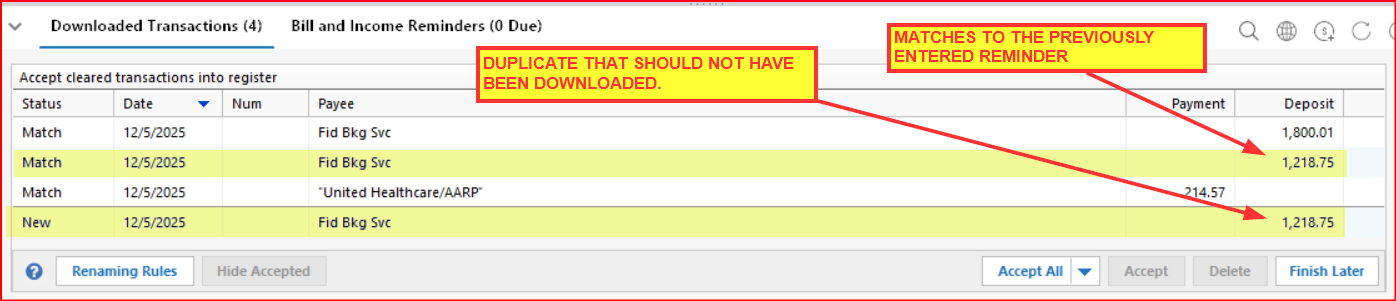
I am going to report this issue to Quicken, as well. It might or might not be related to your triplicate issue this morning but something odd does seem to be going on and simply talking about them in this forum will not get the type of Quicken Dev Team attention that using Report A Problem will get.
Quicken Classic Premier (US) Subscription: R66.23 on Windows 11 Home
0 -
I just noticed a similar thing. ALL downloaded transactions now update reminders AND download a separate cleared entry. Just delete one, but what a pain in the ****$
Reporting now…
1 -
@Boatnmaniac No no recent quicken update, using DC, having made any changes to any accounts or connection. Went to do my normal update and 1 out of the 5 accounts had 2 sets of transactions from 12/3 that downloaded 3 times. No they were not reminder entries either, just regular purchases via debit card. I will report it if it happens again.
1 -
Okay so PNC or Quicken most definately did something last week or they had an issue again. Since I just did OSU on Saturday, it should of pulled in all of my transactions for all of my accounts. I did an OSU a few minutes ago and there shouldn't of been any transactions to download, well there were a lot! Normally if you do an update after 9 am on Friday you shouldn't have anything that will download via OSU till Tuesday after 9 am, as they all clear the bank Monday and are available for OSU till Tuesday after 9 am. I had transactions from 12/2, 12/3 and 12/4 with some transactions not all being duplicates! Note this is for 2 different DC log ins. Note I did get transactions for that range of dates when I did my OSU on 12/6 (Saturday) these from today were new. So you may want to keep an eye on everything and do another OSU update to get missing transactions from last week. If this continues next week most definately calling both PNC and Quicken again and reporting!
0 -
@MBaron - I've noticed that PNC seems to be taking longer to process transactions with some taking as long as 4 days. Others seem to process more normally within 1-3 days. So maybe PNC is still having some internal issues with their system update.
Normally if you do an update after 9 am on Friday you shouldn't have anything that will download via OSU till Tuesday after 9 am, as they all clear the bank Monday and are available for OSU till Tuesday after 9 am.
I generally run OSU 7 days a week…2X on Mon-Fri and 1X on Sat & Sun. For me, PNC has normally downloaded transactions on Saturday mornings (or the 1st time that I run OSU on weekends) provided transactions posted by Friday evening. (Yesterday morning was Saturday and as shown in the picture I posted yesterday 3 valid transactions were downloaded. This has not been an unusual occurrence for me.)
Like you, I generally do not get downloads from PNC on Mondays but I will get them if I did not run OSU over the weekend.
Quicken Classic Premier (US) Subscription: R66.23 on Windows 11 Home
1 -
I can also report some triplicates, where one of those 3 transactions I had previously entered manually, but PNC cleared it and added 2 more. It does also seem to take longer for items to clear.
0 -
@ChetOrSteve I don't let Quicken match them and add them automatically, I go thru and do that myself after OSU, thank heaven or a few of my accounts would be very messed up. Well later today I will do an OSU and see what happens, if there are duplicates I will be calling!
0 -
Hello All,
Thank you all for continuing to report what you are experiencing. For those who are experiencing duplicate transaction issues with PNC Bank—to help our teams investigate and work toward a resolution, we’ll need a bit more information from you:
- Examples of the duplicate transactions – Please provide a few specific transactions that have duplicated so we can see the pattern.
- Downloaded ID – For each example, include the downloaded ID from the Quicken download (if available). See instructions below to find this:
- Add the Downloaded ID column to your register
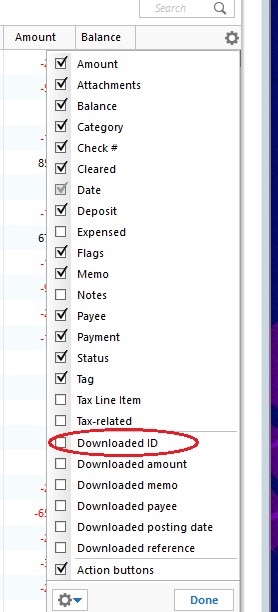
- Click on the Register Columns gear icon at the top right of the account register.
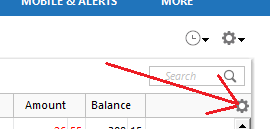
- Place a checkmark next to Downloaded ID then click Done (If you use Two-Line Display, you will need to select Downloaded ID andDownloaded reference)
- Click on the Register Columns gear icon at the top right of the account register.
- Review the Downloaded ID. This is the unique identifier for each downloaded transaction. It is used by Quicken to determine which transactions have been downloaded and which ones need to be downloaded.
- Add the Downloaded ID column to your register
You can submit this information here in the thread, or along with your log files, screenshots, and a sanitized copy of your data file via Help > Report a Problem in Quicken—Attn: CTP‑15396. Let us know when you have done so.
We really appreciate your help and patience as our teams work to resolve this issue.
-Quicken Anja
Make sure to sign up for the email digest to see a round up of your top posts.1 -
Attn: CTP‑15396PNC direct connectI received duplicate download items and sent a problem report in Quicken
0 -
First, I want to confirm that so far I have only seen these duplicate transactions with my PNC Bank accounts.
I think in order for us to be able to do as you requested, we need to first accept the duplicate transactions so we can then take a snapshot of them with the downloaded ID fields, right?
If so, then I will need to wait for a future duplicate download incident before I can submit a Report about it because I deleted the duplicates before actually entering them into the account register.
If not, I had already posted here and Reported one such incident on 12/6:
The PNC checking account downloaded ID for the one that I accepted is 789. The duplicate transaction was deleted so I do not have any transaction information regarding that other that the picture I'd posted on 12/6 of it.
I also had a duplicate transaction that downloaded today. I set up a DC Bank Bill Pay test transaction with PNC for a small $4 transfer between 2 PNC savings accounts. The duplicate appeared in the receiving account, not in the originating account. I did delete the duplicate transaction so I have no record of it in the account register. The receiving account transaction downloaded ID is 93. Following is a picture of what was downloaded this morning into the receiving account with the duplicate transaction.: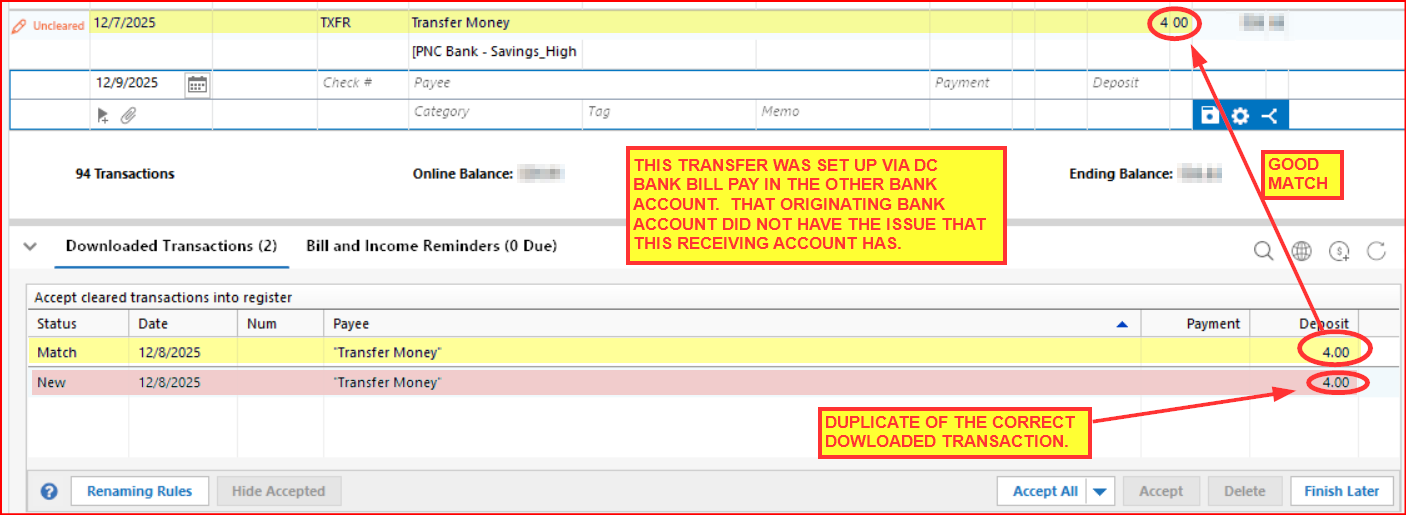
If this information is sufficient, I will submit another Report. Otherwise I will need to wait until I get another duplicate transaction download. I look forward to seeing your reply.
Quicken Classic Premier (US) Subscription: R66.23 on Windows 11 Home
0 -
Interesting phenomenon with both of my checking accounts. I do a reset. The message says the account does not exist. Then it gets updated downloads.
There is no intermediate solution. Either PNC fixes it or PNC doesn't fix it.0 -
Triplicate and duplicate transactions started today 12-9-2025. This is only with PNC. Sent info.
1 -
Hello everyone,
Thank you all for the detailed follow-ups—this information is very helpful for the investigation.
@oldssd—thanks for submitting a problem report to CTP-15396, we'll get your details, and files attached to the ticket.
@Boatnmaniac—your explanation and the examples you shared are very helpful. You’re correct that once a duplicate transaction is deleted, the Downloaded ID is no longer available from the register. If you encounter duplicates again, please allow them to download so you can capture the Downloaded IDs before deleting them, if possible. The IDs you already provided (789 and 93) are valuable—thank you for including those. If you’re able, please submit another Help > Report a Problem with those details and your screenshots, referencing CTP-15396.
@Michael D'Amore—thank you for sharing what you’re seeing. The behavior you described when resetting the account is also useful context and has been noted.
@Rick8—thank you for confirming you reported the recent triplicate and duplicate transactions, we will be sure to get your files added to the ticket.
For everyone:
At this time, this issue remains under active investigation (CTP-15396). If you see additional duplicate or triplicate transactions, please continue to send:• Examples of the transactions
• The Downloaded ID (if available)
• Screenshots and logs via Help > Report a Problem (Attn: CTP-15396)We understand how disruptive this is, and we appreciate everyone’s help and patience while this is being worked.
-Quicken Anja
Make sure to sign up for the email digest to see a round up of your top posts.1 -
Right now I have only 1 account that I am getting duplicate and triplicates from out of the 5 accounts in my OSU. Maybe affecting more but didn't have any transaction since my last OSU update (where there were duplicates) in the other accounts. I read this after the fact so I deleted all the duplicate and triplicate transactions. I will add the ID as instructed however, do you have to accept them to see the duplicate id? I also noticed something different in my last OSU this morning, transactions dated over the weekend….12/6 and 12/7, never before and I have been using Quicken with PNC accounts for quite a long time have I ever gotten transactions from the OSU dated a Saturday or Sunday. UPDATE: I added posting date column to the register, these transactions showed posted 12/8 so it gave me the transaction date in the OSU (which I like). I have another Quicken log in for 2 other accounts and I just ran that OSU and a transaction I know cleared the bank on 12/8 that should of been in this OSU today was not there. Do we know if this is a PNC issue or a Quicken issue. Just seems strange that all my accounts were working fine for a few weeks after the last issue or not getting transactions and then just transactions from last week is where the issue began again!
0 -
PNC or/and Quicken is now not completing check transactions done through quicken. I issued a check to an account through quicken and PNC (Direct Connect) to be delivered 12/1/25. Today, 12/10/25, I clicked on the electronic "lightning" symbol in quicken and it said the check was issued 11/25/25. I checked with the receiving account and they did not receive the check. I called PNC Bank. They could not find the amount subtracted from my PNC checking account. They could not verify that the transaction was actually done on 11/25/25. I spoke with Tier 3 support at PNC and they could not verify the transaction. It cost me $5.00 to do a 1 time bank to bank transfer to correct this today. Tomorrow, I would have passed the grace period, and this would have cost me a $50.00 late fee!!!!!!!!! Is quicken going to pay for these when we assume everything is working as it should, without checking every damn transaction, or duplicate, triplicate, transaction!!!!!!?????????
I am posting a screenshot showing the confirmation that it was processed on 11/25/25 as this cannot be uploaded via online "there is a problem" . Would be useful of this was possible. This is the report today.
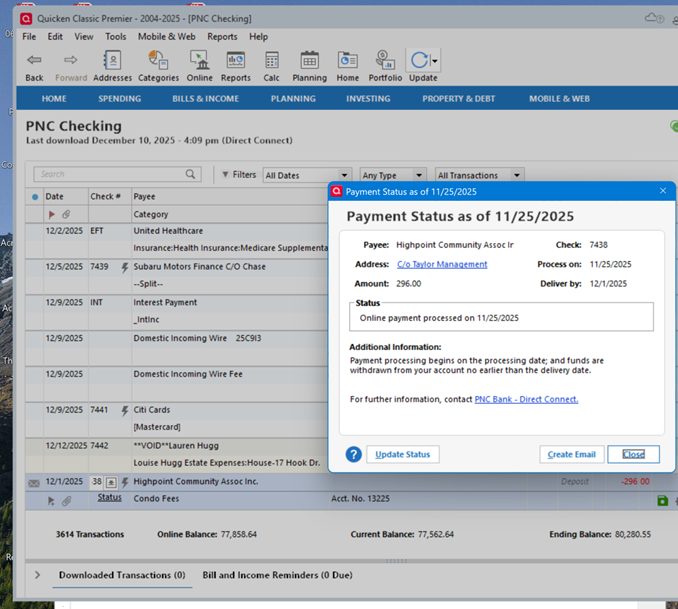
Transaction downloading from PNC also stopped working today. I had everything working for the last 10 days with no download or payment issues. I have reported all online. I am reticent to re-authorize, yada, yada, yada, as everything was working. This is getting so unreliable I am not sure doing anything now will fix anything.
0 -
JimTheo, Validate and repair should not be done unless you are having a real problem, and only then. This process removes bits of info that it thinks is not useful or can't connect to part of the program it thinks it should be connected with. It can often make mistakes leading to degrading of your database over time. This can cause issues later on. My database is over 20 years old and performs perfectly. I have done a validate and repair about 8 times. Use sparingly. I have talked to several database programmers, all of which confirm. Good luck!
0 -
From the picture you posted it seems that this payment was sent via mailed check, not via ACH. Mailed checks are the least reliable method of payment.
Don't you think it's possible that the mailed check might not yet have been delivered or might have been delivered to the wrong address or might have been lost in the mail (all are USPS issues, not PNC issues)?
Also, I have experienced once in a great while where a mailed check (either one I hand wrote out or that the bank printed and mailed) was actually delivered on time to the payee but they misplaced it or simply did not process it.
BTW, PNC does not debit the checking account for any of their bill pays (either ACH or mailed paper checks) until the payment has posted. So if the payee's bank has not processed the check then PNC would have no visibility into the status of the check beyond what their system says when they processed the payment.
In addition, the folks inside PNC (including their Tier 3) does not have visibility to bill pays made via Quicken….just like you will never see Quicken bill pays in your online account at PNC until the payment has actually posted and even then it will never show up as a bill pay transaction. (This has always been a concern of mine but in years of doing Quicken bill pays with PNC they have never missed processing a payment of mine on-time.
What makes you think that PNC has stopped transactions downloading? Posted transactions will generally download 1-2 business days after posting. But I must admit I did have one payment that posted on 12/5 but it did not download until today…5 days but only 3 business days so only 1-2 days past when I'd anticipated it would download.
Quicken Classic Premier (US) Subscription: R66.23 on Windows 11 Home
0 -
@Quicken Anja - The Report you requested was submitted today.
Note, I did have 4 transactions download into my 3 PNC accounts today but there were no duplicates, this time.
Quicken Classic Premier (US) Subscription: R66.23 on Windows 11 Home
0


