Bank Pay not yet cashed checks are incorrectly shown as "cleared."

I have now had trouble a few times with paper bank pay checks which have not been received or cashed by the intended payee. The Quicken register showed that the check had "cleared" but that was incorrect. Quicken had just posted it as cleared but it has not been cashed - and twice it had not even been received. It got lost in the mail. I had to put stop payments on them.
I suggest that the register show when the check has been posted and then later that it has been cashed. Or provide online images of the endorsed check, as my bank (Wells Fargo) does for regular paper checks written by me directly from my checkbook. That way a user can tell that the payee has received and cashed the check, not only that the bank has approved it.
Comments
-
Hello @Jorge Goldstein,
Thank you for coming to the Community to share your feedback! Just to clarify what is happening, since you reference Bank Pay, is this Bank Bill Pay initiated through Quicken? Do the transactions show cleared on the financial institution website? Which register column are you wanting to see "posted" and/or "cashed" showing up in?
I look forward to your reply!
Quicken Kristina
Make sure to sign up for the email digest to see a round up of your top posts.
0 -
@Jorge Goldstein If your bank is sending a paper check, the bank might be saying the payment is "Cleared" when then send the check and debit your account … rather than when they receive back the check after it's been deposited.
You'd need to ask your bank about this.
Q user since February, 1990. DOS Version 4
Now running Quicken Windows Subscription, Business & Personal
Retired "Certified Information Systems Auditor" & Bank Audit VP0 -
[Removed - Duplicate Post]
0 -
[Removed - Duplicate Post]
0 -
@Quicken Kristina (Re-sent and updated): thanks for your quick reply and question. I use Quicken Bank Bill Pay, not Quicken Bill Pay. I have an unlimited number of checks per month. My online system sends an order to Quicken including the payee, address, account number, etc. My register shows that it has been sent. Quicken then instructs Wells Fargo to generate a paper check. When Wells Fargo sends the paper check, they inform Quicken. My Quicken register then shows that the check has posted, which looks the same on the register as though it had been endorsed, presented, and cashed. It looks like it has cleared. But it has not yet. (@NotACPA : That was confirmed by Wells Fargo when I asked them how the process works.)
At that point my Quicken register shows the check-mark for "cleared" but the payee may not yet even have received the paper check. I have received a call from more than one payee asking, "Where is the check?", and I cannot tell her that she has endorsed and cashed it, because I do not know if that is the case. All I know is that Wells Fargo sent it by mail, and instructed Quicken to post it as cleared. That is a problem. I wish I could get access to images of the endorsed check so I can tell the payee "You endorsed it on such and such date." I can't.
In addition, the Quicken register should have an icon for "Posted" when the bank has sent the paper check, and another one for "Cleared" when the check has been endorsed, presented and cashed.
0 -
@Jorge Goldstein Your posts are visible (3 copies so far)
I am afraid what you describe is the way bank bill pay works. At least it worked that way when Bank of America used to offer the service. The bank debits your account and downloads the transaction to Quicken as Cleared when they expect it to be received, a few days after they issue the check.
Quicken can only show you the data that the bank sends. Is there a way you can go to the bank's website and see if the check has been cashed?
QWin Premier subscription0 -
I have the same problem. I've manually written a paper check, which I have not given to the recipient yet. My quicken register shows it has cleared. Um, no it hasn't.
0 -
If you were a Q for Windows user, my answer would be:
You created this transaction from a prior register entry which was already marked as cleared or reconciled, therefore the new transaction is already marked cleared. If you used a Memorized Payee List (MPL) entry instead, make sure that entry does not have a checkmark in "mark as cleared".For you as a Q Mac user, I hope something similar does apply to you … the new transaction you created was already marked as cleared when you created it.
I hope a Q Mac expert will chime in here with the correct answer …0 -
For you as a Q Mac user, I hope something similar does apply to you … the new transaction you created was already marked as cleared when you created it. I hope a Q Mac expert will chime in here with the correct answer
That is the correct answer for Quicken Mac as well, @UKR 😀
@LJDM Go to Window > Payees & Rules > QuickFill Rules and look for the Payee you wrote the check to. Open the QuickFill rule and see if the "Mark as cleared" box is checked, like here:
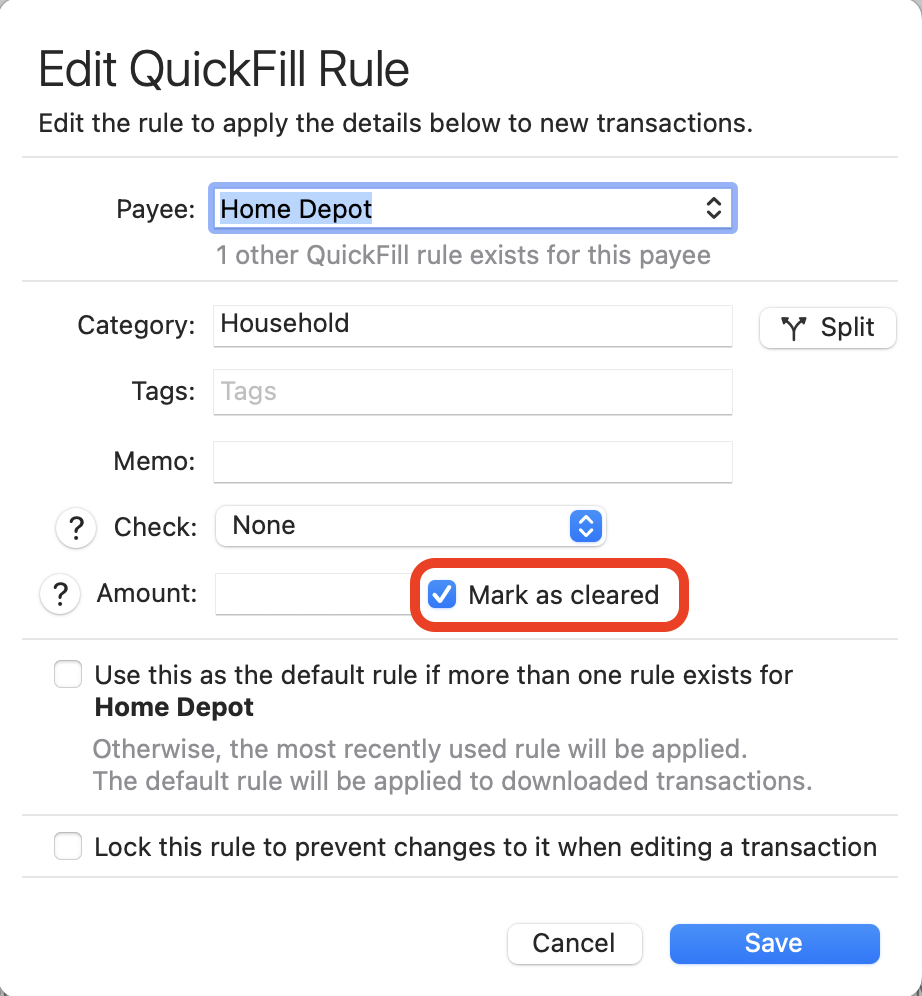
If that box is checked, and transactions you create for this Payee will show they are cleared. If you don't want that — and normally you don't — then uncheck that box and Save the edited rule. Now when you enter a new transaction for this Payee, it won't start out showing it is already cleared.
Quicken Mac Subscription • Quicken user since 19931 -
@LJDM Thank you for your suggestion. I will see if it works. However, let me clarify: when I enter a new transaction as a "SEND," the box in the column CLR does not immediately get a check-mark. It remains unchecked for a few days until the paper check has been sent by the bank to the payee. Then it appears as a check-mark. But, as I have explained, the check-mark at this point only signifies that the check has been sent by the bank, NOT that it has been truly cleared - like endorsed and cashed. So I am curious to know if the QUICKFILL rule you proposed - and which I have implemented for a few payees as a test - will correct this problem in the process. I hope it does but I will let you know.
Meanwhile, good holidays to all!
0




