Investment Sort Order --- again!

I found this thread from three years ago
https://community.quicken.com/discussion/7912812/investment-register-transaction-sort-order?utm_source=community-search&utm_medium=organic-search&utm_term=register+sort+order
And it STILL doesn't seem like Quicken has done this right (I'm using R64.35). In that thread, there is a Preferences screen with the option "Sort same-day transactions by security name". Even though I have that checked, that is NOT what happens. It Sorts by Date, then by ACTION, and THEN by security name. For each date, all the Boughts are first, sorted by security name; all the DIVs are next, sorted by security name; and all the Solds are next, sorted by security name.
I want the option "Sort same-day transactions by security name" do to exactly what it says!
Since Quicken is a database, for the life of me I don't understand why there is no Sort Options to choose Column Sort Order across all the register fields. That's seems like such a straightforward functionality.
[Edited - Enabled Link]
Comments
-
Hello @wburkett,
Thank you for letting us know this issue has returned. Were you using version R64.35 when you first noticed this problem, or has it been going on longer than that?
I am able to replicate the issue and I forwarded it to the proper channels for further investigation and resolution. To contribute to the investigation, please navigate to Help > Report a problem and submit a problem report with log files attached.

While you will not receive a response through this submission, these reports will help our teams in further investigating the issue. The more problem reports we receive, the better.
We apologize for any inconvenience!
Thank you.
(CTP-15834)
Quicken Kristina
Make sure to sign up for the email digest to see a round up of your top posts.
1 -
From one of the posts in the referenced discussion, @Chris_QPW noted:
The name of the preference would probably be better stated as sort by action and then by security.
Which tends to indicate what the OP is saying is the expected behavior for that preference. The OP may want to consider submitting a suggestion to change the behavior of the preference.
Quicken user since Q1999. Currently using QW2017.
Questions? Check out the Quicken Windows FAQ list0 -
Thank you, Kristina —
I don't know whether this was an issue in releases prior to R64.35. It is something that I only took serious note of in the past week or two, tried to solve, couldn't solve, and posted the problem here. So I can only say that is is a problem in R64.35.
I will "report a problem" as you suggest but what log files are you requesting and where do I find them?1 -
That is one possible option - some users may want to sort by action then by security. Ideally, the sort should be flexible across most register fields in a "sort by x, then sort by y, then sort by z" manner.
0 -
Thank you for your replies,
When you report a problem, the log files should be pre-selected. You are able to click on them to see what information is included in each log file. You can also view log files by navigating to Help>Contact Support>Log Files.
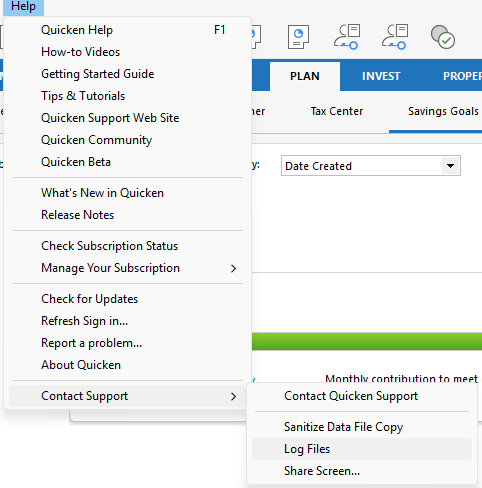
Thank you!
Quicken Kristina
Make sure to sign up for the email digest to see a round up of your top posts.
0 -
I have the exact same problem, which just cropped up this week.
Quicken auto downloads always sort the day's entries by transaction types. To get multiple transactions adjacent to each other in the account register, I have had to manually enter them one at a time for years. This was consistent with the desired date/entry order sort method noted in other posts. Now the system just started overriding the sort order based on the alphabetical name of the action each day, ie. all CGLongs come first followed by Div, etc. This is unacceptable. I also have in Investment Preferences checked the item Sort same-day transactions by security name, but the system is no-longer responds to the selected preference!
[Removed - Disruptive]
-1 -
Hello @Clarkski,
Thank you for letting us know you're also seeing this issue. If you would like to contribute to the investigation, please follow the instructions from my earlier post to send a problem report with log files attached.
Thank you!
Quicken Kristina
Make sure to sign up for the email digest to see a round up of your top posts.
0

